Hire 3D Environment Artist for Unreal Engine 5: Vendor Scorecard and Onboarding
-

Written byDenys Zadoienyi
-

Updated on22.05.2026
-

Time to read15 min

When a mid-size studio decides to hire a 3D environment artist for Unreal Engine 5, the decision usually starts with a portfolio review and ends with a contract signed on intuition. Six weeks later, the first batch of assets lands in engine and nothing integrates cleanly: Nanite flags are set incorrectly, Lumen bounce light reveals material setup errors that weren’t visible in Marmoset renders, and the revision cycle that was supposed to take two days stretches into two weeks.
The problem is rarely the artist’s skill. It is the absence of a structured evaluation before the engagement begins and a documented onboarding before production scales.
This guide gives you both: a vendor scorecard calibrated to UE5’s specific technical requirements, and a four-week onboarding protocol designed to surface integration problems on a single test asset before they spread across a full batch.
Why UE5 Changes the Rules for Environment Art Outsourcing
Unreal Engine 5 is not a cosmetic upgrade over UE4. Nanite, Lumen, World Partition, and PCG (Procedural Content Generation) have fundamentally changed what it means to be “engine-ready.” An environment art studio that delivered excellent results on UE4 projects may not have updated its internal pipeline, asset specifications, or review process to accommodate these systems — and the gap only becomes visible once assets enter production.
Nanite, for example, eliminates manual LOD creation for most opaque geometry by virtualizing the mesh at the micropolygon level. Modern UE5 iterations — 5.3 and later — natively support Masked materials and Two-Sided foliage shading within Nanite, so the old constraint of “masked doesn’t work” no longer holds. What does matter is how a vendor handles the performance cost: masked materials in Nanite incur a measurable overhead during base pass shading because the renderer must recalculate triangle barycentrics per pixel, and negative-space alpha maps add overdraw cost on top of that. Vendors who understand this trade-off will profile their foliage assets under both Nanite and non-Nanite configurations and document which approach performs better for your target hardware. Vendors who simply enable Nanite across the board and ship will not. Translucent materials remain outside Nanite’s rasterization path entirely, and Pixel Depth Offset requires deliberate handling to avoid depth artifacts — these are the real current constraints to evaluate. Epic Games documents the evolving Nanite capabilities and their performance implications in the Nanite Virtualized Geometry technical reference, and a vendor’s familiarity with that documentation is itself a qualifying signal.
Lumen introduces a similar inflection point. Because Lumen calculates global illumination dynamically using the scene’s surface cache, it responds to material roughness, emissive values, and surface normals in ways that pre-baked lighting never did. An environment built to look correct under baked lighting may shift dramatically under Lumen — surfaces that read as grounded become overly bright, contact shadows disappear, and the visual hierarchy of the scene collapses. Catching this early requires lighting tests in engine, not just approval of rendered beauty shots. There is a further platform consideration: per Epic’s Lumen Performance Guide, Lumen is disabled at Medium and Low scalability levels. At those settings the engine falls back to Screen Space Global Illumination (SSGI) for indirect lighting, with Distance Field Ambient Occlusion and Screen Space Ambient Occlusion handling large- and small-scale occlusion respectively. If your project targets a range of hardware, a vendor should be able to set up and validate the fallback lighting path — not assume Lumen will run on every end-user machine.
World Partition and PCG add a third layer of constraint for large-scale environments. Assets destined for open-world or large-zone UE5 projects need to be authored with streaming in mind: proper naming conventions, modular kit dimensions that tile predictably, and collision setups that don’t break runtime streaming. None of this is visible in an ArtStation portfolio submission.
The implication for your procurement process: you are not just hiring a 3D artist. You are evaluating whether a studio’s internal pipeline is compatible with UE5’s production model at the level of your specific project requirements. The scorecard below is structured around this evaluation.
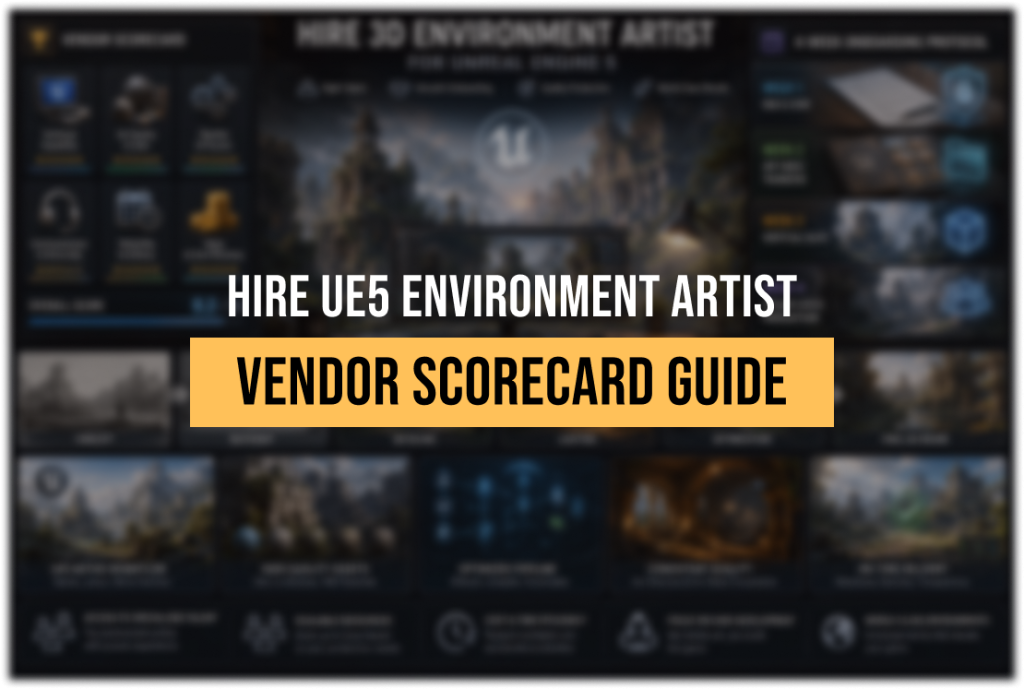
The Vendor Scorecard: Six Criteria for UE5 Environment Art Studios
Think of this scorecard as a structured interview guide. You do not need to score vendors numerically — but forcing the conversation through each criterion surfaces information that a portfolio review never will.
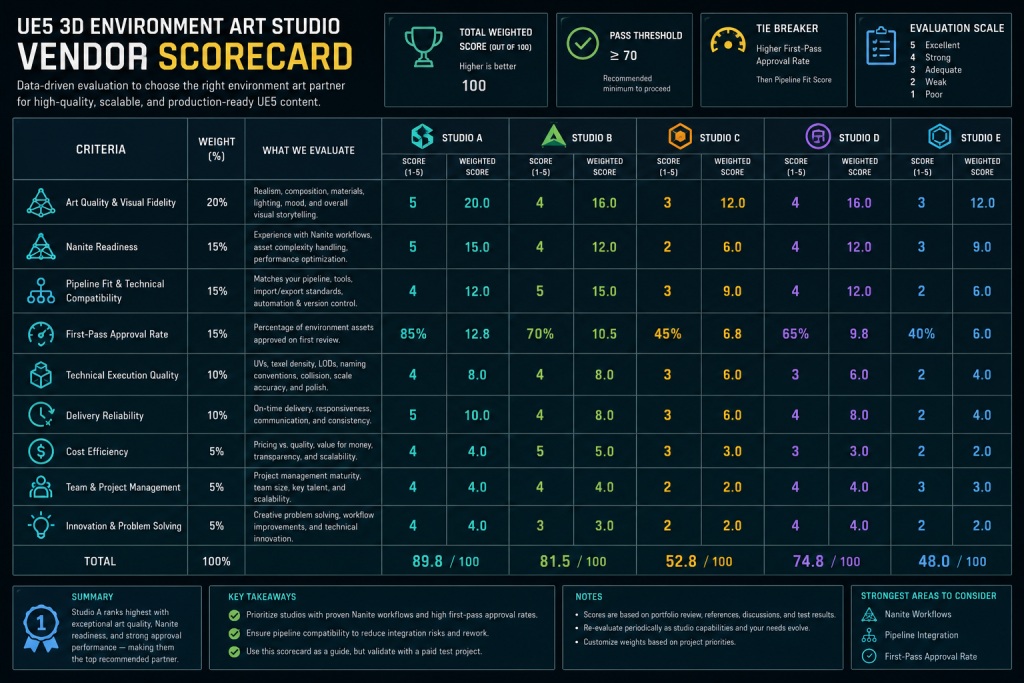
“Editorial illustration created for visual reference purposes. It does not represent a real project, client work, or official software screenshot unless stated otherwise.”
Criterion 1: UE5 Technical Stack Verification
The first question is not “can you work in Unreal Engine 5” — every studio will say yes. The question is: which specific UE5 systems have they shipped with, and in what context?
Ask for project examples where Nanite was enabled for environment assets and where Lumen was the primary lighting solution. Ask whether they have experience authoring assets for World Partition streaming or PCG-populated scenes. If the answer is consistently “yes but we haven’t shipped a project with that” or “we follow standard practices,” treat it as a signal to dig deeper.
Useful follow-up questions for this criterion:
- How do you handle the overdraw cost of masked foliage in Nanite, and when do you profile and compare a non-Nanite fallback for a given asset type? What is your approach to translucent materials and complex decals, which remain outside Nanite’s rasterization path entirely?
- How do you handle the Nanite screen-space size threshold for small-detail assets like debris or props?
- What is your texel density standard for large open-world environments, and how do you validate it before delivery?
- Do you use Virtual Textures or Substrate materials for any of your standard environment shaders?
A studio that has genuinely worked in UE5 production will answer these questions with specifics, trade-offs, and documented decisions. A studio that has been “working in UE5” primarily through marketplace asset customization will give generalized answers.
Criterion 2: Art Bible Compatibility and Style Transfer Speed
The art bible — your document defining color palette, lighting approach, material properties, silhouette principles, and visual reference — is the contractual definition of quality. A vendor’s ability to absorb and faithfully execute an art bible is the single most important predictor of first-pass approval rate.
During the RFP phase, share a simplified version of your art bible (not confidential — a reference sheet is enough) and ask the studio to annotate it: where do they see production risk? Which references are they confident about, and where would they want clarification before starting? This exercise takes the studio thirty minutes and gives you a clear signal about their internal review discipline.
The 80.lv community regularly features environment art breakdowns from AAA productions that document the gap between concept intent and engine result — browsing these as a reference library helps you calibrate what “art bible compliance” looks like in practice, and shapes better questions to ask your vendor candidates.
If a studio returns your art bible annotation without any questions or risk flags, that is not a sign of confidence. It is a sign that their internal QA process does not include pre-production style auditing.
Criterion 3: Delivery SLA and Revision Cycle Definition
Before you sign anything, you need a written definition of what constitutes a complete deliverable. This sounds obvious and is consistently skipped.
A complete environment asset for UE5 production should include: mesh file in the agreed format (FBX or native), textures at agreed resolution and channel packing convention, materials set up in engine with Nanite enabled where applicable, LODs where Nanite is not used, collision geometry, and naming conventions that match your project’s file structure. If any of these items is missing on delivery, the asset is not done — but without a written acceptance checklist, the revision cycle becomes a negotiation rather than a quality gate.
Build the acceptance checklist into your Statement of Work. Define what constitutes a first pass, what feedback turnaround time is committed for both sides, and how many revision rounds are included before additional scope applies. This documentation is not bureaucracy — it is the mechanism that keeps your first-pass approval rate measurable and keeps vendor performance accountable across milestones.
Criterion 4: Communication Ownership and Escalation Path
On outsourcing engagements that span more than four weeks, the most common failure mode is not quality — it is communication lag. An unclear escalation path means that when a technical question arises mid-production (and it will), the answer takes days instead of hours, the artist keeps working on an incorrect assumption, and the revision cost compounds.
Before signing, establish: who is the named point of contact on the vendor side with decision-making authority on scope and quality questions? What is the maximum response time committed for technical questions during production hours? What is the escalation path when that person is unavailable?
Document this in your MSA or as an addendum to the SOW. The vendor should have a named lead or art director attached to your project — not a general support inbox.
Criterion 5: IP Ownership and NDA Structure
This criterion is frequently treated as a formality and handled by legal. It should be reviewed by production leadership as well, because the specifics matter for how the engagement is structured.
The NDA should be signed before you share any project-specific materials — including your art bible, visual targets, GDD excerpts, or unreleased engine builds. IP ownership language in the contract should specify that all deliverables, source files, and derivative works transfer to you upon payment. The MSA structure, where core terms are negotiated once and new scope is appended via SOWs, gives you a reusable framework that significantly reduces onboarding time for subsequent projects with the same vendor.
Criterion 6: Capacity Transparency and Single-Point-of-Failure Risk
A studio that quotes aggressively on timeline often does so by assigning your project to a small team with no buffer for artist turnover, illness, or parallel project competition. Ask directly: how many artists would be assigned to this scope, and what is the studio’s policy if the lead artist becomes unavailable?
For larger scopes, ask whether you would be working with a dedicated pod or drawing from a shared pool. Dedicated pods have more predictable throughput and lower context-switching cost; shared pools are more flexible but introduce scheduling variability that affects your milestone gates.

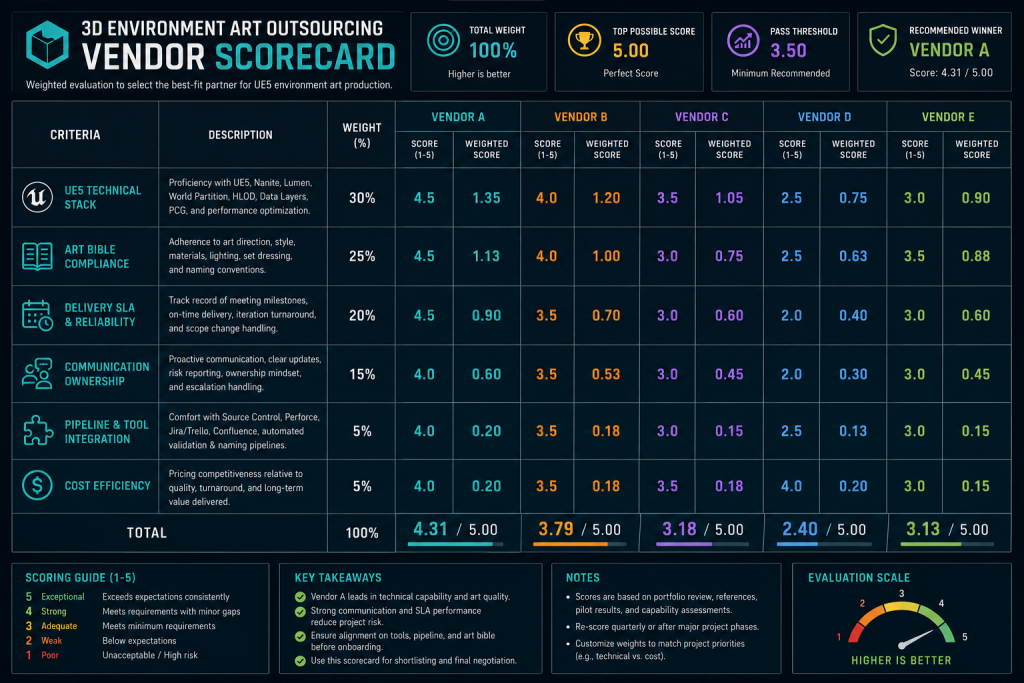
“Editorial illustration created for visual reference purposes. It does not represent a real project, client work, or official software screenshot unless stated otherwise.”
What a UE5-Ready Vendor Actually Delivers
Beyond the scorecard conversation, there is a practical checklist of outputs that a genuine UE5 environment art partner should be prepared to deliver from day one of production. Understanding what this list looks like makes it easier to identify vendors who have it and vendors who are building it as they go.
At the asset level: meshes exported with correct scale and pivot points, UVs at the agreed texel density, Nanite enabled where applicable and documented where it is not, materials built on your project’s master material framework rather than standalone material instances that create maintenance debt, and LODs generated and validated in engine.
At the pipeline level: a documented asset delivery format, naming conventions that match your project’s file structure, a Perforce or version control handoff process that your internal team can integrate without restructuring, and a delivery manifest per milestone that maps each asset to its acceptance status.
At the communication level: weekly status reports tied to milestone gates, a named art lead available for synchronous calls during your production hours, and a documented revision log that tracks feedback, turnaround time, and approval status per asset.
Studios that operate at this level treat outsourcing as a production system, not as a service transaction. The difference is visible in how they respond to your onboarding materials — and the onboarding protocol below is designed to surface it within the first four weeks.
If your project centers on 3D environment modeling for games in UE5 — from modular kits to large-zone landscape compositions — the vendor you select should be able to demonstrate all six scorecard criteria before production begins, not during it.
The Four-Week Onboarding Protocol
The purpose of onboarding is not to introduce the vendor to your studio culture. It is to validate that the vendor’s pipeline can produce assets that integrate correctly into your engine build before you commit to full-scale production. The four-week structure below is designed to accomplish this with one representative test asset.
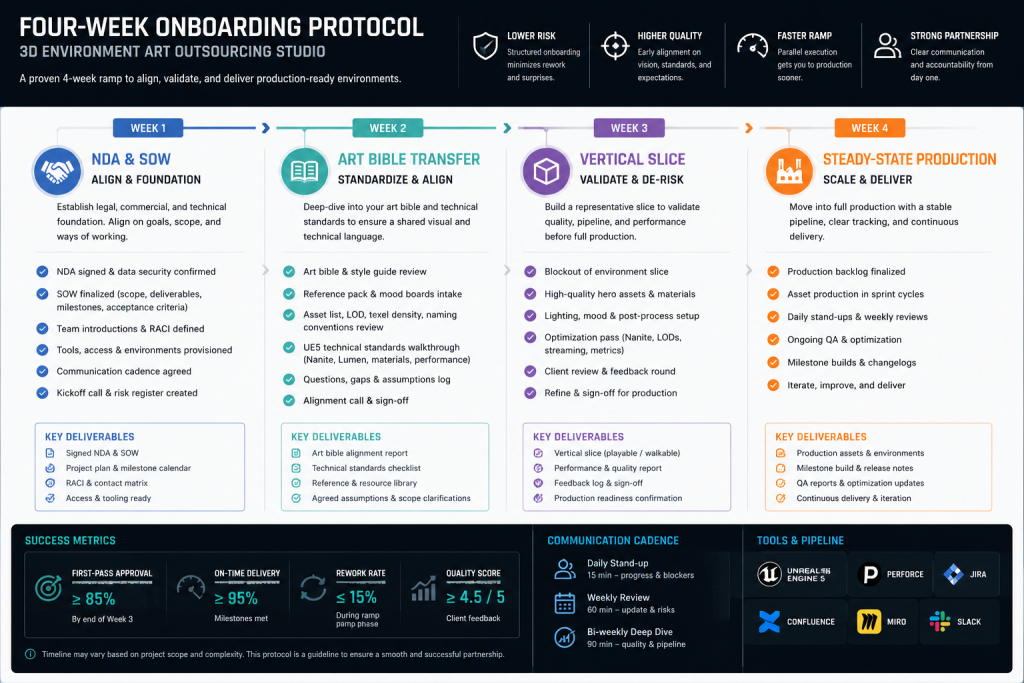
“Editorial illustration created for visual reference purposes. It does not represent a real project, client work, or official software screenshot unless stated otherwise.”
Week 1: Legal and Documentation Handoff
NDA is signed. MSA reviewed and executed. SOW for the test asset scope drafted and approved by both sides.
Your internal team prepares and delivers the onboarding package: art bible (full version), technical specification sheet (texel density, texture resolution, channel packing conventions, Nanite policy, naming convention document, folder structure), and two to three visual reference assets from your existing engine build that represent the target quality bar.
The vendor’s lead reviews the onboarding package and returns a written acknowledgment: which requirements are clear, which need clarification, and any risk flags they have identified before work begins. If nothing comes back flagged, follow up explicitly — silence is not confirmation.
Week 2: Blockout and Style Pass
The vendor produces a blockout of the test asset: geometry silhouette, proportions, and scene placement without final textures or materials. Your art director reviews in engine, not in a rendered preview, and provides feedback within 24 hours.
This is the checkpoint where gross proportion errors, silhouette misreads, and fundamental style misalignments surface. Catching them here costs a day of revision. Catching them at final delivery costs a week.
The blockout approval is a formal gate: work does not proceed to texturing until the blockout is approved in writing. If the vendor’s process does not naturally include this gate, establish it contractually in the SOW.
Week 3: Materials and Engine Integration
The vendor delivers the first full-pass asset: mesh, textures, and materials set up in your engine project. Your technical art lead validates the asset in engine — Nanite enabled and tested in a representative scene, Lumen lighting evaluated against your visual target, collision geometry tested, and naming conventions verified against your project’s file structure.
The validation report is sent to the vendor within 48 hours. This is not a “looks great” email — it is a structured list of pass/fail items mapped to the acceptance checklist from the SOW. Anything that does not pass is a revision item with a defined turnaround expectation.
Week 4: Final Asset Delivery and Production Readiness Review
Revisions from Week 3 are incorporated and the asset is resubmitted for final acceptance. If all acceptance criteria are met, the vendor is cleared for full-scale production.
The production readiness review is a brief synchronous call: both sides confirm the communication cadence for the production phase (weekly status reports, synchronous call frequency, revision turnaround expectations), confirm the milestone schedule for the first production batch, and identify any open questions before steady-state begins.
If Week 3 validation revealed significant integration problems that required more than one round of revision, consider whether the scope of the test asset was large enough to represent the production challenge. A test asset that onboards smoothly may not predict performance on a complex modular kit; a test asset that required three revision rounds on technical integration is a clear signal to resolve the pipeline question before committing to full production.
The Game Art Studio behind this protocol — Nasty Rodent — runs UE5-native production pipelines for mid-core and AAA environment art outsourcing, with documented experience across Nanite-enabled modular environments, Lumen-lit large zones, and PCG-assisted landscape population. If your project is entering the vendor evaluation phase, the scorecard conversation starts with a brief.
Build vs Buy: When In-House Makes More Sense
Outsourcing a 3D environment artist for UE5 is the right decision in specific circumstances. It is the wrong decision in others. A clear-eyed build-vs-buy assessment before you begin the vendor search saves both time and budget.
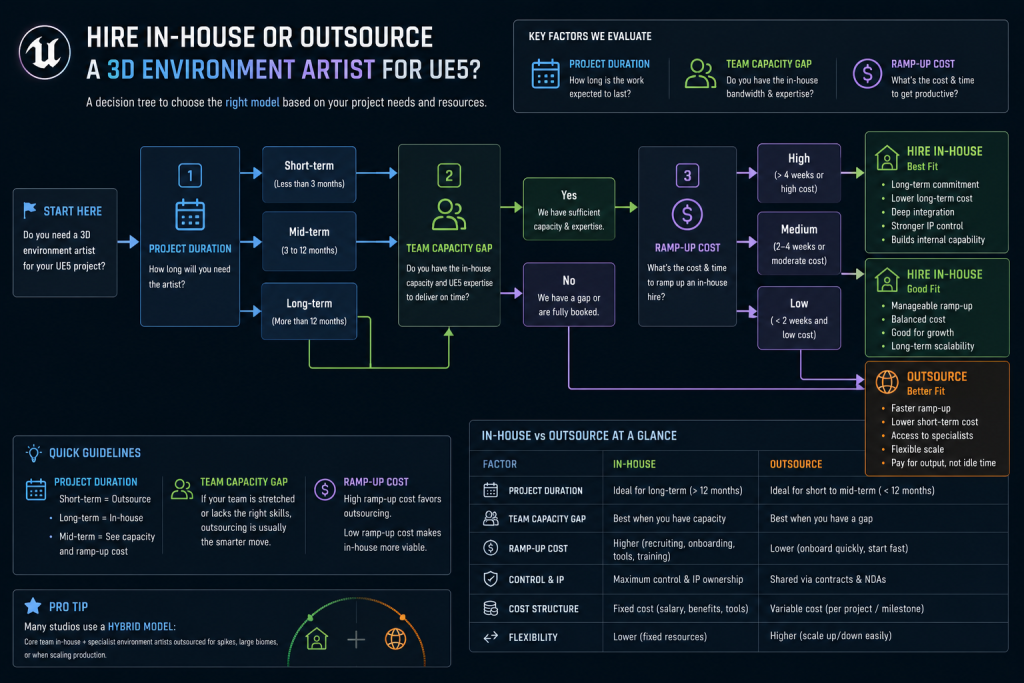
“Editorial illustration created for visual reference purposes. It does not represent a real project, client work, or official software screenshot unless stated otherwise.”
Outsourcing makes structural sense when: your project has a defined content volume that exceeds your internal team’s capacity for the production window; the environment art scope is well-defined and can be fully specified in an art bible and SOW before production begins; your internal technical art team can dedicate time to vendor onboarding and integration review; and the engagement duration is long enough to justify the ramp-up cost.
In-house makes more structural sense when: the environment art scope requires constant, fluid collaboration with level design that cannot be managed asynchronously; the project is in pre-production and the visual target is still being developed iteratively; your team does not currently have the bandwidth to manage an outsource vendor properly — because an unmanaged vendor will produce unreviewed assets, and that is worse than no assets; or the scope is so small that the onboarding cost exceeds the production benefit.
The most common mistake is outsourcing during production pressure rather than as a planned capacity strategy. A vendor onboarded under deadline pressure will not go through the four-week protocol above — and the integration problems that the protocol is designed to catch will instead surface at milestone review, when the cost to fix them is substantially higher.
If you are evaluating outsourcing as a response to a capacity gap that already exists, the first question to answer is not “which vendor” but “which assets can be fully specified and handed off today.” Start with the scope that is closest to locked, not the scope that is largest.