What Is Lumen in Unreal Engine 5: Real-Time Global Illumination Explained
-

Written byDenys Zadoienyi
-

Updated on04.06.2026
-

Time to read18 min

- What Is Lumen? The Direct Answer
- Why the Previous Approach Created Production Problems
- How Lumen Works: The Technical Foundation
- Lumen vs Baked Lighting: A Production Comparison
- What Lumen Changes for Environment Art Production
- Lumen and Nanite: Why They Work Better Together
- Performance: What Lumen Actually Costs
- When Lumen Is Not the Right Choice
- How Lumen Fits Into a Mid-Core and AAA Art Pipeline at Nasty Rodent
- Lumen in UE5: Quick Reference Summary
- Ready to Build Your UE5 Environment Art Pipeline on Lumen?
Lighting has always been one of the most technically demanding parts of a game art pipeline — and for most of Unreal Engine 4’s lifespan, getting realistic lighting into a shipped game meant accepting a tradeoff: either bake your lightmaps and lock your scene in place, or go fully dynamic and accept the visual quality loss that came with it.
“Editorial illustration created for visual reference purposes. It does not represent a real project, client work, or official software screenshot unless stated otherwise.”
As an art director working on a mid-core or AAA production, you have felt that friction. The hours waiting for Lightmass builds. The discovery — late in production — that a time-of-day system breaks your carefully baked GI. The parallel-world problem: your static lit scene and your dynamic objects looking like they belong in different games.
Lumen was built to close that gap. And while the headline — “real-time global illumination with no baking” — is accurate, the practical implications for how you plan an environment art pipeline run considerably deeper than the marketing copy suggests. This guide breaks down what Lumen actually is, how it works under the hood, and what an art director needs to understand before committing a project to a Lumen-based lighting strategy.
What Is Lumen? The Direct Answer
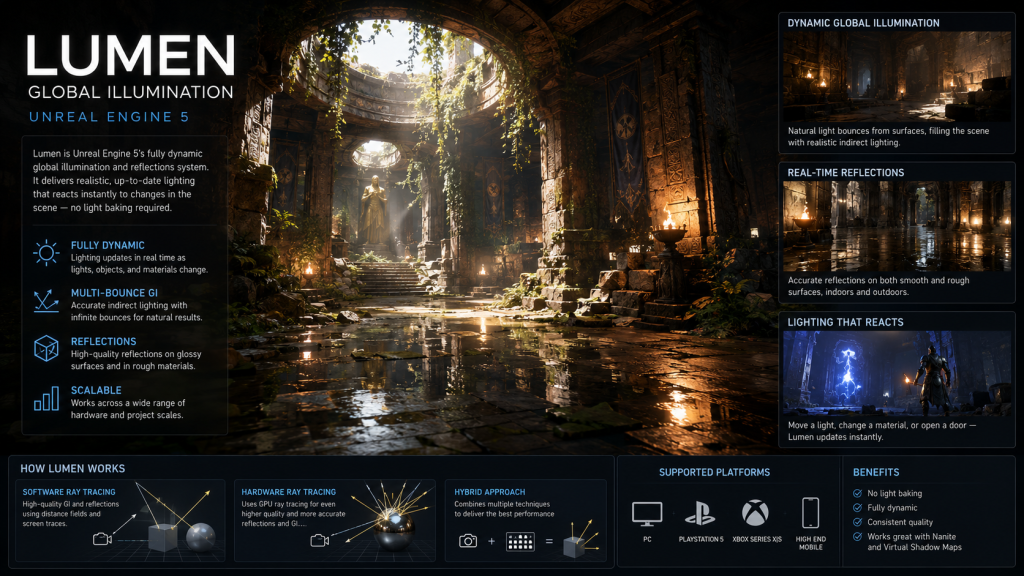
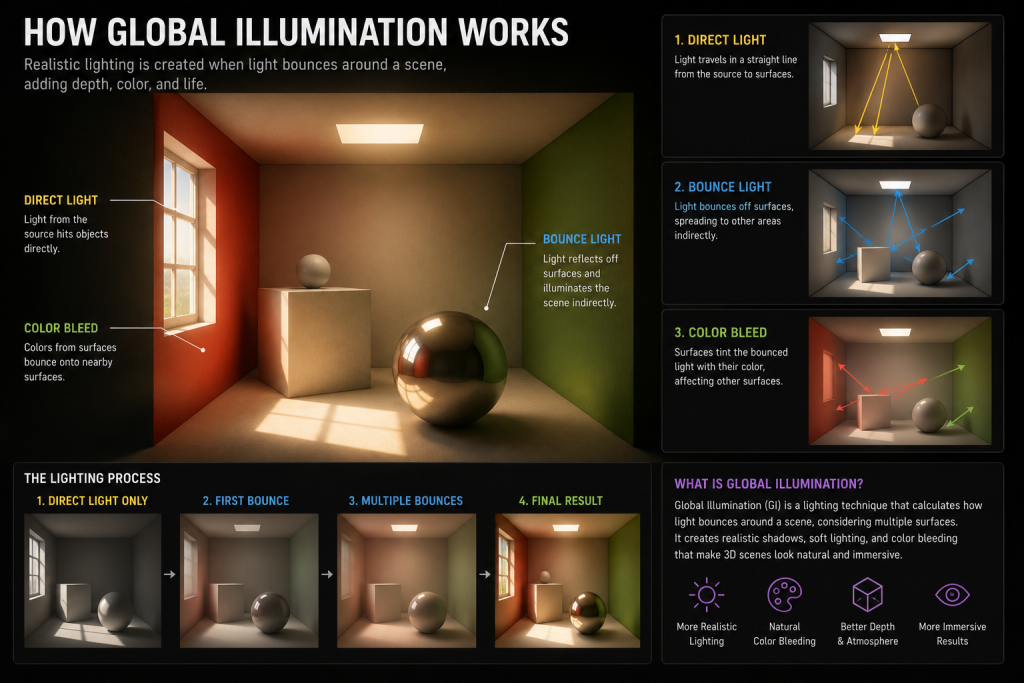
Lumen is Unreal Engine 5’s fully dynamic global illumination and reflections system. According to Epic’s official documentation, it is the default global illumination and reflections system for new UE5 projects using supported rendering settings and target platforms.
“Editorial illustration created for visual reference purposes. It does not represent a real project, client work, or official software screenshot unless stated otherwise.”
What that means in practice: indirect lighting, reflections, emissive material contribution, and sky lighting all update in real time — without precomputed lightmaps, without rebuild passes, and without the locked-down scene geometry that baked lighting requires. Move a light source, change a material’s color, open a door in a dark corridor — the indirect light responds immediately and correctly.
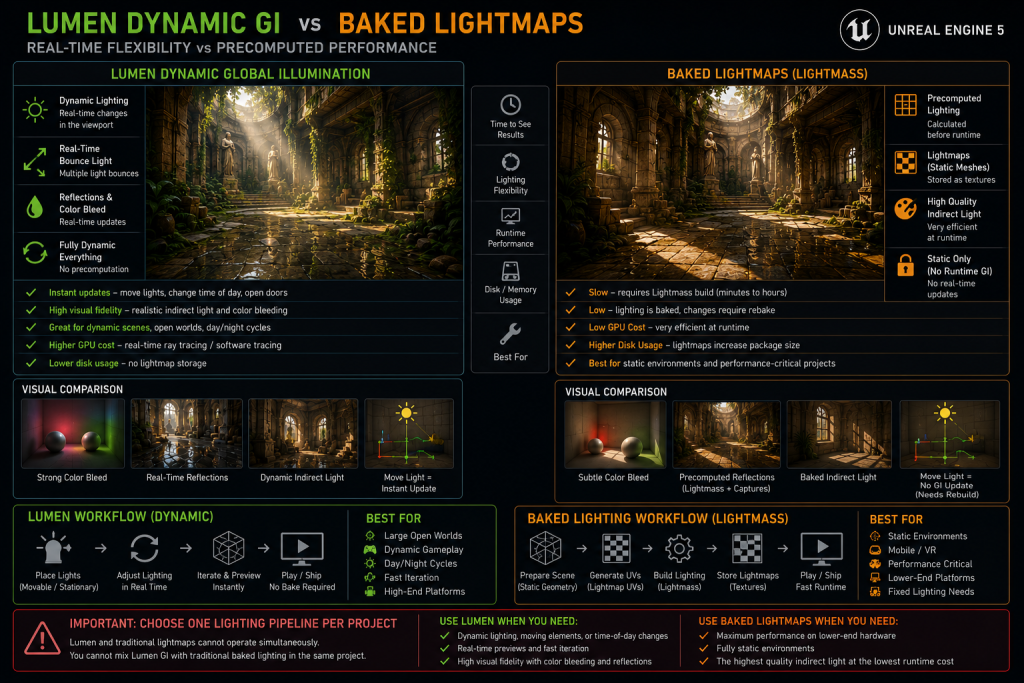
In Lumen-based projects, the lighting path shifts fundamentally: Screen Space Global Illumination (SSGI) and Distance Field Ambient Occlusion (DFAO) from UE4 are both superseded when Lumen is active. Precomputed static lighting is disabled for GI purposes — Lumen and traditional lightmaps cannot operate simultaneously. Teams typically choose either a Lumen workflow or a baked-lighting workflow based on their target platform and performance requirements.
Why the Previous Approach Created Production Problems
To understand why Lumen matters for art production, it helps to be precise about what baked lighting actually demanded of teams.
Lightmass — UE4’s precomputed lighting system — required every static mesh that contributed to or received indirect light to have a second UV channel specifically for lightmap projection. Setting correct texel density across a large environment was painstaking work. Every lightmap-receiving surface needed clean, non-overlapping UVs at the right resolution. A prop that was fine at 64×64 lightmap resolution in an overview scene looked visibly wrong in a close-up gameplay area. Multiply this across thousands of environment assets and you have a non-trivial ongoing maintenance burden.
Then there was build time. On a large environment, a production-quality Lightmass pass could take hours. During that time, the artist cannot see final lighting — they are working in an approximation. Iteration cycles stretched. The feedback loop between lighting decisions and their visual result was fundamentally broken.
The deeper problem for any production with dynamic elements — time-of-day systems, moving platforms, destructible environments, opening doors — was that baked lighting simply did not accommodate them cleanly. Static lighting coexisted awkwardly with dynamic objects, and the seam between baked GI and dynamic direct lighting was often visible to anyone who looked for it.
Lumen removes these constraints structurally, not just technically.
Did you know that…?
Before Lumen, achieving realistic light bounce in a real-time engine often required artists to place dozens of fake fill lights by hand — a technique known informally as “lighting cheats.” In the Matrix Awakens UE5 tech demo, Epic demonstrated large-scale Lumen GI behavior, including emissive window meshes propagating light across the scene — a showcase of what the system could achieve at open-world scale on a PS5.
How Lumen Works: The Technical Foundation
Understanding Lumen’s architecture at a conceptual level matters for art directors because several asset authoring decisions flow directly from how the system operates. The full technical specification is covered in Epic’s Lumen Technical Details documentation; what follows is the production-relevant summary.
The Surface Cache: Lumen’s Internal Scene Representation
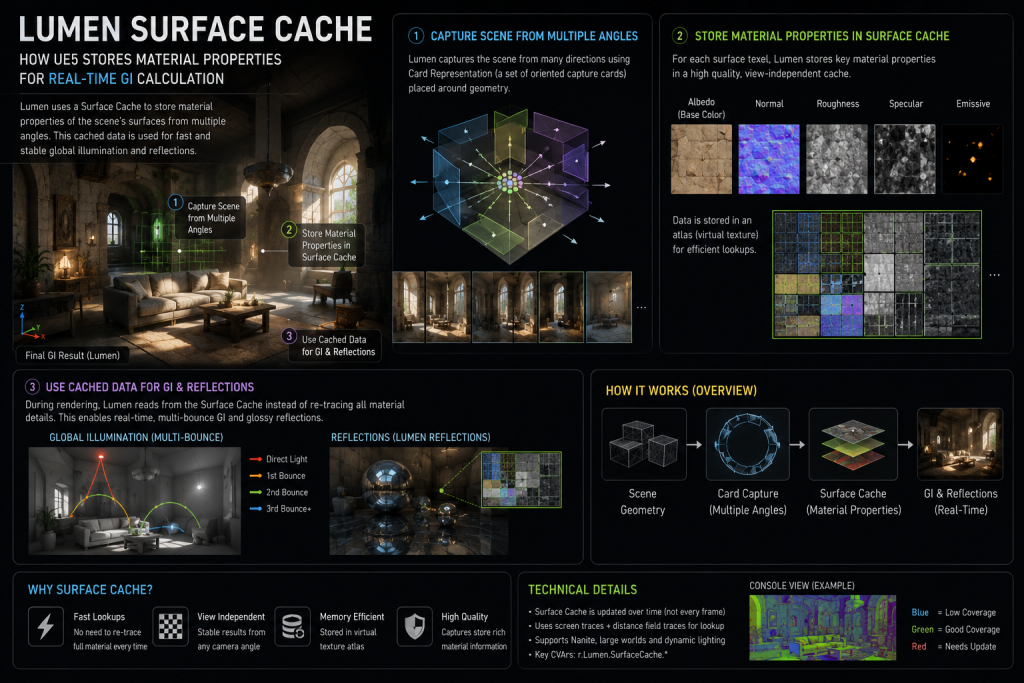
Lumen does not evaluate full PBR shader calculations at every ray hit — that would be prohibitively expensive in real time. Instead, it generates an automatic internal representation of the nearby scene called the Surface Cache.
The Surface Cache works by placing flat capture positions called Cards on each mesh, distributed to cover the mesh from multiple angles. These cards capture material properties — base color, roughness, emissive values — at low resolution into an atlas texture. When a ray hits a surface, Lumen looks up the pre-cached material data rather than re-evaluating the full shader. This is what makes real-time GI at interactive frame rates possible.
“Editorial illustration created for visual reference purposes. It does not represent a real project, client work, or official software screenshot unless stated otherwise.”
By default, Lumen places 12 Cards on a mesh. For complex interior meshes or assets that contribute significant indirect light — thick walls, columns, arches — this count can be increased via the Max Lumen Mesh Cards setting in the Static Mesh Editor. Meshes where Lumen’s Surface Cache appears pink or black in the Lumen visualization modes are typically under-carded and should be addressed.
Software Ray Tracing vs Hardware Ray Tracing
“Editorial illustration created for visual reference purposes. It does not represent a real project, client work, or official software screenshot unless stated otherwise.”
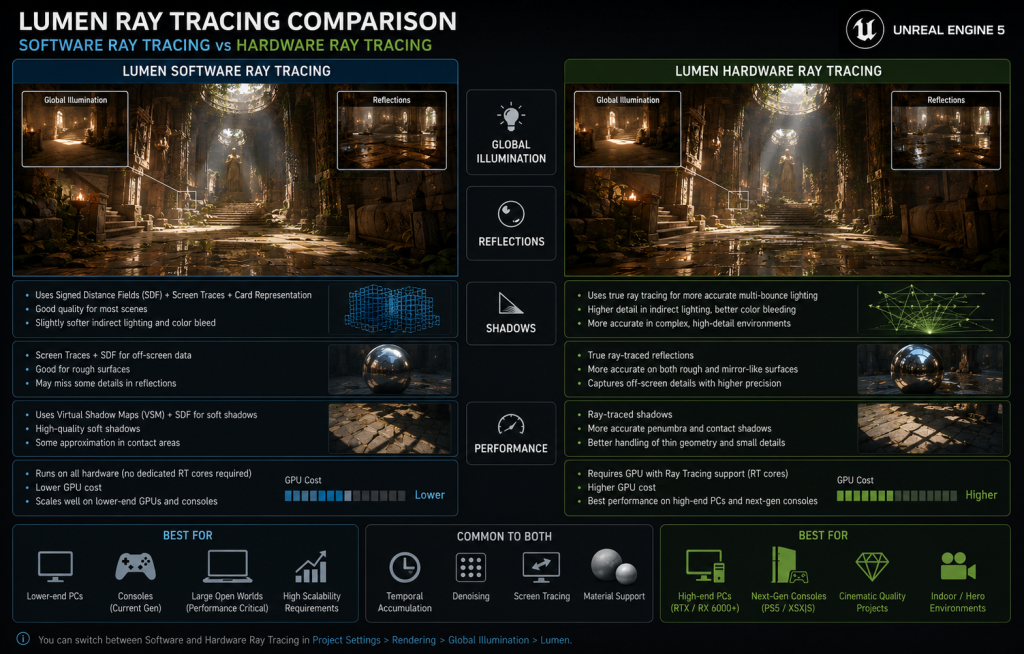
Lumen supports two distinct tracing methods, and the choice between them has real art and performance implications.
Software Ray Tracing is Lumen’s default and broadest-compatible path. It traces rays using Mesh Signed Distance Fields (SDFs) — mathematical representations of each mesh’s surface that allow efficient ray marching without a dedicated ray tracing unit. Screen Traces are performed first (within the depth buffer), followed by Distance Field traces for off-screen surfaces. Software RT traces against detailed Mesh Distance Fields up to approximately 40 meters from the camera, shifting to a lower-resolution Global Distance Field for coverage out to 200 meters by default — extendable to 800 meters through the Lumen Scene View Distance setting. This two-tier approach keeps per-frame cost manageable while maintaining reasonable indirect lighting coverage at distance.
Software RT is the broadest-compatible Lumen tracing path — it runs without dedicated ray tracing hardware and is available across the widest range of GPUs that UE5 supports, subject to the project’s feature level, rendering settings, and scalability configuration. This makes it the practical default for projects targeting a broad hardware range. Its limitations: SDF representations are approximate, meaning very thin geometry or high-frequency surface detail can be missed. Foliage leaf cards, thin railings, and micro-detail props are common problem areas.
Hardware Ray Tracing uses dedicated ray tracing cores (available on modern GPUs with DirectX 12 support) to trace against the full BVH scene geometry rather than distance field approximations. The result is higher accuracy — particularly for reflections, skinned character contributions, and scenes with complex occlusion. Hardware RT also extends global illumination coverage significantly further with Far Field traces.
The tradeoff is performance cost and hardware requirements. Hardware RT requires DX12 support and is more expensive per frame, especially in scenes with high instance counts. In practice, a production targeting PS5 and Xbox Series X can use Hardware RT; a project that must run on legacy PC hardware or Nintendo Switch falls back to Software RT or baked lighting entirely.
What Lumen Does Not Support
This is the section most articles either skip or bury. Before committing an art pipeline to Lumen, an art director needs to know the documented limitations:
- Forward Shading — Lumen is incompatible with Forward Shading render mode. Deferred rendering is required.
- Previous-generation consoles — Lumen is not available on PS4 or Xbox One. Projects targeting those platforms need a non-Lumen lighting path.
- VR — Lumen does not currently support Virtual Reality rendering targets.
- Translucency — Lumen has limited support for translucent surfaces. Transparent glass, water surfaces, and particle effects do not fully receive or cast GI the way opaque surfaces do. This is a material-authoring consideration: any surface that relies heavily on translucency for visual quality needs a separate lighting strategy.
- Static Lighting coexistence — When Lumen is enabled, precomputed lightmap contributions are disabled. You cannot mix Lumen GI with traditional baked lighting in the same project.
Lumen vs Baked Lighting: A Production Comparison
“Editorial illustration created for visual reference purposes. It does not represent a real project, client work, or official software screenshot unless stated otherwise.”
| Factor | Lumen (Dynamic GI) | Baked Lighting (Lightmass) |
| Build time | None — updates in real time | Hours for large environments at production quality |
| Lightmap UVs | Not required | Required: second UV channel, correct texel density |
| Dynamic scenes | Full support — lights, geometry, materials can change | Static only — dynamic objects receive approximated GI |
| Time of day | Correct real-time response | Requires separate baked passes per lighting condition |
| Hardware requirements | Next-gen consoles + high-end PC; Software RT for broader range | All platforms, including legacy hardware |
| Translucency | Limited — GI does not trace through transparent surfaces | Full support with proper lightmap setup |
| Iteration speed | Immediate — change a light, see the result | Slow — each change requires a rebuild pass |
| Memory overhead | Distance Fields + Surface Cache (significant) | Lightmaps (can be very large for high-res scenes) |
| Visual quality ceiling | High — dynamic, view-dependent, physically accurate | Very high at Epic quality — but static and labor-intensive |
The table reveals the practical trade space: Lumen wins decisively on iteration speed and dynamic scene support. Baked lighting still has a role in projects targeting legacy hardware or where maximum visual fidelity with minimal runtime cost is the priority — certain mobile titles and cross-gen productions often fall into this category.
What Lumen Changes for Environment Art Production
This is where the implications become concrete for an art director’s pipeline decisions.
Dedicated lightmap UVs are no longer required for Lumen GI workflows. This removes a non-trivial source of technical debt from the environment asset pipeline. Assets built for a Lumen project do not need a second UV channel for lightmap projection. Imported photogrammetry and Megascans assets can go into the scene without a UV-unwrap pass for lighting.
Emissive materials as real light sources is a creative unlock that changes how environment artists approach scene lighting. In baked pipelines, emissive materials were typically visual-only — they glowed but did not actually illuminate surrounding surfaces without additional light actors. In Lumen, emissive meshes contribute to global illumination. Neon signs bounce colored light onto nearby walls. A glowing lava pool illuminates the ceiling above it. Fire particles cast real light into a cave. This means material authoring decisions — emissive values, surface area, intensity — now have direct lighting implications that must be budgeted for.
The practical constraint: large emissive surfaces are more expensive for Lumen to trace. Neon signs and small glowing props are fine; a large, highly emissive floor or ceiling begins to generate meaningful tracing cost. Artists should keep emissive surface area proportionate to performance budgets and avoid relying on oversized emissive meshes as primary scene illumination sources.

Color bleed becomes real, not approximated. In baked pipelines, the warm orange-red light bouncing off a brick floor onto a white wall above it was either pre-computed or faked. With Lumen, it calculates dynamically — which means material color choices affect scene lighting in ways they did not before. A red-tinted rock wall genuinely tints the shadow areas of nearby geometry. This changes how an art director evaluates material palettes for interior and semi-enclosed spaces.
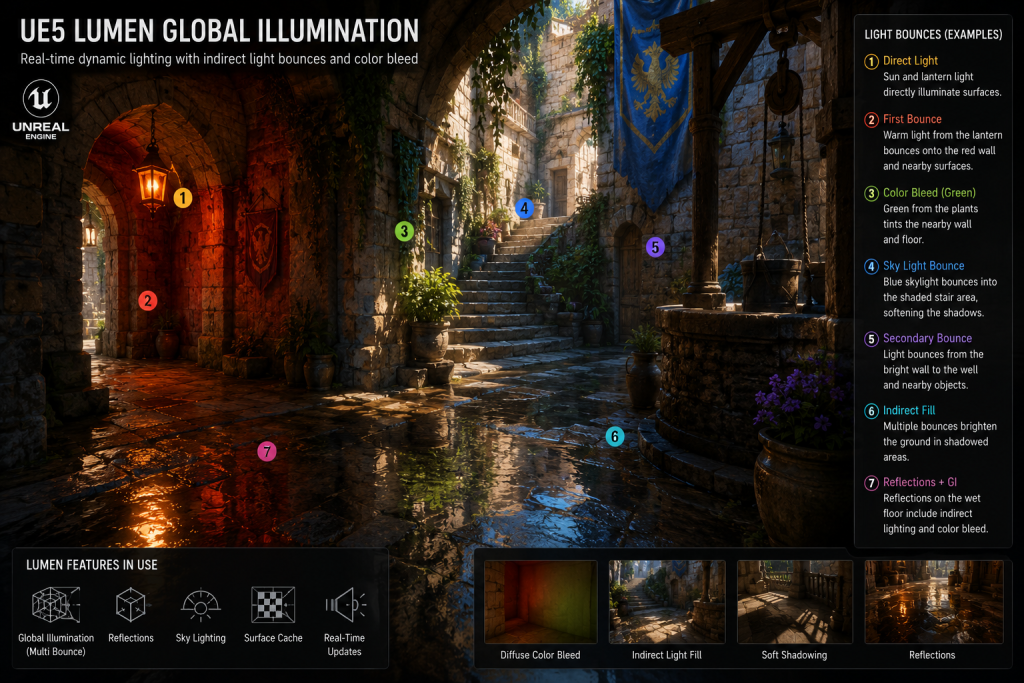
“Editorial illustration created for visual reference purposes. It does not represent a real project, client work, or official software screenshot unless stated otherwise.”
Character integration improves structurally. One of the most visible seams in baked-lighting pipelines was the disconnect between a static-lit environment and a dynamically lit character moving through it. Lumen narrows this gap because both the environment and the character are receiving GI from the same dynamic system. Characters lit by Lumen will pick up color bleed and bounce light from their surroundings in a way that baked GI never supported. For our real-time character shading pipeline, Lumen’s indirect lighting integration means character materials can be designed with the expectation of receiving correct environment-sourced bounce light rather than compensating for its absence.
Iteration speed changes the creative process. An environment artist working in a Lumen scene can move a sun angle, change a material’s roughness, or add a window cutout and see the correct indirect lighting response immediately. The creative feedback loop that baked lighting broke — sometimes for hours at a time — is restored. This has a downstream effect on production velocity that is easy to underestimate until you have worked through a milestone without it.
The environment lighting concept art phase benefits directly from this: lighting concepts that are established in pre-production can be validated against a real-time GI approximation earlier in the pipeline, reducing the risk of late-stage discovery that a lighting direction does not hold in engine.
Lumen and Nanite: Why They Work Better Together
Lumen and Nanite are independent systems — either can be used without the other. But in practice, they are designed to complement each other, and understanding the relationship helps explain why Epic treats them as a pair.
Nanite provides the geometry-side foundation that Lumen’s scene capturing benefits from. According to Epic’s technical documentation, Lumen’s scene capturing — the process of updating the Surface Cache — becomes significantly more expensive in scenes with large numbers of high-polygon meshes that have not enabled Nanite and do not have proper LODs set up. Nanite’s virtualized geometry system streams and scales mesh detail automatically, which keeps Lumen’s scene update cost manageable even at high scene complexity.
Conversely, Hardware Ray Tracing’s integration with Nanite has improved significantly in UE5.3 and later — more recent engine versions can stream Nanite geometry more directly into BVH intersection for Lumen Reflections, improving visual consistency over earlier approaches that relied more heavily on lower-resolution fallback mesh approximations.
In practical terms: for most Lumen-based UE5 environments, enabling Nanite on eligible static meshes is often the preferred default for performance stability and scene complexity management. The combination is what Epic targets as the primary production configuration for next-gen console titles. For a deeper look at how Nanite changes the geometry pipeline, our Nanite vs Lumen workflow breakdown covers both systems in their respective technical detail.
Performance: What Lumen Actually Costs
Performance figures change with engine version, hardware, and scene complexity — so this section reflects the documented targets from Epic’s Lumen Performance Guide rather than attempting to give concrete numbers that would become stale.
Epic’s stated primary shipping target for Lumen is large, open worlds running at 60 FPS on next-generation consoles. The engine’s High scalability level contains Lumen settings tuned for 60 FPS; the Epic scalability level targets 30 FPS with higher quality settings. At internal 1080p resolution, Lumen relies on Temporal Super Resolution (TSR) to produce output quality approaching native 4K — meaning Lumen does not render GI at native 4K, it renders at a lower resolution and upscales.
The most common performance variables in a Lumen scene:
Scene complexity and instance count. Software RT traces against Distance Fields, whose update cost scales with instance count. Scenes with thousands of overlapping mesh instances — dense foliage, particle-heavy environments — generate higher tracing costs. The Global Distance Field mode (tracing a single merged field rather than per-mesh SDFs) is a significant optimization for these cases.
Emissive surface area. Larger emissive surfaces generate more tracing rays from more directions. Keeping emissive props appropriately sized and not using oversized emissive geometry as primary illumination is a standard optimization practice.
Translucency. Lumen does not trace through transparent materials, but complex translucent surface layering still generates overhead through other rendering paths. Heavy use of transparency in view — water, glass, particles — should be profiled carefully.
Reflection quality settings. Hardware RT reflections with Hit Lighting enabled are substantially more expensive than Surface Cache-based reflections. SIGGRAPH data from Epic’s Matrix Awakens work showed Hit Lighting at roughly 11ms versus Surface Cache at around 2ms for reflection tracing on PS5 — a meaningful difference that production teams should factor into their rendering budget decisions.
For any production targeting a specific platform and frame rate target, these settings are levers in the Post Process Volume and project scalability configuration — the correct approach is to profile per-level against the target hardware, not to rely on general estimates.
When Lumen Is Not the Right Choice
Choosing Lumen is not always the right decision. Honest treatment of the system requires covering the scenarios where the traditional lighting path remains more appropriate.
Cross-gen or legacy-platform targets. If a project must run on PS4, Xbox One, Nintendo Switch, or low-spec PC hardware, Lumen is not available. These platforms require either baked lighting or lighter dynamic GI approximations like SSGI. This is a hard platform constraint, not an optimization choice.
Mobile-first productions. Lumen on mobile exists in a limited, high-end form and requires specific device profiles and Vulkan SM5 support. Most mobile productions are better served by mobile-appropriate lighting pipelines.
VR titles. Lumen is generally not a practical choice for VR production targets due to performance cost and rendering-path constraints. VR projects should validate a non-Lumen lighting path early in pre-production rather than treating it as a late optimization.
Very high frame rate requirements. Some competitive multiplayer games target 120 FPS or higher. At those frame budgets, Lumen’s GI cost — even at reduced quality settings — may be too expensive. Tekken 8 is a documented example of a UE5-based production that chose baked lighting to ensure a stable high frame rate target.
Projects with heavy translucency. Games built around water, glass, magical effects, or particle-heavy visual styles will encounter Lumen’s translucency limitation continuously. For these productions, the expected visual behavior may be cleaner with a hybrid approach or traditional lighting.
How Lumen Fits Into a Mid-Core and AAA Art Pipeline at Nasty Rodent
Working across environment art productions at different scales, the practical shift that Lumen creates is most visible in pre-production and milestone review velocity. When lighting can be evaluated in real time against final materials and geometry, the number of lighting-direction iterations that happen within a milestone — rather than between milestones — increases substantially. Problems that would previously have been discovered at a lighting build review get caught during daily work sessions.
For UE5 lighting and environment production, this means the asset brief for environment kits can specify material color and emissive values with the expectation that they will participate in the GI solution — not just look correct under neutral studio lighting. It raises the bar on material authoring precision and shifts some of what was previously a lighting-pass responsibility into the texturing and material pipeline.
The practical consequence for outsource production: environment assets delivered for Lumen-based projects require clean mesh topology that generates accurate Distance Fields, correct emissive value ranges, and materials authored with the expectation of Lumen’s color bleed behavior — not just legacy “make it look right under direct light” texturing.
When we at Nasty Rodent evaluate incoming briefs for UE5 environment art, verifying Lumen compatibility is part of the technical onboarding — checking Distance Field generation, emissive surface area budgets, and translucency handling — before production begins. More detail on our environment art approach is in the section below.
Lumen in UE5: Quick Reference Summary
| Topic | Key Facts |
| What it is | Fully dynamic global illumination and reflections system; default in UE5 |
| What it replaces | Baked Lightmass, SSGI, DFAO, Screen Space Reflections |
| Tracing modes | Software RT (Distance Fields, broad hardware) / Hardware RT (BVH, dedicated RT units) |
| Platform support | PS5, Xbox Series X/S, high-end PC; not available on PS4/Xbox One; generally not practical for VR production targets |
| Translucency | Limited — transparent surfaces do not fully participate in GI/reflection tracing; separate handling often needed |
| Lightmap UVs | Not required — significant asset pipeline simplification |
| Emissive lighting | Emissive materials contribute to GI; large emissive surfaces increase tracing cost |
| Nanite relationship | Independent but complementary; Nanite improves Lumen scene update performance |
| Performance targets | High scalability: ~60 FPS on next-gen consoles; Epic: ~30 FPS; TSR for 4K output |
Ready to Build Your UE5 Environment Art Pipeline on Lumen?
Understanding Lumen’s technical model is the foundation — but shipping a production-grade environment in UE5 means translating that understanding into asset briefs, material specs, and pipeline decisions that hold up across milestones.
At Nasty Rodent, we work with mid-core and AAA studios building environment art for UE5 productions. If your project is transitioning to a Lumen-based pipeline — or you need an outsource partner who already understands what correct Distance Field generation, emissive surface budgets, and Lumen-compatible material authoring look like in practice — we can get into your pipeline quickly.
Get in touch for a technical pipeline review — we’ll look at your brief, your target platform, and your current asset specifications, and give you a direct read on what a Lumen-ready environment art workflow looks like for your production scope.