What Is Nanite in Unreal Engine 5: A Technical Guide for 3D Production Teams
-

Written byDenys Zadoienyi
-

Updated on11.05.2026
-

Time to read12 min

- What Is Nanite in Unreal Engine 5?
- How Nanite’s Cluster System Actually Works
- What Changes in Your 3D Asset Pipeline
- What Nanite Is Not: The Limitations Art Directors Need to Know
- Nanite vs. Traditional LOD: A Production Decision Matrix
- The Authoring Constraints Nanite Doesn’t Remove
- How We Work with Nanite at Nasty Rodent
- Nanite vs. LOD: Side-by-Side Comparison
- What Nanite Changes for Your Next UE5 Project
There’s a moment in every UE5 project when someone on the art team asks the same question: “Do I need to retopologize this, or can I just throw it straight into Nanite?”
If you’re an AAA-tier art director managing a multi-platform production pipeline, that question lands differently than it does for a junior modeler. Because the answer isn’t just technical — it touches your style consistency, your asset review cycles, your shadow rendering budget, and ultimately your milestone gate timeline.
This guide cuts through the marketing narrative. We’ll explain what Nanite is at the geometry-processing level, what it actually changes in your production workflow, where its limitations still bite, and how to make principled decisions about which assets go through Nanite and which don’t.
What Is Nanite in Unreal Engine 5?
Nanite is UE5’s virtualized geometry system — a GPU-driven, cluster-based mesh management solution that renders only the geometry contributing meaningfully to the current frame, at pixel-accurate detail, without manual LOD chains.
The core idea: instead of storing discrete LOD0/LOD1/LOD2 meshes and swapping them at distance thresholds, Nanite stores your mesh as a hierarchical cluster tree. At runtime, it evaluates which clusters are visible, at what screen-space size, and renders only those — streaming geometry on demand from VRAM and system RAM.
Per Epic Games’ official Nanite documentation:
Nanite uses a new internal mesh format and rendering technology to render pixel scale detail and high object counts. It intelligently does work only on the detail that can be perceived and no more.
Three things Nanite eliminates for static geometry:
- Manual LOD creation per asset
- Draw call budgeting per mesh
- Polycount limits as a primary constraint
Three things Nanite does not eliminate (more on this below):
- Material complexity budget
- Memory constraints (VRAM + RAM)
- The need for clean topology and thoughtful asset authoring
As an art director at Nasty Rodent, I’ve watched teams misread Nanite twice — once by ignoring it entirely (“we’ll just keep doing LODs”), once by treating it as a magic button (“we’ll import ZBrush directly”). Both cost rounds of revisions. The truth is in the middle, and it’s worth understanding precisely.
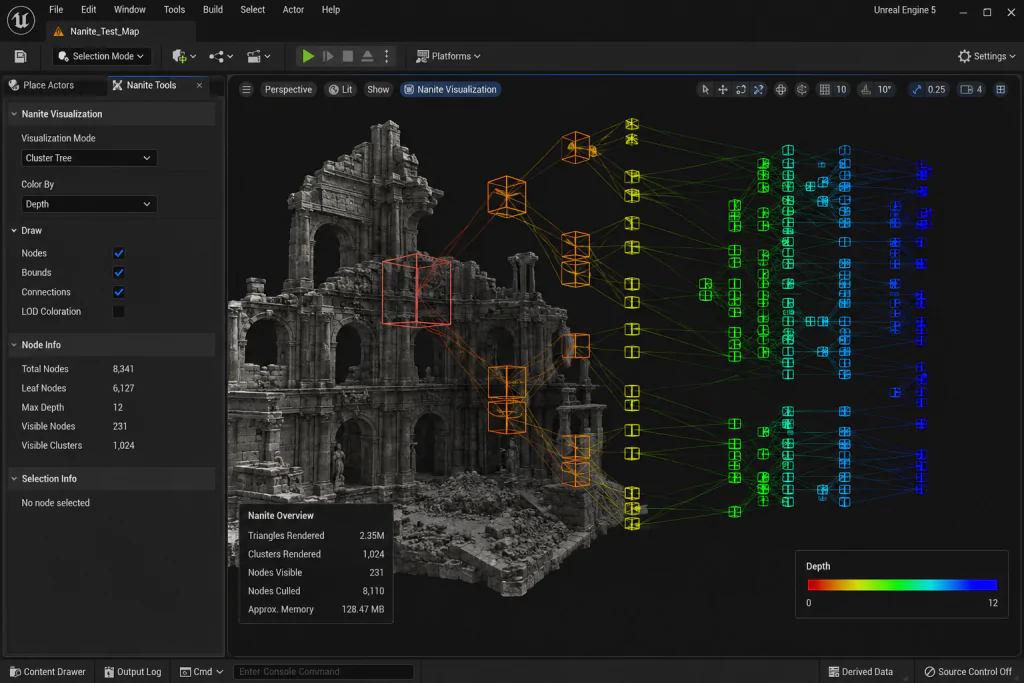
“Editorial illustration created for visual reference purposes. It does not represent a real project, client work, or official software screenshot unless stated otherwise.”
How Nanite’s Cluster System Actually Works
Understanding the mechanism prevents misusing the tool.
When you enable Nanite on a static mesh, UE5 preprocesses it into a hierarchical cluster tree. Each cluster contains up to 128 triangles. The hierarchy stores parent clusters (lower detail) and child clusters (higher detail) — a DAG (directed acyclic graph) structure, not a simple LOD chain.
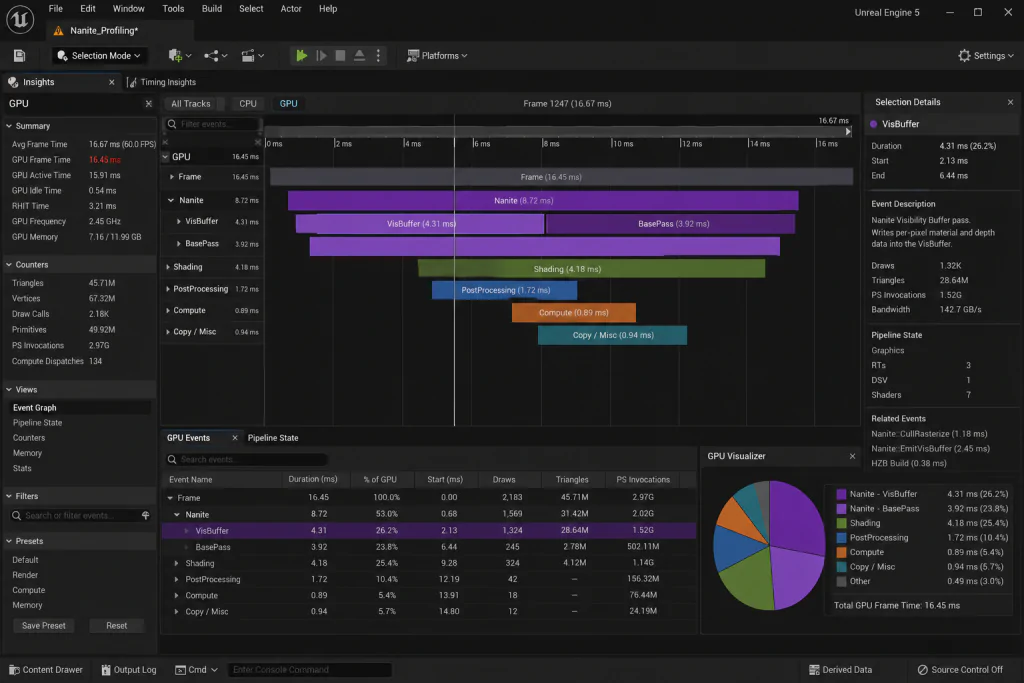
“Editorial illustration created for visual reference purposes. It does not represent a real project, client work, or official software screenshot unless stated otherwise.”
At render time, UE5 runs a two-pass system:
Pass 1 — VisBuffer (Visibility Buffer): The GPU determines which clusters are visible in the current camera view, applies HZB (Hierarchical Z-Buffer) occlusion culling, and selects the appropriate LOD per cluster based on screen-space coverage. Clusters that project to fewer pixels get coarser representation. Clusters close to camera get full detail.
Pass 2 — BasePass (Material shading): Only the visible, LOD-selected clusters are shaded. Materials are evaluated per pixel, not per triangle.
The practical outcome: a 50-million-triangle environment asset renders at roughly the same GPU cost as a well-optimized 200K-triangle mesh under traditional LOD pipelines — for the geometry pass specifically.
From Epic’s SIGGRAPH 2021 deep dive, authored by Engineering Fellow Brian Karis: the system eliminates the constraint that frame budgets are limited by polycounts, draw calls, or mesh memory usage.
The key phrase: for the geometry pass specifically. Nanite shifts your bottleneck — from geometry to materials and instances.
What Changes in Your 3D Asset Pipeline
The practical impact on an art director’s pipeline is significant, but not total.
Photogrammetry and ZBrush imports
Before Nanite, importing a photogrammetry scan or ZBrush sculpt into a game engine meant a full retopology pass, UV rebuild, normal map bake, LOD generation — 3–5 days of technical art work per hero asset. With Nanite, you can import the high-resolution source geometry directly and let UE5 handle the LOD streaming.
Researchers at East Tennessee State University tested Nanite against traditional LOD pipelines in UE5 and found that Nanite eliminated a significant portion of the photogrammetry production pipeline — specifically the retopology and texture baking stages where an artist would manually lower polycount for LOD creation.
This doesn’t mean retopology is dead. It means retopology is no longer required for static environment assets where the detail comes from actual geometry, not from normal maps baked off a high-poly.
However, retopology in 3D modeling is still required for characters, skeletal meshes, animation workflows, and proper deformation control.
For characters — skeletal meshes — retopology is still necessary, because Nanite’s skinned mesh support was experimental in UE5.4 and only stabilized in 5.5. More on that in the limitations section.

LOD workflow changes
The old pipeline for a prop:
- Model high-poly in ZBrush
- Retopo to game mesh
- Bake normals from high to game mesh
- Generate LOD0/LOD1/LOD2 manually (or via auto-LOD)
- Import all LODs, set up LOD distances
The Nanite pipeline for a static prop:
- Model in ZBrush or sculpting package
- Import high-res directly (or a cleaned version)
- Enable Nanite on import
- Done — UE5 handles the rest at runtime
The hours saved per asset compound across an environment pipeline. For a mid-core/AAA project with 200–500 environment props, eliminating manual LOD chains can save 4–8 weeks of technical art time across the production cycle.
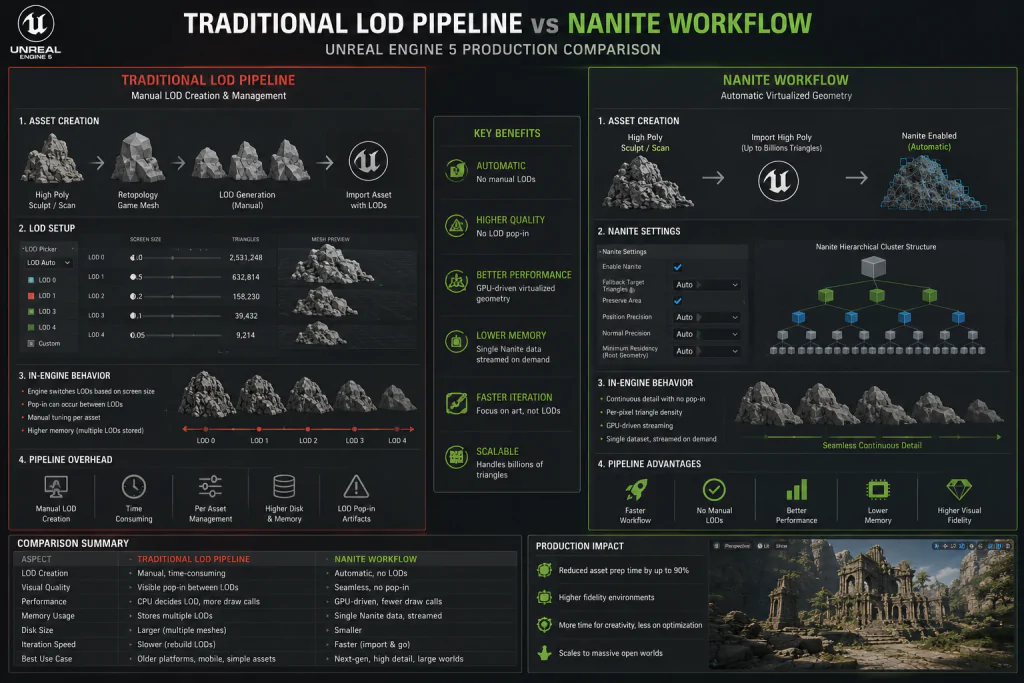
“Editorial illustration created for visual reference purposes. It does not represent a real project, client work, or official software screenshot unless stated otherwise.”
Virtual Shadow Maps integration
Nanite integrates directly with UE5’s Virtual Shadow Maps (VSM). Shadow geometry is processed through Nanite’s cluster system — meaning shadow rendering for Nanite meshes is substantially more efficient than for traditional static meshes with multiple LODs. This matters when your scene has dozens of dynamic lights, which is standard for AAA outdoor environments.
What Nanite Is Not: The Limitations Art Directors Need to Know
Here’s where most explainers undersell the complexity.
Translucent materials: hard unsupported
Nanite does not support translucent materials. Glass, water surfaces, particles — none of these can use Nanite’s rendering path. They fall back to traditional rasterization. This is a hard constraint, not a workaround situation.
Practical consequence: in architecture visualization or interior environment art, transparent materials are common. Your prop library needs to account for which assets have translucent surfaces and exclude them from Nanite enabling.
Masked materials: supported but costly
Masked materials (foliage, fences, fabric with alpha cutouts) are supported but carry a performance penalty. As documented by engine engineers: Nanite groups non-deformed materials into a single raster bin and processes them in one pass. Masked materials each require their own raster bin — meaning more passes, more overhead, slower rendering.
Heavy use of masked materials on foliage in open-world environments is one of the most common Nanite performance issues in mid-core AAA production. If your art team plans dense grass and vegetation, profile carefully before committing the entire environment to Nanite foliage.
Skinned meshes: stabilized in 5.5
Skeletal mesh support was experimental in 5.4, stabilized in 5.5. Morph targets and cloth simulation still carry limitations. For character-heavy productions — character artists, this means your pipeline distinction stands:
- Static props, environment assets, architectural elements → Nanite ready
- Characters, creatures, cloth-simulated assets → standard skeletal mesh pipeline
This still requires a standard 3D character pipeline for UE5 including retopology, UV mapping, rigging, skinning, and animation preparation.
This is not a minor caveat. AAA character work remains a separate technical art domain from Nanite-enabled environment production.
Disk space: 2–3× increase per mesh
Enabling Nanite increases mesh disk usage by 2–3× compared to a standard imported static mesh. For a project with hundreds of high-poly Nanite assets, this adds up to significant project storage. Plan your Derived Data Cache (DDC) sharing strategy early — in team development, a shared DDC reduces Nanite mesh processing time across the team.
Memory: instance counts still matter
Nanite’s triangle streaming reduces geometry bandwidth — but instance counts still impact VRAM and RAM usage. Root LOD clusters for all instances, even distant ones, must be resident in memory. In practice, extremely high instance counts can saturate GPU memory even when triangle counts seem low. This is the less-discussed Nanite constraint that shows up late in production during open-world level streaming profiling.
Nanite vs. Traditional LOD: A Production Decision Matrix
When should you enable Nanite, and when should you keep traditional LODs?
| Asset Type | Nanite Appropriate? | Why |
| Hero environment props (rocks, ruins, buildings) | ✅ Yes | High poly detail benefits from cluster streaming |
| Photogrammetry scans | ✅ Yes | Eliminates retopo requirement entirely |
| High-poly architectural elements | ✅ Yes | Consistent detail at all distances |
| Simple props (crates, debris, small geometry) | ⚠️ Optional | Low benefit; tiny meshes collapse to pixels quickly |
| Foliage with alpha masks | ⚠️ Caution | Masked material bin cost — test before committing |
| Characters, creatures | ❌ No (pre-5.5) / ⚠️ Test (5.5+) | Skeletal mesh support is newer; verify on your UE version |
| Translucent objects (glass, water) | ❌ No | Hard unsupported by Nanite rendering path |
| Animated/deforming geometry (not skeletal) | ❌ No | Deformed materials break single-bin optimization |
| Terrain/Landscape | ✅ Yes | Native Landscape Nanite support; improves VSM performance |
From our pipeline work on mid-core/AAA UE5 projects: the default posture should be “enable Nanite on all static geometry, profile exceptions.” Not “enable on hero assets only.” The overhead of selective enabling without profiling is more expensive in art director review time than just starting with full enable and identifying exceptions through GPU profiling.
The Authoring Constraints Nanite Doesn’t Remove
Nanite changes what you worry about, not whether you worry.
Clean topology still matters. Nanite’s cluster generation works better with logical edge flow and consistent triangle density. Assets with random topology, excessive N-gons, or wildly inconsistent density produce inefficient cluster trees. The rendering difference may be subtle, but profiling will reveal it in complex scenes.
UV sets and vertex attributes cost memory. Nanite still depends on clean vertex data. Extra UV sets, custom vertex attributes, and unnecessary channels increase per-cluster memory cost. The authoring rule: Position, Normal, UV0 always. Lightmap UV1 when using baked lighting. Vertex colors when needed for material blending. Avoid excess.
Material ID count per mesh is capped at 64. For complex modular assets with many material zones — this is an edge case, but modular building construction sets with dozens of surface types can hit it. Plan material ID counts at the asset spec stage, not after import.
Triangle density distribution matters. Flat surfaces with over-triangulation waste cluster budget. Dense geometry on detail that will never be close to camera is misallocated budget. Think: where will the camera actually get close? Put hero-level triangle density there.
How We Work with Nanite at Nasty Rodent
We’re a game art outsourcing studio based in Tallinn, Estonia — full-cycle production covering 3D Characters, 3D Environment, 3D Props, 3D Vehicles, 3D Weapons, Concept Art, and UX/UI. Our stack includes Maya, 3ds Max, Marmoset Toolbag, Plasticity, Substance Painter, Substance Designer, and Unreal Engine 5.
For environment assets destined for UE5 production, our current pipeline looks like this:
Source authoring: We model with Nanite’s cluster generation in mind — consistent triangle density in high-detail zones, logical edge flow, clean vertex data. No manual LOD creation for static props.
Import validation: Every Nanite-enabled asset goes through a three-step validation: enable Nanite on import, visualize clusters in the Nanite visualization mode, profile in a representative scene with stat Nanite and GPU profiling. If the VisBuffer or BasePass cost spikes unexpectedly, we investigate material complexity before topology.
Material audit: Before final delivery, we flag all masked materials in the asset set and profile their raster bin cost in context. Translucent surfaces are explicitly excluded from Nanite at the spec stage — not discovered at integration.
Character pipeline separation: We maintain a distinct pipeline for skeletal meshes. Characters on projects running UE5.4 go through standard retopo → bake → LOD workflows. Projects on 5.5 get a case-by-case Nanite evaluation for character meshes, with explicit profiling sign-off.
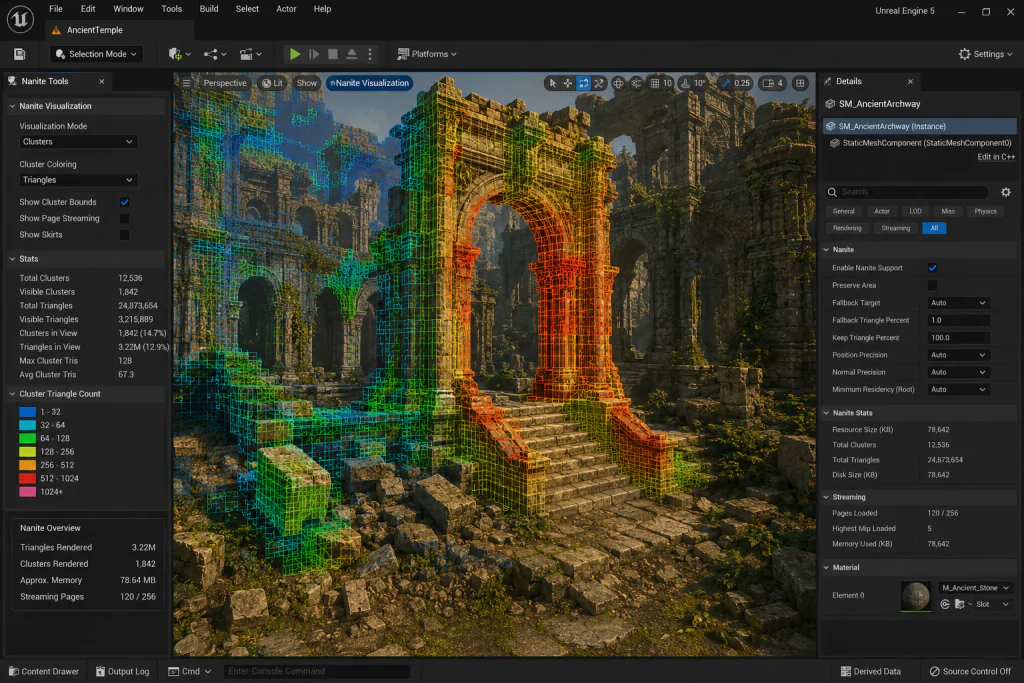
“Editorial illustration created for visual reference purposes. It does not represent a real project, client work, or official software screenshot unless stated otherwise.”
Our clients include studios such as Whimsy Games, Offworld Industries, Galaxy 4 Games, Benner Games, The Bearded Ladies Consulting, Reburn, and other teams developing mid-core and AAA Unreal Engine productions.
If you’re building a 3D environment pipeline for UE5 and want production-ready assets that pass Nanite integration without surprises, you can see our portfolio or reach out directly.
Nanite vs. LOD: Side-by-Side Comparison
| Parameter | Traditional LOD | Nanite (UE5) |
| LOD authoring | Manual (3–5 LODs per asset) | Automatic (cluster tree generated on import) |
| Triangle budget | Hard limit per frame | Soft limit; GPU streams what’s needed per pixel |
| Draw call impact | Significant | Substantially reduced for static meshes |
| Masked materials | Standard cost | Higher cost (per-bin overhead) |
| Translucent materials | Supported | Not supported |
| Character/skeletal mesh | Full support | Stabilized in UE 5.5; limitations remain |
| Disk footprint | Standard | 2–3× larger per Nanite mesh |
| Shadow rendering | Traditional shadow cascades | Virtual Shadow Maps — more efficient |
| Photogrammetry workflow | Requires retopo + bake + LOD | Import source geometry directly |
| Performance profiling | Stat RHI, stat SceneRendering | stat Nanite, VisBuffer, BasePass, raster bins |
What Nanite Changes for Your Next UE5 Project
Nanite shifts the constraint structure of your 3D production pipeline. Polycount and manual LODs are no longer the primary bottleneck. Material complexity, instance counts, and asset authoring discipline take their place.
The practical takeaway for an art director running a UE5 environment pipeline:
- Enable Nanite on all static geometry by default, then identify exceptions through GPU profiling — not the other way around
- Audit masked materials early; profile foliage in context before committing
- Maintain a clear separation between Nanite-eligible static props and character/skeletal pipelines
- Plan your DDC strategy for team environments before production ramps up
- Track disk usage: a 2–3× increase per Nanite mesh compounds across large prop libraries
If your team is navigating a UE5 environment production for a mid-core or AAA title and needs 3D environment assets that are Nanite-ready from the first delivery — Nasty Rodent works in 3D props,3D characters, and full environment pipelines with UE5 integration as part of the standard delivery spec.
Explore our 3D environment portfolio or reach out to discuss your pipeline requirements. We’re based in Tallinn, Estonia — Nasty Rodent OÜ.
We are Nasty Rodent, a game art outsourcing studio crafting high-fidelity visuals for games across all genres and platforms. From initial concept art to final UI and animation — delivered as production-ready assets for gameplay, storytelling, and player immersion. With 40+ team members, 10+ years in production, and 30+ clients worldwide, we have contributed to projects alongside Whimsy Games, Offworld Industries, Galaxy 4 Games, Benner Games, The Bearded Ladies Consulting, and Reburn.
Case
What we are working with nanite on various projects one of them is Starship Troopers: Extermination