Blueprint vs C++ in Unreal Engine: When to Use Each
-

Written byDenys Zadoienyi
-

Updated on10.07.2026
-

Time to read10 min

- Blueprint vs C++: What Each One Actually Does
- Why “Which Is Better” Is the Wrong Question
- When to Use C++: Architecture, Performance, and Systems That Have to Scale
- When to Use Blueprint: Iteration, Prototyping, and Designer-Facing Systems
- The Hybrid Pattern Epic Actually Recommends
- Where Teams Get This Wrong
- UI, HUD, and Widget Blueprint: The Case Everyone Forgets
- What This Means for Production Planning
- Blueprint or C++: A Quick Decision Framework
Every Unreal Engine project runs into this question early, usually right after the first working prototype: does this system go in Blueprint, or does it go in C++? The framing as “versus” is misleading. Blueprint and C++ aren’t competing for the same job. C++ is a programming language – it defines systems from scratch. Blueprint is a scripting layer built on top of those systems – it defines behavior by wiring together functionality that already exists. Once a team stops treating this as a choice between two rivals and starts treating it as a division of labor, the actual decision gets much easier to make consistently, project after project.
“Editorial illustration created for visual reference purposes. It does not represent a real project, client work, or official software screenshot unless stated otherwise.”
Blueprint vs C++: What Each One Actually Does
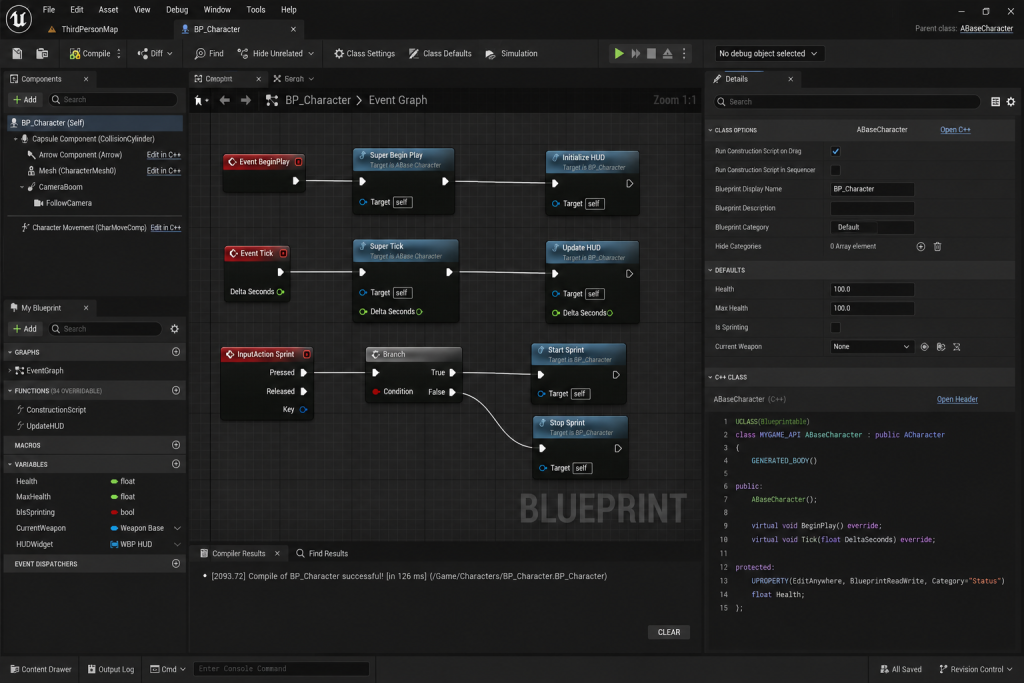
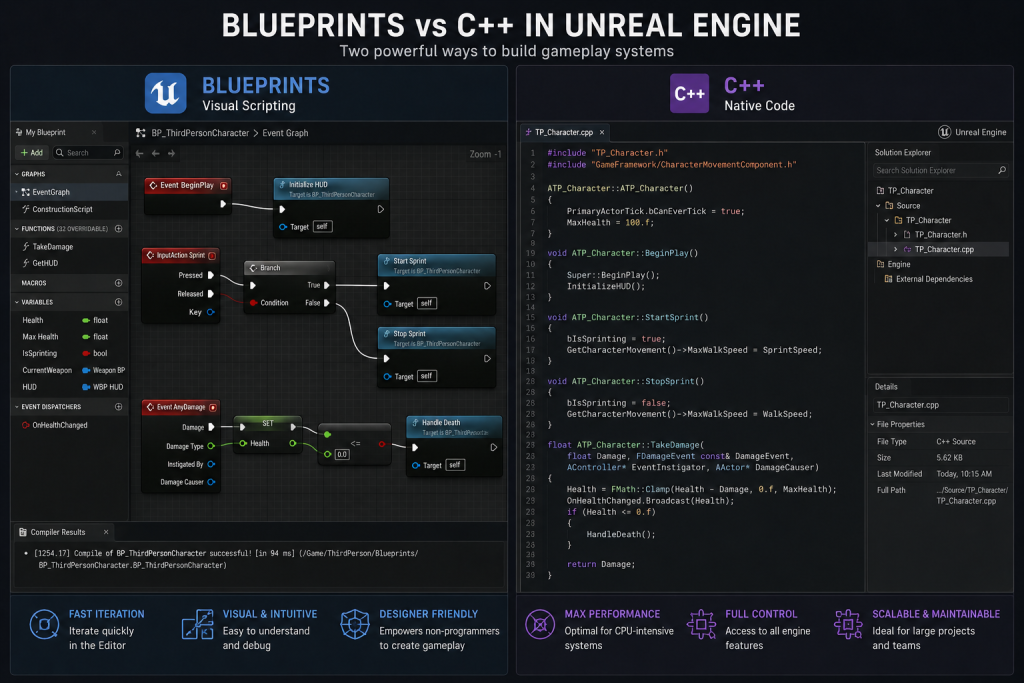
C++ in Unreal Engine gives you low-level control: you can build new classes, extend the engine’s own systems, integrate third-party libraries, and write the kind of tight, data-heavy logic that a visual graph struggles to express cleanly. It compiles into machine code, it’s text, and it’s the format most mature code review, diff, and version-control workflows are built around.
Blueprint is Unreal’s visual scripting layer. It compiles too, but into bytecode that runs on a virtual machine sitting on top of the engine – which is exactly why it carries a small amount of execution overhead that pure C++ doesn’t. In exchange, Blueprint gives you something C++ can’t: a visual graph that a designer or an artist can open, understand, and modify without a compile-and-restart cycle every time they change a number.
“Editorial illustration created for visual reference purposes. It does not represent a real project, client work, or official software screenshot unless stated otherwise.”
Why “Which Is Better” Is the Wrong Question
Epic’s own engineering documentation answers this directly, and it’s worth citing because it settles an argument that shows up in nearly every studio at some point: there is no single right choice between Blueprint and C++, because every project and team is different – the real question is how you split the two, not which one wins outright. The recommended default is straightforward: use C++ to build the underlying systems, and use Blueprint to script the specific behaviors that sit on top of those systems.
That framing matters more than it sounds like it should, because it changes what the decision actually is. Instead of asking “is this feature better suited to Blueprint or C++,” the more useful question is “am I defining a system, or am I defining a behavior within a system that already exists.” A vehicle’s acceleration and steering logic is a system. Which specific car uses which specific top speed is a behavior. The first belongs in C++. The second is exactly what Blueprint is for.
The same split shows up in weapon systems, which is why it’s one of the most common teaching examples in Unreal projects: firing logic, reload timing, and ammo tracking are a system, written once in C++. Which specific weapon uses which fire rate, recoil pattern, or visual variant is a behavior – that’s the part a designer should be able to tune per weapon without a programmer opening a header file every time art delivers a new model.
When to Use C++: Architecture, Performance, and Systems That Have to Scale
C++ earns its place whenever a system needs to survive contact with scale, whether that’s scale in complexity, scale in the number of instances running at once, or scale in how many people need to touch the code without breaking it. A handful of situations come up often enough to name directly:
Core, low-level infrastructure – the base classes everything else in the project extends from – belongs in C++, because this is the layer where a change to one class quietly breaks a hundred Blueprints built on top of it if it isn’t stable to begin with. This is also where a project’s character architecture usually lives: a base Character class written in C++ handling movement, health, and input, with individual characters extended as Blueprints on top of it, keeps the expensive, easy-to-break logic in one place while still letting designers spin up new character variants without touching code.
Tight loops and tick-dependent classes with many active instances are the other clear case. Blueprint has no support for multithreading, and executing a Blueprint tick is noticeably slower than a native one – the kind of difference that stays invisible with ten active instances and turns into a measurable frame-rate problem at a few hundred. Systems that process large data sets, or that do heavy string manipulation and complex math, run into the same wall: these operations are awkward to express as a node graph in the first place, long before performance becomes the deciding factor.
When to Use Blueprint: Iteration, Prototyping, and Designer-Facing Systems
Blueprint’s advantage isn’t that it’s a lighter version of C++. It’s that it removes the compile-and-restart cycle from the parts of development where fast iteration matters more than raw execution speed. A designer testing five different values for a jump height, or an artist adjusting the timing on a set of UI animations, gets immediate feedback in Blueprint that a C++ recompile simply can’t match on every single tweak.
This is also where accessibility does real production work, not just a nice-to-have. A visual graph that a non-programmer can open and follow means a smaller, more expensive engineering team doesn’t become the bottleneck for every gameplay behavior a project needs. Blueprint Interfaces and Blueprint Function Libraries extend that same logic further – they let a studio expose reusable, well-scoped pieces of functionality that designers can build with safely, without needing write access to the systems underneath.

The Hybrid Pattern Epic Actually Recommends
Almost no shipped Unreal project sits at either extreme. The pattern Epic recommends explicitly, and the one that shows up consistently across production teams, is C++ as the foundation with Blueprint layered on top of it: write the base classes and core systems in C++, then expose the specific pieces designers need – through BlueprintReadWrite properties, BlueprintCallable functions, or a dedicated Blueprint Function Library – and let Blueprint handle the day-to-day behavior scripting from there.
The direction of the exposure matters more than it looks like it should. C++ exposing functionality to Blueprint is common and cheap to maintain. The reverse – a C++ class trying to reach into something a Blueprint defined – is far more fragile and is generally worth avoiding unless there’s no other option. Keeping that direction consistent is one of the simplest things a technical lead can do to stop a project’s Blueprint layer from turning into a maze nobody wants to open.
Where Teams Get This Wrong
The most common mistake isn’t picking the wrong tool for an individual feature. It’s never revisiting the split as the project grows. A Blueprint that made sense at fifty nodes because it needed to stay editable by a designer often keeps growing past the point where anyone can follow it, simply because nobody set a threshold for when it should move to C++. Epic’s own guidance here is useful precisely because it isn’t dogmatic: profile with a tool like Unreal Insights before converting anything, since Blueprint execution overhead is frequently insignificant outside of tight loops and tick-heavy systems, and refactoring into C++ before you’ve actually hit a bottleneck just trades design flexibility for a maintainability burden nobody asked for yet.
The second common failure is the mirror image – writing everything in C++ out of habit, then wondering why every small gameplay tweak requires a programmer and a recompile. A project that never gives designers a Blueprint layer to work in isn’t more disciplined; it’s just slower, because it turned every non-technical decision into an engineering ticket. The same discipline that keeps a visual style consistent across a large art team – a documented standard everyone can check their work against instead of relying on memory – applies just as directly to a Blueprint and C++ split. Without a written convention for where the line sits, every programmer draws it slightly differently, and the architecture drifts the same way an undocumented visual style does.
UI, HUD, and Widget Blueprint: The Case Everyone Forgets
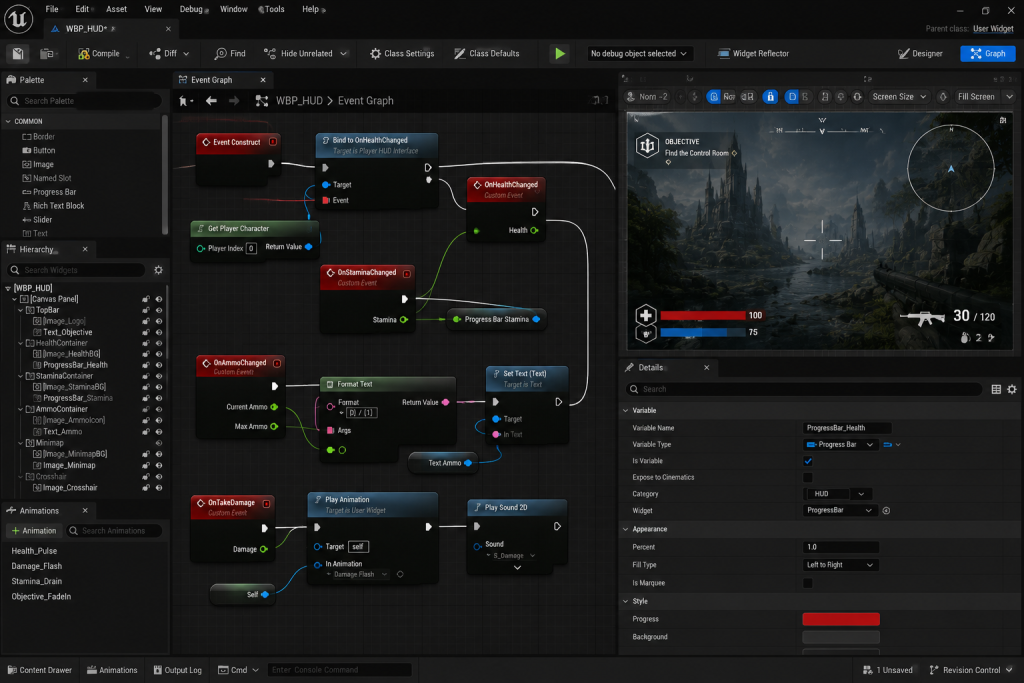
In many Unreal projects, much of the interface layer – HUDs, menus, inventory screens, dialogue boxes – is built with Widget Blueprints (UMG), not hand-written C++. This isn’t a shortcut; it’s the intended workflow. UI layout, animation timing, and screen-to-screen flow change constantly during production as playtesting reshapes what the interface needs to communicate, and that’s exactly the kind of fast-iteration work Blueprint is built for. The data those widgets display – inventory contents, health values, quest state – is a different matter, and it typically lives in C++ for the same reason any other game data does: it needs to be fast, centrally owned, and safely shared across systems that have nothing to do with the interface itself.
“Editorial illustration created for visual reference purposes. It does not represent a real project, client work, or official software screenshot unless stated otherwise.”
At Nasty Rodent, we treat game interfaces as production systems, not isolated screens. Our UX/UI team designs HUDs, menus, interaction flows, and interface assets that are prepared for real engine integration in Unreal Engine, Unity, and custom pipelines. That matters in projects where Blueprint iteration, designer-facing logic, and C++ gameplay architecture need to stay aligned instead of drifting into separate workflows. If your team is planning a UI-heavy Unreal project, our game UX/UI design pipeline helps keep visual direction, usability, and technical implementation working from the same brief.
What This Means for Production Planning
The Blueprint vs C++ split isn’t only a technical decision – it shapes staffing. A production that leans heavily on Blueprint for gameplay behavior can move faster with a smaller core engineering team and a larger design/art bench doing the day-to-day iteration, provided the underlying C++ systems those Blueprints depend on are solid enough not to need constant rework. A production that under-invests in the C++ foundation usually finds out the hard way, once the Blueprint layer has grown too large to safely refactor and every new feature request turns into a discussion about whether “just add it as a Blueprint” is still true.
This is the same production-planning problem that shows up whenever a studio briefs external teams on a UE5 project: the brief needs to define technical boundaries clearly enough that a vendor or a new hire isn’t guessing where the architecture line sits.
It’s also worth revisiting whenever a studio is weighing engine choice more broadly – Blueprint’s visual, designer-accessible layer is one of the more concrete differences between how Unreal and Unity structure a mixed team’s workflow, not just a footnote in the comparison.
Blueprint or C++: A Quick Decision Framework
All of the above collapses into a small set of practical signals. None of them is absolute on its own, but together they’re usually enough to settle the question for a specific feature:
| Use Blueprint when… | Use C++ when… |
| The logic is content-specific (this weapon, this level, this cutscene) | The logic defines a reusable system other content builds on |
| Designers or artists need to tune it often | It runs every frame or affects many instances at once |
| The feature is still being tested or iterated on | It handles core gameplay, save data, AI, networking, or a framework like the Gameplay Ability System |
| It controls UI layout, animation timing, or level-specific events | Multithreading, heavy math, or large data sets are involved |
| Iteration speed matters more than execution speed | Maintainability and code review matter more than iteration speed |