What Is a 3D Artist? The Roles Behind a Game Production Pipeline
-

Written byDenys Zadoienyi
-

Updated on16.06.2026
-

Time to read12 min

- Why “a 3D artist” is not one job
- The core specializations
- Hard-surface versus organic: two different kinds of artist
- The 3D production pipeline, stage by stage
- What “game-ready” actually means — and why it’s the whole job
- The technical artist: the role everyone forgets
- How we approach 3D production at Nasty Rodent
- 3D artist roles compared at a glance
- How to think about staffing 3D art
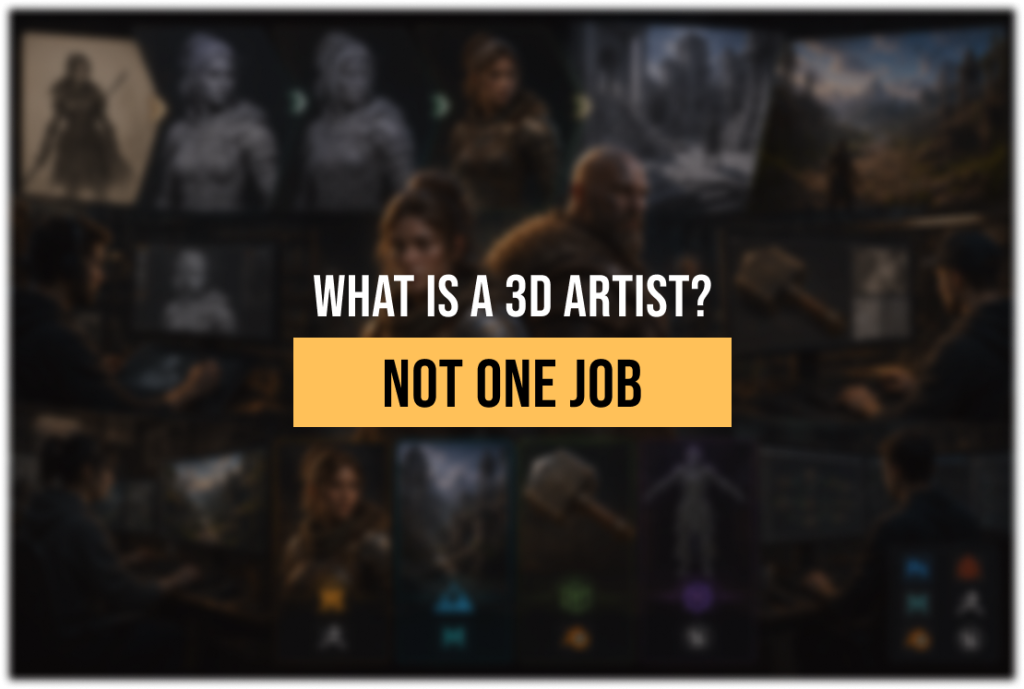
What is a 3D artist? On a job board it looks like one role, but on a real production it’s an umbrella over several specialists who rarely do each other’s work — and for an art director, treating them as interchangeable is one of the fastest ways to watch a visual target fall apart. The person who sculpts a hero character is usually not the person who builds a modular environment kit, who is usually not the person who writes the shaders that make any of it run. Understanding that distinction is the difference between staffing a pipeline and assembling a pile of mismatched assets.
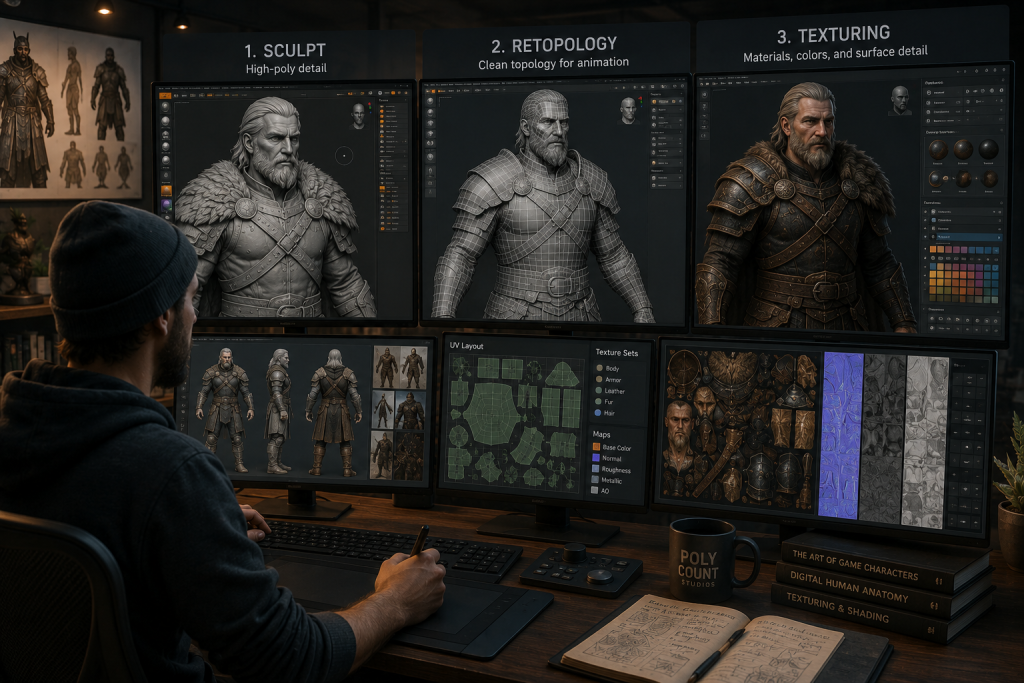
“Editorial illustration created for visual reference purposes. It does not represent a real project, client work, or official software screenshot unless stated otherwise.”
A 3D artist creates the three-dimensional models, textures, and surfaces that fill a game — characters, environments, props, and almost everything a player sees in the world. But “a 3D artist” is really a category covering several specialized roles, each owning a different stage of a production pipeline that turns a flat concept into an optimized, game-ready asset.
Why “a 3D artist” is not one job
The single most useful thing to understand about 3D artists is that the title describes a discipline, not a job. At a hobbyist level, one generalist can take a model from concept to engine. At mid-core or AAA scale, that same scope is split across specialists, because the skill ceiling in each stage is high enough that mastery in one rarely transfers cleanly to another. A brilliant character sculptor and a brilliant hard-surface vehicle modeler are both “3D artists,” and putting either one on the other’s work usually produces competent mush instead of a hero asset.
For an art director, the cost of getting this wrong lands on two surfaces. The first is the visual target: a generalist stretched across roles produces assets that each look fine in isolation but drift apart as a set — the lookdev never locks, because no single specialist owned the bar for characters, or for environments, or for the material language that holds them together. The second is production throughput: when you scope “a 3D artist” without naming the specialization, you discover the mismatch mid-project, when a character artist is three weeks into vehicles and the silhouette still isn’t reading. Depending on complexity, a production asset can take anywhere from a few days to several weeks — longer for hero-quality work — so a mis-assigned role isn’t a small slip, it’s weeks of finished-looking work that has to be redone by the right specialist. The fix is upstream: know which roles your game actually needs before you brief anyone.
The core specializations
Most 3D art roles cluster into four specializations, and a serious production usually staffs them as distinct seats rather than one flexible body.
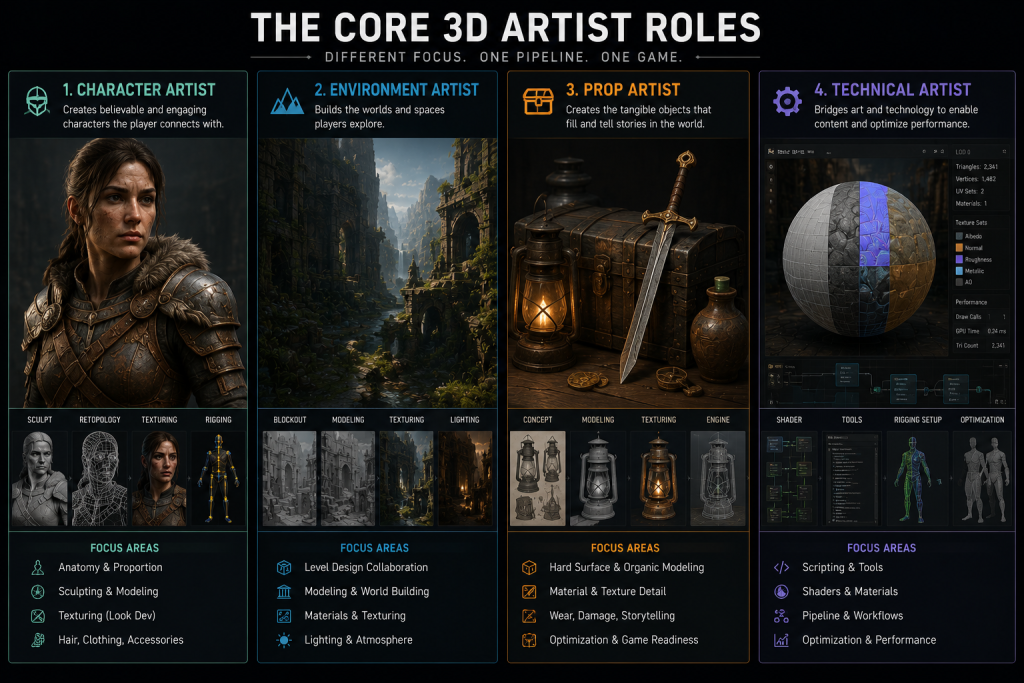
“Editorial illustration created for visual reference purposes. It does not represent a real project, client work, or official software screenshot unless stated otherwise.”
The character artist owns the figures players bond with — anatomy, clothing systems, facial detail, and the polish that turns a model into a hero asset. This is the role where art-direction continuity matters most, because a character carries the game’s identity, which is why studios treat character art as a specialization in its own right rather than a generic modeling task.
The environment artist builds the world: terrain, architecture, modular kits, and the set dressing that makes a space feel lived-in. Their craft starts with rough geometry blockouts to establish scale and composition before any detailed asset exists, and their challenge is consistency at volume — which is what makes environment art production a different muscle from character work. An environment artist thinks in reusable kits and sightlines; a character artist thinks in silhouette and surface.
The prop artist produces the high-volume objects that populate the world — weapons, furniture, containers, the hundreds of items that fill a level. The discipline here is throughput with consistency: every asset has to match the established style and hit the polygon budget, which is why prop art production is its own role and not a junior afterthought. Props are where a style guide either holds or quietly falls apart across a thousand small decisions.
The technical artist is the one most people forget — and I’ll come back to why that’s a mistake. They bridge art and programming: authoring shaders, building pipeline tools, solving the engine-side problems that artists hit, and keeping the whole production moving. They don’t make the hero asset; they make sure the hero asset runs.
Hard-surface versus organic: two different kinds of artist
Cutting across those roles is a deeper split that explains a lot of mis-hires: hard-surface versus organic modeling. Hard-surface work — weapons, vehicles, buildings, machinery — demands precision, clean geometry, and crisp mechanical edges. Organic work — characters, creatures, plants — is about natural shapes, anatomy, and flowing form. They use overlapping tools but reward almost opposite instincts, and most senior 3D artists lean hard into one.
This matters for an art director because asset type maps onto the split. A tactical shooter heavy on weapons and vehicles needs hard-surface specialists; a creature-driven RPG needs organic sculptors. Briefing the wrong brain at the work is the quiet reason a portfolio that looked stunning produces underwhelming results — the artist was excellent, just at the other discipline.
Did you know that…?
A high-poly sculpt can run into the tens of millions of polygons, while the version that actually ships in the game might be a few thousand. A huge part of a 3D artist’s craft is throwing away 99% of the geometry while keeping the look of it — which is exactly the trick the pipeline below exists to perform.
The 3D production pipeline, stage by stage
Roles make sense once you see the pipeline they’re arranged around. A single game asset moves through a sequence that isn’t arbitrary — each stage prepares the asset for the next, and skipping one creates problems downstream.
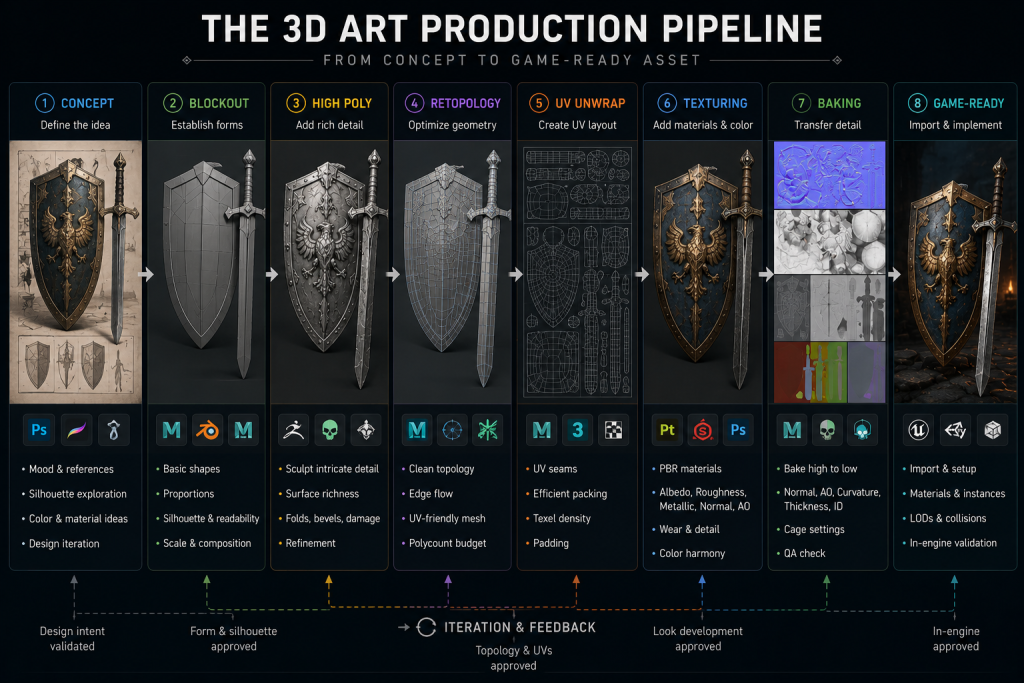
“Editorial illustration created for visual reference purposes. It does not represent a real project, client work, or official software screenshot unless stated otherwise.”

- Concept — a 2D design establishes shape, silhouette, materials, and style direction. Reference is everything here.
- Blockout — rough geometry sets proportion and scale before detail exists, so mistakes are cheap to fix.
- High-poly sculpt — the artist adds all the fine detail (pores, scratches, wear), often in ZBrush, ignoring polygon count entirely.
- Retopology — the heavy sculpt is rebuilt as a clean, low-poly mesh with quads arranged in loops around areas that deform.
- UV unwrapping — the 3D surface is flattened into 2D space so textures can be applied accurately.
- Baking — the high-poly detail is transferred onto the low-poly mesh as texture maps.
- Texturing — PBR materials (albedo, roughness, metallic, normal) give the surface its real look, usually in Substance Painter or Designer.
- Rigging and skinning — a skeleton and controls are added so the model can move and deform naturally.
- LOD and optimization — multiple versions are made for different viewing distances.
- Engine integration — the asset is imported, set up, and tested in Unreal or Unity.
Two stages do the heavy lifting and are worth understanding. Retopology is where the messy sculpt becomes usable: clean topology — quads in loops, with hard edges aligned to UV seams — is what lets a model deform without shading errors, a point experienced artists on Polycount raise often because bad edges commonly produce baking artifacts.
Baking is the magic that makes the trick from the fun fact work. As Marmoset’s documentation describes it, the detail of the high-poly mesh is projected — ray-traced — onto the low-poly mesh, which is precisely why the low-poly needs clean UVs and a triangulated mesh first.
For a deeper walk through this sequence for characters specifically, we broke it down in our guide to the 3D character pipeline in UE5.
| Pipeline stage | What it produces | Owned by | Red flag if skipped or rushed |
| Concept → blockout | Shape, scale, style direction | Concept + modeler | Proportions wrong; expensive to fix later |
| High-poly sculpt | Fine surface detail | Sculptor | Detail that can’t be carried to game-ready |
| Retopology + UV | Clean, deformable low-poly | Modeler / tech-aware artist | Shading errors, broken deformation |
| Baking + texturing | Game-ready look | Texture artist | Baking artifacts (seams, normal bleeding), flat or off-target materials |
| Rig + LOD + engine | Working in-engine asset | Tech artist | Asset that looks fine, runs badly |
If a “finished” asset is throwing red flags in the bottom two rows — beautiful in a render, broken in engine — that’s the tell that someone treated game art like general 3D. Which brings up the thing most people miss about the whole discipline.
What “game-ready” actually means — and why it’s the whole job
Here is the distinction I’d put at the center of any answer to “what is a 3D artist”: the job is not making something that looks good. It’s making something that looks good and runs in real time at the quality bar. A film-grade sculpt that tanks the frame rate is not a game asset; it’s a pretty object that failed the only test that matters.
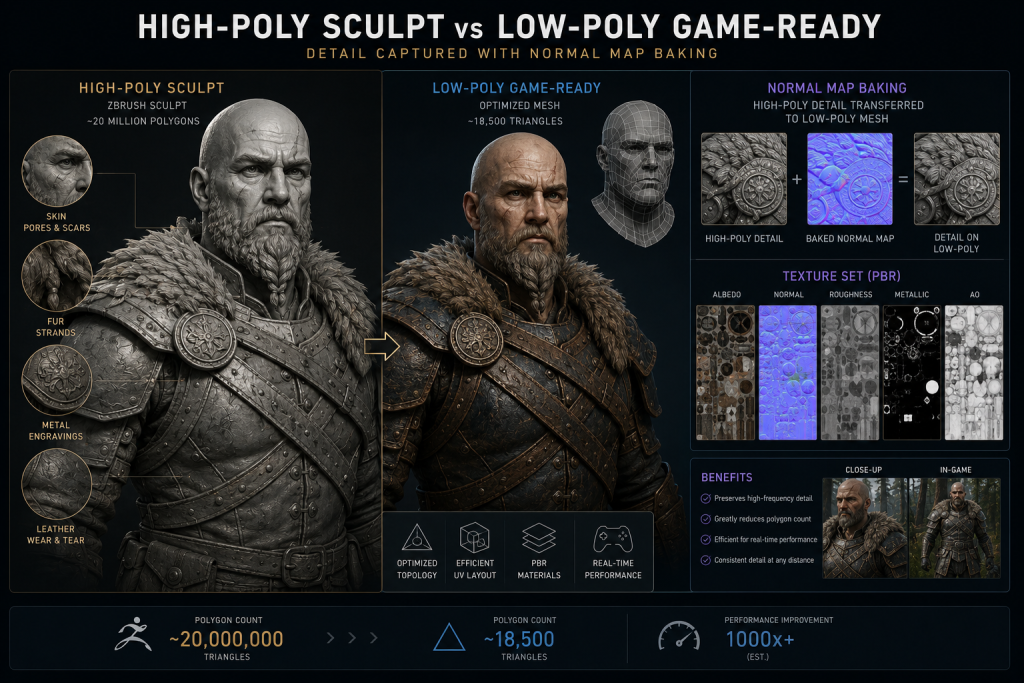
“Editorial illustration created for visual reference purposes. It does not represent a real project, client work, or official software screenshot unless stated otherwise.”
That’s why retopology, baking, and optimization aren’t tedious afterthoughts — they are the craft that separates a game artist from a general 3D artist. The entire pipeline exists to hold detail and performance in the same asset: capture everything in the high-poly, then carry the look of it onto a lightweight mesh the engine can afford. Real-time tools have shifted where that line sits — features like Nanite in UE5 change how much geometry an engine can swallow on static meshes — but the principle holds completely: you still need clean topology for rigging, deformation, and texture baking, and a raw multi-million-poly sculpt can’t be UV’d or textured at all. Nanite isn’t a license to ship unoptimized chaos; a game-ready asset is still a negotiation between fidelity and budget, and a good 3D artist is fluent in both sides.
For an art director, this is also where the visual target is won or lost. Lookdev — locking the material language, the silhouette readability, the PBR consistency across a set — has to be set early and held through every asset, or the game ships looking like several games stitched together. The specialist roles exist precisely so that someone owns that bar at each stage. Game-ready isn’t a final checkbox; it’s the assumption the whole pipeline is built to satisfy.
The technical artist: the role everyone forgets
When a studio lists “3D artists” and forgets the technical artist, the pipeline works right up until it doesn’t. The technical artist is the bridge between art and programming — they author the shaders that make materials read correctly, build the tools that keep modelers from doing repetitive work by hand, support rigging and deformation pipelines, and solve the engine-side problems that would otherwise stall the art team.
At AAA scale, even this role fragments — the same specialization principle applied one level down. A character TA (or technical animator) lives in rigging, skinning, and cloth and hair simulation; an environment or VFX TA lives in procedural generation (often Houdini), shading, destruction, and optimization. One person rarely does both well. The common thread is the same: they’re the bridge between code and art, not a second pile of modelers.
The reason they get forgotten is that their work is invisible when it’s good. Nobody points at a smooth pipeline and says “great tech art,” the way they point at a hero character. But remove the technical artist and the symptoms appear everywhere at once: assets that won’t import cleanly, shaders that look different in engine than in the texturing tool, rigs that deform badly, a team burning hours on manual fixes. On a serious production, the technical artist is what turns a group of talented modelers into a pipeline that actually delivers.
How we approach 3D production at Nasty Rodent
The thread through everything above is that “a 3D artist” is the wrong unit to think in — a game needs the right specialists arranged around a pipeline, with someone owning the visual target at each stage. That gap, between hiring a title and staffing a pipeline, is where a lot of productions quietly lose their lookdev and their schedule. At Nasty Rodent, we work the other way around: we map the roles a project actually needs — character, environment, prop, and the technical art that holds it together — to the asset types and the engine, so the visual target is set early and carried through to game-ready delivery rather than discovered at review. Across mid-core and AAA work, that specialization-first approach is what keeps a set of assets reading as one game. You can see the kind of character art production that anchors that approach across our work.
3D artist roles compared at a glance
| Role | Owns | Thinks in | Typical tools |
| Character artist | Heroes, creatures, anatomy | Silhouette, surface, polish | ZBrush, Maya, Substance Painter |
| Environment artist | Worlds, kits, set dressing | Scale, reuse, composition | Blender/Maya, Substance Designer |
| Prop artist | High-volume objects | Throughput, consistency, budget | Maya/Blender, Substance Painter |
| Technical artist | Shaders, rigs/sim, tools, pipeline (split by domain at scale) | Performance, automation, integration | Engine tools, scripting, Houdini |
How to think about staffing 3D art
The honest answer to “what is a 3D artist” is that it’s the wrong question for planning a production. The right question is which 3D artists — which specializations, arranged around which stages of the pipeline, with someone owning the visual target throughout. Get that mapping right and the assets read as one game; get it wrong and you find out at review, when the fixes are most expensive.
If you’re scoping 3D work and want a senior read before you commit, we can set up a short call with our art lead — thirty minutes to look at your asset list, flag where you’ll need hard-surface versus organic specialists, where the technical-art gaps are, and what a game-ready handoff would actually include. No budget and no commitment; bring your reference and a rough asset breakdown, and we’ll give you a concrete read on the roles your project needs.