ZBrush vs Blender for Sculpting: Workflow Decision for AAA
-

Written byDenys Zadoienyi
-

Updated on13.07.2026
-

Time to read12 min

- The Real Question: Discipline, Not Software Preference
- ZBrush vs Blender for Sculpting: Technical Capability Compared
- A Common Hybrid Workflow: Blender Blockout, ZBrush Sculpt, Retopology Handoff
- Cost of Ownership: What the Subscription Actually Means for a Team
- Where Teams Get Stuck: Sculpt Layers, Polycount Ceiling, and Viewport Feel
- Best Sculpting Software for Game Art: It Depends on the Asset Class
- From Concept to Sculpt: Where the Pipeline Actually Starts
- After the Sculpt: The Retopology Handoff
- A Decision Framework for Art Directors
- About Nasty Rodent
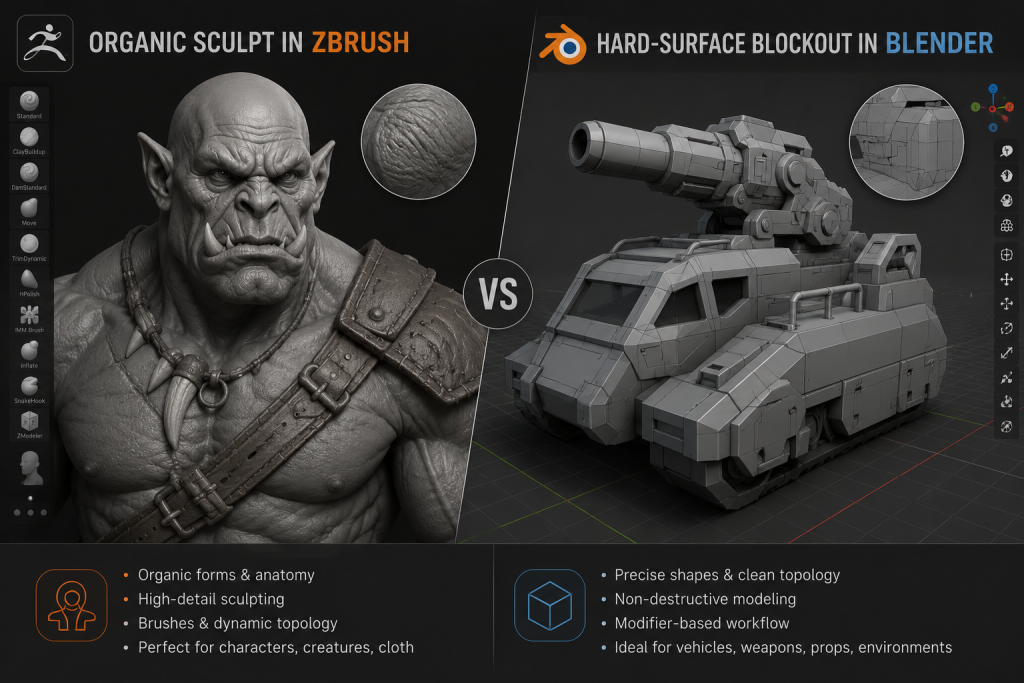
ZBrush vs Blender for sculpting is rarely the clean either/or it gets framed as in beginner tutorials. On a mid-core or AAA production, the tool isn’t chosen once for the whole studio – it’s chosen per asset class, per pipeline stage, and increasingly per artist working inside the same review gate. The question an art director actually needs answered isn’t “which sculpting app is better.” It’s “which stage of my pipeline needs which tool, and can my team move between them without losing a day to file conversion and mesh cleanup.”
“Editorial illustration created for visual reference purposes. It does not represent a real project, client work, or official software screenshot unless stated otherwise.”
That reframing matters, because most comparisons treat this as a hobbyist’s software-shopping decision, framing Blender sculpting vs ZBrush as a matter of personal taste. In an AAA sculpting pipeline the stakes are different: picking the wrong default doesn’t just cost personal frustration, it costs review cycles on a milestone that’s already booked.
The Real Question: Discipline, Not Software Preference
Sculpting lives inside the organic half of production – the half built around forms that deform: characters, creatures, cloth, foliage. Where the split between hard surface and organic modeling decides which artist and which review gate an asset gets in the first place, the ZBrush-versus-Blender question sits one level deeper: it decides which tool that organic specialist reaches for once the asset has already been classified as a sculpt job.
That’s also why “best sculpting software for game art” doesn’t resolve to a single answer. A creature artist pushing a very dense, high-resolution organic sculpt has a different tool priority than a props artist adding chipped paint and dents to an asset that’s 90% Boolean geometry and 10% sculpted wear. The software question only makes sense once you know which artist, on which asset, at which stage of the batch.
ZBrush vs Blender for Sculpting: Technical Capability Compared
“Editorial illustration created for visual reference purposes. It does not represent a real project, client work, or official software screenshot unless stated otherwise.”
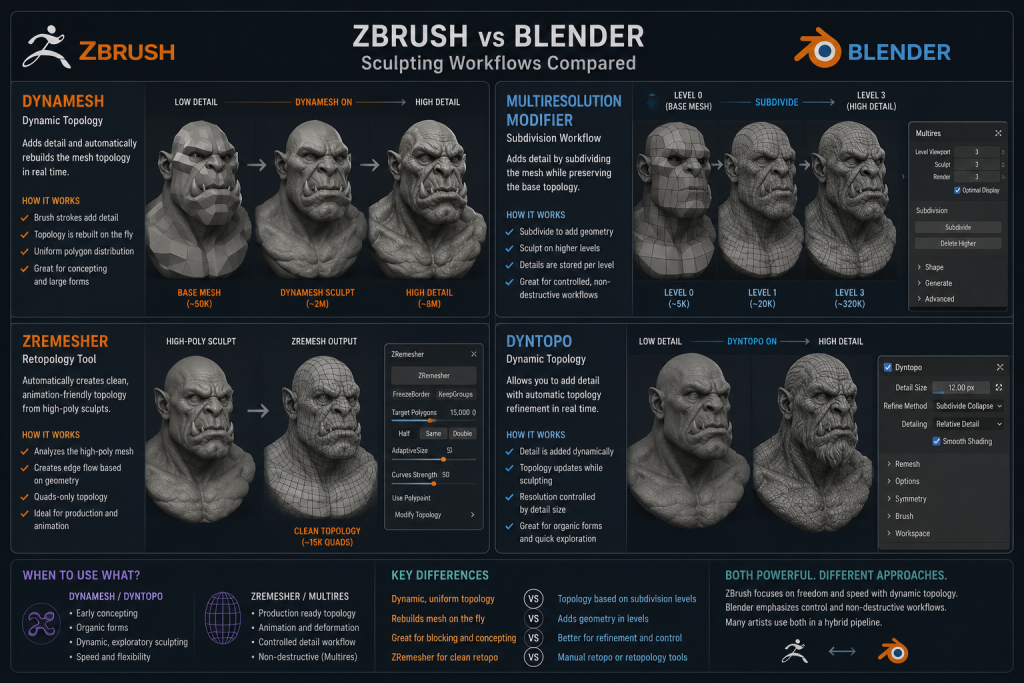
Both tools sculpt. What differs is how they handle density, non-destructive iteration, and the specific features a character pipeline leans on daily.
| Capability | ZBrush | Blender |
| Dense-mesh handling | Millions of polygons through subdivision levels, DynaMesh, and Sculptris Pro, with dense organic detail as the core design priority | Multiresolution modifier and Dyntopo handle serious sculpting work, but very dense organic sculpts tend to expose viewport and workflow limits earlier than ZBrush on comparable production hardware |
| Non-destructive base meshes | DynaMesh (voxel remesh on demand), ZRemesher (auto quad retopology), Sculptris Pro (dynamic tessellation) | Multires modifier (level-based, non-destructive on lower levels), Voxel Remesher (quick manifold rebuild via Ctrl-R in Sculpt Mode), Dyntopo (destructive, no going back down) |
| Sculpt layers | Native, stacked, non-destructive – core to iterative character work | No direct equivalent to ZBrush’s layer stack as a core sculpting feature; artists often approximate it with duplicate meshes, shape keys, modifiers, or staged file versions |
| Camera / viewport | Proprietary perspective system, occasionally described by artists as visually inconsistent at extreme close range | True 3D perspective camera, real-time Eevee preview while sculpting |
| Bridge to other DCCs | GoZ – native round-trip to Maya, 3ds Max, and Cinema 4D; Blender interchange runs through the community-maintained GoB add-on rather than native GoZ, and a separate Substance Bridge (added in 2026) links to Substance Painter | Native import/export; relies on GoB for ZBrush interchange, or standard FBX/OBJ round-trips otherwise |
| License model | Subscription only since December 2023; perpetual licenses discontinued | Free, open-source (GPL) |
In practice, the gap that actually shows up in production review isn’t a checklist item – it’s what happens at hour six of a hero character sculpt, when subtool count climbs, sculpt layers need isolating, and the mesh is deep into iteration. That’s the point where ZBrush’s layer stack and dense-mesh handling earn their reputation, and where Blender artists tell you they start planning around workarounds rather than sculpting freely.
A Common Hybrid Workflow: Blender Blockout, ZBrush Sculpt, Retopology Handoff
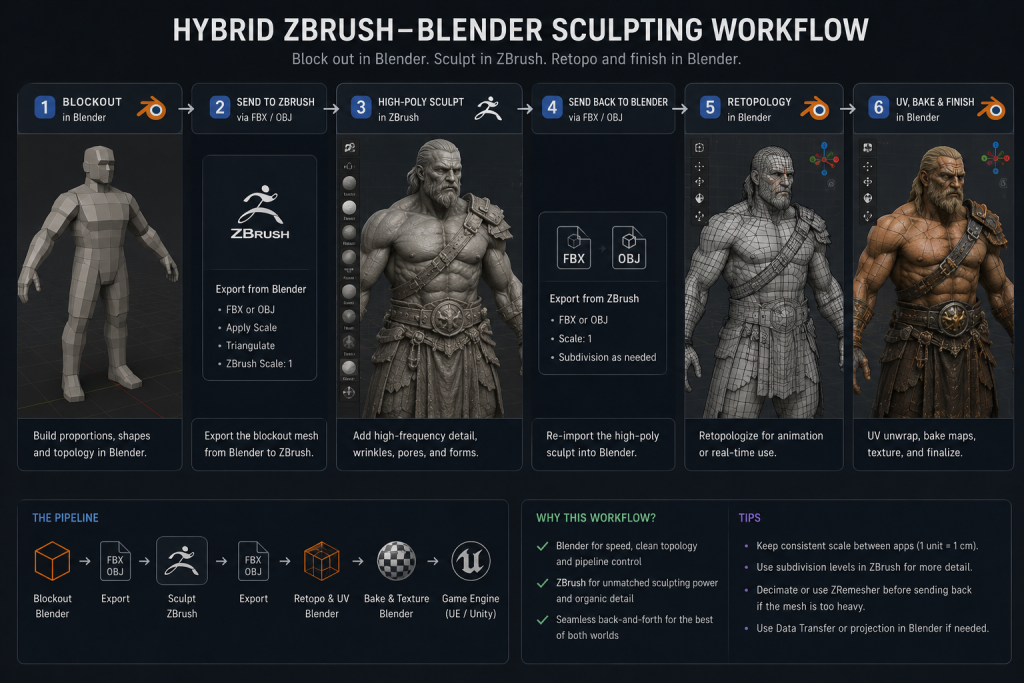
A realistic zbrush vs blender sculpting workflow rarely stays inside one application from start to finish. This pattern appears frequently across production breakdowns and artist workflow write-ups, even if no single source can claim it as universal studio policy: block out proportions and hard-surface elements in Blender, where the real perspective camera and modifier stack make early-stage decisions faster, then bring the asset into ZBrush through a ZBrush-Blender bridge for the organic detail pass – skin, cloth folds, creature anatomy – where dense sculpting and layers matter most. Independent artist breakdowns of game-ready props built this way – including a documented ZBrush-and-Blender asset walkthrough on 80.lv – consistently name the same small toolset behind it: ZBrush for the sculpt, Substance Painter for texturing, and a game engine for final assembly, with Blender’s role limited to early shape exploration before the detail pass takes over. That combination shows up often enough across separate write-ups to count as a recurring pattern worth planning around, even without a formal cross-studio survey to confirm how widespread it is.
“Editorial illustration created for visual reference purposes. It does not represent a real project, client work, or official software screenshot unless stated otherwise.”
What makes this workflow viable rather than a chore is a dedicated bridge between the two applications. ZBrush’s native GoZ round-trip covers Maya, 3ds Max, and Cinema 4D out of the box; the ZBrush-to-Blender leg of a hybrid pipeline typically runs through GoB, a community-maintained add-on that mimics GoZ-style interchange, or a manual FBX/OBJ round-trip on teams that don’t want a third-party add-on in the toolchain. Neither path is lossless in every direction – UV data generated in ZBrush’s UV Master and intermediate subdivision levels don’t always survive the round trip, so a pipeline that leans on this handoff still needs a UV and subdivision strategy agreed on in advance, not assumed. Without some form of bridge, hybrid workflows fall apart fast – the friction of manual export/import at every iteration outweighs whatever tool advantage either app offers.
Cost of Ownership: What the Subscription Actually Means for a Team
ZBrush is now sold primarily through subscription plans under Maxon, with perpetual licenses discontinued in December 2023; Blender remains free and open-source under the GPL, with no license fee at any team size. For a single artist, that can look like a simple license comparison. At team scale, the real question is total cost of ownership rather than the monthly fee itself.
Run the math at team scale and the gap stops being abstract. A handful of character artists on annual ZBrush licenses adds up to a real, recurring line item a producer has to justify against the project’s tooling budget – not a one-time purchase decision an art director makes in isolation. That’s worth flagging even in an art-director-focused comparison, because the tool standardization conversation on a growing team usually ends up in the same room as the budget conversation.
What the license line doesn’t capture is total cost of ownership. A studio standardizing on Blender for sculpting saves that line item but often pays it back in onboarding time if senior hires were trained on ZBrush and now need to relearn muscle memory, or in missing sculpt-layer workflows that have to be rebuilt with duplicate objects and modifiers. Neither tool is “free” once training time and workflow gaps are priced in – the subscription fee is just the most visible part of the number.
Where Teams Get Stuck: Sculpt Layers, Polycount Ceiling, and Viewport Feel
The three friction points that come up repeatedly when artists describe switching tools aren’t feature-list gaps – they’re workflow habits that don’t transfer.

Sculpt layers are the biggest one. ZBrush artists build characters as a stack of non-destructive passes – base forms, then wrinkles, then damage – and can dial any layer up or down independently at review time. A long-running Polycount thread on switching between the two tools reaches a consistent conclusion: Blender’s sculpting toolset has genuinely improved, but the missing layer and polygroup system, combined with a real gap in how much polycount each application can comfortably handle, is what keeps experienced character artists from making a full switch away from ZBrush. That kind of first-hand account, from artists who actually attempted the migration rather than theorized about it, tends to be more reliable than a feature checklist.
The second friction point is the polycount ceiling. Blender’s viewport starts to strain well before ZBrush’s does on the same hardware, which changes how far an artist can push detail before they have to decimate and lose the ability to go back up in resolution. The third is the camera itself – ZBrush’s non-standard perspective system versus Blender’s true 3D camera, which affects how naturally an artist reads proportions mid-sculpt, especially on foreshortened views.
None of these are reasons to rule a tool out. They’re reasons to know, before a production batch starts, which friction point your team will hit first – and to plan the review cadence around it rather than discover it mid-milestone.
Best Sculpting Software for Game Art: It Depends on the Asset Class
The honest answer to “best sculpting software for game art” splits by what’s being sculpted, not by studio preference. Hero character and creature work – the deepest end of organic sculpting – is where ZBrush’s dense-mesh handling and sculpt layers earn their subscription cost most clearly, and it remains a common standard in many professional character pipelines, especially where dense organic sculpting and layer-based review sit at the center of the asset. This is also where “zbrush vs blender for game characters” stops being an abstract comparison and becomes a per-hire staffing decision: a character artist trained primarily on one tool will default to it under deadline pressure, regardless of what the studio’s tool policy says on paper.
Environment sculpting sits in a different part of the spectrum. Rock formations, terrain detail, and organic set dressing don’t usually need the layer depth a hero character does, and a 3D environment pipeline that’s already built around Blender for blockout and modifier-based iteration can often keep environment sculpting inside the same application without a hard cutover to ZBrush – the detail ceiling on rocks and foliage rarely hits the point where Blender’s Multires modifier becomes the bottleneck.
That split is exactly why a studio’s answer to “which tool” should follow the asset brief, not a blanket policy. Standardizing every artist on one app regardless of asset class either overpays for ZBrush seats that spend most of their time on light detail work, or forces character artists into workarounds a proper layer system would have solved in minutes.
From Concept to Sculpt: Where the Pipeline Actually Starts
Neither tool answers the question of what to sculpt – that’s decided upstream. A production-ready concept art package with clear silhouette, proportion, and material callouts is what turns a sculpting session into execution rather than design-by-clay. Sculptors working from a vague or incomplete concept spend the early hours of a sculpt making art-direction decisions that should have been locked before the file was ever opened in ZBrush or Blender – and that time shows up in the schedule as “sculpting,” when it’s really unresolved concept work wearing a sculpting hat.
After the Sculpt: The Retopology Handoff
A finished high-poly sculpt, whichever tool produced it, isn’t a deliverable on its own – it’s the input to the next stage. The mesh has to be rebuilt with clean, animation-ready topology before it’s usable in an engine, a process covered in detail in our guide to retopology in 3D modeling. This is where the tool choice at the sculpting stage quietly resurfaces: ZBrush’s ZRemesher can generate a workable auto-retopo base directly inside the same application the sculpt was built in, while a Blender-only pipeline typically routes into Maya Quad Draw or a dedicated tool for the manual pass a hero character needs. Neither path is wrong, but it’s worth deciding at the brief stage rather than discovering the handoff friction after the sculpt is already signed off.
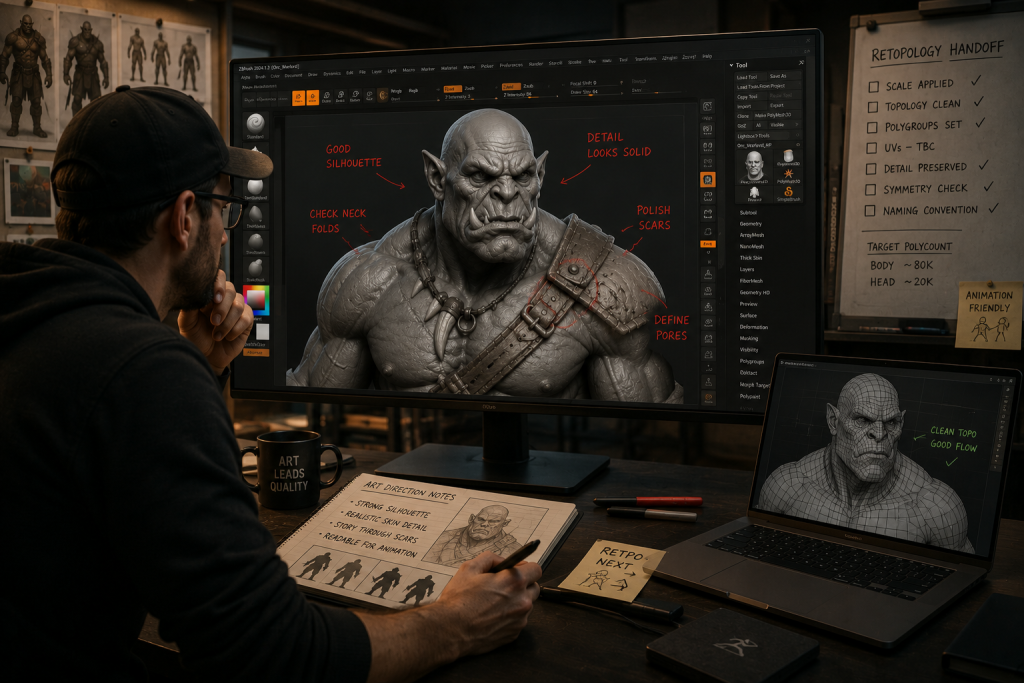
“Editorial illustration created for visual reference purposes. It does not represent a real project, client work, or official software screenshot unless stated otherwise.”
A Decision Framework for Art Directors
Run these four questions before setting a tool standard for a batch, rather than defaulting to whatever the last hire used:
- What’s the asset class? Hero characters and creatures lean ZBrush; static environment detail and props can often stay in Blender without a quality cost.
- What’s the team’s existing muscle memory? A team of ex-AAA character artists already fluent in sculpt layers will fight a Blender-only mandate longer than the license savings are worth.
- Does the pipeline need a ZBrush-to-Blender bridge? If Maya or Cinema 4D sit downstream, native GoZ removes friction. If Blender does, that friction is removed by GoB instead – plan for a community add-on in the toolchain rather than assuming native support.
- What’s the actual review bottleneck? If sculpt iteration speed at high density is what’s slipping milestones, that’s a ZBrush-shaped problem. If it’s onboarding cost and licensing spend on a growing team, that’s a Blender-shaped one.
None of these questions have a universal answer – that’s the point. The framework exists so the decision gets made deliberately, once, per asset class, instead of being re-litigated informally every time a new hire brings a preference with them.
About Nasty Rodent
Nasty Rodent is a mid-core and AAA game art outsourcing studio built around production-ready 3D pipelines – from concept through sculpt, retopology, and engine-ready delivery. Our 3D character production runs both ZBrush and Blender depending on the asset brief, standardized by asset class rather than by blanket studio policy, so a hero creature and a background NPC each get the workflow their review gate actually needs.
If your next batch mixes hero characters with environment-scale organic detail and you’re not sure where the tool line should sit, send us the asset list – we’ll map it to a sculpting workflow with review gates included, not just a software recommendation.