Hire an Unreal Engine Developer: A Technical Vetting Process for AAA
-

Written byDenys Zadoienyi
-

Updated on17.08.2026
-

Time to read23 min

- Why a Portfolio Review Isn’t a Technical Vetting Process
- The Nanite Questions That Separate Shipped Experience from Tutorial Experience
- World Partition and the Question Most Interviewers Skip
- Reading a Portfolio Without Getting Fooled by Beauty Shots
- The Lumen Questions That Actually Test Production Experience
- 5 Technical Checks Before You Sign
- The One-Scene Diagnostic That Tells You More Than Any Portfolio
- Vetting It Yourself: What In-House Screening Actually Takes
- What a Bad Vetting Call Actually Costs
- If You’re Hiring Specifically for Environment Art, Not a Generalist
- Quick Self-Test: Are You Ready to Vet a UE5 Developer Yourself?
- Did you know?
- In-House Screening vs. Generic Staffing vs. Structured Technical Vetting
- How to Get This Right on the First Hire, Not the Second
A resume that lists Nanite, Lumen, and World Partition tells you almost nothing. Reading about a system and shipping with it under a real performance budget are two different skill levels, and a standard interview rarely tells them apart – it checks whether the candidate knows the vocabulary, not whether they’ve hit the walls that only show up in production.
A scope note before anything else: this guide covers technical vetting for UE5’s rendering and world-building systems – the ground where art direction, technical art, and engine-level production discipline meet. If what you actually need to test is C++ architecture, gameplay networking, or the Gameplay Ability System, that’s a related but different interview, and this checklist won’t cover it end to end. What follows is built for the person or team who’ll own Nanite-ready geometry, Lumen-lit scenes, and World Partition content organization on your production – whether that’s an in-house Unreal Engine developer, a technical artist, or an external UE5 partner.
That gap – between “worked with UE5” and “shipped production-grade UE5 work” on exactly those systems – is what a real technical vetting process is built to close. It’s not a resume screen. It’s not a portfolio scroll. It’s a specific set of questions about Nanite, Lumen, and World Partition, plus a method for reading a portfolio that doesn’t fall for a good screenshot.
UE5 technical vetting means testing a candidate’s or team’s real production experience with Unreal Engine 5’s rendering and streaming systems – Nanite virtualized geometry, Lumen global illumination, and World Partition – through specific technical questions and portfolio verification, rather than relying on a general resume review or a single art test.
“Editorial illustration created for visual reference purposes. It does not represent a real project, client work, or official software screenshot unless stated otherwise.”
Written by the technical art and production team at Nasty Rodent – we run UE5 art pipelines for mid-core and AAA titles, including Squad and Starship Troopers: Extermination, and we sit on both sides of this vetting process more often than we’d like.
Why a Portfolio Review Isn’t a Technical Vetting Process
A portfolio is a curated selection – a handful of pieces someone chose specifically because they hold up under a quick look. That’s not a flaw in the format; it’s what portfolios are for. The problem is that most hiring processes stop there, and the gap between a curated screenshot and a production-ready UE5 asset is exactly where things go wrong.
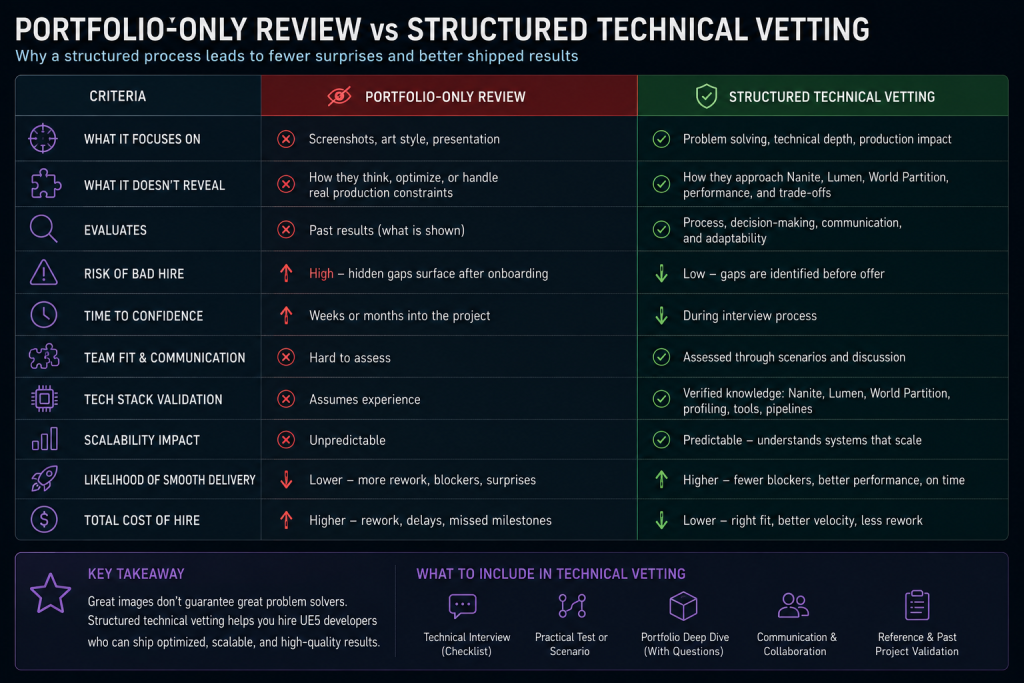
“Editorial illustration created for visual reference purposes. It does not represent a real project, client work, or official software screenshot unless stated otherwise.”
Unreal Engine isn’t a niche skill you can afford to under-vet, either – GDC’s 2026 State of the Game Industry survey found Unreal Engine is now the primary engine for 42% of surveyed developers, ahead of Unity at 30% – and adoption is higher still at AA (59%) and AAA (47%) studios specifically, exactly the tier this guide is written for. That kind of broad adoption also makes surface-level familiarity more common: an engine name on a resume tells you almost nothing about depth, precisely because so many people have touched UE5 at some level.
If you’re an outsource decision-maker building a vendor pool, or a producer trying to close a capacity gap before a milestone gate, the risk isn’t that the candidate can’t model or light a scene. It’s that their UE5 pipeline experience is shallower than it looks – one demo reel built around a tutorial project, not a shipped title with real performance budgets and real review cycles.
In our own experience running UE5 art pipelines, this pattern repeats: when a candidate’s real Nanite or Lumen depth turns out to be thinner than the interview suggested, it doesn’t show up as “the work is bad” on day one. It shows up as a first-pass approval rate on milestone one that’s noticeably below what the same team hits on a properly vetted hire, extra rework weeks that weren’t in the schedule, and a vendor scorecard that’s already under pressure before the relationship has a chance to prove itself. For a producer, that’s a capacity-planning problem – the gate review slips. For an outsource manager, it’s a vendor onboarding cycle that starts in the red instead of on schedule. (These are patterns we’ve observed across our own engagements, not a published industry benchmark – your mileage will depend on team, scope, and how the vetting was actually run.)
None of that shows up in a portfolio. It only shows up in specific technical questions – which is what the rest of this guide covers. If you already know you need ongoing UE5 production capacity rather than a one-off hire, our UE5 production services page covers how a vetted team gets structured around a milestone schedule instead of a single contract.
The Nanite Questions That Separate Shipped Experience from Tutorial Experience
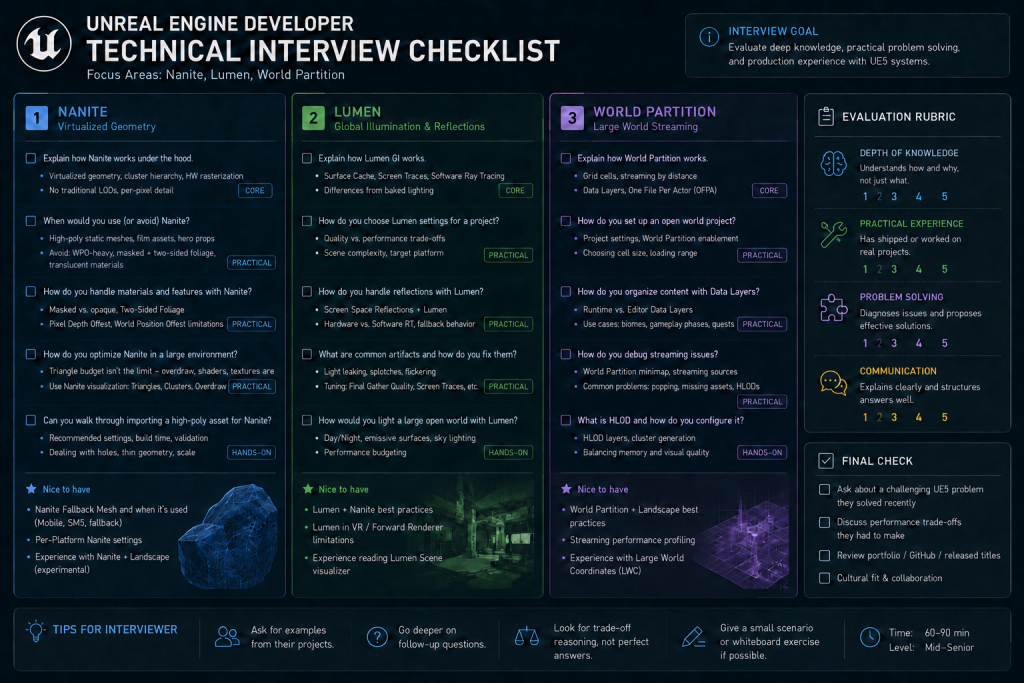
Nanite is Unreal Engine’s virtualized geometry system – Epic’s own documentation describes it as a way to render pixel-scale detail from very high object counts by streaming only what’s actually visible on screen, using an internal mesh format instead of manually authored LODs. That’s the pitch every candidate can recite. The vetting question is whether they’ve hit the parts of Nanite that don’t show up in the marketing copy.
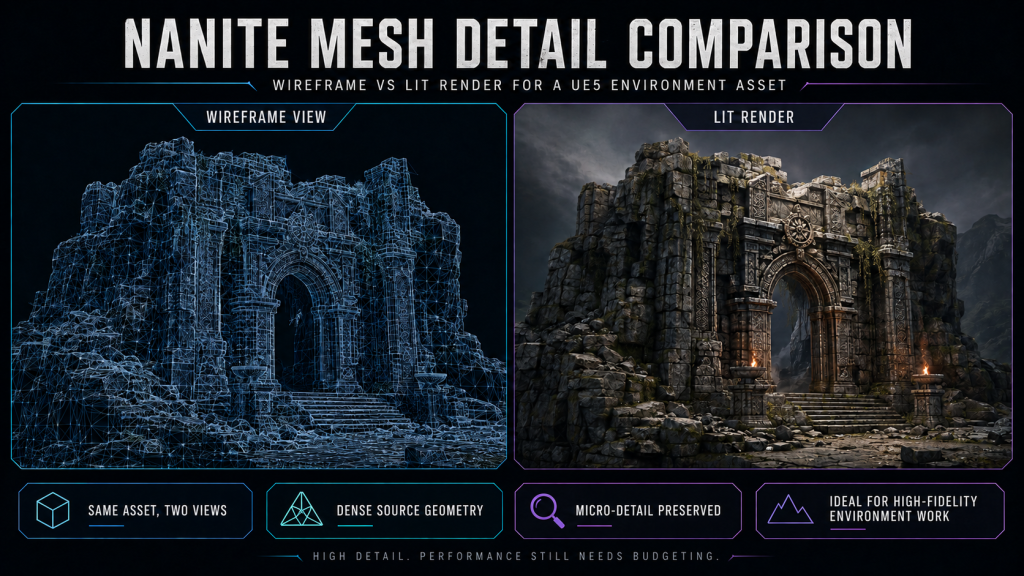
“Editorial illustration created for visual reference purposes. It does not represent a real project, client work, or official software screenshot unless stated otherwise.”
Ask this instead of “are you familiar with Nanite”: “Walk me through a mesh you had to pull out of Nanite, and why – and which engine version was that on?” The version qualifier matters: Nanite support has expanded materially across recent UE5 releases, including newer skeletal-mesh workflows that didn’t exist earlier in UE5’s life – so a correct answer today can look different from a correct answer given eighteen months ago, and a good candidate ties their answer to a specific version rather than talking about Nanite as one fixed thing. What hasn’t changed across versions is that Nanite only supports Opaque and Masked material blend modes; translucent materials still fall back to a default material with a warning. Masked materials work, but they’re expensive – heavy alpha-masked foliage can cost more with Nanite than without, because of overdraw. A candidate who’s shipped with it describes a specific material or platform constraint they hit and the workaround, tied to a version. Someone who’s only read the documentation describes Nanite in the abstract and struggles the moment you ask which version, or what changed.
If your own team needs the fundamentals first before running this interview, our explainer on what Nanite actually does under the hood is a faster primer than Epic’s full documentation set.
A second question worth asking: “How did you manage Nanite streaming budget on a real level, not a single hero asset?” Nanite’s data format is genuinely compressed – quantized, streamed in at the detail level the camera actually needs – and Epic’s own numbers put it well below traditional geometry at equivalent visual fidelity. That efficiency doesn’t remove the need for asset-size discipline: import complexity, fallback mesh settings, and how many high-density assets are in view at once still drive the streaming pool. Candidates who’ve only built single showcase pieces rarely know this distinction exists, because one hero asset never stresses a streaming budget the way a full level does. Someone who’s shipped a real environment kit has a story about a memory or streaming-pool conversation that happened because of it.
If a candidate answers both of these with specifics – not general Nanite marketing language, but actual constraints and actual workarounds – that’s a strong signal. If they answer with confidence but no specificity, that’s the first red flag.
World Partition and the Question Most Interviewers Skip
World Partition changed how large UE5 worlds get built – instead of manually splitting a level into sublevels, it stores the world as a single persistent level cut into grid cells that stream in and out automatically based on distance from a streaming source. Most interviewers stop at “have you used World Partition” and accept a yes. That question alone tells you almost nothing – it’s enabled by default in many UE5 game templates and is Epic’s recommended workflow for large-world streaming, so a huge share of candidates can honestly say yes without having solved a real streaming problem with it.
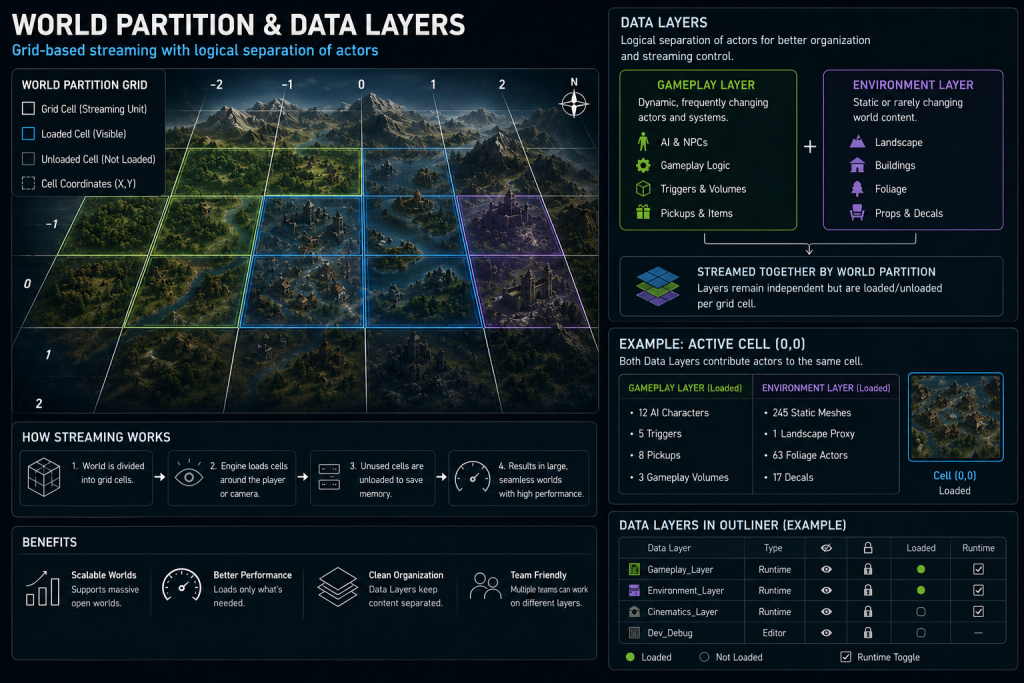
“Editorial illustration created for visual reference purposes. It does not represent a real project, client work, or official software screenshot unless stated otherwise.”
The better question: “Describe how you organized Data Layers on a project, and what broke when you got it wrong.” Data Layers organize actors into groups that can be loaded and unloaded independently, in the editor and at runtime – used for everything from separating gameplay elements out of environment assets to driving quest states and world-progression changes. A candidate who’s actually run this on a team-sized project describes a specific organizational scheme and a specific mistake, not just the textbook definition. Actors that reference each other get bundled and loaded together by design, so a common thing to listen for is a candidate who’s hit an unexpected loading cascade because of a cross-reference they didn’t anticipate – that’s a real story, not a documented “failure mode.”
A second useful probe, specifically for multiplayer or split-screen projects: each player controller is a World Partition streaming source by default. Ask how the candidate tested or profiled that setup. If they’ve never worked on a multiplayer World Partition project, that’s a completely normal answer – but they should say so plainly instead of talking around it. Vague confidence is a worse sign here than an honest “I haven’t worked on that specific case.”
Reading a Portfolio Without Getting Fooled by Beauty Shots
The technical readiness of a portfolio piece rarely shows up in the beauty shot – it shows up in the details most viewers skip past. Three things worth checking on every UE5 portfolio piece before an interview even starts:
- Wireframe or Nanite visualization overlays. If every image is a lit, polished final render with no technical breakdown anywhere, that’s not automatically disqualifying – NDA restrictions on a shipped title often mean a candidate legitimately can’t share internal tooling screenshots. But it’s worth asking directly, and offering a controlled, non-confidential test scene if the answer is “I can’t share that from past work.” A flat refusal to walk through any technical breakdown, even on neutral material, is the actual signal.
- Scene scale and context. A gorgeous single hero prop tells you about modeling skill. It tells you almost nothing about whether the person can hit a draw call optimization budget across a full level. Look for full scenes, not isolated assets, if the role is environment-adjacent.
- Shipped vs. personal project framing. Personal projects are legitimate portfolio pieces, but they optimize for a different thing than a shipped title does – nobody is capping a personal Nanite scene to a console memory budget. Ask directly which pieces were shipped under real technical constraints and which were self-directed, and expect a candidate to answer honestly without being defensive about it.
The Lumen Questions That Actually Test Production Experience
Lumen is Unreal Engine’s dynamic global illumination and reflections system, built to integrate directly with Nanite, World Partition, and Virtual Shadow Maps. It’s also the system where “I know Lumen” collapses fastest under a real question, because Lumen has hard platform constraints that only show up once you’ve shipped.
Ask: “Have you had to design around any of Lumen’s platform limits – static lighting, Forward Shading, or last-gen consoles?” These aren’t trick questions – they’re documented boundaries. Per Epic’s own technical documentation, Lumen global illumination can’t be combined with baked static lighting, it isn’t compatible with Forward Shading, and it doesn’t run on last-generation consoles like PlayStation 4 or Xbox One. Not every strong candidate will have hit these – someone who’s only shipped current-gen and PC titles may never have needed a fallback path, and that’s a legitimate answer, not a gap. What you’re actually listening for is whether they know these constraints exist at all before you ask, versus discovering them live in the conversation.
If the term itself needs unpacking for whoever’s running the interview, we’ve written up how Lumen calculates indirect lighting separately.
A second angle: ask how they diagnosed a Lumen performance problem – noisy reflections, light leaking through geometry, or a frame budget blown by ray tracing. The specific troubleshooting story matters more than the theoretical explanation of how Lumen works. Anyone can explain global illumination in the abstract; someone who’s actually profiled it under a real frame budget can usually walk you through the diagnostic path in concrete terms – which tool they reached for first, what the numbers told them, what they tried that didn’t work.
5 Technical Checks Before You Sign
| Check | What to Ask | What a Real Answer Sounds Like | Red Flag |
| Nanite constraints | “What have you had to pull out of Nanite, and on which engine version?” | Names a specific material or platform constraint (translucency is still unsupported; masked foliage is costly) with a version and project context | Generic “Nanite handles everything” with no exceptions or version awareness |
| World Partition / Data Layers | “What broke when your Data Layer setup was wrong?” | A specific organizational mistake and how it was fixed | Can only describe World Partition in textbook terms |
| Lumen constraints | “What happened combining Lumen with static lighting or last-gen consoles?” | References a real platform limitation and a scalability fallback | Claims Lumen “just works” everywhere with no caveats |
| Portfolio technical proof | Ask for any technical breakdown the candidate can legally share, or offer a neutral test scene | Explains the setup through permitted examples, a sanitized breakdown, or a controlled test | Avoids any technical walkthrough at all, even on non-confidential material |
| Shipped vs. personal work | “Which of these pieces shipped under real budget constraints?” | Answers directly, distinguishes shipped from self-directed | Vague or evasive about what actually shipped |
The pattern across all five checks is the same: a candidate with real production experience answers with a specific story and a specific constraint. A candidate who’s read the documentation answers with the correct vocabulary and no specifics. Vocabulary is easy to learn from a blog post. Constraints are best understood by someone who’s actually hit, profiled, or resolved them in production.
The One-Scene Diagnostic That Tells You More Than Any Portfolio
Everything above tests knowledge of specific systems in isolation. Real UE5 production work rarely presents problems that neatly – a scene goes wrong across two or three systems at once, and reading the failure correctly is a different skill from knowing each system individually. This is also the point where engine-side technical vetting genuinely separates from an art-focused portfolio review: an environment artist’s evaluation centers on the asset; this one centers on the scene as a running system.
A useful live or take-home scenario: “Here’s a scene where the Nanite streaming pool is overcommitted, Lumen reflections are noisy, and the level hitches during traversal. Walk me through what you’d check first, and why.” There’s no single correct order, but a candidate with real diagnostic experience narrates a process – checking streaming stats before assuming it’s a Lumen problem, distinguishing a CPU-side hitch from a GPU-bound one, separating “this is a content-authoring mistake” from “this is a renderer configuration issue.” A candidate without that experience tends to jump straight to a fix without establishing what’s actually broken, or treats all three symptoms as one problem when they may have three separate causes.
This kind of scenario is difficult to fake convincingly, because it rewards a diagnostic sequence, not a memorized answer – which is exactly what makes it worth the extra 15–20 minutes in an interview or take-home format.

Vetting It Yourself: What In-House Screening Actually Takes
Running this vetting process in-house is completely doable, and for a single hire, it’s often the right call. Here’s what it actually requires, honestly, without the sales pitch.
You need someone on your side who has hands-on UE5 production experience – not necessarily a senior engine programmer, but at minimum a technical artist or lead who has personally hit Nanite or Lumen constraints on a shipped or near-shipped project. Without that person in the room, the interview degrades into checking whether the candidate uses the right vocabulary, which is exactly the trap this whole process is designed to avoid.
As a planning estimate, not a fixed rule: a proper technical round – prep, the interview itself, and a portfolio deep-dive with real follow-up questions – tends to run a half-day of a senior reviewer’s time per candidate once you account for prep and a written debrief. If you add a paid art or technical test on top, build in enough calendar time for a real turnaround rather than a rushed 48-hour deadline – a rushed test tells you less than no test at all.
The three places in-house screening most often breaks down:
- The interviewer doesn’t know enough UE5 to catch a confident wrong answer. This is the single biggest failure mode. A candidate who’s fluent in the vocabulary but shallow in experience can talk past a generalist interviewer without ever being caught.
- There’s no second technical opinion. A single interviewer’s read is workable for a straightforward hire, but it carries real individual bias – a second technical reviewer is worth the extra hour for a senior or lead-level role, or for anyone who’ll own a shared World Partition level other people depend on.
- The portfolio review happens too fast. Ten minutes scrolling through a portfolio in a meeting isn’t a review – it’s a glance. A real portfolio review means going through whatever technical breakdowns the candidate can legally share, and preparing specific follow-up questions before the interview, not during it.
None of this is a reason not to do it yourself. It’s a reason to be honest about the time and expertise it costs before you commit to it – which is exactly the calculation the next section walks through.
What a Bad Vetting Call Actually Costs
The direct cost of a bad UE5 hire is obvious – you pay someone who doesn’t perform. The costs that actually sink a milestone are the ones nobody puts in the budget, and the framing below reflects our own production experience on a limited set of UE5 engagements – not a published industry benchmark, and not necessarily representative of every studio’s situation.
- Rework time. A candidate whose Nanite or Lumen experience is thinner than it looked typically needs materially longer than estimated on their first real deliverable, because the learning happens on your production’s clock instead of before it.
- Technical debt in the scene. Assets built by someone unfamiliar with Nanite’s streaming model often pass a first review and then cause build-size or streaming problems later – debt that surfaces after the person who caused it has moved on to the next task.
- Milestone risk premium. Time spent recovering from a bad hire is time that isn’t going toward the next milestone gate. On a fixed-scope AAA schedule, that risk compounds; it doesn’t just delay one deliverable, it pushes the whole downstream schedule.
- Recruitment cost, twice. You pay the sourcing and interview time for the original hire, and then you pay it again for the replacement – usually under worse time pressure than the first search had.
- Team drag. A senior artist or tech lead who has to babysit an underqualified hire isn’t doing their own production work during that time – an opportunity cost that rarely gets tracked but is very real.
The trade-off is straightforward even without precise multipliers: a few hours of qualified senior time spent vetting is inexpensive compared with repeating a recruitment cycle and losing weeks of production time to rework and correction. When vetting is skipped, the gap often becomes visible only after production time has already been lost – not on day one, but once real work hits the systems the interview never tested. The threshold shifts with team size and stakes: for a single short-term contractor, the informal version of this process might be enough; for anyone joining a multi-milestone AAA production, or anyone who’ll touch a shared World Partition level other people depend on, the full process is worth the time regardless of how strong the portfolio looks.
In our experience, this plays out most often on mid-production capacity gaps: a team runs its own UE5 environment vetting internally, the first hire’s Nanite experience turns out to be tutorial-depth rather than shipped-depth, and by the third milestone the internal lead is spending more time correcting the hire’s work than producing their own. That’s usually the point a studio brings in an outside team already screened against exactly this checklist – not because DIY vetting doesn’t work, but because it takes a second, unplanned pass to get right. (General pattern based on our production experience, not a specific named project.)
If You’re Hiring Specifically for Environment Art, Not a Generalist
Everything above applies to Unreal Engine developers and technical generalists broadly – engine-level questions about Nanite, Lumen, and World Partition. If the role you’re actually filling is narrower – specifically a 3D environment artist rather than a UE5 developer or technical artist – the vetting emphasis shifts toward asset-level readiness: polycount budgets, texel density, and modular kit discipline sit alongside the engine questions. We cover that version of the process, with a full vendor scorecard for hiring a 3D environment artist, separately – worth a look if environment art specifically, not general UE5 development, is the gap you’re closing.
When we run this vetting internally at Nasty Rodent, our own team’s technical bar sits at exactly this intersection – engine-level UE5 fluency checked against asset-level production discipline, because a candidate can pass one and fail the other. More on how we structure that and the studio behind it is just below; our shipped UE5 work is in the portfolio.
Quick Self-Test: Are You Ready to Vet a UE5 Developer Yourself?
Not every item here carries the same weight – a missing reviewer is a bigger problem than a tight test-turnaround window. So instead of a single score, split it into what’s actually required and what just makes the process smoother.
Required – without these, an in-house interview is checking vocabulary, not experience:
- Someone on your side has hands-on production experience with the UE5 systems the role actually needs – Nanite, Lumen, World Partition, or whichever combination this hire will own.
- That reviewer can tell the difference between a plausible diagnostic process and memorized terminology, not just recognize the right vocabulary.
- You have some way to verify a candidate’s claimed shipped work against something checkable.
- You have real time on a senior person’s calendar for a proper technical round – not a rushed 20-minute chat.
Recommended – these reduce risk but a strong process can work without every one:
5. A second technical reviewer, not just one interviewer’s judgment.
6. A real (even small) UE5 test scene you can hand to a candidate.
7. Room in your schedule for a paid test’s turnaround time, if you’re using one.
8. Slack in your milestone schedule to absorb a wrong first hire without it cascading.
9. You’re hiring for a single role, not trying to stand up a repeatable vendor-screening process.
Reading it honestly: if any “Required” item is missing, that’s the gap to close first – either by bringing in a qualified technical reviewer before you interview anyone, or by using an already-vetted external team instead of running this cold. Missing “Recommended” items just means plan around the specific gap, not that the whole process is unreliable.
Did you know?
Nanite’s compression is good enough that it usually beats traditional geometry on disk and memory at the same visual fidelity – that part of the reputation is earned. What catches artists off guard is that “compressed” doesn’t mean “free.” A streaming pool still has a ceiling, and a level with too many high-density Nanite assets in view at once can hit it even though any single asset looks fine in isolation. The problem shows up in a streaming stat, not in how the mesh looks sitting alone in the viewport.
In-House Screening vs. Generic Staffing vs. Structured Technical Vetting
| Approach | What Gets Checked | Typical Blind Spot | Time to Confidence | Best For |
| Portfolio-only review | Visual quality, style fit | Depth of Nanite/Lumen/World Partition experience | Fast, often wrong | Never – always pair with questions |
| Generic dev staffing marketplace | General coding tests, broad engine familiarity | UE5-specific production constraints, art-pipeline fit | Days to weeks | Programmer-heavy gameplay roles |
| In-house technical interview (this guide) | Nanite exceptions, Lumen limits, World Partition setup, portfolio depth | Requires a qualified technical interviewer on staff | Several hours per candidate | Single hires with in-house UE5 expertise available |
| Pre-vetted external team | Same technical bar, screened before you ever see the candidate | Requires trusting the vendor’s own screening process | Days | Ongoing capacity, mid-production gaps, no in-house UE5 lead |
The takeaway isn’t that one option is universally right – it’s that portfolio-only review belongs nowhere on this list as a standalone method. Whichever path you choose, it should include the technical questions above in some form.
How to Get This Right on the First Hire, Not the Second
A recurring pattern in the UE5 hires we’ve seen go wrong is the same one: the interview tested vocabulary more thoroughly than it tested production judgment. Nanite, Lumen, and World Partition all have a fluent-sounding surface and a much harder set of real constraints underneath – and the most reliable way to tell which side a candidate is standing on is to ask about the constraints and the diagnostics directly, not just the concepts.
If you’re building this checklist for a one-off hire, run it yourself with the self-test above as a gut-check first. If you’re closing a recurring capacity gap – the kind that shows up every time a new UE5 milestone starts and there’s nobody available who’s actually shipped with these systems – that’s a different problem, and it’s the one we solve directly for mid-core and AAA studios.
We’ll run a free 48-hour technical capability assessment against your specific UE5 pipeline requirements – no portfolio scroll, no vague “we know Unreal Engine.” You send us what the role or vendor needs to handle (Nanite-heavy environment work, Lumen-lit interiors, World Partition open-world streaming, or a mix), and we hand back a scorecard against exactly the criteria in this article, without obligation.
Send your UE5 pipeline requirements through our services form, or book a call to discuss the specific technical gap you need to close.