3D Asset Optimization for AAA Console: What the Memory Budget Actually Constrains
-

Written byDenys Zadoienyi
-

Updated on28.09.2026
-

Time to read11 min

- Why “Optimized” Often Means Polygon-Optimized Only
- How AAA Console Memory Budgets Actually Work
- What Actually Eats the Memory Budget
- Setting a Memory Budget by Asset Role and Category
- Where Modular Kits and Streaming Fit Into the Memory Picture
- Case Notes: Console Memory Constraints on Real Titles
- Console Memory Budgeting vs Polygon Budgeting: Side-by-Side

“Editorial illustration created for visual reference purposes. It does not represent a real project, client work, or official software screenshot unless stated otherwise.”
3D asset optimization for AAA console is where a lot of technically sound work still surfaces late-stage memory, streaming, or stability problems, because “optimized” quietly gets treated as a synonym for “low triangle count.” A prop list can hit every polygon target on the sheet and still blow the console’s memory budget the moment its textures, streaming behavior, and Nanite footprint get added up – and by the time that shows up in a build, it’s usually too late to fix without re-authoring assets that were already signed off.
3D asset optimization for AAA console means keeping every asset’s memory cost – textures, mesh data, and streaming residency – within the project’s defined category-, scene-, or streaming-region-level allocations, not just keeping its triangle count low. A low-poly asset with oversized, uncompressed textures can consume more memory than a denser mesh with a disciplined texture budget – which is why a triangle-only optimization pass can pass every polycount review and still be the reason a build misses its memory target.
Why “Optimized” Often Means Polygon-Optimized Only
Polygon budgets get most of the attention in a technical brief because triangle count is easy to measure, easy to put in a spreadsheet, and easy to check in a modeling tool’s viewport. Memory is harder to reason about at the same stage, because it depends on decisions – texture resolution, compression format, streaming priority, whether an asset uses Nanite – that often get finalized later than the base mesh.
That gap produces a predictable failure mode: an asset list clears its polygon review cleanly, and the first real memory pressure only shows up once enough assets are loaded together in a real scene, on real target hardware. At that point, the fix options are worse than they would have been earlier – re-compressing textures across a hundred already-approved assets, or re-authoring streaming priorities that were never planned as a system to begin with.
Our polygon and LOD budget guide covers the triangle-count side of this problem in depth – asset-role budgets, LOD tiers, and platform-specific triangle ranges. This article deliberately stays on the other half of the same production problem: what happens to an asset list once memory, not triangle count, is the constraint actually being tested against.
How AAA Console Memory Budgets Actually Work
Both PS5 and Xbox Series X ship 16 GB of GDDR6 as their total memory pool, but the two platforms structure that pool differently, and the difference matters for how an art team plans around it.
PS5 uses a unified memory architecture: a single 16 GB GDDR6 pool at 448 GB/s bandwidth, shared between CPU and GPU workloads without a hard partition between them, as detailed in lead system architect Mark Cerny’s public PS5 architecture presentation. Xbox Series X exposes its 16 GB of GDDR6 as one addressable memory system with two asymmetric bandwidth regions: 10 GB accessible at 560 GB/s and the remaining 6 GB at 336 GB/s, an arrangement Microsoft has documented in its own Series X architecture disclosures. This is not two separate memory pools – it’s one address space where bandwidth-sensitive allocations need to be planned with the faster region in mind, rather than treating all 16 GB as functionally equivalent.
There is no platform-wide public specification stating that AAA runtime art assets get a fixed “3–5 GB” allocation on either console. Any such figure can only ever be an illustrative project-level planning number, not a Sony or Microsoft standard – if a specific allocation target exists for your production, it comes from your own technical brief or engine team, not from a public platform rule.
Neither platform makes its full 16 GB available to a game’s assets. A meaningful share is reserved for the operating system, background services, and engine overhead before any art asset is loaded. The practical implication for a technical brief: never plan an asset memory budget against the console’s total GDDR6 figure. The exact game-available allocation is SDK- and platform-documentation territory, and should be confirmed against your current target environment rather than inferred from the headline 16 GB hardware specification – a number pulled from a two-year-old article is a liability, not a planning baseline.
| Platform | Total Unified Memory | Architecture | Practical Note |
| PS5 | 16 GB GDDR6, 448 GB/s | Single unified pool, no hard CPU/GPU split | Single public bandwidth spec; game-available allocation is still below the headline 16 GB |
| Xbox Series X | 16 GB GDDR6, one address space with two bandwidth regions (10 GB @ 560 GB/s, 6 GB @ 336 GB/s) | Asymmetric-bandwidth unified pool | Bandwidth-sensitive allocations should target the faster region, not assume all 16 GB behaves the same |
What Actually Eats the Memory Budget
Triangle count is one input into an asset’s memory footprint, and often not the largest one. For art-asset planning, four categories deserve particular attention.
Textures. A multi-map 4K material set (base color, normal, roughness/metallic, and any additional maps) at an uncompressed or poorly compressed format can easily dominate the memory footprint of a moderately dense mesh, depending on compression format, mip residency, and channel packing. Texture resolution, mip strategy, and compression format (BCn variants and platform-specific formats) are often one of the largest controllable contributors to art-asset memory, especially for environment and prop content – which is why a texture budget belongs in the same technical brief as the polygon budget, not as an afterthought resolved during art review.
Streaming pool allocation. Modern console engines can stream texture and geometry data according to visibility, location, and project-specific streaming rules, rather than holding every asset in a level resident at once. It’s worth being precise about what “streaming pool” means here: an engine’s texture-streaming pool (Unreal’s, for example) is a specific, engine-managed subset of runtime memory – it is not synonymous with total game-available memory. Geometry, render targets, animation data, audio, code, engine systems, and transient buffers all draw from the broader runtime budget alongside whatever the streaming pool covers. An asset’s contribution to the memory budget isn’t just its own footprint – it’s how that footprint interacts with everything else competing for the same pool at the same moment, which is a scene-level planning problem, not a per-asset one.
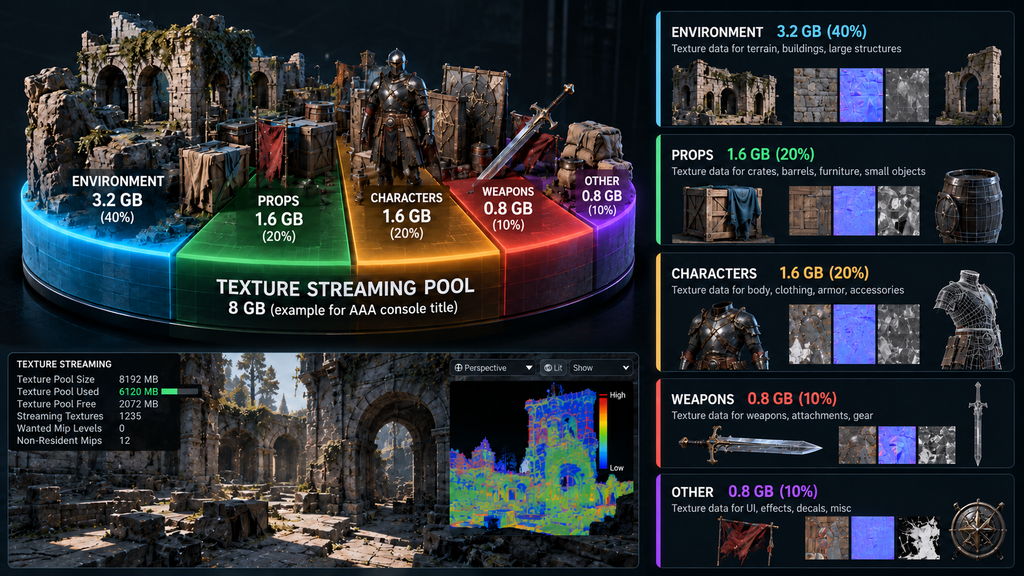
“Editorial illustration created for visual reference purposes. It does not represent a real project, client work, or official software screenshot unless stated otherwise.”
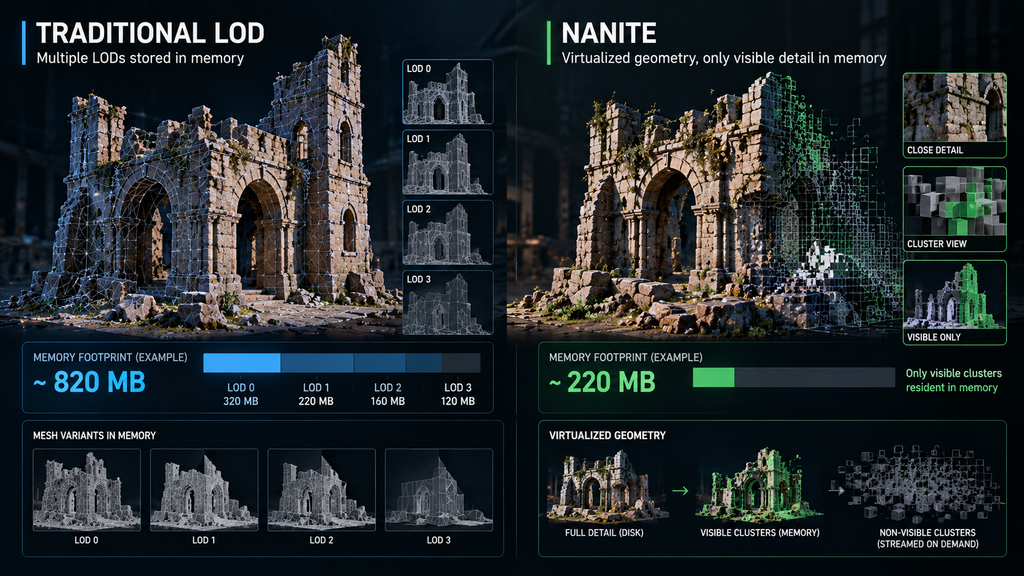
Nanite’s memory profile. For UE5 projects, Nanite-enabled meshes carry their own runtime data structures, but source triangle count alone is not a useful proxy for resident runtime memory – per Epic’s own Nanite documentation, Nanite compresses geometry and streams it hierarchically, so only the required visible detail is streamed in beyond a mesh’s always-resident minimum (root) data, rather than the full source density of every visible mesh needing to stay resident. That still needs explicit profiling, not an assumption in either direction: teams should measure streamed geometry pages, fallback data, and scene-level residency rather than carrying over traditional LOD-based memory assumptions, or assuming Nanite is memory-free because it removes manual LOD authoring work. Our dedicated guide to Nanite in UE5 covers what Nanite changes technically beyond memory alone.
“Editorial illustration created for visual reference purposes. It does not represent a real project, client work, or official software screenshot unless stated otherwise.”
Animation and skinning data. Character memory isn’t limited to the skinned mesh itself – it includes skeletal-mesh skinning data and skeleton-related structures, separately authored animation assets, morph targets where used, materials and textures, and runtime animation-system overhead. A roster of secondary or background characters sharing skeletons and animation sets has a different memory shape than the same character count built as fully unique rigs with unique animation sets – a planning detail that belongs in the character budget alongside triangle counts, not filed separately from it.

Setting a Memory Budget by Asset Role and Category
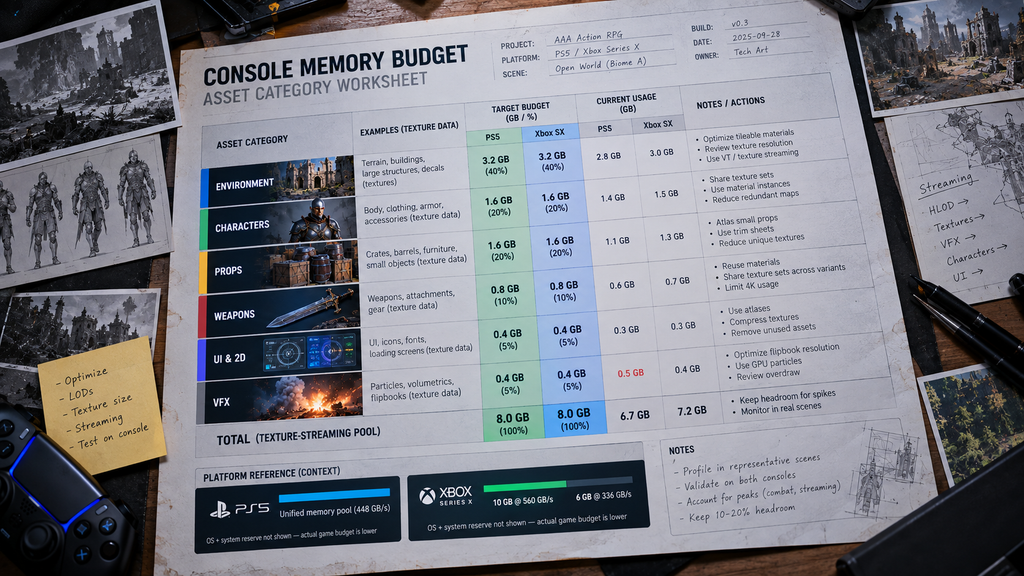
A usable console memory budget assigns a category-level allocation before production starts, the same way a polygon budget does – but the categories split by memory behavior, not by triangle count.
Hero assets (player character, primary weapon, key set-piece environment elements) often receive larger per-asset memory budgets, because they’re viewed close-up for extended periods and tolerate the fewest visible compression artifacts. Repeated and instanced assets (modular kit pieces, common props, secondary NPCs) shift the optimization problem in a different direction: mesh and texture resources are frequently shared across instances rather than duplicated per copy, so instance count should not be treated as a linear multiplier of full asset memory. What actually matters for this category is per-instance overhead, how much unique material or texture variation the instances introduce, visibility, and how many unique resources need to stay resident in a worst-case scene. Individual background and distant assets often receive tighter per-asset allocations, since screen presence and player attention are both lowest for this category – though aggregated across a large vista or dense background layer, their combined memory cost can still add up to a meaningful share of a scene’s budget.
Our character pipeline reference documents a working triangle range for a hero character as an illustrative planning example, not a platform standard – our polygon and LOD budget guide uses roughly 80,000–120,000 triangles at LOD0 for a mid-core/AAA hero character as that kind of example, not a PS5 or Xbox Series X requirement. The same asset’s memory allocation – its texture set resolution, material complexity, and whether it uses Nanite Skeletal Mesh support where the project’s UE version and target platform support it – needs its own line in the technical brief, sized against the category logic above rather than assumed from the triangle budget alone. Our 3D character and 3D props teams scope both sides of that budget together when a technical brief calls for it.
“Editorial illustration created for visual reference purposes. It does not represent a real project, client work, or official software screenshot unless stated otherwise.”
Where Modular Kits and Streaming Fit Into the Memory Picture
Modular environment kits are where triangle-budget thinking and memory-budget thinking diverge most visibly. A kit piece can be triangle-light and still create a memory problem if its texture atlas is oversized relative to how small the piece actually reads on screen, or if too many unique kit variants are resident in the same streaming cell at once.
Our guide to modular prop kits covers the grid, snapping, and connection-matrix side of kit planning; the memory-specific addition worth flagging here is that a kit’s trim-sheet and texture-atlas strategy is also part of its memory strategy. A shared atlas or trim-sheet approach can reduce unique texture residency across dozens of kit pieces, and when paired with a compatible material and instancing setup, it can also help reduce state changes or draw-call pressure – but the atlas alone doesn’t guarantee that reduction; it depends on how materials and instancing are actually set up around it. Kit pieces that stream in and out together also need their combined memory footprint checked against worst-case streamed cell or region combinations, not just each piece’s individual number in isolation – the same scene-level logic that applies to polygon budgets applies to memory, and it’s just as easy to miss by only checking per-asset numbers. Our deeper technical breakdown of UE5 environment art for AAA projects covers the Nanite and World Partition side of this in more depth.
Case Notes: Console Memory Constraints on Real Titles
Console memory planning looks different depending on genre and scope, and a few patterns from Nasty Rodent’s own production work illustrate the range.
On Starship Troopers: Extermination, developed by Offworld Industries for PC and console on UE5, our documented scope covers props, environment assets, and aircraft (vehicle) work delivered within the project’s own technical budgets – memory and streaming decisions on that title are set by Offworld Industries’ engine team, not claimed here as Nasty Rodent’s own optimization work. On Mutant Year Zero: Road to Eden and Miasma Chronicles, both developed with The Bearded Ladies for PC and console, our scope covers weapons, props, and environment assets delivered to each project’s defined technical requirements; LOD and memory-budget decisions on both titles likewise sit with the client’s own technical team and are not represented here as Nasty Rodent production history.
What carries across all three engagements is the production discipline, not a specific number: assets are built to the technical budget the client’s engine team defines, with texture and streaming behavior treated as part of that budget from the brief stage rather than resolved after modeling is complete.
Console Memory Budgeting vs Polygon Budgeting: Side-by-Side
| Aspect | Polygon Budgeting | Memory Budgeting |
| Primary unit | Triangle count per asset, per LOD tier | Megabytes/gigabytes per asset category and streaming cell |
| Biggest lever | Mesh density, LOD chain design | Texture resolution and compression, streaming priority, Nanite streaming configuration/residency |
| Scales with | Instance count, screen coverage | Unique resource residency, texture reuse, per-instance overhead, streaming-region composition |
| Where it’s covered in depth | Polygon & LOD budget guide (linked above) | This article |
| Common failure if skipped | Frame-rate drops from geometry overdraw | Streaming overrun, texture thrashing, out-of-memory risk, or late-stage stability and performance problems |
Both budgets are set in the same technical brief, against the same asset list, and neither one substitutes for the other – a technically sound polygon budget with no corresponding memory plan is only half a console optimization strategy.
If your production needs 3D art built to specific console polygon, texture, and memory constraints, Nasty Rodent’s 3D environment team works to the technical budgets your production team defines, rather than a generic one-size-fits-all target.