Hard-Surface Concept Art: Weapons, Vehicles and Mechanical Design
-

Written by Denys Zadoienyi
-

Updated on19.10.2026
-

Time to read12 min

- Where Hard-Surface Concepts Leave Gaps for the Modeling Desk
- Develop Function and Form Together
- Silhouette and Shape Language That Hold Up in the Game Camera
- Attachments and Variants: Design the Kit, Not Just the Gun
- The Sheet Set a Production Package Can Include
- Vehicles and Mechanical Design: What Changes When Parts Move
- New Design or Texture-Only Skin Concept? Scoping the Concept Stage
- Handoff: What the Modeler Checks Before Building
- Our Approach to Hard-Surface Concepts
- Three Concept Scopes Side by Side
- Agree the Concept Package Before Detailed Production Begins
Hard surface concept art develops the visual design and intended behavior of weapons, vehicles and mechanical props for games. Artists may use sketches, paintovers and rough 3D models to explore and resolve the design. Before detailed asset production, the receiving team needs the agreed views, callouts and references that explain what it is expected to build.
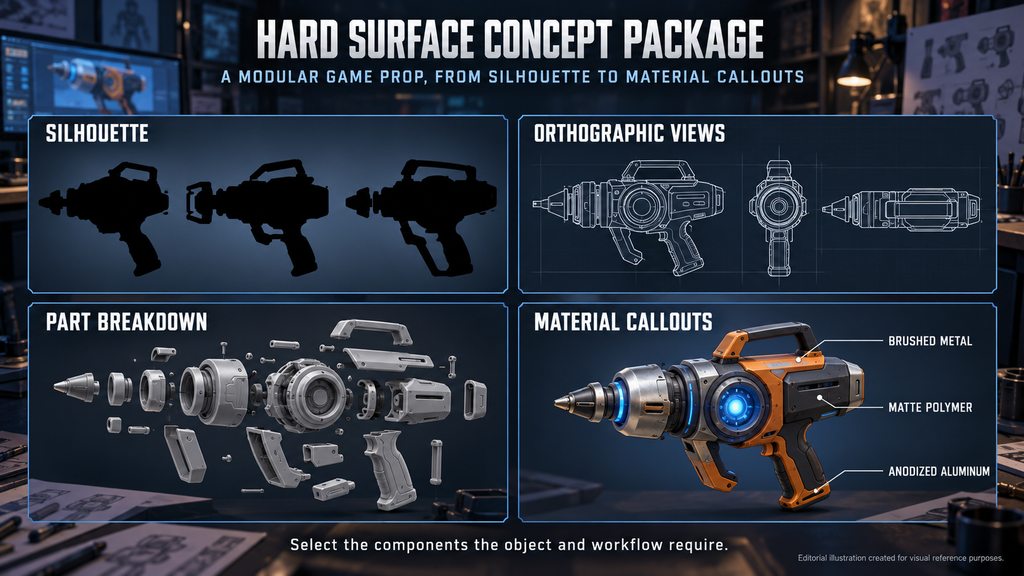
“Editorial illustration created for visual reference purposes. It does not represent a real project, client work, or official software screenshot unless stated otherwise.”
If you are an art director or tech art lead handing concepts to a 3D team, the useful question is not only whether the design looks good. It is whether the team can start the agreed work without guessing at design-critical details. Below: how function and form develop together, how weapon concept art treats attachments as a system, which sheets a package can include, what changes in vehicle concept art, and when a texture-only skin is enough. For the wider field, start with what concept art is.
Hard surface concept art develops the design of manufactured objects for games, including weapons, vehicles and mechanical props. Depending on the production stage, it can range from exploratory sketches and 3D blockouts to approved views, material callouts and motion studies that guide detailed asset production.
Where Hard-Surface Concepts Leave Gaps for the Modeling Desk
A polished hero image can leave production-critical decisions unresolved. A single render shows one angle, one pose and one state, while the receiving team may still need additional views, motion studies or explanations of how components fit together.
In an illustrative kit of one base weapon and eight attachments, three unresolved items per component produce 27 items to clarify. They may be resolved together or through several reviews; the number does not translate directly into interruptions, revisions or production time.
Modeler input can be an agreed part of the design process; the risk is design-critical gaps that nobody owns. An art director sees them as drift from the art bible, a producer as schedule risk. A thin brief adds to the problem, and our concept art brief guide covers what belongs in one.
Develop Function and Form Together
In a 2019 interview on 80.lv, weapon artist Dmytro Butenko argued that the biggest problem in hard-surface work is a lack of understanding of an object’s function and purpose, and that a believable weapon, vehicle or device is impossible without at least a basic grasp of how it works.
His example is the Helsing crossbow for Metro Exodus. It started from the recognizable form of the earlier crossbow but had to be redesigned from the ground up, partly because of new attachment functionality. Loading, bolt feed and string design were treated as one connected system and tested and approved before he returned to the form. The model was then blocked out so an art director could paint over the greybox to shape the final look. He also notes that a detailed technical task from the lead technical designer helped a lot, much as a good brief does.
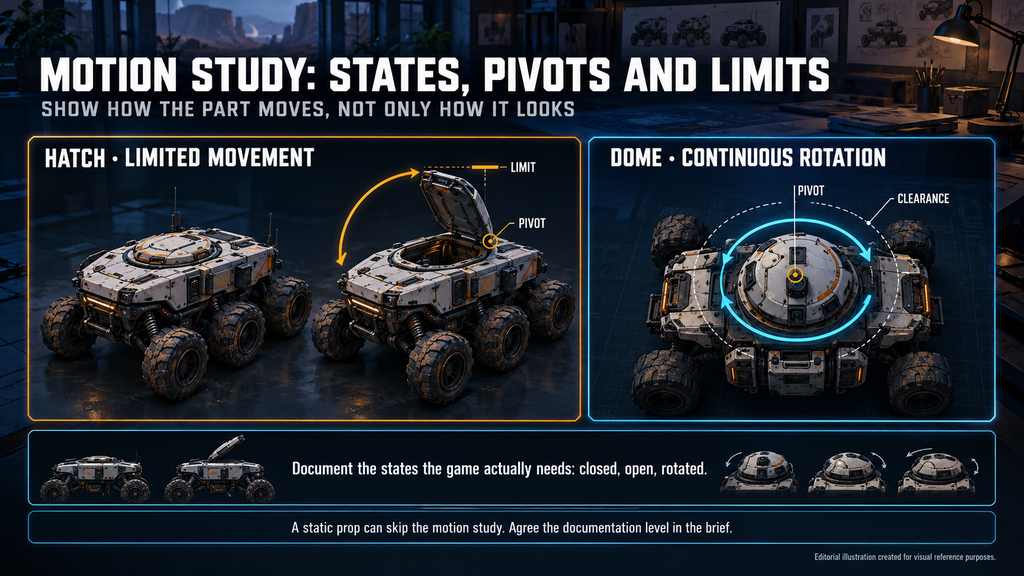
The practical lesson is to use functional requirements to guide visual exploration, and to test important movements before polishing the design. Sketches and rough 3D studies can develop together. Document the states the game actually needs, then refine the silhouette, clearances and moving-part relationships through review. Combine functional reference with the project’s visual references and mood boards.
“Editorial illustration created for visual reference purposes. It does not represent a real project, client work, or official software screenshot unless stated otherwise.”
“Mechanical design” here means that logic, not a style: how things open, rotate, lock and wear. For walkers and mechs, develop joint placement, required poses and silhouette together, checking that the design supports the intended animation. It is also why hard surface differs from organic work: forms are manufactured, so panels, seams and joints carry meaning. How those forms are built in 3D is a separate topic, covered in our hard surface vs organic modeling comparison.
Silhouette and Shape Language That Hold Up in the Game Camera
Silhouette is where hard-surface design is settled cheaply: thumbnail passes let a team compare many outlines before any detail is drawn, and an art director’s rules do the most work here.
Judge each outline as the player will see it: a first-person weapon is held close and read in motion, the same weapon in third person or on the ground is read small. Test thumbnails filled solid black, at reduced size and against a busy background. Use silhouette tests to assess the distinctions the game requires, and combine them with checks of color, material grouping and gameplay presentation. Cosmetic variants may intentionally preserve the base weapon’s recognizable outline.
Shape language gives silhouettes a rule. Decide which families of shapes belong to which faction, tier or manufacturer, and how much detail lives in the form versus the texture. Check readability in every configuration the game allows, including attachment removal where supported.
Attachments and Variants: Design the Kit, Not Just the Gun
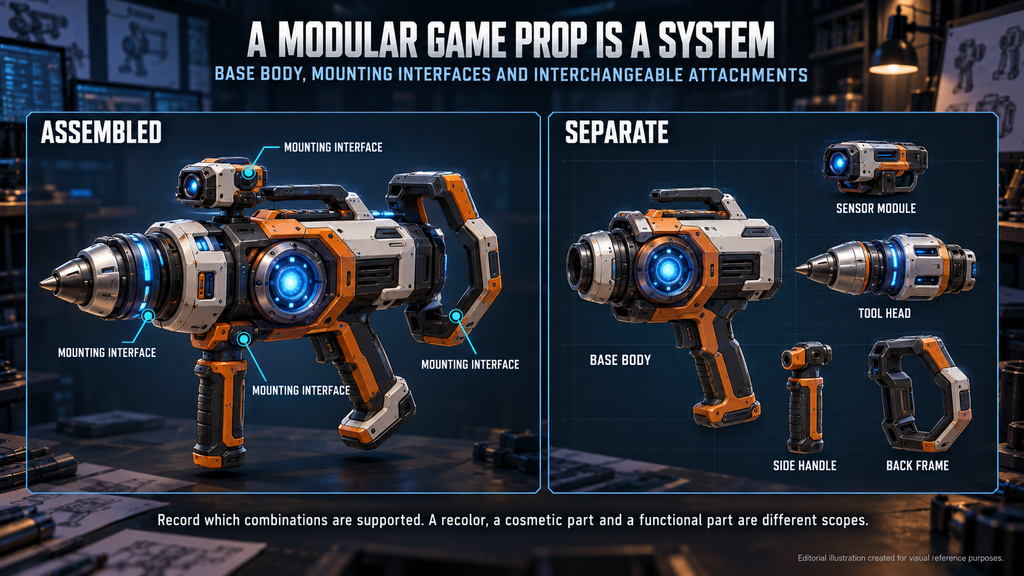
A modular object is a system of a base, mounting interfaces, parts and variants. If only the base is designed, the system gets invented later by whoever builds it. An Overkill 3 artist’s production write-up on Game Developer describes a task of 30 weapons with replaceable parts: stocks, scopes, muzzle brakes, foregrips, lasers and flashlights. That is a kit, and a kit needs rules before it needs parts. The article dates from 2015 and covers a mobile shooter, so it is an example of the problem, not of current budgets.
Four rules keep a concept kit coherent:
- Define compatible interfaces. Identify the mounting interfaces used by each attachment family and record which combinations are supported.
- Show the views needed to resolve mounting and clearance. Include assembled and separate views where they answer different production questions.
- Check supported combinations. Review clearance, required movement and player-facing visibility in the configurations the game permits.
- Name the variants. A recolor, a cosmetic part and a functional part are different scopes.
“Editorial illustration created for visual reference purposes. It does not represent a real project, client work, or official software screenshot unless stated otherwise.”
How many pieces this adds up to in production is a counting job, and our props and weapons scope estimation guide covers the worksheet.
The Sheet Set a Production Package Can Include
A hard-surface production package contains the views, callouts and supporting references agreed for the receiving team’s next task. The table lists possible components, the questions they answer and the gaps to check. Select the components that the object and workflow require.

| Sheet | Question it answers | Who relies on it | Red flag |
| Silhouette and thumbnail pass | Does the design read at a glance and when held or moving? | Art director | Designs that need distinct gameplay identities fail their agreed readability checks |
| Orthographic views and turnaround | What are the proportions, and where does each part sit? | Modeler | Required proportions or hidden surfaces remain ambiguous, with no supporting views or 3D reference |
| Part breakdown or exploded view | What separates from what? | Modeler, rigger | Required part separation or movement is unclear; surface detail is mistaken for a movable component |
| Motion study | How does the part move, and what clearances or limits apply? | Modeler, animator, tech artist | Required motion, pivots or paths, clearances or limits are unclear for the states the game needs |
| Material breakdown and color callouts | What is each part made of, and how does it wear? | Texture artist | Material or finish differences required for the approved look remain unspecified |
| Scale reference | How big is it against a hand, a character or existing assets? | Modeler, level designer | Scale is unspecified or not tied to the player’s hands, characters or existing assets |
| Attachment and variant sheet | Which parts swap, and what does a swap change at the interface? | Modeler, producer | Attachments drawn as separate objects, with no mount, clearance or supported combinations |
The views depend on the object’s complexity and asymmetry: side, front, top and rear are a starting point, not a universal list. A static prop can skip the motion study. Agree the documentation level in the brief.
Vehicles and Mechanical Design: What Changes When Parts Move
Vehicle concept scope depends on how the asset appears and behaves in the game. Agree whether the work covers an exterior, a usable interior, moving assemblies and damage states, and which design decisions need input from modeling, animation or technical art. On the production side we scope vehicle work as exterior, interior, rig and physics – a way of describing scope, not a technical classification; see our 3D vehicles service.
- Exterior. The silhouette must read at the distances the game uses, and the proportions have to hold up in the orthographic views.
- Interior, where required. Define the visible or usable areas, sightlines and controls needed for the agreed camera and gameplay. A background vehicle may need only limited interior detail.
- Moving parts. Show the intended motion of hatches, turrets, wheels, tracks and rotors. Identify pivots or movement paths, required clearances and any limits that apply. Distinguish continuous rotation from limited movement, and illustrate the poses or states the game needs.
- Damage, where required. Show the damage states the game needs and identify any exposed interiors or detachable parts. Agree the representation with the technical team: surface changes, deformation and separation can require different production work.
Rig and physics setup are downstream tasks; the concept can help agree their requirements. Characters have their own handoff rules, and for them our breakdown of the character concept art to 3D pipeline is the better starting point.
Did you know?
The Overkill 3 artist notes that players could rotate the guns to any angle, so in that game every detail had to be pixel-perfect and nothing stayed hidden.
New Design or Texture-Only Skin Concept? Scoping the Concept Stage
The examples here concern texture-only weapon skin concepts: pattern, wear and color variations on an approved model, with geometry unchanged. The sheet shows several variants on the same silhouette, so the client picks and the texture artist executes without guessing. Other cosmetic concepts can include new geometry, materials or effects, so define the deliverable explicitly rather than relying on the word “skin.”
On Squad, our concept work covered weapon skin variations on existing weapon models, and our 3D team then built the final production weapons. We have also produced weapon skin concepts for La Quimera.
Treat a request as a texture-only skin concept when only the surface changes, and as new design when function, parts or proportions change. Once the base silhouette and design language are approved, the remaining decisions usually shrink to material, palette and detail. That is a tendency, not a rule: a premium cosmetic reviewed by many stakeholders can still run through several rounds. Planning those rounds is covered in our concept art scope estimation guide.
Handoff: What the Modeler Checks Before Building
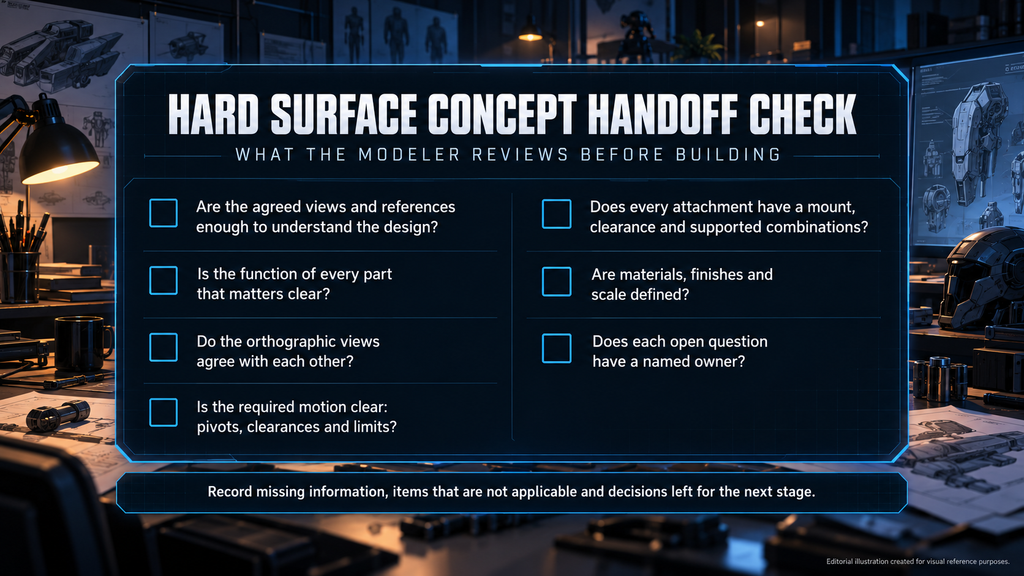
Before a concept goes into detailed production, the receiving team reviews it against the agreed scope. Typical questions:
- Are the agreed views and references enough to understand the approved design?
- Is the function of every part that matters for modeling, animation or gameplay clear?
- Do the orthographic views agree with each other?
- Is the required motion clear, including pivots or movement paths, clearances and any applicable limits?
- Does every attachment have a mount, clearance and a list of supported combinations?
- Are materials, finishes and scale defined at the agreed level?
- Does each open question have a named owner?
Record missing design-critical information, items that are not applicable and decisions intentionally left for the next stage. Clarification remains part of production, so assign an owner to unresolved questions. A receiving modeler’s review or a rough blockout can help identify ambiguities before detailed asset production.
“Editorial illustration created for visual reference purposes. It does not represent a real project, client work, or official software screenshot unless stated otherwise.”
Our 3D weapon art for games guide covers the production route that follows, starting with orthographic reference.
Our 3D weapons service takes approved concepts into production models with proper topology, textures and LODs for all game types and platforms.
Our Approach to Hard-Surface Concepts
We treat a concept as a production document: reference-driven design with accurate proportion, material behavior and mechanical logic, guided by your art bible where one exists. The studio details are in the block above, and the realistic concept art gallery shows the work.
Three Concept Scopes Side by Side
| Scope | Suitable when | What the deliverable contains | Main risk |
| Texture-only skin concept on an approved model | The base geometry is locked and only pattern, wear or color changes | Several variants on the same silhouette, plus color and material callouts | A variant that needs new geometry slips in and is treated as a skin |
| New design with the agreed production views and callouts | There is no approved design, or the function has changed | The views, motion studies, callouts and scale references the object needs | Open mechanism questions found at the modeling stage |
| Design developed or checked with a rough 3D blockout | Complex mechanisms, vehicle interiors or tight camera conditions | The agreed views and callouts, plus a rough 3D check before sign-off | Extra step, and a blockout mistaken for the final form |
The scopes can coexist: new design for hero weapons, texture-only skin concepts for their cosmetic variants.
Agree the Concept Package Before Detailed Production Begins
Define the documentation level in the brief, design attachments as a kit, and let a modeler review the package before sign-off, so the design, behavior and views are agreed before detailed asset production begins.
Need hard-surface concepts your modelers can build from? Send us your object list, references and art bible. We review them against the structure above and usually reply within 1–2 business days.
Explore our concept art → · sales@nastyrodent.com
See the finished work in the Nasty Rodent portfolio.

Let's work
together

in mind?
From 3D characters and environments to weapons, props, concept art and game UI/UX: ten years deep, 40+ artists strong, zero fluff. Tell us what you are making and get a free, no-pressure estimate.
estimate