Cross-Platform Art Delivery: One Asset Pipeline for PC, Console and Mobile
-

Written byDenys Zadoienyi
-

Updated on16.10.2026
-

Time to read14 min

- Where Independently Maintained Asset Sets Create Rework
- One Shared Source, Several Target Representations: How to Structure the Pipeline
- What to Share and What to Adapt per Platform
- Build Texture Tiers from Shared Sources
- Where One Engine Project Can Scale and Where Art Has to Step In
- When Target-Specific Re-Authoring Is Justified
- Who Is Responsible for Each Version: Handoff and Review Gates
- Our Approach to Multi-Target Delivery
- Three Ways to Organize Multi-Target Assets: Side by Side
- How to Decide Before the Asset List Grows
A cross-platform game art pipeline decides, before production starts, which work is shared between PC, console and mobile and which work is done once per target. Adding a console or mobile target after assets have been approved can expose assumptions made for the original platform: some assets can be reused through target-specific settings, others need changes to geometry, textures, materials or presentation.
“Editorial illustration created for visual reference purposes. It does not represent a real project, client work, or official software screenshot unless stated otherwise.”
If you are a producer planning a release on more than one platform, the useful question is not whether assets can be shared. It is where they can be shared, where they cannot, and who is responsible for the difference. The answer has four parts: shared sources, platform representations, target-specific checks and a named owner for each version.
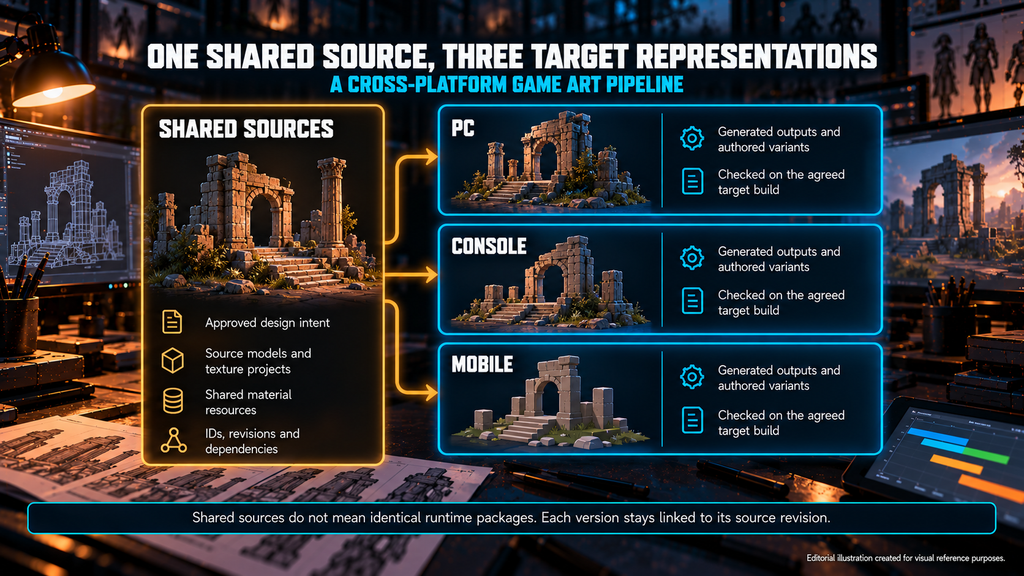
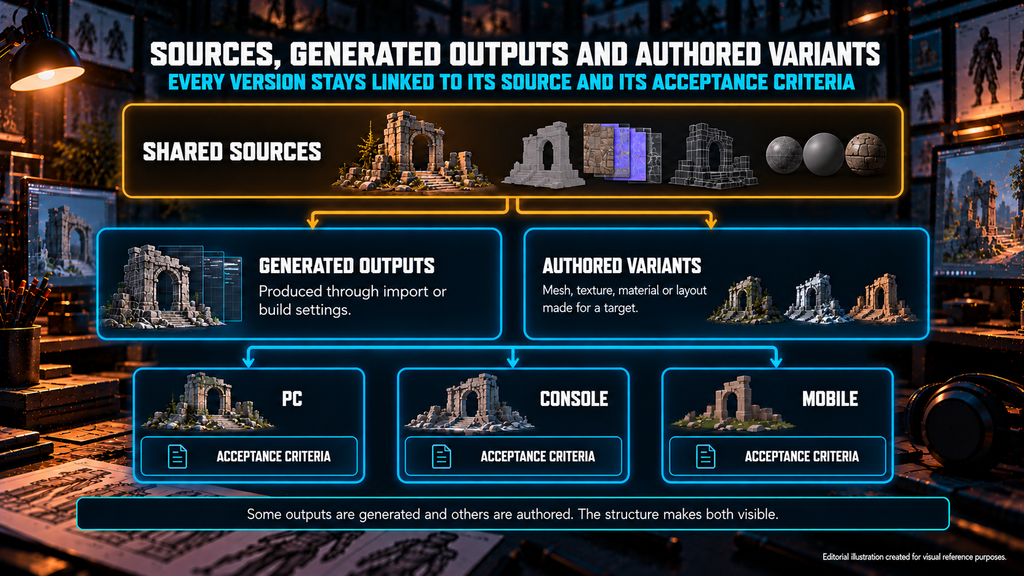
A cross-platform game art pipeline coordinates shared authoring sources, platform-specific representations and the checks required for each target. Some outputs can be generated through import or build settings; others require authored mesh, texture or material variants. Each version remains linked to its sources, dependencies and acceptance criteria.
Where Independently Maintained Asset Sets Create Rework
Maintaining each platform as its own asset set can be a valid decision. The trouble starts when the duplication is not coordinated and changes are not tracked.
Consider an illustrative list of 300 props intended for three targets – a round number for the math, not a studio benchmark. The team may need to validate up to 900 asset-target combinations, even when the authoring sources are shared. The potential saving comes from reusing source work and coordinating changes. Three independently maintained sets can duplicate authoring and revision work, although their review effort depends on how much the targets differ, which checks are required and how much can be automated.
A producer reads that as capacity. Every added target adds validation work, and a scope freeze that does not name the targets leaves the capacity gap to be discovered at the milestone gate. An art director reads it as drift. If versions are adjusted independently, silhouettes, material values and readability can diverge, and cross-platform parity becomes something to chase instead of something defined.
The failure is rarely dramatic: a console version approved against an outdated source, a mobile variant nobody can trace back, a late change that reaches two of three targets. Together they reopen sign-off on assets the team believed were closed.
Our 3D props brief asks for the triangle ceiling, texel density, texture memory and draw-call target up front, so they become production rules instead of review comments, and it asks for the target platform and engine because mobile, console and PC are different production plans. A shared pipeline does not erase that sentence. It gives each plan a place to live.
A shared-source pipeline records every target-specific representation as a traceable output. Some outputs are generated, others are authored; the structure’s job is to make both visible. Shared sources preserve the asset’s approved design intent and the authoring data needed for planned changes. Depending on the workflow, this may include geometry, high-detail models, texture projects and shared material resources. Platform variants can use different topology, UV layouts or material structures when required, while remaining traceable to that shared foundation.
Shared authoring sources do not imply identical runtime packages: Epic’s documentation describes cooking as the step that converts content into platform-specific formats, and Unity documents that AssetBundles are built for a specific target platform.
“Editorial illustration created for visual reference purposes. It does not represent a real project, client work, or official software screenshot unless stated otherwise.”
Four things need to be fixed before the first asset is built:
- Identification. Follow the project’s naming conventions and record asset IDs, revisions and target applicability in filenames or metadata, as appropriate.
- Versioning. Record which source revision each representation came from.
- Sources and dependencies. Keep the agreed authoring files, required dependencies and workflow instructions accessible to the receiving team.
- Import conventions. Document scale, coordinate conversion, UV usage, naming and target-specific overrides for the agreed engine setup, following a documented asset import pipeline.
My advice: write a one-page delivery spec per target before the first asset is built. Name the hardware or device tier, engine version and renderer, camera conditions and budgets, say which outputs are generated and which are authored, and name who accepts each one.
Production note. Epic’s resolution-scale example reduces the 3D scene resolution separately from conventional 2D UI. Interfaces rendered through world-space widgets need their own checks. Define how each interface is rendered before deciding which scaling settings apply.
Start by identifying what can be shared and which target-specific differences need planning and validation. The table outlines common areas to assess for game art for PC, console and mobile, and the failures to look for.
| Layer | Usually shared | May change per target | Red flag |
| Geometry and LOD | Approved design intent, silhouette targets, usable source models | Topology, LOD chain, switch distances, triangle ceiling per tier | Silhouette or deformation breaks at lower detail, or the mobile mesh was never reviewed at its real viewing distance |
| Textures | Source texture projects, material rules | Resolution, compression, UV layout and texel density, by agreed variant | Variants resized or repacked with no record of the source or the rule |
| Materials and shaders | Look targets, material parameters, shared material resources | Supported features, shader variants, layer and transparency use, measured rendering cost | Look drifts between targets because variants were edited by hand with no common reference |
| Scene and streaming | Kit logic, modularity, pivots | Instance density, scene and build configuration, draw-call budget | An environment reused on another target without validating scene density, visual requirements and performance |
| UI and HUD | Visual language, iconography | Adaptive layouts, hit areas, safe zones, input variants | One layout stretched across devices with no per-target check |
The shared direction defines the visual and functional requirements. Each platform representation must meet those requirements within its agreed technical constraints. Some changes in appearance are deliberate, agreed adaptations; a red flag is a change that nobody agreed or recorded.
The figures that fill these cells belong in a per-platform budget worksheet. The polygon and LOD budget guide shows how to build one by asset role, so this table deliberately stays out of triangle ranges.
For environments, the same split applies at scene level. Our 3D environment work runs on scene targets that the client sets – draw calls, frame budget, texture memory and streaming cell size – and treats them as production rules from the brief onward.
Keep editable texture sources at a resolution suitable for the planned outputs. Use platform import settings or documented export presets to generate resolution and compression variants where practical. Review the results at the intended viewing conditions: some assets may need texture adjustments, rebaking or a different layout to preserve readability.
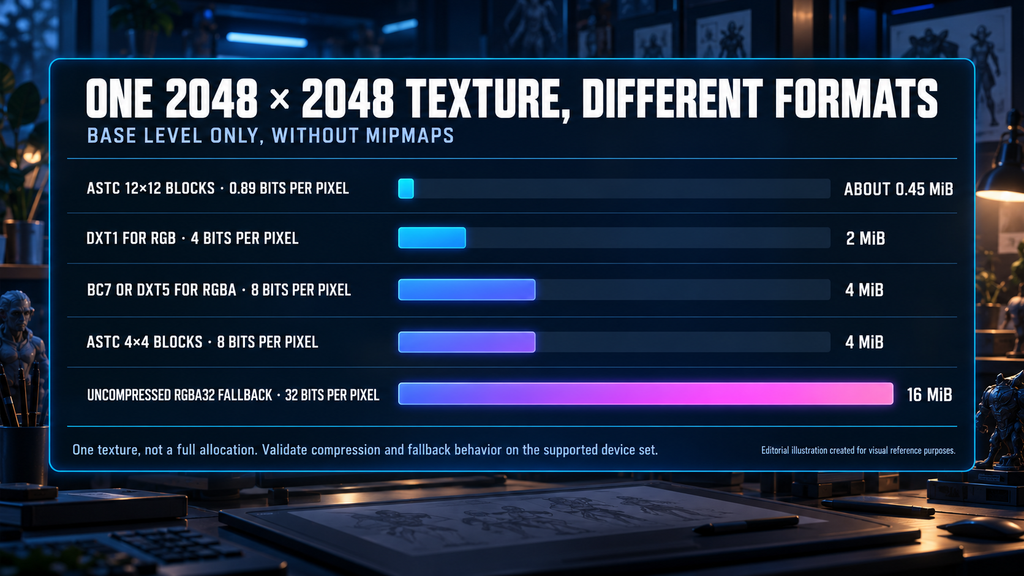
The compression format is where platforms genuinely differ. Unity’s documentation gives platform-by-platform texture format guidance: for devices with DirectX 11-class or better GPUs, DXT1 for RGB at 4 bits per pixel and BC7 or DXT5 for RGBA at 8; ASTC on iOS and tvOS devices with an A8 chip or later; and ASTC, ETC2 or ETC on Android, where Unity warns you might need several application versions with different sub-targets. ASTC trades quality for size on a sliding scale, from 8 bits per pixel with 4×4 blocks down to 0.89 with 12×12 blocks. Unity’s import settings also let a project set size and format per platform, so some variants come from settings rather than from a separate file.
Run the arithmetic on the base level of one 2048 × 2048 texture, without mipmaps. At 8 bits per pixel it occupies 4 MiB. At 4 bits per pixel, 2 MiB. At ASTC 12×12, about 0.45 MiB. Unity documents that on older Android devices without ASTC support the texture is decompressed to uncompressed RGBA 32-bit, which increases memory use: the same texture then takes 16 MiB. These figures describe one texture, not a full allocation or a scene’s memory, and the RGB and RGBA examples are not presets for normal maps, HDR or other data textures. Format support can materially change texture memory use, so validate compression and fallback behavior on the supported device set.
“Editorial illustration created for visual reference purposes. It does not represent a real project, client work, or official software screenshot unless stated otherwise.”
Three rules keep tiers manageable:
- Define density by asset role and target. Keep comparable assets consistent within the agreed presentation.
- Reuse UV layouts where practical. Record variants that need repacking, atlasing or rebaking.
- Evaluate shared materials and atlases together. In our props work, hero props get their own material while set dressing shares atlases; the effect on draw calls still depends on the material, batching and instancing setup.
Resolution, compression format and quality are chosen against target support, visual requirements and measured memory use. Each tier needs a visual check as well as a size check. What a tier is allowed to cost in memory is a budget decision, and the console memory budget guide covers how that constraint works on current consoles.

Where One Engine Project Can Scale and Where Art Has to Step In
An engine can scale rendering features across targets, but only within what the assets and the renderer allow. Multi-platform asset optimization therefore starts in the asset, not in the settings menu.
Unreal Engine’s scalability settings adjust the quality of features such as view distance, shadows, textures and effects to maintain performance across platforms and hardware, and a project can customize them in its own config file. Three of those switches land directly on art. Material Quality Level lets a material skip expensive parts through a Quality Switch expression; Epic describes those parts as having a minor effect on the final look, and whether that holds depends on how the material is built. Skeletal Mesh LOD Bias can push characters to a lower LOD globally; Epic’s note is that, depending on the quality of your first or second LOD, it can be worth exposing as a scalability option. The texture scalability group can adjust the streaming pool, mip bias and anisotropy, so the textures have to be reviewed at the lower settings the project will actually allow.
Epic also cautions that per-actor Detail Mode should be used only on objects with no effect on gameplay. Set dressing becomes a candidate only after someone has confirmed that, and that the scene still reads without it.
Scalability settings operate within the features supported by the selected renderer and platform. Check the rendering and material features used by the project against the target’s support matrix. Unsupported features may require a different setup or authored adaptation.
The asset specification should therefore identify the material variants, LOD configurations and texture detail levels each target requires, reviewed at the intended camera distances and quality settings, with visual and functional checks alongside performance measurements. For a producer this is a scope question: scalability is an engineering feature, but the art it depends on is a deliverable and belongs in the acceptance criteria. Otherwise the first profile on the weakest target shows a number nobody planned for, and routine adaptation becomes rework against a milestone gate that has already moved.
When Target-Specific Re-Authoring Is Justified
Shared sources are the starting point, not a rule. In my experience the expensive mistake is not choosing re-authoring; it is discovering the need after the schedule was built around the wrong assumption.
Five signals point to targeted re-authoring:
- Readability falls short in the agreed viewing conditions. A detail-heavy hero shape that collapses at mobile screen size and distance needs design work, not only a lower LOD.
- Geometry or deformation needs manual work. If a target’s budget forces new topology that must still deform correctly, you are authoring a variant. Plan it as one.
- Shading features are unsupported or too expensive. A target on a different rendering path may need a different material setup.
- The resource layout changes. New UV layouts, atlases or material slots mean new production steps.
- Layout and interaction requirements differ. Interfaces have their own hit areas, safe zones and screen ratios, and a shared adaptive system may or may not cover them.
These signals identify work to estimate. Compare the cost of a targeted variant with the cost of extending the shared setup, including implementation, validation and future changes.
Mobile production has its own constraints, and our 3D props work for mobile targets is built around aggressive triangle budgets, atlased textures, a minimal material count and LOD chains tuned for mid-range devices, with silhouette readability at small scale as the design constraint.
Interface work shows the same logic on a smaller scale. On Wave Master, a mobile game for Banner Games, our UX/UI work focused on keeping the interface clear on a mobile screen while matching the game’s vibrant underwater style.
Who Is Responsible for Each Version: Handoff and Review Gates
Assign a responsible owner and an approver for each deliverable and each platform check. Agree who defines budgets, authors variants, configures the engine, builds the content and performs target-device validation. These responsibilities may be split between the client and the partner according to the project scope, and the split belongs in the contract and the asset spec, not in anyone’s memory.
On Mutant Year Zero: Road to Eden, Nasty Rodent worked with The Bearded Ladies on weapons, props and environment assets built to the project’s technical requirements. The published case documents those deliverables.
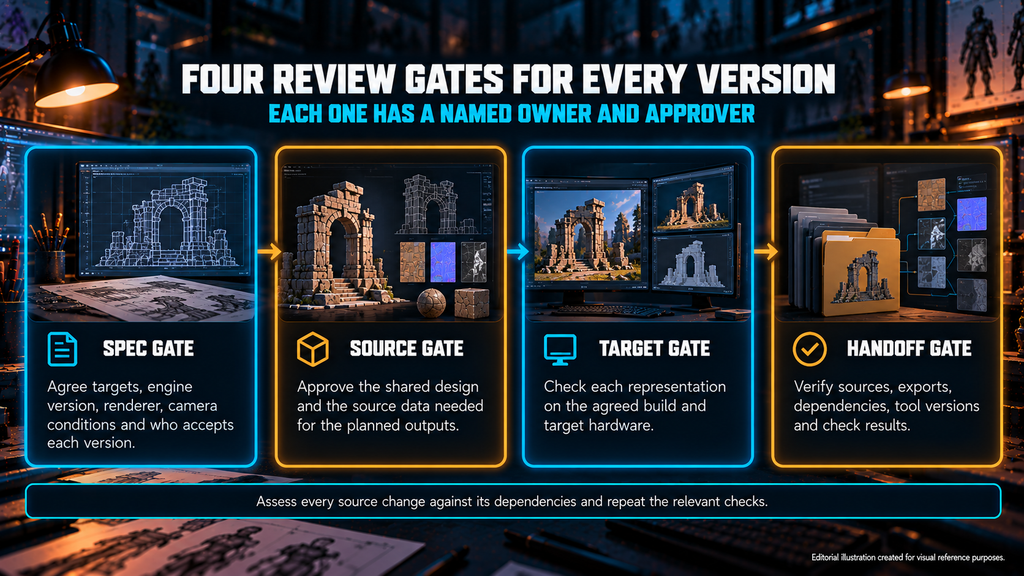
Four gates keep versions honest:
- Spec gate. Agree the actual targets: hardware or device tiers, engine version, renderer, camera conditions and the people who accept each version. Write the acceptance criteria before the first asset.
- Source gate. Approve the shared design and the source data needed for the planned outputs.
- Target gate. Check each required representation for visual quality, functional behavior and technical compliance in the agreed target configuration. Run the agreed build on target hardware: the editor alone does not give realistic performance metrics, and Unity’s profiling documentation recommends profiling a build on the target device.
- Handoff gate. Verify the package before final approval. What to receive at handover – editable sources, exports, textures and materials, documentation – decides whether the next team can continue without calling the vendor. Add dependencies, tool versions, manual operations and check results, because source files alone do not guarantee that every variant can be reproduced.
“Editorial illustration created for visual reference purposes. It does not represent a real project, client work, or official software screenshot unless stated otherwise.”
Add one rule to the change process: assess each source change against its dependencies. Identify the affected representations, update them through the documented workflow and repeat the relevant checks. Record the impact assessment and any accepted exceptions, so the cost of a late change is visible before anyone approves it.
Our Approach to Multi-Target Delivery
We work with teams on PC, console and mobile, and the first thing we ask for is the numbers: triangle ceiling, texel density, texture memory, draw-call target and the confirmed platforms. Those become the spec for a multi-target art pipeline agreed at the brief, not discovered at the port. The studio details are in the block above.
Three Ways to Organize Multi-Target Assets: Side by Side
| Approach | Suitable when | Work to account for | Main risk |
| Shared representations with target settings | Existing content meets each target’s requirements | Import and build configuration, target validation | Assuming settings can solve unsupported features or presentation problems |
| Shared sources with authored variants | Some targets need different geometry, textures, materials or layouts | Variant production, dependency tracking, validation | Changes fail to reach affected variants |
| Substantially separate platform representations | Presentation or technical requirements differ significantly | Separate authoring work plus coordination of shared design and changes | Uncontrolled divergence and duplicated maintenance |
The approaches can coexist in one project: shared settings for most props, authored variants for hero assets, a separate representation for a screen layout. Mobile-first or premium-first is a sequencing choice that applies to each of them; decide early which detailed sources are kept.
How to Decide Before the Asset List Grows
A cross-platform game art pipeline makes shared work, target-specific changes and acceptance responsibilities explicit. Document the source data, required representations and validation process early, then test representative assets before scaling production, so it is clear where reuse is practical and where additional authoring is required.
Shipping on more than one platform? Send us your asset list, your target platforms and the engine you use. We review them against the structure above – where sources can be shared, where target-specific variants are likely, which gates you need – and we usually reply to briefs within 1–2 business days.
Get a multi-target art pipeline review → · sales@nastyrodent.com
See the finished work in the Nasty Rodent portfolio.
Let's work
together


in mind?
From 3D characters and environments to weapons, props, concept art and game UI/UX: ten years deep, 40+ artists strong, zero fluff. Tell us what you are making and get a free, no-pressure estimate.
estimate