LOD (Level of Detail) for Real-Time 3D: Polygon Budget Guide
-

Written byDenys Zadoienyi
-

Updated on09.09.2026
-

Time to read15 min

- What a Polygon Budget Actually Controls
- Polygons vs Triangles: Why This Guide Uses Triangles
- What LOD Means in Real-Time 3D
- The Variables That Actually Set a Budget
- Setting Character Polygon Budgets by LOD Tier
- Weapons and Close-View Assets
- Props and Repeated Assets
- Environment Assets and Scene Density
- Vehicles
- Triangle Count Is Only One Runtime Cost
- Frame Budget and Profiling
- If You’re on Unreal Engine 5: What Nanite Changes
- Building the Budget Before Production Starts
- Common Mistakes That Blow Polygon Budgets Mid-Production
- How Nasty Rodent Approaches Technical Constraints
- Polygon Budgeting Approaches by Production Context
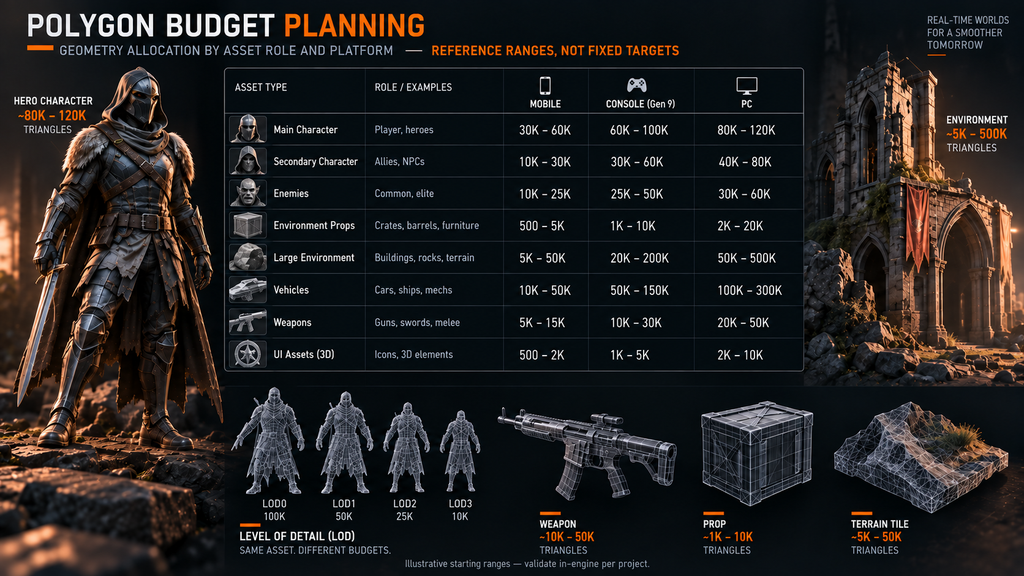
Most polygon budget conversations start with the wrong question: “how many polygons should this asset have?” There is no single answer, because the number depends on the asset’s role in the scene, the platform it ships on, how long and how closely the camera actually sees it, and which LOD tier is being measured. A hero character viewed at arm’s length on console and the same character rendered as a background silhouette on mobile are not the same budgeting problem, even though both start from the same source file.
“Editorial illustration created for visual reference purposes. It does not represent a real project, client work, or official software screenshot unless stated otherwise.”
This guide covers how polygon budgets and LOD tiers actually get set for real-time 3D production – characters, weapons, props, vehicles, and environments – and where the reasoning changes by platform. It is a planning framework, not a fixed lookup table: the working ranges included below are illustrative starting points, and the one absolute number set reused from an existing published Nasty Rodent reference is marked as such.
What a Polygon Budget Actually Controls
A polygon budget is not a single number assigned to an asset. It is an allocation decision made across three layers at once:
- Per-asset triangle count – how many triangles a single mesh carries at its highest LOD.
- Per-LOD-tier reduction – how much that count drops at each subsequent LOD level as the asset moves away from camera or shrinks on screen.
- Scene-level total – how many triangles from all visible assets combined are on screen in the worst-case frame.
Scene-level totals are where otherwise reasonable per-asset budgets can break down. A team can hit every individual asset’s target and still miss the frame budget, because nobody added up what happens when a dozen of those assets are visible at once. The numbers in this guide are starting points for the first layer – they only hold if the second and third layers are planned alongside them, not after.
Polygons vs Triangles: Why This Guide Uses Triangles
In production conversations, “polygon budget” is used loosely as an umbrella term, but engine-facing geometry budgets are almost always expressed in triangles, since render meshes are triangulated regardless of how they were authored (quads, n-gons, or otherwise). Every figure in this guide is a triangle count. “Polygon budget” is used in headings because that’s the term people search for – the working unit throughout is the triangle.
What LOD Means in Real-Time 3D
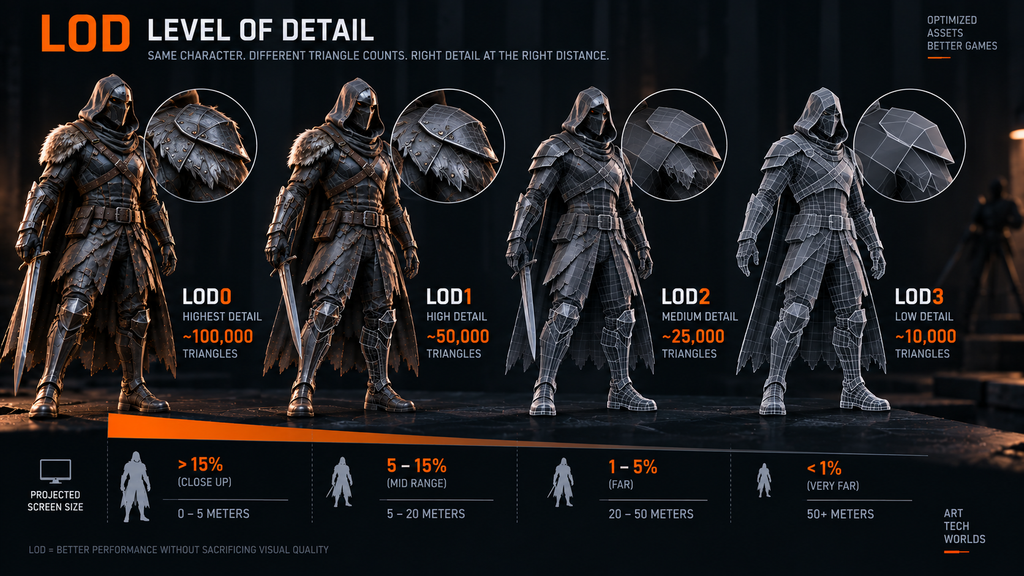
A traditional Level of Detail (LOD) system uses progressively simpler representations of a mesh as it becomes smaller on screen – whether because the camera moved away or because the object is simply small relative to the viewport. The standard tier structure most engines expose:
- LOD0 – full detail, used at close range or high screen coverage.
- LOD1, LOD2… – progressively simplified versions, each reducing triangle count while trying to preserve the features still visible at that tier’s typical screen size.
- Lowest LOD – a heavily simplified mesh, used only when the asset occupies very little of the screen. How aggressive this final tier can be depends on the asset’s shape complexity and how far it typically sits from camera; it is not always reducible to “silhouette only.”
Modern engines, including Unreal Engine, drive LOD transitions primarily by projected screen size rather than raw camera distance, and allow that threshold to be set per platform – the same asset can swap to a lower LOD earlier on mobile than on console. The exact reduction percentage between tiers is not a fixed industry standard; engine documentation typically presents specific ratios as illustrative examples for a tutorial asset, not as a rule to apply universally. What matters in practice is validating each transition visually at the distances players actually experience, and using cross-fading or transition blending where the engine supports it, to avoid a visible pop at the swap point.
“Editorial illustration created for visual reference purposes. It does not represent a real project, client work, or official software screenshot unless stated otherwise.”

The Variables That Actually Set a Budget
Three especially important asset-level variables to weigh before assigning a number are:
Deformation cost. A skinned, animated mesh carries a per-vertex skinning and animation cost that a static mesh doesn’t. Two meshes at the same triangle count are not equivalent in runtime cost if one is rigged and the other is a static prop.
Screen presence. A hero weapon in a first-person game occupies substantial, close-range screen space for the entire session. A background prop might be visible for two seconds in a wide shot. Budgets should track actual screen time and proximity, not just a category label.
Instance count. An asset that appears once per level tolerates a very different per-instance budget than one that gets placed two hundred times in the same scene. Multiplying per-asset cost by realistic instance count is easy to overlook in early planning, and ignoring it can push scene-level workloads beyond the intended target.
Setting Character Polygon Budgets by LOD Tier
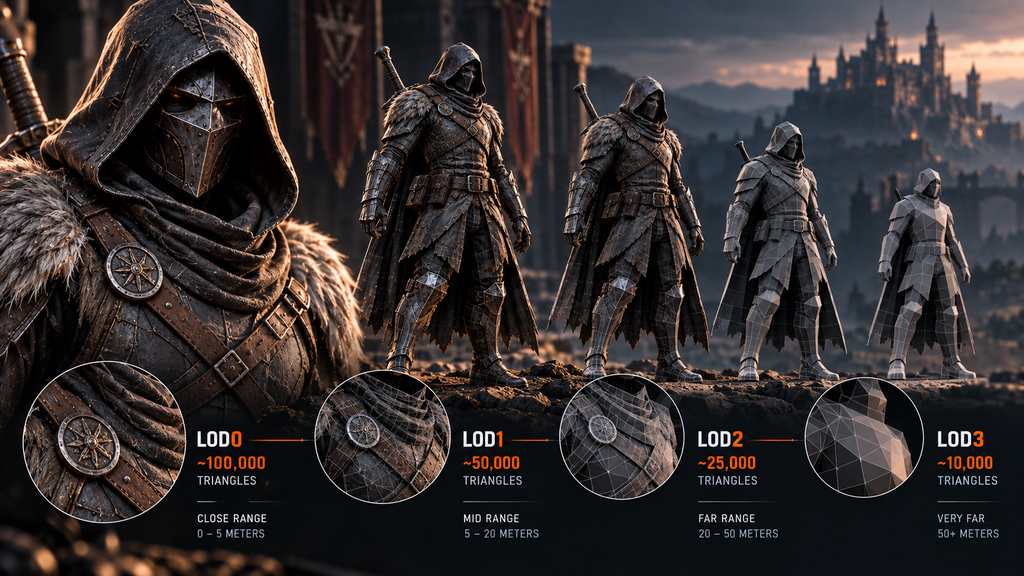
For a mid-core/AAA PC or console hero character, our existing UE5 character pipeline guide documents a working range of 80,000–120,000 triangles at LOD0, stepping down to 8,000–15,000 at the lowest LOD used for distant or background rendering. That is the one figure in this guide sourced directly from a published production reference rather than a general industry heuristic – it should be treated as a project-specific planning example, not an engine requirement or a universal rule for every hero character.
“Editorial illustration created for visual reference purposes. It does not represent a real project, client work, or official software screenshot unless stated otherwise.”
Secondary and background characters extrapolate from the same relative logic – lower narrative weight and shorter screen time justify a proportionally lower budget – but without a specific published reference to anchor them, they should be treated as starting hypotheses to validate through your own in-engine profiling rather than fixed targets:
| Asset Role | Relative Geometry Allocation | Main Constraint |
| Hero / player character | High (reference: 80K–120K LOD0 on PC/console, see above) | Screen coverage, close-range scrutiny |
| Secondary / named NPC | Medium | Simultaneous visibility with the hero |
| Background / crowd character | Low | Instance count when many appear at once |
Mobile character budgets are typically tighter than PC or console, but there is no fixed scaling factor that applies across projects – device tier, renderer, shader complexity, screen resolution, and thermal envelope all affect where the practical ceiling actually sits for a given title, and a number set on paper without a device profiling pass is a hypothesis rather than a validated target.
Weapons and Close-View Assets
In a first-person or over-the-shoulder game, a hero weapon can justify disproportionately high geometric detail relative to its physical size, because it occupies substantial, close-range screen space for the entire session – closer in practice to a secondary character’s budget than to a typical prop’s.
Attachments – scopes, magazines, grips, and similar modular parts – should usually be budgeted separately from the base weapon when they are swappable, because the runtime cost that matters is whatever combination of parts is visible at once, not any single part in isolation.
| Asset Role | Relative Geometry Allocation | Main Constraint |
| Hero weapon (primary, screen-persistent) | High | Close, constant screen presence |
| Secondary weapon / attachment | Medium | Combination cost when several parts are equipped together |
| Handheld prop (non-weapon) | Low–medium | Screen time relative to the hero asset |
Props and Repeated Assets
Props split along a different axis than characters or weapons: the deciding factor is usually instance count rather than screen proximity. A set-dressing prop that never appears more than once or twice in a shot tolerates a much higher per-instance budget than the same prop type placed by the hundred across a level.
Repeated set-dressing props are particularly easy to over-build early in production, because their individual cost can look negligible until instance counts scale up – setting an explicit relative priority in the technical brief, rather than leaving it to individual judgment, avoids that late rework cycle.
Environment Assets and Scene Density
Environment budgeting follows a related but distinct logic from character, weapon, and prop budgeting, because the unit of concern shifts from “one asset’s triangle count” to scene density – how many modular pieces, hero architectural elements, and repeated set-dressing props are visible in the worst-case frame, combined.
A handful of principles carry over directly from the asset-role thinking above: hero environment pieces (a distinctive doorway, a landmark structure) justify a higher per-asset budget than modular kit pieces, which in turn justify more than small repeated clutter; and instanced geometry (repeated architectural modules, foliage clusters) should be budgeted by instance count against the scene total, not by a single asset’s number in isolation. On Unreal Engine 5, static opaque environment geometry is also the strongest candidate for Nanite, which can shift part of the optimization effort away from manually authored geometry LOD chains and toward source-data size, material complexity, visibility, streaming, memory, and overall scene cost instead.
The full technical breakdown of environment-specific budgeting – modular kit design, texel density, LOD chains for non-Nanite assets, and platform-by-asset-category ranges – is covered in our 3D environment design pipeline guide, which goes considerably deeper on this category than the scope of this article.
Vehicles
Vehicles occupy a wider budget range than any other asset category, because a drivable hero vehicle seen from a close third-person or cockpit view has very different requirements from a background vehicle glimpsed at a distance.
Hero vehicles often justify a longer LOD chain than characters or props, because they need to stay readable across a wider span of camera scales – from close cockpit or exterior detail to distant chase framing to a small silhouette at range – rather than a fixed number of tiers that applies to every project. Vehicles with separate destructible or damage-state geometry need each damage state budgeted individually rather than assuming the base mesh’s LOD chain automatically covers it – a gap that shows up late in production if it isn’t addressed at the brief stage.
Triangle Count Is Only One Runtime Cost
A polygon budget that only tracks triangle count is measuring one input among several that determine actual frame cost. The same triangle count can carry very different runtime costs depending on:
- Materials and mesh sections – additional material slots or render sections can increase draw-call and shading overhead, depending on the engine and rendering path.
- Skinning and morph targets – animated deformation carries a per-vertex cost a static mesh doesn’t.
- Transparency and overdraw – translucent or masked surfaces are frequently more expensive than additional opaque geometry at the same triangle count.
- Shadows – shadow-casting geometry can add meaningful rendering and memory cost, with the exact impact depending heavily on the engine’s shadowing method, the number and type of active lights, and overall scene setup.
- Texture memory – high-resolution textures compete for the same memory budget as dense geometry.
- Draw calls and instance count – how many separate rendering commands the scene issues, independent of any single mesh’s complexity.
Two assets at the same triangle count are not the same runtime cost if one is a static opaque prop and the other is a skinned, masked-material, shadow-casting character. This is why a triangle-count table alone – including the tables above – is a planning starting point, not a performance guarantee.
Frame Budget and Profiling
Every polygon budget ultimately exists inside a frame-time budget. A 30 FPS target allows roughly 33.3 ms per frame, 60 FPS about 16.7 ms, and 120 FPS about 8.3 ms. Geometry competes with materials, lighting, shadows, animation, post-processing, and physics for that same window – a scene can be well within its triangle budget and still miss its frame target because of cost elsewhere in that list.
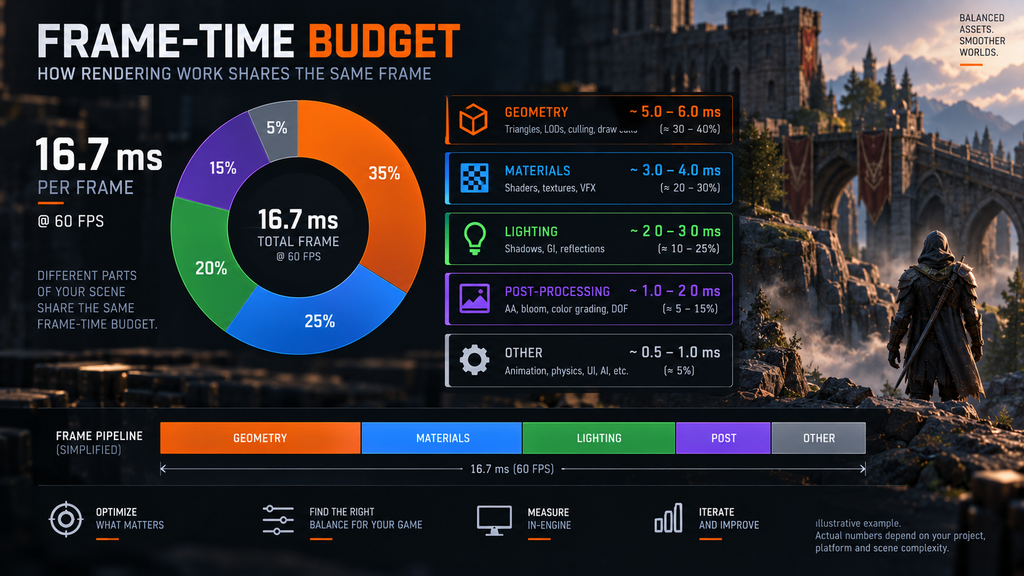
“Editorial illustration created for visual reference purposes. It does not represent a real project, client work, or official software screenshot unless stated otherwise.”
This is the reasoning chain a polygon budget actually serves: asset budget → scene-level workload → frame time, not “asset triangle number → good or bad” in isolation. A number set before a single asset exists and profiled is a hypothesis, not a validated target – the first hero asset in each category should go through an in-engine profiling pass before the rest of the asset list is produced against the same numbers.
If You’re on Unreal Engine 5: What Nanite Changes
Nanite changes the geometry-budgeting model for supported content rather than making budgeting irrelevant. For Nanite-enabled static meshes, Unreal Engine manages fine-grained geometric detail dynamically based largely on projected screen size instead of a manually authored LOD chain. In Unreal Engine 5.8, Nanite also supports Skeletal Meshes: Epic documents Nanite Skeletal Mesh content as having no traditional geometry LODs, with animation LODs remaining applicable instead – a meaningfully different model from the character LOD tables earlier in this guide.
This does not make the reasoning in this article obsolete – it shifts where the budgeting effort goes. Source-geometry size, material complexity, memory and disk footprint, streaming behavior, target-platform fallback paths (for hardware that doesn’t support Nanite), and any non-Nanite content in the same scene still need to be planned and profiled as part of the overall frame budget. For the full technical breakdown of what Nanite does and doesn’t change – including its current Skeletal Mesh support, foliage handling, and the decision matrix for static geometry – see our dedicated guide, What Is Nanite in UE5.
Building the Budget Before Production Starts
The technical brief is where polygon budgets get set. “AAA quality” by itself is not a usable geometry requirement – a production brief needs measurable constraints, whether expressed as triangle ranges, LOD tier targets, screen-size thresholds, platform profiles, or another engine-specific acceptance criterion.
A working polygon budget worksheet, set before modeling begins, should include:
- Asset role classification – every planned asset assigned to a role (hero, secondary, background/crowd) before work starts, not decided retroactively.
- Platform target(s) – each asset role gets a budget row per platform if the project ships on more than one, rather than one shared number stretched to cover both.
- LOD tier count and reduction approach – how many LOD levels the asset uses, and roughly how aggressive the reduction is at each tier, based on acceptable visual error at that tier’s typical screen size.
- Worst-case scene total – the maximum realistic number of instances of each asset role on screen simultaneously, multiplied against the per-instance budget.
- Review checkpoint – a point in production, typically after the first hero asset of each category is complete, where the budget is validated against actual in-engine profiling rather than the modeling tool’s viewport statistics.
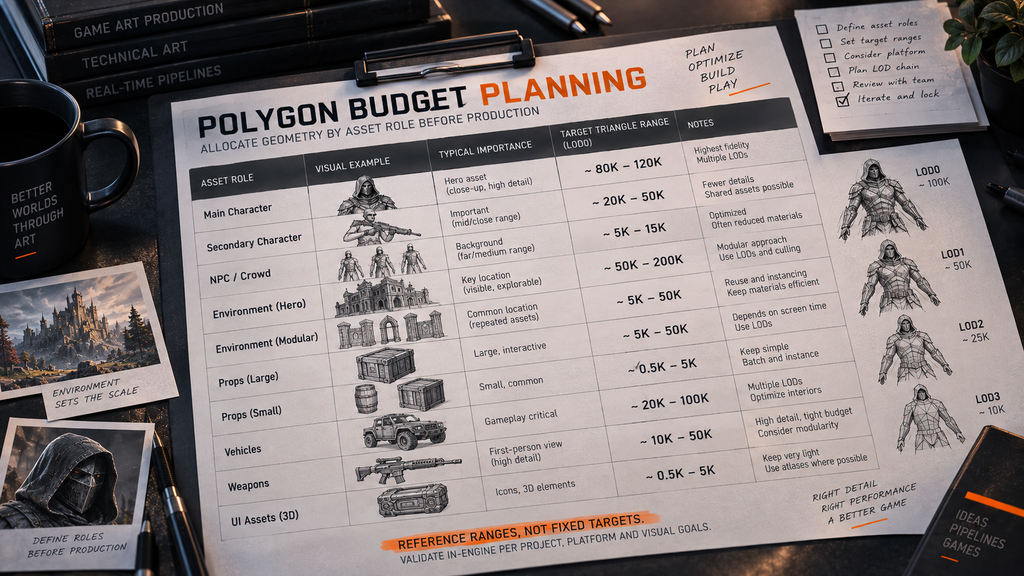
“Editorial illustration created for visual reference purposes. It does not represent a real project, client work, or official software screenshot unless stated otherwise.”
Skipping step 5 leaves the initial budget untested – the first hero character, weapon, and vehicle should each go through an in-engine profiling pass before the rest of the asset list is produced against the same targets.
Common Mistakes That Blow Polygon Budgets Mid-Production
Setting one number for an entire asset category. “Props are 2,000 triangles” ignores the significant gap between a hero prop and a set-dressing prop covered above. This can create substantial mid-production rework when the gap surfaces late.
Forgetting instance count. A prop budgeted correctly in isolation can still blow the scene-level total if a hundred instances of it appear in the same frame.
Measuring in the modeling tool, not the engine. Import-time triangulation, generated LODs, duplicated vertices at hard edges or UV seams, and engine-specific mesh processing can all make runtime geometry statistics differ from the modeling package’s reported count.
Locking the budget without a platform column. A single shared number across mobile and console is unlikely to represent both platforms well – it tends to be either unnecessarily conservative for one or unshippable on the other.
How Nasty Rodent Approaches Technical Constraints
We deliver environment and props assets for PC and console titles – including Ready Or Not, Starship Troopers: Extermination, Mutant Year Zero: Road to Eden, and Miasma Chronicles – within client-defined polygon budgets. LOD strategy and Nanite decisions on those titles are set by each client’s own engine team, not claimed here as our production history.
More broadly, our environment and props work is associated with teams including Offworld Industries and The Bearded Ladies.
The exact polygon and LOD requirements vary by project and are defined against the client’s constraints rather than a universal studio-wide number. For outsourced asset production, agreeing on those constraints before the asset list scales – target platform, asset role, expected screen coverage, LOD strategy, and in-engine validation criteria – is best handled at the technical brief stage rather than resolved asset by asset once modeling is underway. If your production has a polygon budget that needs a second set of eyes before you commit an asset list to it, our 3D environment and 3D character teams can review the numbers against your target platforms as part of a technical brief consultation.
Polygon Budgeting Approaches by Production Context
| Approach | Best For | Key Risk |
| Single shared budget across all asset roles | Prototypes, jams, very small scope | Over- or under-budgets most asset types |
| Per-role budget, single platform | Single-platform mid-core productions | Doesn’t transfer cleanly if a port is added later |
| Per-role, per-platform budget worksheet | Multi-platform mid-core/AAA productions | Needs an owner to keep it current as the asset list grows |
| Per-role, per-platform, with in-engine validation checkpoints | AAA productions, large outsourced asset lists | Highest planning overhead, lowest late-production rework risk |

Let's work
together


in mind?
From 3D characters and environments to weapons, props, concept art and game UI/UX: ten years deep, 40+ artists strong, zero fluff. Tell us what you are making and get a free, no-pressure estimate.
estimate