Niagara vs Cascade: Choosing a VFX System for Unreal Engine 5
-

Written byDenys Zadoienyi
-

Updated on23.07.2026
-

Time to read17 min


- What Niagara and Cascade Actually Are
- Architecture: Fixed Emitter Modules vs a Programmable System Framework
- Performance: Simulation Target and What GPU Actually Changes
- Authoring Workflow: Property Panels vs Programmable Modules
- Cascade’s Deprecation: What’s Actually Confirmed
- Migrating Cascade Content: What the Official Converter Actually Handles
- The Production Decision: New Build, Convert, or Rebuild
- Niagara vs Cascade: Quick Comparison
- Niagara vs Cascade for Character and Weapon Effects
- Niagara Fluids: A Capability Cascade Never Had
- Authoring Workflow: Debugging and Profiling
- Common Effect Types: Where Each System Historically Sat
- How We Work at Nasty Rodent
Niagara vs Cascade is not really an open question in Unreal Engine 5 anymore – Cascade is officially deprecated, and Epic has confirmed it will be removed in a future release. What’s still genuinely worth working through is what that means in practice: how Niagara’s architecture differs from Cascade’s, where the official migration tooling holds up and where it doesn’t, and how a production team should handle a project that still has Cascade content sitting in it.
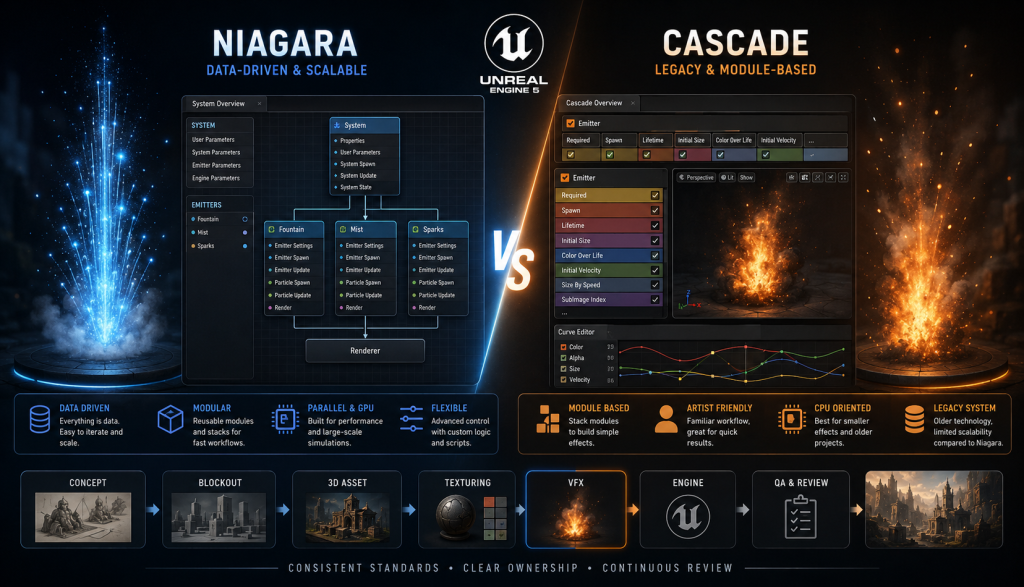
“Editorial illustration created for visual reference purposes. It does not represent a real project, client work, or official software screenshot unless stated otherwise.”
This guide covers both halves of that question. The first half is technical: how Niagara’s System-Emitter-Module structure works, what its GPU workflow actually adds over Cascade’s, and what the authoring workflow looks like by comparison. The second half is closer to a production decision: whether to rebuild legacy Cascade effects from scratch or convert them using Epic’s official tool, and what that choice looks like when the project is being handed to an external art or technical art team rather than kept fully in-house.
What Niagara and Cascade Actually Are
Cascade was Unreal Engine’s original visual effects system – the tool used to build particle-based effects like fire, smoke, sparks, and impact bursts throughout the UE4 era. It works on a fixed set of modules attached to individual emitters, each configured through property panels rather than a visual scripting layer. Cascade primarily runs particle simulation on the CPU, but it also supports a GPU Sprites emitter type for high-particle-count effects, switching the simulation target on a per-emitter basis. Its real limitation was never a complete absence of GPU support – it was a less flexible, less extensible architecture for building, sharing, and scaling effect logic than Niagara provides.
Niagara is Unreal Engine’s current VFX system, available in later UE4 versions but substantially expanded into the primary tool for UE5 production – part of the broader set of engine changes we cover in our guide to what Unreal Engine 5 is. Rather than a fixed module set, Niagara treats a visual effect as a data-driven system built from three layers: a System (the top-level container for an effect), one or more Emitters inside it, and Modules stacked inside each Emitter that define specific behavior – spawn rate, velocity, collision, color over lifetime, and so on. Niagara supports both CPU and GPU simulation, and its module logic can be extended with HLSL code directly inside the editor rather than requiring a programmer to add new C++ functionality.
The practical distinction that matters for a production team isn’t which system is “better” in the abstract – it’s that one is on a confirmed removal path and the other is Unreal Engine’s actively supported VFX framework.
Architecture: Fixed Emitter Modules vs a Programmable System Framework
Cascade particle systems are also organized around emitters and modules – that part isn’t unique to Niagara. Emitters and their module stacks can be copied or reused between particle systems, so it’s not accurate to say Cascade offered no reuse at all. What Cascade doesn’t provide is Niagara’s broader model of reusable scripted modules, parameterized emitters, and shared data-driven behavior – reuse in Cascade generally means copying a working setup and adjusting it, not building a single vetted module that multiple effects reference and update from a shared source.
Niagara’s System-Emitter-Module hierarchy is built for that kind of reuse from the start. A Module is a discrete unit of behavior – think of it as a container that takes data in, performs an operation, and writes data back out – and a module can be shared across compatible emitter and system stack contexts, with a shared source that updates every effect that references it when the module itself changes. An art director standardizing VFX style across a project can build a library of vetted modules (a consistent smoke dissipation curve, a standard impact spark behavior) and have every artist on the team build from the same source instead of each artist copying and adjusting a similar setup independently. That’s a meaningfully different production model than Cascade’s copy-and-adjust pattern, and it’s the architectural reason Niagara scales better across a team producing many effects against a shared visual target – the same governance concern that shows up across visual consistency work generally, just applied to VFX specifically.
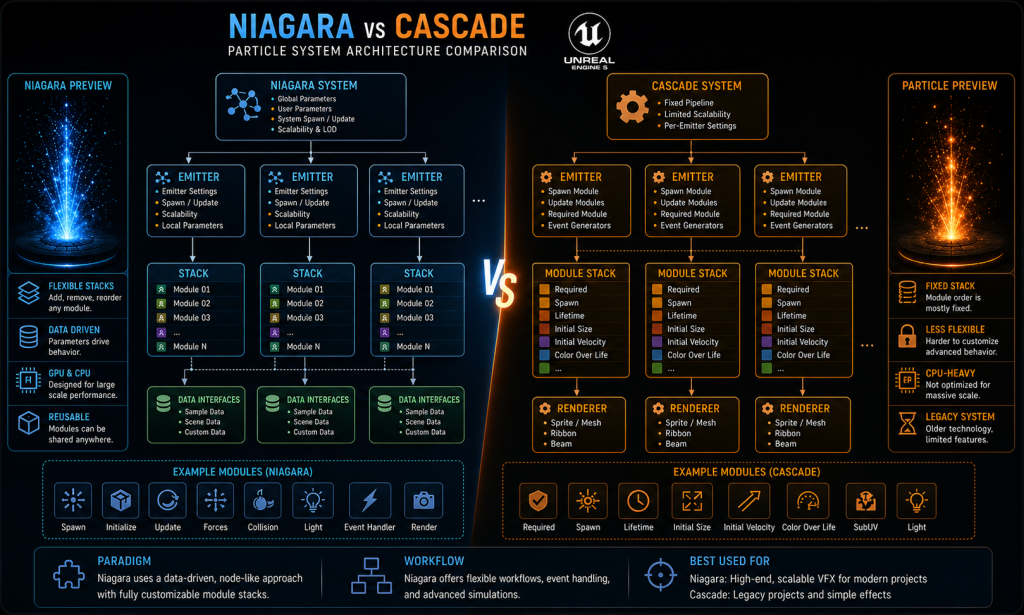
“Editorial illustration created for visual reference purposes. It does not represent a real project, client work, or official software screenshot unless stated otherwise.”
Data Interfaces are the other structural piece worth understanding early: they let a Niagara system pull live data from elsewhere in the engine – a character’s velocity, a weather system’s wind direction, an audio signal’s amplitude – directly into particle behavior through a general-purpose framework, without requesting a new engine-side hook from a programmer every time an effect needs to react to gameplay state. Cascade has no direct equivalent to that general-purpose framework, but it wasn’t blind to gameplay state either – Dynamic Parameters, instance parameters, and Blueprint-driven particle parameters could all feed runtime values into a Cascade effect. The difference is that Cascade’s data access was assembled per-effect from several narrower mechanisms, where Niagara offers one unified, extensible one.

Performance: Simulation Target and What GPU Actually Changes
Cascade defaults to CPU-simulated emitters, but it also supports a GPU Sprites emitter type for high-particle-count effects – configuring an emitter as a GPU Sprite moves its particle simulation onto the graphics card. That capability has existed since UE4. So the real performance distinction isn’t “Cascade can’t use the GPU” – it’s that Cascade’s GPU workflow is narrower and less programmable: GPU Sprites support a fixed, comparatively limited set of behaviors and modules, and several Cascade features simply aren’t available once an emitter is switched to GPU simulation.
Niagara makes CPU or GPU simulation an explicit per-emitter decision inside a much broader data-driven framework – a shared authoring model across CPU and GPU emitters, with substantially broader programmability and data access than Cascade’s GPU Sprites, though individual modules, Data Interfaces, collision methods, and event workflows can still be simulation-target-specific rather than universally interchangeable. That’s the actual reason large-scale environmental VFX – sandstorms, magic-heavy combat with dozens of simultaneous casters, destruction-heavy set pieces – moved to Niagara well before deprecation made the switch mandatory: not GPU access itself, but GPU access combined with the flexibility to keep building complex, data-driven behavior on top of it.
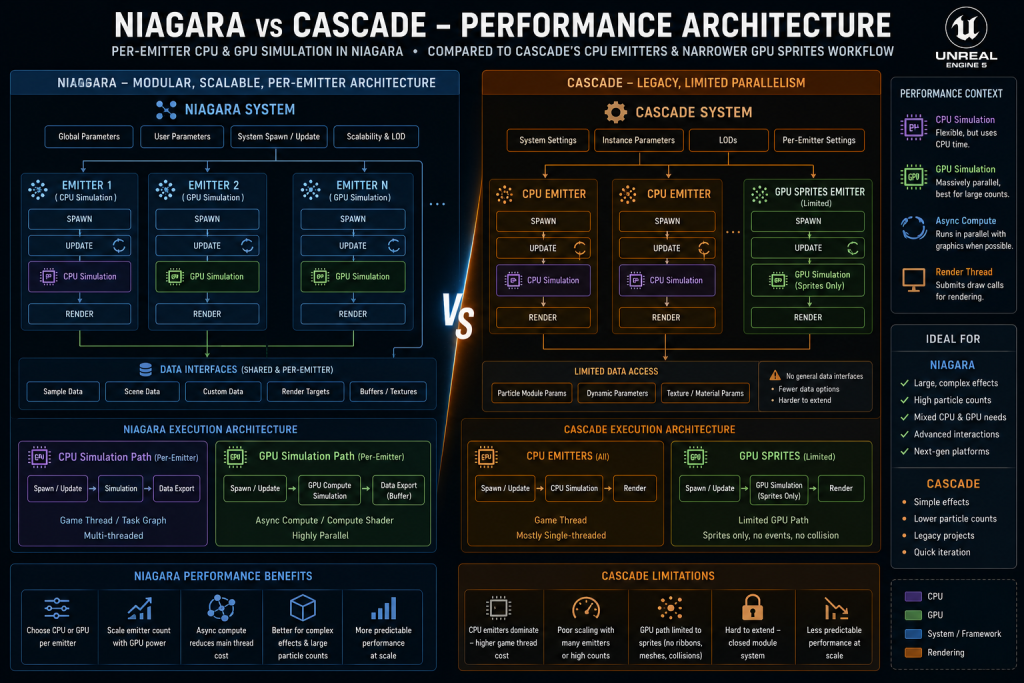
“Editorial illustration created for visual reference purposes. It does not represent a real project, client work, or official software screenshot unless stated otherwise.”
It’s worth being direct about a caveat that gets skipped in most VFX comparisons: GPU simulation doesn’t automatically make an effect cheap. Dense translucent particles can still be bottlenecked by overdraw, material instruction cost, sorting, and memory bandwidth – none of which GPU-based simulation solves by itself, because simulation cost and rendering cost are separate budgets. A GPU-simulated smoke effect with an expensive translucent material and heavy overdraw can still tank frame rate even though the particle positions are computed cheaply. Simulation and rendering need to be profiled separately, and a technical artist choosing CPU vs GPU per emitter is making a simulation-target decision, not a guarantee about total effect cost.
That per-emitter choice isn’t purely about raw particle count, either. Effects whose individual particles need to drive authoritative gameplay logic are generally kept off pure GPU simulation, or separated from gameplay entirely – a weapon projectile’s collision and damage resolution typically stays in gameplay code regardless of which system renders the visual trail, with Niagara or Cascade handling the trail, spark, and impact response rather than the underlying hit detection. The simulation-target decision is really about where an effect’s visual computation should live, not about which system gets to own gameplay-critical logic.
Authoring Workflow: Property Panels vs Programmable Modules
Cascade’s editor is an interactive property-panel workflow: modules are added to an emitter and configured through exposed properties, and standard edits preview in real time in the viewport without a compile step – Cascade was never a “change a value, wait, then see the result” tool for ordinary effect authoring. Where Cascade does hit a wall is behavior that falls outside a module’s exposed properties and available parameter channels: extending it that far generally meant reaching for Dynamic Parameters, material-side workarounds, vector fields, or external Blueprint logic, and in some cases genuinely required new native module development from a programmer.
Niagara’s authoring model moves much more of that programmable behavior into the VFX editor itself. Modules are built from graphs of nodes with an interactive graph-based preview, and a technical artist can inspect, modify, or build new modules without leaving the Niagara editor – including writing custom HLSL directly inside a node when the built-in module library doesn’t cover a specific behavior, with Niagara compiling the result internally while still giving the artist real-time visual feedback. This shifts a category of technical decisions that used to require programmer time or an external workaround in the Cascade era into something a technical artist can own directly inside the same tool. For a team running VFX production against a fixed milestone schedule, that shift – not “no more waiting to see changes,” since Cascade already offered that for standard edits, but “far fewer trips outside the VFX editor for custom behavior” – is what compounds across a project with dozens or hundreds of effects.
Cascade’s Deprecation: What’s Actually Confirmed
This part isn’t a judgment call – it’s documented directly by Epic. Cascade is marked deprecated as of UE 5.0, and Epic’s own UE5 migration documentation states plainly that Cascade will be removed in a later release, with developers directed to switch to Niagara. It still runs inside current UE5 versions, so an existing Cascade-based project doesn’t break on upgrade, but there’s no ambiguity about the trajectory: new development shouldn’t be built on it, and any Cascade content still in a project is technical debt tied to a confirmed removal path, even though Epic hasn’t named the specific release in which removal happens.
That matters more for a production team than it might for a solo developer experimenting in a personal project, because a deprecated system carries specific production risks: Epic isn’t adding new features to it, community tutorials and forum support are increasingly UE4-era and stale, and hiring or onboarding an artist who’s only worked in Niagara means Cascade becomes a skill gap on top of a technical one.
Migrating Cascade Content: What the Official Converter Actually Handles
Epic ships a built-in Cascade to Niagara Converter plugin, accessible through a right-click “Convert to Niagara System” option on any Cascade particle asset. It’s a useful first-pass migration tool, but not a substitute for technical and visual validation – treating it as a one-click solution is where migration timelines go wrong.
The converter generates a new Niagara System alongside the original Cascade asset, and produces a conversion report inside the Niagara Log listing exactly what it converted successfully and what it skipped. Epic documents specific modules and properties that the converter doesn’t fully support – meaning some Cascade effects come through cleanly and others require manual reconstruction of the skipped behavior inside Niagara after conversion. For a small, simple effect, that manual cleanup might be minor. For a complex legacy effect built up over multiple UE4-era modules with custom behavior layered on top, the honest assessment is often that a clean manual rebuild in Niagara produces a better result than converting and patching – the converter is a triage tool for figuring out what needs attention, not a guarantee that the output is production-ready as-is.
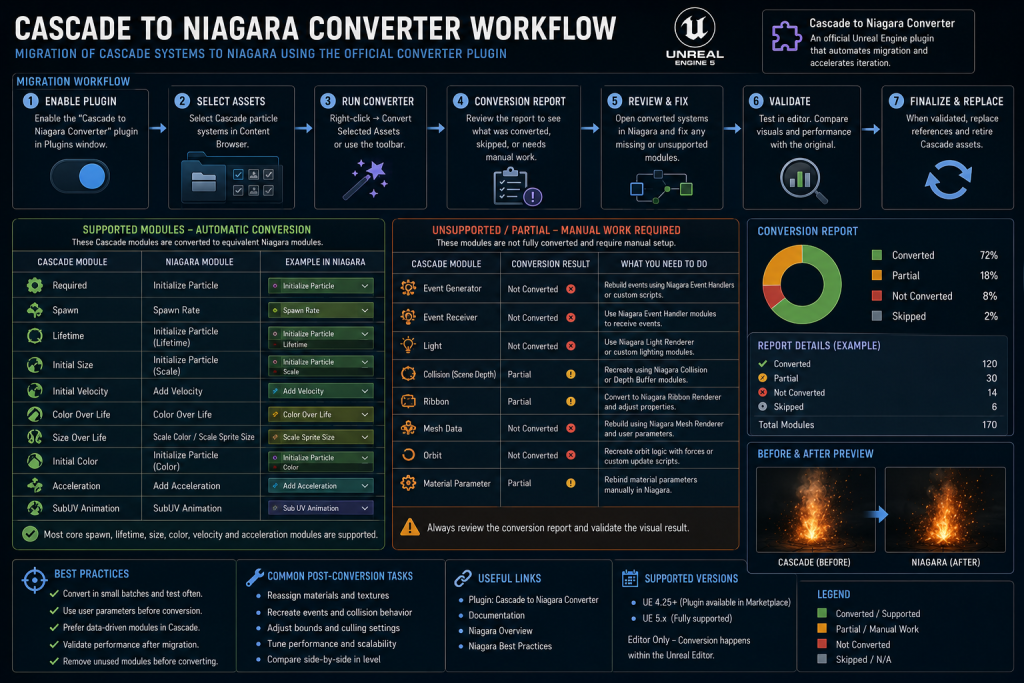
“Editorial illustration created for visual reference purposes. It does not represent a real project, client work, or official software screenshot unless stated otherwise.”
This is the detail that most general VFX comparisons skip past, and it’s the one that actually determines a migration timeline: budgeting time as “run the converter” is a different estimate than “run the converter, review every conversion report, and manually rebuild whatever it flagged as unsupported.”
The Production Decision: New Build, Convert, or Rebuild
For any Unreal Engine 5 project, the practical decision tree looks different depending on where the content already is.
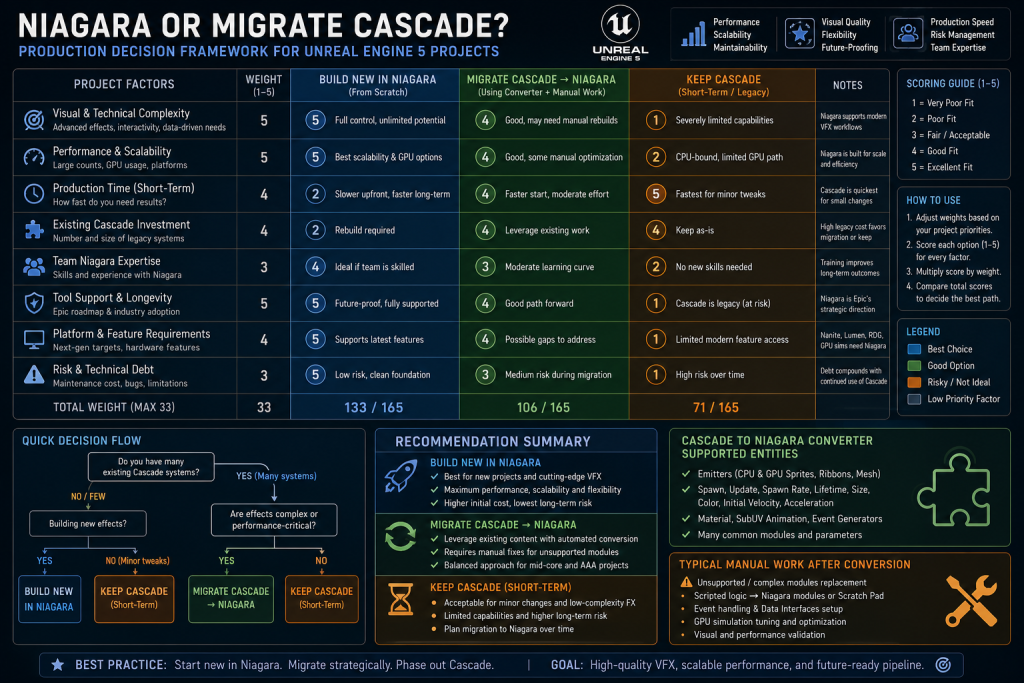
“Editorial illustration created for visual reference purposes. It does not represent a real project, client work, or official software screenshot unless stated otherwise.”
New effects on a UE5 project. New VFX work should default to Niagara – starting on a system scheduled for removal creates debt on day one for no offsetting benefit. The narrow exception is short-lived, tightly scoped work on a codebase that’s deliberately frozen ahead of a planned engine upgrade, where a temporary Cascade patch might be pragmatic; outside that specific case, the default holds without qualification.
Legacy Cascade content inherited from a UE4 project. This is where the real judgment call sits. Running the converter first and reading its report is the right starting point regardless of the effect’s complexity – it costs little and tells you exactly what you’re dealing with. From there, simple effects with a clean conversion report may need only limited manual work, but every converted effect – clean report or not – should still pass a real validation pass: visual parity against the original, timing, bounds, material parameters, scalability behavior across platforms, and performance, not just a glance at whether it looks roughly right. Complex effects flagged with unsupported modules are a case-by-case call between patching the converted asset and rebuilding it natively in Niagara, and that call should weigh the effect’s visibility (a hero spell effect that appears in every trailer warrants a clean rebuild; a background ambient particle probably doesn’t) alongside how much of the original Cascade logic the converter actually preserved.
A project moving into an outsourcing engagement. This is where Cascade legacy content becomes a brief-writing problem, not just a technical one. If a project handing VFX work to an external team still has Cascade assets in its content, that status needs to be explicit in the technical brief – whether the vendor is expected to migrate them, rebuild them, or simply leave them untouched pending an internal decision. We cover how a UE5-specific technical brief should handle exactly this kind of legacy-system detail in our guide to briefing a game art studio for UE5 production – the same discipline that applies to Nanite readiness and Lumen lighting response applies just as directly to VFX system status, and skipping it produces the same category of downstream surprise.
Niagara vs Cascade: Quick Comparison
| Cascade | Niagara | |
| Status in UE5 | Deprecated, scheduled for removal | Current standard VFX system |
| Simulation | Primarily CPU emitters; GPU Sprites available with narrower, less programmable support | CPU or GPU simulation per emitter within a broader, consistently programmable framework |
| Structure | Emitters and modules, but limited to copy-and-adjust reuse | System / Emitter / Module hierarchy with reusable scripted modules |
| Extending behavior | Dynamic Parameters, material workarounds, or new native modules from a programmer | Visual node graphs; custom HLSL inside the editor |
| Live gameplay data | Dynamic Parameters, instance parameters, Blueprint integration – assembled per effect | Native, general-purpose Data Interfaces |
| Iteration | Interactive property-based preview; custom native behavior may require code changes | Interactive graph-based preview; custom scripted modules authored and compiled inside Niagara |
| Best fit today | Maintaining existing legacy content only | All new production |
Niagara vs Cascade for Character and Weapon Effects
VFX doesn’t live in isolation from the rest of a production’s visual target – a muzzle flash, a hit spark, or a weapon trail has to read consistently with the asset it’s attached to, under the same lighting the rest of the scene ships with. Niagara’s broader GPU support and more programmable authoring model make this kind of tight iteration against a live weapon asset or character asset considerably more flexible than Cascade’s narrower module set allowed, which matters specifically for effects that need several rounds of visual calibration against a hero asset before they’re approved. Environment-scale effects – weather, ambient magic, large-scale destruction debris across a scene built for Unreal Engine 5 environment production – see an even larger practical benefit from Niagara’s GPU workflow, simply because the particle counts and behavioral complexity involved are higher.
Niagara Fluids: A Capability Cascade Never Had
One category of effect illustrates the architectural gap between the two systems better than a feature checklist can: real-time fluid simulation. Epic’s Niagara Fluids plugin extends Niagara with grid-based 2D and 3D fluid simulation templates for effects such as fire, smoke, gas, and other fluid-like phenomena, built directly on top of Niagara’s existing infrastructure rather than as a separate system. The plugin exposes 2D templates optimized for real-time game use and 3D templates aimed at cinematic-quality output, and because it’s built on standard Niagara systems and emitters, advanced users can extend it without writing a custom plugin or a new data interface from scratch. As with any plugin still under active development, its exact maturity and supported feature set should be checked against the specific Unreal Engine version a project is running, since plugin status changes between releases.
Cascade has no equivalent, structurally or historically – fluid-like behavior in the Cascade era generally meant faking the look with layered sprite emitters and hoping the illusion held up at the camera angles that mattered, or reaching for an external tool entirely. Niagara’s native infrastructure makes this category of effect substantially more accessible than it ever was in Cascade, though production-quality fluid work still requires real simulation tuning, material work, and platform-specific performance profiling – it’s a meaningfully lower starting point, not a shortcut past the work.
Authoring Workflow: Debugging and Profiling
The workflow difference extends past authoring into how a team diagnoses a VFX performance problem once it’s in a scene. Cascade effects could be profiled through Unreal’s general-purpose tools – particle counters, draw call and overdraw stats, CPU and GPU profiling – but nothing in Cascade itself broke performance cost down by system, emitter, or simulation stage. Niagara adds system-specific debugging and inspection tools on top of those same general engine profilers: the Niagara Debugger can display a real-time HUD with detailed simulation information – particle counts, memory use, active systems, and captured snapshots – while Unreal’s general CPU, GPU, and rendering profilers still handle attributing that cost to the broader frame budget. The exact commands, metrics, and debugger features available vary by engine version, so it’s worth confirming against the specific UE5 release a project is running rather than assuming parity across versions. For a production tracking VFX performance across dozens of effects against a platform budget, that added layer of system-specific visibility is the difference between profiling being routine and profiling being a special investigation reserved for when something’s already visibly wrong.
Common Effect Types: Where Each System Historically Sat
Not every effect category benefited from the Niagara transition equally, which is useful context for understanding why some UE4-era projects still have Cascade content lingering rather than having migrated everything at once. Simple, low-particle-count effects – a small muzzle flash, a short-lived hit spark, a UI-linked flourish – worked adequately in Cascade’s standard CPU emitters and didn’t put enough pressure on the system to force an early migration. The effects that pushed teams toward Niagara first were the ones where Cascade’s narrower architecture genuinely got in the way: large-scale environmental atmosphere, destruction debris fields, and any effect that needed to react to live gameplay data through more than a handful of narrow mechanisms. That uneven pressure is part of why so many mid-production UE4-to-UE5 upgrades ended up with a genuinely mixed content state – new large-scale effects built natively in Niagara, older simple effects left in Cascade because migrating them wasn’t the urgent problem – which is exactly the state a technical brief needs to account for explicitly rather than assume away.
How We Work at Nasty Rodent
Niagara and legacy-particle status are part of the technical environment we work within when delivering UE5 environment production at Nasty Rodent, alongside the broader UE5 pipeline considerations covered in our guide to what Nanite is and how it changes 3D production. When a project still carries Cascade content into a new production phase or an outsourcing engagement, that status gets documented explicitly during technical onboarding – the same way Nanite readiness and Lumen lighting response get scoped for environment and character work – so it doesn’t turn into an unexpected integration or ownership gap mid-production.

Let's work
together


in mind?
From 3D characters and environments to weapons, props, concept art and game UI/UX: ten years deep, 40+ artists strong, zero fluff. Tell us what you are making and get a free, no-pressure estimate.
estimate