Environment Concept Art: From Callouts to 3D Blockout
-

Written by Denys Zadoienyi
-

Updated on20.10.2026
-

Time to read13 min

- Why a Beautiful Painting Is Not Yet a Production Document
- Start From Inputs: Art Bible First, Mood Board as One Reference
- Composition Keys That Tell the 3D Team Where Things Go
- Scale: Anchor the Space to the Player
- Modular Logic: Show What Repeats and What Is Unique
- Material and Palette Zones: Style Sheet and Calibration Level
- The Sheet Set a 3D Team Can Build From
- Concept in 3D: When to Block Out Before You Paint
- Handoff to Blockout: What the 3D Team Validates
- Starting Point: Concept, Blockout or an Existing Kit
- Our Approach to Environment Concepts
- Three Ways to Concept a Location
- Agree How the Concept and Blockout Work Together
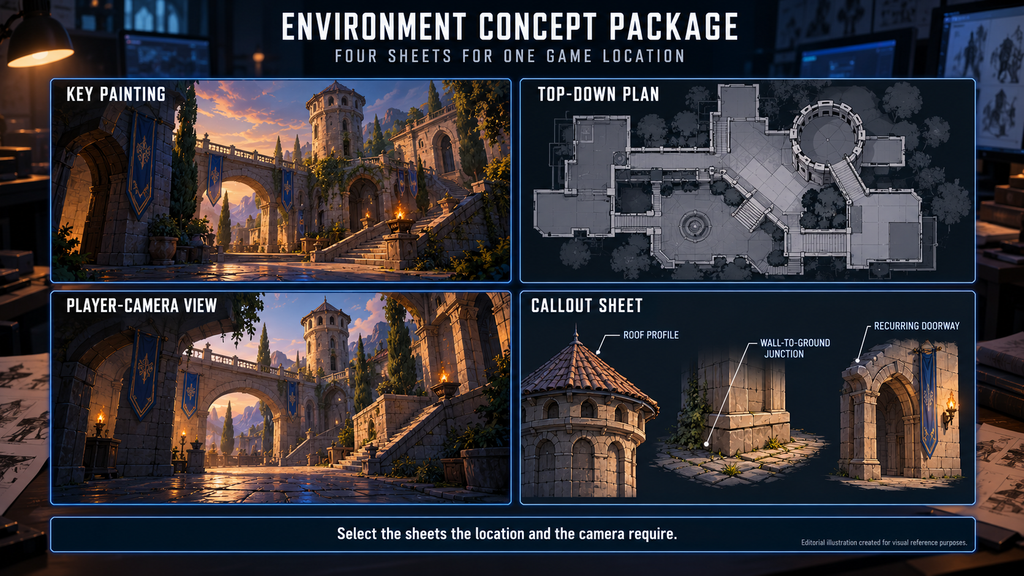
Environment concept art for games does more than show what a location looks like. For the team building the location it also records visual decisions: where the player’s eye goes, how large things are, what is meant to repeat and what the surfaces are made of. It may guide a new blockout, develop alongside one, or build on an existing layout.
“Editorial illustration created for visual reference purposes. It does not represent a real project, client work, or official software screenshot unless stated otherwise.”
If you are an art director or tech art lead preparing a location for 3D, start by agreeing who owns gameplay layout, spatial metrics and visual design, and which decisions still need testing in 3D. Below: what a location concept can carry into 3D, how composition keys, scale, modular logic and material zones work as instructions, which sheets a package can include, and when a concept is better built in 3D from the start. For the wider field, start with what concept art is.
Environment concept art for games is the design of a game location before detailed production. Depending on the stage, it can range from thumbnails and paintings to top-down plans, callouts and rough 3D blockouts that tell the 3D team where the player looks, how large things are, what repeats and what the surfaces are made of.
Why a Beautiful Painting Is Not Yet a Production Document
A key painting shows one view, at one moment, under one light, and it is only one part of game environment concept art. It can be exactly the right deliverable for a pitch or a mood decision. A 3D team building the location usually needs more: how areas connect, what stands behind the corner, how big a doorway is, and which pieces will be repeated across the level.
When those answers are not in the package, someone makes them anyway, often the person building the blockout. The risk is design-critical gaps that nobody owns: the layout is drawn one way, the art bible implies another, and the schedule absorbs the difference.
Our concept art brief guide asks for a top-down overview plus ground-level detail for environments, so the first round starts from an agreed deliverable instead of a single image.
Start From Inputs: Art Bible First, Mood Board as One Reference
The art bible gives a location concept its rules: shape language, material logic, how much detail lives in form and how much in texture. A concept that follows it stays consistent with the rest of the game, and where no art bible exists the first job is to write those rules down. Our game art bible guide covers what belongs in one.
A mood board is one input among several. It sets atmosphere, palette direction and reference, but it does not decide layout, scale or what the kit contains. How a mood board becomes a brief is the subject of our mood boards in game production article.
Composition Keys That Tell the 3D Team Where Things Go
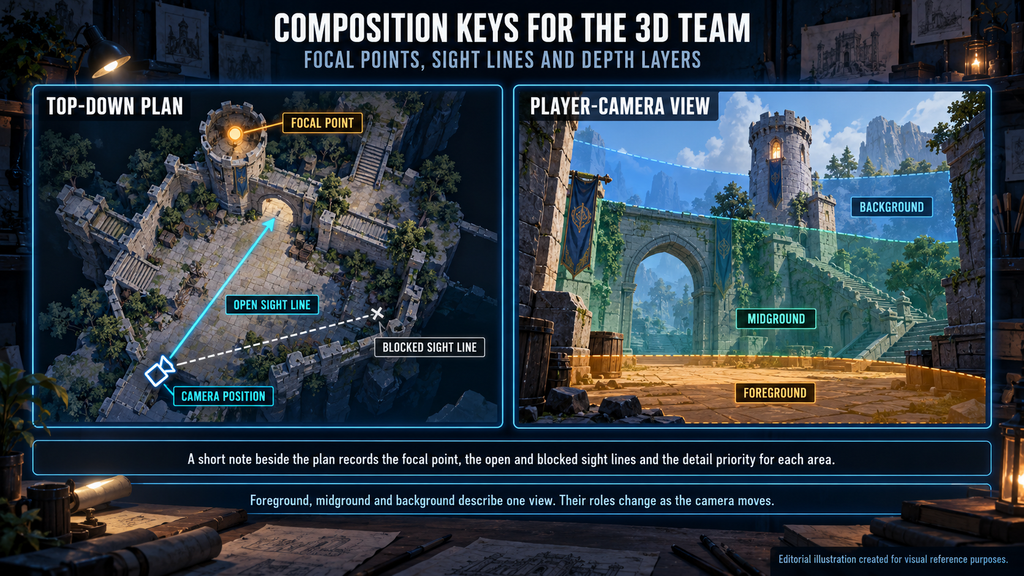
Composition is a large subject on its own. Three useful production checks are focal points, sight lines and depth layers. They provide a starting point for discussing how the intended composition should translate into the game, and a specific location may add others, such as verticality, routes or changes in visibility.
- Focal points. Which place or object should the player notice first, and which areas matter for gameplay versus background? This helps the team prioritize visual detail.
- Sight lines. Which views are open, where are they blocked, and what is revealed at the far end? A blockout can then be used to test those views early.
- Depth layers. What belongs to the foreground, midground and background, and which of them need full detail versus a simplified read?
Specify the camera projection, framing and permitted movement. For a fixed view, review the intended composition; for scrolling, rotating or zooming cameras, check the important viewing positions and ranges. Foreground, midground and background describe a particular view, so their roles can change as the camera moves. In a first-person or third-person game, sight lines are read from the player’s eye or shoulder along a path. A short note beside the plan, with the focal point, the open and blocked sight lines and the detail priority for each area, is a practical way to record all three.
“Editorial illustration created for visual reference purposes. It does not represent a real project, client work, or official software screenshot unless stated otherwise.”
Scale: Anchor the Space to the Player
Paintings are forgiving about scale: a door can be almost any height and still look right. A blockout is less forgiving, because the player’s character, the camera and any vehicles or doors will quickly show whether the space is too small or too large.
A concept can anchor scale with visual references: a figure at the player’s size, a known asset such as a door or vehicle, or the grid unit where the project uses one. On concept work we draw scale references against the client’s existing assets. Visual references do not replace gameplay metrics. Where the location is playable, use the project’s agreed units and movement metrics alongside them, confirm the relevant clearances with level design and test them with the intended character and camera. A familiar-looking doorway is a reference, not proof that the space will work in play. For a screen-only casual scene, relative sizes within the composition may be all that is needed.
Modular Logic: Show What Repeats and What Is Unique
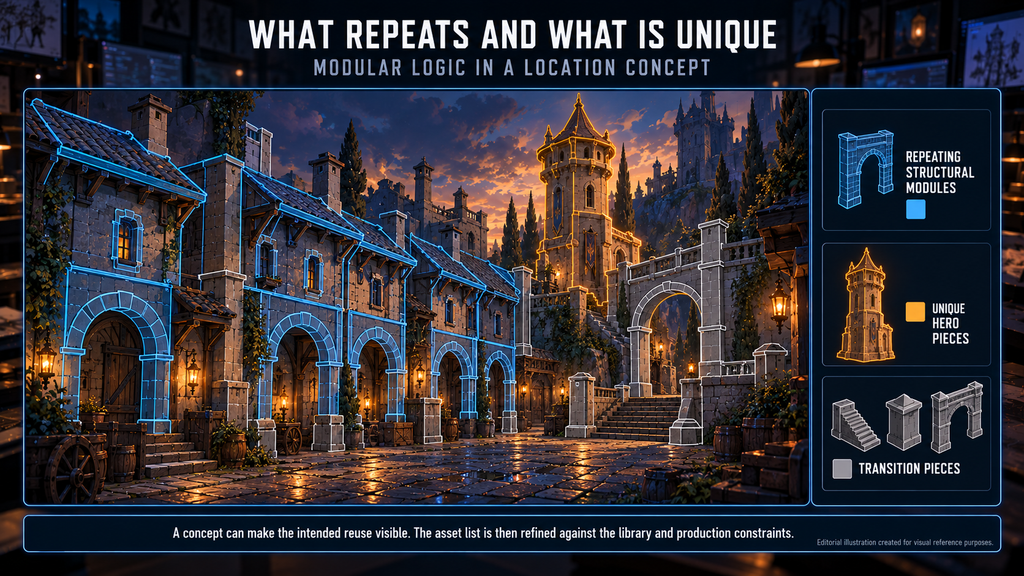
Many locations are assembled from repeating structural pieces plus a smaller number of unique ones, though terrain-heavy or highly bespoke spaces lean less on kits. A concept can make the intended reuse visible. Mark repeated structures, unique landmarks, transition pieces and relevant terrain or vegetation families. This gives the environment team a starting asset list to refine against the existing library, layout and production constraints.
“Editorial illustration created for visual reference purposes. It does not represent a real project, client work, or official software screenshot unless stated otherwise.”
Concept artist Tai Le Dinh described this in a 2026 80.lv interview about a personal Unreal Engine 5 project. He made six initial concepts to define the direction, and did not try to concept every corner of the town. From those six images and real-world references he could already see the asset library he would need: buildings, towers, arches, roofs, foliage and small street props. He also built architecture kits in small, medium and large sizes to assemble sections faster. It was a solo portfolio project, so treat it as a method, not as a studio benchmark.
Counting the pieces and sizing the work is a separate job; our environment art scope estimation guide covers it.
If an approved kit already exists, its dimensions and constraints are inputs to the concept. How snapping works is covered in our modular prop kits guide.
Material and Palette Zones: Style Sheet and Calibration Level
A material zone marks which surfaces are made of what, where the palette shifts between areas, and where wear or damage concentrates. For both realistic and stylized environment concept art, define the material identities, palette relationships and surface treatment needed for the approved look. The level of simplification and the shading rules come from the project’s art direction. Zones describe intent; they are not a shader specification or a verified look under every lighting condition.

On large casual projects we use a style sheet and a calibration level. Palette per biome, outline and shading rules, light direction and prop scale are fixed on the first approved screen, and every later level is checked against it. That is how a zoo, a castle and an underwater level can belong to the same game.
The Sheet Set a 3D Team Can Build From
A location package contains the views, callouts and references agreed for the next team’s task. An environment callout is an annotated detail that resolves a specific production question, such as a roof profile, a wall-to-ground junction, a material transition or the construction of a recurring doorway. The table lists possible components, the question each answers and the gap to check. Select what the location and the workflow need.
| Sheet | Question it answers | Who relies on it | Red flag |
| Key painting or keyframe | Does the location have the right mood and look? | Art director, producer | The painting is the only document, although the team also needs layout and scale decisions it does not show |
| Top-down plan | Where do areas, paths and landmarks sit relative to each other? | Level designer, 3D team | How areas connect is left to each builder’s reading of the painting |
| Player-camera views | What does the player see from the positions or camera ranges that matter most? | Art director, 3D team | Key positions or camera ranges have no view, so sight lines are guessed |
| Callout sheet | Which local design, construction or surface details need clarification? | Modeler, texture artist | A production-critical detail remains unclear, with no supporting reference or assigned owner |
| Scale reference | How big is it against the player and existing assets? | Modeler, level designer | Scale is unspecified, or not tied to the player or existing assets |
| Material and palette zones | Which surfaces and colors belong where, and which rules keep areas consistent? | Texture artist, art director | Palette or surface rules differ between areas without a stated reason |
The set depends on the location and the camera. Sometimes the main document is an agreed view from the game camera. A large explorable space may need additional player-camera views, while complex height relationships or hidden junctions may call for an extra view or section. Agree the set in the brief, and give each sheet a version label so the team can tell which one is current.
Concept in 3D: When to Block Out Before You Paint
Some environments are concepted directly in 3D. In our realistic concept art gallery, the isometric buildings that look like 3D renders began as location concepts produced directly as isometric 3D blockouts with materials, then used as the reference for final assets. That workflow gave the environment team an explicit spatial reference. Whether 3D is faster than painting depends on the scene, available assets, required finish and the team’s tools.
3D environment concept art can establish the visual arrangement and proportions without being a playable level. Where gameplay validation is required, test the relevant space in the target project with the agreed character and camera setup.
The idea is not new. Bungie’s Steve Theodore argued in a 2008 Game Developer column that the concept phase should not end with a handoff, and recommended turning the sketch into a 3D proportion study before anyone starts polishing. His example was a character, not a location, so take the principle and leave the animation details.
Tai Le Dinh’s account points the same way for locations. After the blockout he kept designing directly in 3D and used quick paintovers only when needed, because some ideas that worked in 2D needed adjustment once he saw them in the level.
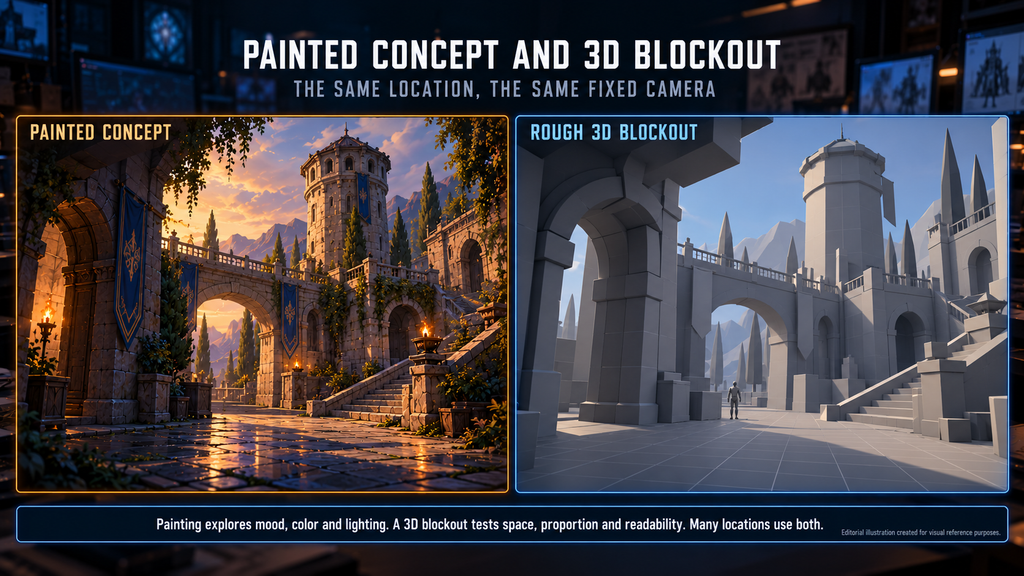
The choice depends on the camera, the complexity of the layout and who has to approve. Painting is a common way to explore mood, color and lighting direction, and a 3D concept a common way to test space, proportion and readability. Many locations use both: a painting for the hero area, a blockout for the rest.
“Editorial illustration created for visual reference purposes. It does not represent a real project, client work, or official software screenshot unless stated otherwise.”
Did you know?
In Theodore’s example, a monster’s rear legs had been made more angular and simpler to suit its insect side. Only when the finished model reached animation did the team find it could not manage the bounding run the design called for. The flaw had gone undetected through every concept iteration.
Handoff to Blockout: What the 3D Team Validates
A blockout tests spatial decisions at the agreed scale and camera settings. It may precede the concept, develop alongside it, or provide the next validation step. Our 3D environment design guide describes its sign-off gate: player scale, camera angle and modular grid compliance. Use the blockout to test any concept decisions already made and feed the results back into visual development.
What comes back is feedback. Typical examples: a sight line that the layout blocks, a doorway that is too small for the player, or a repeating piece that does not fit the grid. Record approved changes in the agreed source of truth, whether that is the blockout scene, an annotated view or a concept sheet. Update affected references when needed, and mark superseded versions so the next artist does not build from an outdated decision.
Four useful questions for the handoff review:
- Which version is approved, and where is it stored?
- Which decisions are fixed, and which are still being explored?
- Who owns the open questions?
- If a 3D scene is handed over, are the agreed files, scale and camera setups available?
Our 3D environment service can start from a concept, a blockout or your existing layout, depending on what you already have.
Starting Point: Concept, Blockout or an Existing Kit
Not every location needs the full environment concept art process. A new location with no approved direction often starts with concept work, though a rough blockout can come first when the layout is the open question. A location whose layout already exists may only need callouts and material zones on top of a blockout. If a kit already exists, concepts may be needed only for the pieces it does not cover.
The amount of concept work then depends on the exploration depth, the documentation level, the revisions you expect and who approves. Our 3D environment cost guide covers how the starting point changes the scope of the production work that follows.
Our Approach to Environment Concepts
We treat a location concept as a production document, agreed with the team that builds it. Our stylized environments gallery shows casual work.
On Bubble Quest of Vikings, our work within full art production included layout concepts and 2D environments.
Three Ways to Concept a Location
| Approach | Suitable when | What it delivers | Main risk |
| Painted key concept | Direction and mood are still open, or a pitch needs approval | Key views at the agreed finish level, with color and lighting | Layout, scale and modular logic are left to interpretation |
| Painting plus plan and callout sheets | Spatial and construction decisions must be passed on explicitly, within one team or to an outsourced one | Key views, top-down plan, callouts, scale references, material zones | More documentation up front, and the sheets must stay in step with agreed changes |
| Concept built as a 3D blockout | The camera is fixed or tightly controlled, or exact proportions matter | A rough 3D location with measurable proportions, plus basic material and color assignments where needed | The study is mistaken for a playable level or for final art direction |
Agree How the Concept and Blockout Work Together
Name the camera, agree the sheets in the brief, mark the intended reuse and agree who owns layout, spatial metrics and visual design, so the decisions needed for the next stage are settled and the rest are tested in 3D.
Need environment concepts your 3D team can build from? Send us your location list, references and art bible. We review them against the structure above and usually reply within 1–2 business days.

Let's work
together


in mind?
From 3D characters and environments to weapons, props, concept art and game UI/UX: ten years deep, 40+ artists strong, zero fluff. Tell us what you are making and get a free, no-pressure estimate.
estimate