What a Weekly Art Production Report Should Contain
-

Written byDenys Zadoienyi
-

Updated on14.10.2026
-

Time to read19 min

- What a Weekly Art Production Report Should Contain
- A Copy-Ready Weekly Report Template
- Who Reads Which Section (and What They Decide)
- How to Spot a Report That Obscures Schedule Risk
- How to Put the Report Into the SOW and Onboarding
- What to Do When the Report Turns Red
- How to Get a Weekly Report You Can Act On
A weekly art production report helps you assess whether outsourced work is progressing toward agreed acceptance criteria before a formal milestone review. It should show each asset’s stage, pending reviews, blockers and the decisions needed from your team.
“Editorial illustration created for visual reference purposes. It does not represent a real project, client work, or official software screenshot unless stated otherwise.”
The difference shows up late. A status line that says “on track” can survive until the gate review, when “in progress” turns out to mean blockout for half the batch. This guide lists what the report should contain, gives you a template to copy and shows how to spot a report that obscures schedule risk instead of describing it.
A weekly art production report is a written status record that an art vendor sends on a fixed day. It shows each asset’s pipeline stage and review state, plus rework, blockers, pending client decisions, risks, scope changes and next week’s plan, so the client can check progress against the milestone and act before a gate is missed.
Why “On Track” Is Not a Weekly Art Report
“On track” is a conclusion, not a report. It asks the reader to trust the author’s judgment and gives nothing to check. That is tolerable for a week or two. It stops being tolerable when a batch holds many assets in different stages and your own teams are planning around it.
The pattern is easy to recognize. In the first weeks, a percentage replaces the asset list. A batch described as “mostly done” can mean that most assets are finished or that every asset has reached the same unfinished stage, and the sentence does not say which. Then the milestone date stays unchanged on paper while work in progress ages underneath it. By the time the gate review arrives, the first look at the batch is also the first honest status, and the options left are rushing, trimming scope or moving the date.
Two consequences follow. Teams that depend on the batch, such as level design, animation and engine integration, have planned around a forecast nobody verified, and each of them has to replan on its own when the date moves. And the conversation about whether the vendor is the problem starts without evidence: no record separates a vendor delay from a slow review queue on your side or from a spec question that nobody answered.
The cost lands differently by role. For a producer, it lands in the capacity plan. Every dependent team was promised assets by a date, and the honest answer to “what do I tell stakeholders if this slips?” needs asset-level facts that a one-line status cannot supply. If you are a producer planning gate reviews around an external batch, the weekly report can surface these gaps before a formal milestone review.
For an outsource manager, it lands in the vendor scorecard. First-pass approval rate and revision count can be calculated only from records of what was delivered, reviewed and returned, and response time only from a log of requests and answers measured against the agreed response times. Without those records, a decision to extend, supplement or replace a vendor rests on impressions. These records support vendor assessment and escalation; any decision to end an engagement must also follow the agreement’s terms.
An incomplete report does not establish dishonesty. Ask for the missing evidence before drawing conclusions. A report that cannot be checked cannot protect either side.
What a Weekly Art Production Report Should Contain
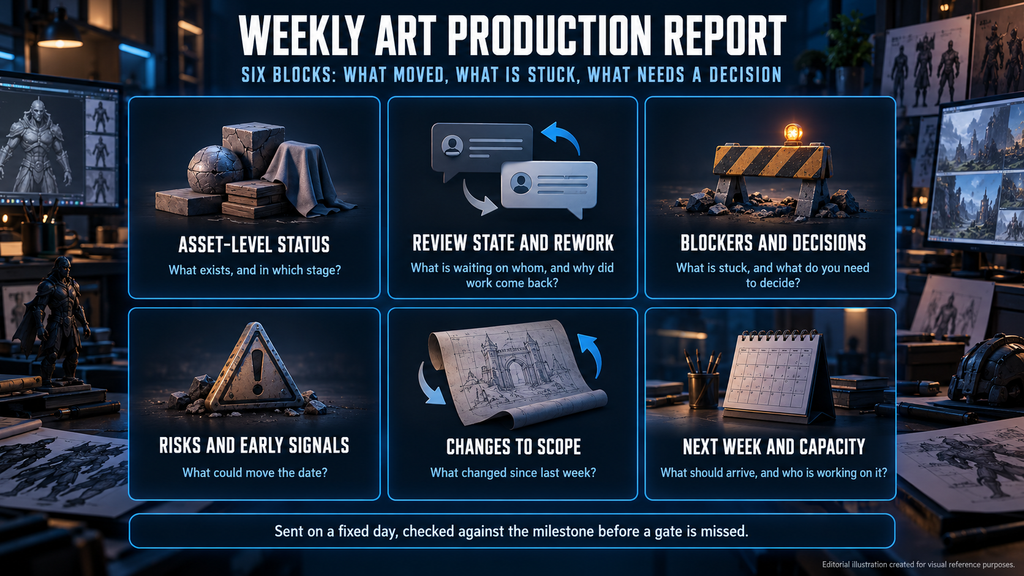
A weekly art production report earns its place when a producer can answer three questions from it in a few minutes: what moved, what is stuck and what needs a decision. Six blocks cover all three.
| Block | Minimum content | Question it answers |
| Asset-level status | Every asset in scope with its pipeline stage and one of five statuses; vendor-reported and reviewer-confirmed progress marked separately | What exists, and in which stage? |
| Review state and rework | Deliveries awaiting review, accepted and returned; the classification and cause of each return | What is waiting on whom, and why did work come back? |
| Blockers and decisions | Each blocker with its dependency, owner and next action; decisions needed from the client with a needed-by date | What is stuck, and what do you need to decide? |
| Risks and early signals | Anything that could move a milestone, with the signal that raised it | What could move the date? |
| Changes to scope | Requested, approved or pending changes with their schedule impact | What changed since last week? |
| Next week and capacity | Planned deliveries, review requests and any change in the team on the batch | What should arrive, and who is working on it? |
The blocks below assume 3D asset production, where stages are easy to name. Concept art, UI and animation need their own stage names, but the logic is the same: every item has a stage, a status and a next step.
Asset-Level Status With Verifiable Evidence
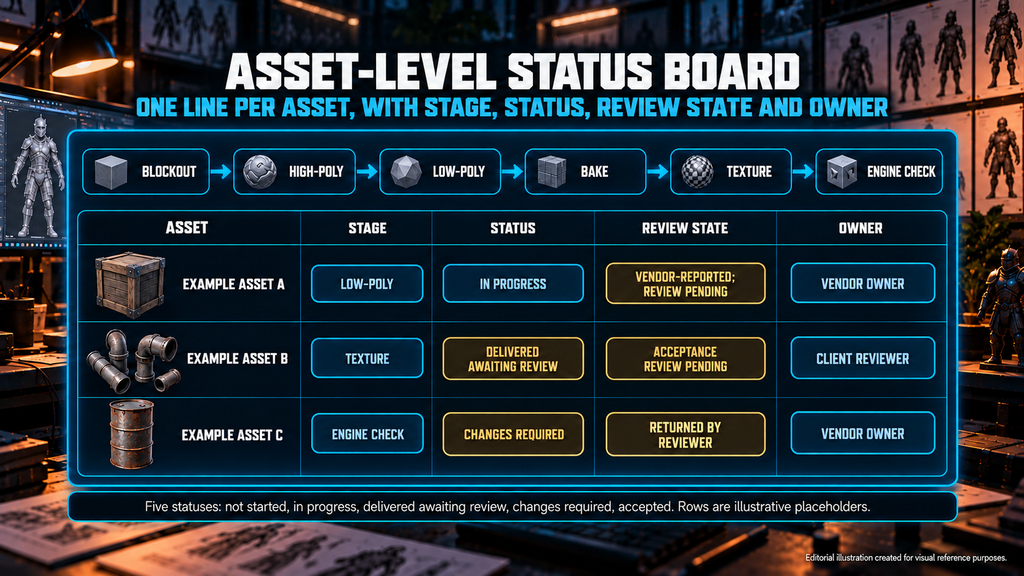
List every asset in the batch, one line each, with its pipeline stage (for example blockout, high-poly, low-poly, bake, texture or engine check) and one of five statuses: not started, in progress, delivered awaiting review, changes required or accepted. Add the date the asset entered its current stage and the latest file revision. An asset that has not changed stage since the last report is information in itself, so mark it. A percentage can work as a supporting figure if its basis is defined, but it should not replace the asset-level record.
These statuses apply to the gate or deliverable named in the row. “Accepted” means that the named reviewer has approved that defined scope against the agreed criteria; it does not mean the whole asset is production-ready if later stages remain. We recommend this five-status scheme for the template, in line with our recovery playbook, not as an industry standard. Agree the status definitions and map the vendor’s tool labels to them consistently, and track blockers separately from the gate status.
Keep vendor-reported progress separate from reviewer-confirmed outcomes. Record what was checked, by whom and when. “Texturing done” remains vendor-reported until the identified revision has been checked against the agreed requirements. Use confirmed outcomes to describe completed gates, and use current work-in-progress evidence, remaining effort, dependencies and review capacity to forecast the rest. Mark uncertain inputs explicitly.
Review State and Rework
This block answers two questions: what is waiting for review, and what came back and why. List every delivery with its review state and submission date. Link each submission to its asset, gate and file revision, then record the submission and decision dates, reviewer, outcome and feedback. Classify the requested work as nonconformity correction, planned refinement, clarification or scope change. For a nonconformity, identify the unmet requirement; keep unresolved or mixed causes visible.
Keep one record per completed review decision, and carry unresolved items forward by ID rather than counting the same return again in each weekly report. For first-pass approval rate, count the first completed review at a defined gate, show pending reviews separately, and do not treat “no return” as “accepted” while a decision is missing.
Our guide to art rework rate explains how to measure it and why a raw revision count cannot show cause; the weekly report is where that log gets its weekly input.
Blockers and Decisions Waiting on You
List each blocker with its dependency, owner, date raised and next action. Then add the part that thin reports leave out: the decisions that sit on your side. A pending client answer can delay delivery when it blocks scheduled work or acceptance. Record the affected asset, the required input, its needed-by date and the work that can continue independently. Typical examples are a reference awaiting approval, a spec question or a style direction nobody has confirmed.
This matters most when the vendor also leads art direction. Nasty Rodent led the entire art direction for Whimsy Games on Wild Rage, with work spanning concept art, characters, weapons, props and environment. On a project like that, a report that tracks only asset status can miss the decisions that keep the style coherent across disciplines, so those decisions need their own list with an owner and a needed-by date.
Risks and Early Signals
Name anything that could move a milestone and the signal that raised it: assets spending longer in a stage than planned, throughput below the rate the remaining work needs, slower answers to questions, or revision demand rising above its baseline. Our guide to keeping an outsourced art team on schedule explains each signal and what to do when one fires; the report should summarize the signal, supporting evidence, affected commitment and planned response.
For each risk, record the observed signal, affected milestone or dependency, possible impact, response owner, next action and review date. Separate confirmed facts from assumptions and unresolved explanations. A plausible cause can be recorded as a hypothesis to check; it should not be presented as an established diagnosis.
Changes to Scope
Record every request that changes scope or direction since the last report: request ID, who raised it, the affected assets, whether it is requested, approved, pending or declined, who authorized the decision, and its schedule and cost impact where relevant. Work on a change should not start before approval, and the report is where an unapproved change becomes visible before it becomes a dispute. Our article on game art scope creep covers the change procedure; the weekly report should link to the change record and summarize its approval state and impact.
Next Week and Team Capacity
State what should be delivered next week (assets and gates), the owners, which reviews you will be asked for and by when, who is working on the batch and any material availability constraints. Flag any change from the previous week: a lead on leave, an artist rotated off, a parallel project competing for the same specialists. Your reviewers can then schedule their own time, and you can ask about a team change before it reaches the batch.

A Copy-Ready Weekly Report Template
A generic outsourcing status report template covers schedule, budget and a traffic-light summary. That is not enough for art production, where the unit of progress is the asset and the real question is which stage it has reached. A game art status report template should be built around the asset list. Copy the structure below into a shared document or spreadsheet and keep the headings fixed from week to week.
“Editorial illustration created for visual reference purposes. It does not represent a real project, client work, or official software screenshot unless stated otherwise.”
Header (once per report)
- Project, batch and milestone
- Reporting period
- Status cut-off timestamp and time zone
- Report delivery deadline and time zone
- Baseline milestone date and baseline version
- Current forecast, variance and key assumptions
- Named report owner (vendor) and client decision owner
- One-sentence summary, written last
Table 1. Asset status
| Asset ID / name | Stage / gate and status | Stage entered | Revision / evidence | Review confirmation | Baseline / forecast | Next action, owner and due date | Blocker or decision ID |
| Example asset A | Low-poly / In progress | [date] | [revision and link] | Vendor-reported; review pending | [baseline] / [forecast] | [vendor owner] submits by [date] | None |
| Example asset B | Texture / Delivered awaiting review | [date] | [submission and link] | Received; acceptance review pending | [baseline] / [forecast] | [client reviewer] reviews by [date] | [ID] |
| Example asset C | Engine check / Changes required | [date] | [revision and feedback link] | Returned by [reviewer] on [date] | [baseline] / [forecast] | [vendor owner] resubmits by [date] | [ID] |
Baseline and forecast dates refer to the next agreed gate or delivery identified in the row. Link supporting records where the detail would make the weekly table difficult to read. The rows are illustrative placeholders, not a real project.
For a large scope you do not need to repeat the full production tracker every week. Link to the full register and show changes and exceptions, while keeping the state at the cut-off.
Table 2. Blockers and decisions
| ID | Item | Type | Owner | Raised | Needed by | Next action |
| [ID] | Review decision on the submitted texture gate, example asset B | Decision | Client reviewer | [date] | [date] | Client reviews and records the outcome |
| [ID] | Engine-check correction on example asset C | Blocker | Vendor | [date] | [date] | Vendor resubmits with changes listed |
Table 3. Review and rework log
| Field | What to record |
| Asset and gate | The scope being reviewed |
| Submission | Submission ID, file revision and date |
| Decision | Reviewer, decision date and outcome |
| Feedback | Linked notes, feedback type and applicable requirement |
| Attribution | Supported cause, unresolved attribution or mixed causes |
| Follow-up | Action owner and resubmission commitment |
Three short fields
- Risks: ID, signal and evidence, affected commitment, impact, owner, response, next update
- Changes: request ID, affected assets, requested, approved, pending or declined, authorized decision, schedule and cost impact where relevant
- Next week and capacity: planned asset and gate deliveries, owners, review commitments and material availability constraints
Four rules keep the template honest. Use the same asset IDs as the SOW asset list, so the report reconciles with the contract. Agree the status definitions and map the vendor’s tool labels to them consistently. Link evidence appropriate to the claim: work-in-progress images for visual progress, identified file revisions for deliverables, and validation records or engine evidence for technical checks, kept accessible to the agreed reviewers. And write the summary sentence last, from the tables, not first from impressions.
Who Reads Which Section (and What They Decide)
Different readers use the same report to make different decisions, and each should be able to find their section without reading the rest.
| Reader | Reads first | Decision it supports |
| Producer or outsource producer | Blockers and decisions; next week and capacity | Whether dependent teams keep their dates, and what needs unblocking from your side |
| Art director | Review state; decisions waiting on you | Which references and directions to approve before the next batch, and whether style drift is starting |
| Technical artist | Asset-level status; changes to scope | Which assets to validate next, and whether spec questions are still open |
| Vendor manager | Review state and rework; risks | Inputs for the vendor scorecard, and whether to use the escalation path |
The outsource producer role matters here because someone has to own the weekly read. Our guide to game production roles describes what the outsource producer owns and how that role connects the producer, the art director and the technical artist. If the report has no named reader on your side, it will be filed and not used.
If you are a vendor manager running more than one studio, ask every vendor for the same six blocks. Identical blocks let reports from different studios feed one scorecard, and differences between them become visible instead of buried in formatting.
How to Spot a Report That Obscures Schedule Risk
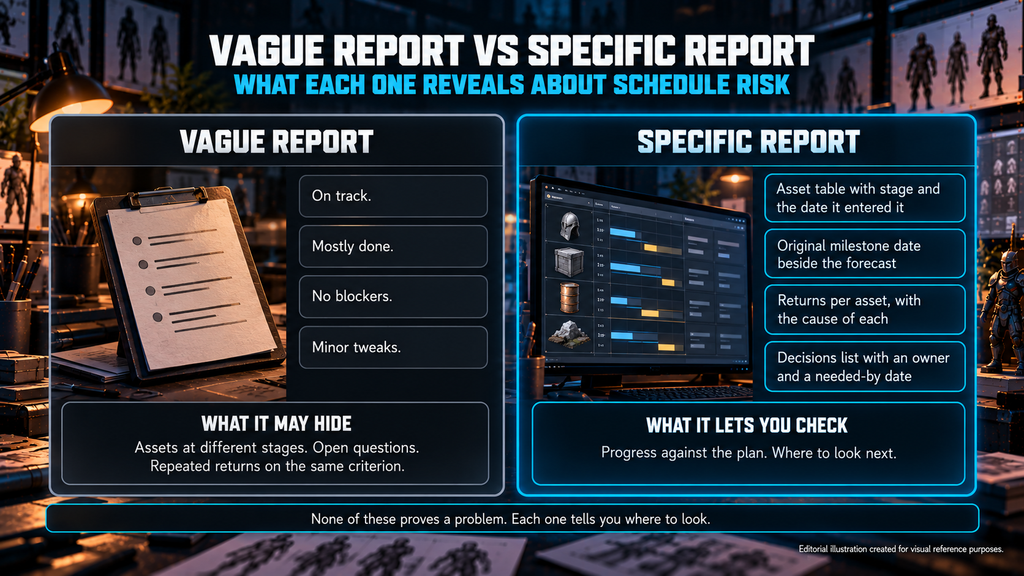
A report can be complete in form and still obscure schedule risk. The signs are specific, and each one has a request that tests it.
“Editorial illustration created for visual reference purposes. It does not represent a real project, client work, or official software screenshot unless stated otherwise.”
| What the report says | What it may hide | What to ask for |
| “On track” or a percentage, with no asset list | Assets sitting at different stages, with unfinished work in early ones | The asset table for the full scope |
| “No blockers” report after report | Known open questions or dependencies not reflected in the report | A reconciliation against the log of questions asked and answered, each with an owner |
| Every asset “in progress” | Assets that have stayed in one stage longer than plan and progress justify | The stage, the date the asset entered it and progress within the stage, compared with the plan |
| Dates change without comment | A baseline that was quietly rewritten | The original milestone date beside the current forecast |
| Returns described as “minor tweaks” | Repeated returns on the same criterion | The number of returns per asset and the cause of each |
| No decisions list | Possibly nothing, or a decision missing from the record | A decisions list with an owner and a needed-by date, reconciled with the request log and dependencies |
| Text identical to last week’s report | A report that may not have been updated | A current timestamp and an explanation of “no change” on each line |
None of these rows proves a problem. Each one tells you where to look. In practice, one of the most useful requests is the date an asset entered its current stage, because it turns “in progress” into something that can be aged. Compare that age with the plan and with progress inside the stage, because a long stage alone does not prove a stall.
Check selected claims against the identified files and review records. Choose the sample and cadence according to asset complexity, production impact and prior discrepancies. A spot check can reveal a mismatch, but it does not validate the whole batch or replace agreed acceptance reviews. Record what was checked and what remains unverified.
Apply the same checks to your own records. An empty decisions list is useful only if it reconciles with the requests and dependencies raised elsewhere. A missing known decision indicates a reporting gap; an empty list alone does not establish one.
How to Put the Report Into the SOW and Onboarding
A vendor cannot be late with a report nobody specified. Write the requirement down before the first batch. The SOW should name:
- the reporting period, status cut-off and delivery deadline, with an agreed time zone, and the channel the report arrives in
- the template or reporting specification, its version and the agreed process for approving updates
- a named author on the vendor side and a named reader on yours
- the stage names and the five statuses
- the evidence linked to each report, such as work-in-progress images, file revisions and validation records
- what happens when a report is missing or incomplete, which should be a step on the escalation path
Define who may approve reporting-format changes and how the approved version is recorded. Changes affecting obligations, scope, acceptance or payment follow the agreement’s change procedure.
Sample wording to adapt with your legal owner: “The Vendor will deliver a written weekly report by [day and time, time zone], with a status cut-off of [day and time, time zone], using the reporting specification in Exhibit [X], version [N], to [named recipient]. A missing or incomplete report is escalated to [named contact] under the agreed escalation path.” Our RFP and SOW guide covers where milestone, acceptance and escalation language belongs in the contract.
Agree the reporting requirements during onboarding and run the format once using an approved sample, a calibration asset or the first production item. Check that the status, evidence and decision fields can be completed and understood before relying on the report for a larger batch. Our vendor onboarding protocol already recommends a committed weekly status update during first-batch production; this guide defines what that update should contain. If that run produces a report you cannot check, you learn it before the larger batch depends on it.
Then decide whose template to use. A template from your side makes reports from several vendors comparable and feeds one vendor scorecard, but it adds effort for the vendor, and smaller teams may resist it. A template from the vendor fits their tools and costs them little, but formats differ from one vendor to the next. Check either template against the agreed content requirements. Our advice is to fix the content and flex the format: require the six blocks and the five statuses, and let the vendor choose the tool.
Because the report is read asynchronously, it should stand on its own. A reader in a different time zone should not need a call to understand it.
What to Do When the Report Turns Red
If the report uses red, amber and green signals, agree what each means for the project and record the evidence behind the label. Missing information should remain unconfirmed rather than defaulting to green.
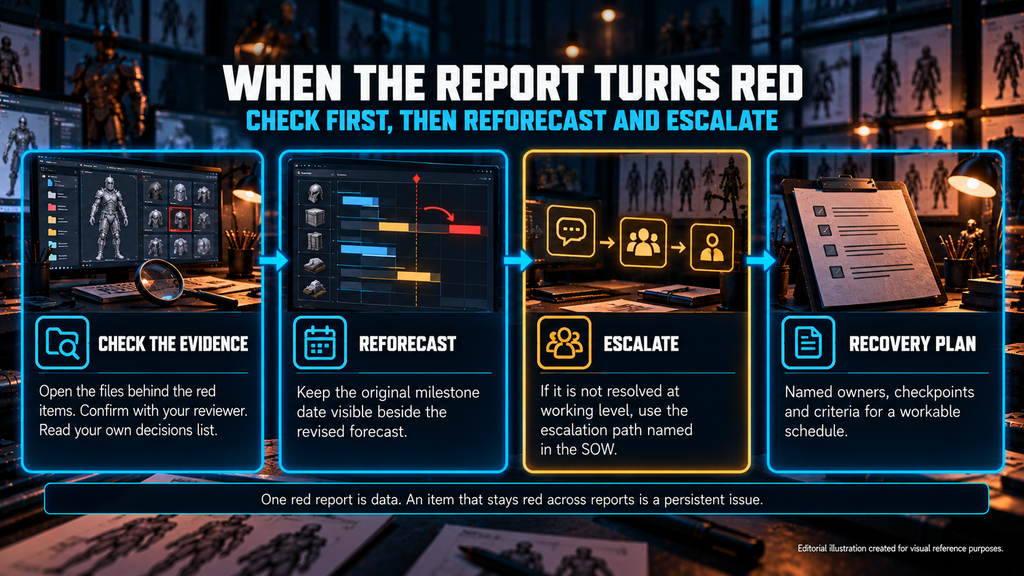
When a report shows red, check before you react. Open the files behind the red items and confirm the status with your reviewer. Read your own decisions list, because a red item may be waiting in your queue. Compare the forecast with the baseline: a date that moved without a recorded reason is a question for the named contact, not yet an accusation.
“Editorial illustration created for visual reference purposes. It does not represent a real project, client work, or official software screenshot unless stated otherwise.”
Keep the original milestone date visible beside the revised forecast, and ask for a reforecast instead of a rewritten plan. A plan quietly rewritten to match reality erases the evidence you need to tell a one-off from a pattern. If the item cannot be resolved at working level, use the escalation path named in the SOW instead of a new one improvised on the spot.
One red report is data. An item that remains red across reports is a persistent unresolved issue. Its duration, changing impact and underlying evidence determine whether the situation is worsening, and the cause matters more than the color: a capacity gap, an unclear spec and a slow review queue call for different responses. Urgent blockers and milestone risks should be raised through the agreed channel when identified, then included in the weekly record. Do not wait for the next reporting day to request a time-critical decision. When the problem is a missed delivery, our vendor missed milestone recovery playbook covers triage, recovery options and the decision to continue, supplement or replace. An honest weekly record gives that process its first input, the asset-level status, before anyone has to reconstruct it from memory.
A report is only as useful as the production behind it. At Nasty Rodent, every batch goes through internal art review by the lead artist before a client sees it, work is delivered by milestone with a defined revision path, and each engagement has a dedicated point of contact. The reporting format is worth settling during project setup, together with the milestones, not after the first batch arrives. Our game art outsourcing services page describes the working models.
How to Get a Weekly Report You Can Act On
Ask for asset-level status, a separate list of decisions waiting on you and a baseline date next to the forecast. Put the format, the cut-off and the delivery deadline into the SOW, validate it on a representative item and compare what the report says with what your reviewer sees in the files. A report built this way tells a producer what to do on Monday, not only what happened last week.
If you are planning an outsourced batch and want to settle the report before production starts, bring your milestone plan to that conversation. It is easier to define the report against real milestones than in the abstract.
Planning an outsourced batch? Send your brief and milestone plan to sales@nastyrodent.com, and tell us which report sections your producers need each week – we will check them against our production setup.