Game UI/UX Design Cost: What Drives the Estimate
-

Written by Denys Zadoienyi
-

Updated on09.10.2026
-

Time to read12 min

- Seven Work Categories Behind a UI/UX Estimate
- UX and UI Are Separate Budget Lines
- Starting Point: Existing UI System, New Design, or a Purchased Kit
- Custom Art, Diegetic UI and Motion
- Platforms, Languages and Accessibility: Additional Work to Define
- Revisions and Change Control
- Engagement Model and the Shape of the Budget
- How the Decisions Combine
- One Interface, Three Work Packages
- Reading a UI/UX Quote Against These Categories
- What We Need to Estimate Your UI/UX
Game UI design cost depends on which categories of work a quote includes. Two quotes for “the UI” can price different jobs: one may cover only the visual look of screens, while another also covers interaction structure, a reusable component kit, custom illustration, motion and a handoff that engineers can build from. Comparing their totals without comparing what each one includes tells you very little.
This guide organizes a game user interface (UI) and user experience (UX) estimate into seven work categories, shows what can change each category, and ends with a checklist for comparing quotes. It explains budget drivers rather than publishing a rate card or a universal price range. If you fund the project rather than manage production, confirm what the quoted price includes, which tasks remain with your team, and how changes will be approved.
A game UI/UX estimate prices an agreed combination of interaction structure, a visual system, screen production, custom art, diegetic or spatial UI, motion, and delivery work. Delivery may cover design handoff, engine implementation and validation, depending on the agreement. Research, testing, translation and other services should be identified separately where included.
Seven Work Categories Behind a UI/UX Estimate
Our game UI/UX design services cover different delivery needs. For comparing estimates, the following seven categories help identify what the vendor will deliver, what your team will handle, and where the quote needs clarification. They are a budgeting checklist, not a required package or a sequence of seven production stages.
| Work category | What it can deliver | What can change the work | Confirm in the quote |
| Interaction structure | Information architecture, flows, wireframes and interaction states | Unresolved game rules, flow depth, input methods and meaningful edge cases | Who defines and approves the structure; whether prototypes, research or usability testing are included |
| Visual system | Typography, color roles, component styles and visual states | Existing UI rules versus a new system; component types and variants | Which reusable components and states are included |
| Screen production | Layouts assembled from the visual system, with specified content and data states | Screen families, structural variants and content requirements | What requires a new layout versus content population or checks |
| Custom art | Agreed icons, illustrations, backgrounds and other bespoke assets | Asset count, style, variants and required outputs | Which assets are included and which existing assets can be reused |
| Diegetic and spatial UI | Design for interfaces or indicators presented in the game world | World placement, viewing conditions, interaction and implementation method | Whether new 3D assets, materials or shaders are needed, and where that work is priced |
| Motion | Transition and feedback specifications, animation assets or agreed engine animation | Behaviors, variants, output format and implementation depth | Whether the deliverable is a specification, an exported asset or implemented behavior |
| Handoff, implementation and validation | Agreed source files, exports and specifications; engine assembly, integration and checks where included | UI framework, delivery boundary, target hardware and acceptance criteria | Who assembles the UI, connects behavior and data, and verifies the result |
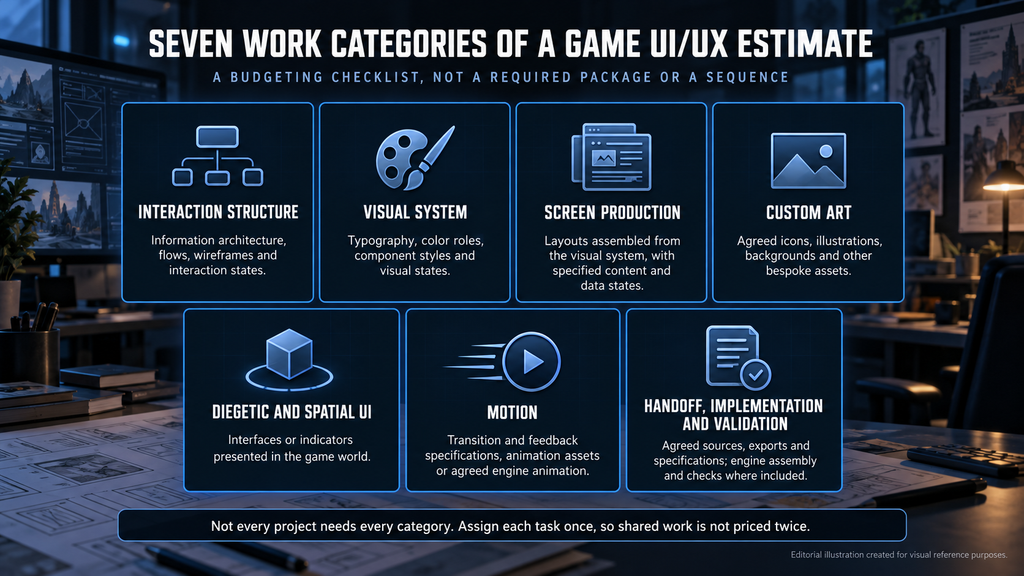
“Editorial illustration created for visual reference purposes. It does not represent a real project, client work, or official software screenshot unless stated otherwise.”
Not every project needs every category. Several categories can involve the same asset: an in-world display may need artwork, motion and engine setup. Assign each task clearly so shared components, asset production and implementation are not priced twice. A shooter HUD and a mobile game’s shop menus may distribute the work very differently.
UX and UI Are Separate Budget Lines
A UI-only quote may exclude interaction structure and rely on flows, wireframes and states supplied by your team. If those inputs are missing, clarify who will develop them before visual production starts. They may need clarification, an additional task or a change to the agreement, depending on the original scope. Our guide to UI versus UX in production explains the distinction between interaction decisions and visual design. Confirm whether the quote covers either area or both, and who approves each.
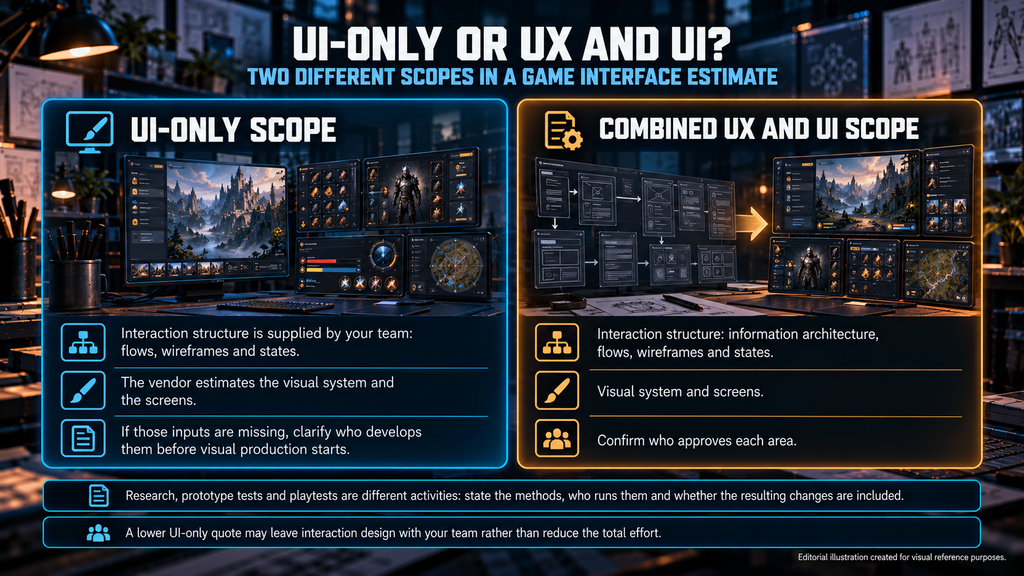
“Editorial illustration created for visual reference purposes. It does not represent a real project, client work, or official software screenshot unless stated otherwise.”
Research, prototypes, usability testing and playtesting also need explicit scope. A design review, a test of a prototype and a test in a playable build are different activities. State which methods, recruitment, sessions and reporting are included, who runs them, and whether changes resulting from testing are part of the agreement.
Starting Point: Existing UI System, New Design, or a Purchased Kit
First, establish what already exists and what can be reused. An art bible can define the visual direction without supplying UI components, interaction states or layout rules. A suitable existing UI system can reduce new design work, while a new or inconsistent interface may require system design, an audit or adaptation. The estimate should identify what the vendor can extend and what still needs to be created.
A purchased UI kit or template is another possible starting point, but its purchase price is not the cost of a finished interface. Allow for style matching, the states and screens the kit does not cover, adaptation to your platforms and languages, and handover. A hybrid scope can combine a suitable kit with custom screens for the parts of the game that are specific to it. Check the license terms and dependencies before treating a kit as a production-ready foundation.
A design-file kit and an engine template are different starting points. Confirm which editable files, fonts, assets, dependencies and usage rights come with the purchase, and which parts your team must still implement or maintain.
Custom Art, Diegetic UI and Motion
Screens differ in how much artwork they carry. A shop, an event pop-up or a reward screen can need custom illustration and icons, while a minimal status display needs far less. The same game can contain both, which is why the genre label alone says little about the custom art category.
Diegetic UI belongs to the game’s fiction, such as a display the character can use. Spatial UI is presented in the game world without necessarily being part of that fiction. Both need an agreed presentation and implementation method. A display may reuse an existing surface or require a new asset; a world-space widget can itself render through a render target, so these techniques can be combined. Confirm what needs new art, what needs engineering, and who checks readability and interaction in the scene. Our guide to diegetic and non-diegetic UI explains the design distinction.
Motion needs the same clarity. Timing specifications, exported animation assets and behavior implemented in the engine are different deliverables. Name the required formats, states and implementation owner before estimating the work.

Platforms, Languages and Accessibility: Additional Work to Define
Platforms, input methods, target languages and accessibility requirements can change design, implementation and validation. They do not imply a fixed cost multiplier. Some requirements reuse the existing system; others need new behavior, components or checks. Controller support needs navigation and focus behavior, while touch layouts need suitable interaction targets.
Localization can affect text expansion, fonts, line breaking, layout direction and testing. Specify whether the assignment covers localization-ready design, implementation support, translated content or linguistic QA; these are different services. Accessibility may require text scaling, alternative cues, navigation changes or screen narration, depending on the agreed requirements.
Name the exact platforms, input methods, languages and accessibility requirements in the brief. For how to turn them into a scoped deliverable list, see our guide to scope estimation beyond screen count. Here, the budget question is which additional tasks and checks the vendor must deliver.
Revisions and Change Control
Review rounds are part of the cost. A quote should state how many rounds each stage includes and how extra rounds are priced. Separate three things: corrections needed to meet the agreed specification, included review rounds, and changes to the brief, such as a new platform, a late language or a different output level. They should not automatically be treated as the same billable event. Our guide on how scope creep starts covers how to keep those changes visible and priced.
Engagement Model and the Shape of the Budget
Our service page describes project-based work, ongoing support and outstaffing as different ways to organize the engagement. Confirm separately how that engagement is billed. Project-based work is not automatically fixed price, and ongoing support does not by itself define the rate structure or spending limit. Our comparison of fixed price and time and materials explains the billing terms and estimation risk. Match scope stability to the contract’s assumptions, reporting, change control and any agreed budget limits.
How the Decisions Combine
This matrix shows the decisions that can change an estimate. It is not a ranking of project types or a set of financial multipliers, and comparisons only hold when the other assumptions stay the same.
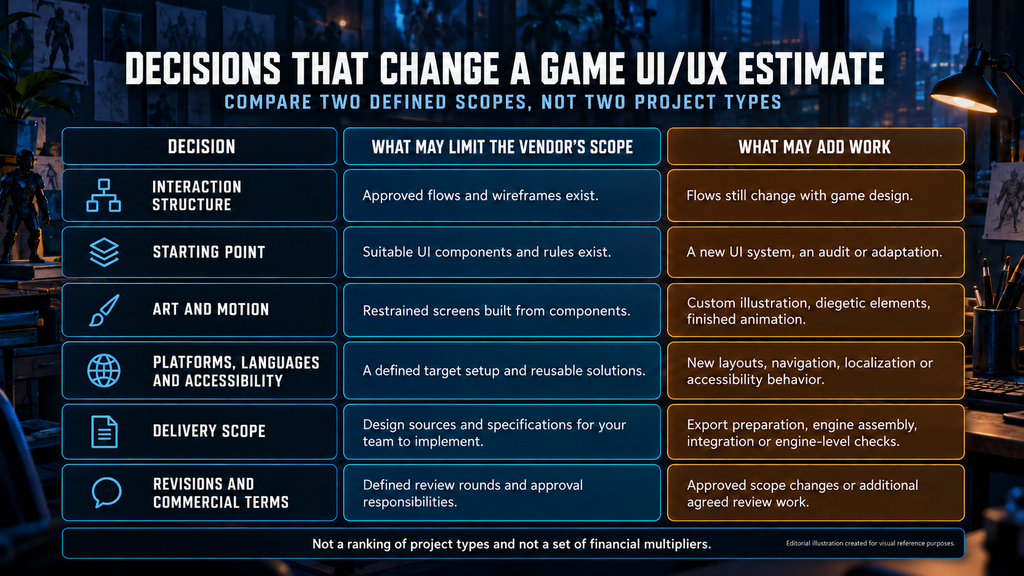
“Editorial illustration created for visual reference purposes. It does not represent a real project, client work, or official software screenshot unless stated otherwise.”
| Decision | What may limit the vendor’s scope | What may add work | Confirm before requesting a quote |
| Interaction structure | Approved flows and wireframes already exist | Flows still change with game design | Who owns structure and validates interaction logic |
| Starting point | Suitable UI components and rules already exist | A new UI system, an audit or adaptation | Available UI sources, art direction and reuse constraints |
| Art and motion | Restrained screens built from components | Custom illustration, diegetic elements, finished animation | Number of custom assets and what “motion” means |
| Platforms, languages and accessibility | A defined target setup and reusable solutions | New layouts, navigation, localization support or accessibility behavior | Exact targets, required functions and who validates them |
| Delivery scope | Design sources and specifications for your team to implement | Export preparation, engine assembly, integration or engine-level checks | Deliverables, implementation owner and acceptance criteria |
| Revisions and commercial terms | Defined review rounds and approval responsibilities | Approved scope changes or additional agreed review work | Included rounds, change approval, billing terms and any budget limits |
The decisions interact. A restrained interface in many languages can need more validation than a richer one in a single language. The useful comparison is what changes between two defined scopes, not which project sounds more expensive.
One Interface, Three Work Packages
Consider the reward and shop flow of a mobile casual game. This hypothetical example compares scope, not prices. Packages A and B assume the same target platform and language, design-source handoff, and engine implementation by the client. Package C explicitly adds further deliverables.
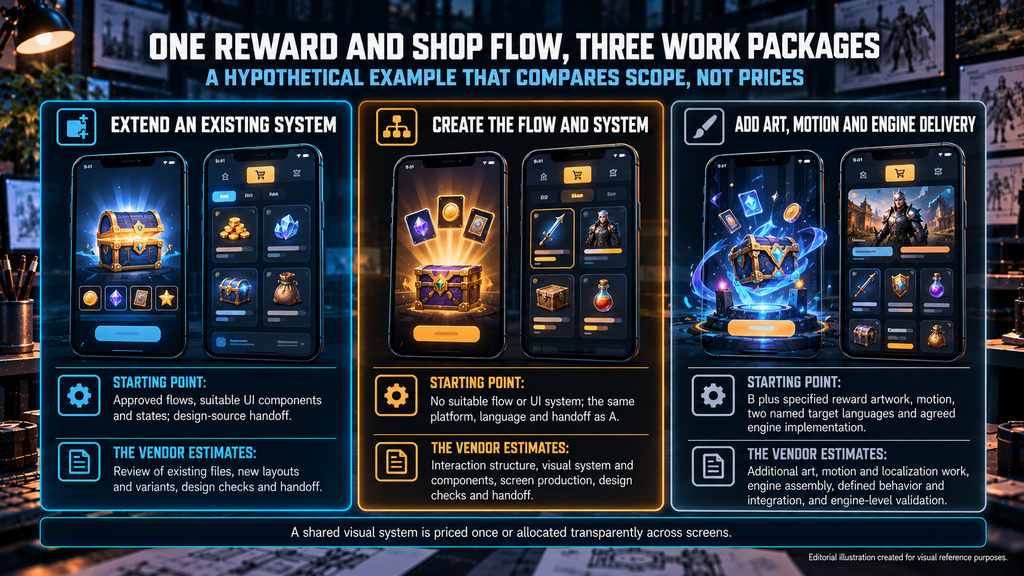
“Editorial illustration created for visual reference purposes. It does not represent a real project, client work, or official software screenshot unless stated otherwise.”
| Package | Starting point and delivery boundary | What the vendor estimates |
| A. Extend an existing system | Approved flows, suitable UI components and states; design-source handoff | Review of existing files, required new layouts and variants, design checks and handoff |
| B. Create the flow and system | No suitable flow or UI system; the same platform, language and handoff as A | Interaction structure, visual system and components, screen production, design checks and handoff |
| C. Add art, motion and engine delivery | B plus specified reward artwork, motion, two named target languages and agreed engine implementation | Additional art, motion and localization work, engine assembly, defined behavior and integration, and engine-level validation |
These are different work packages for the same feature. A shared visual system should be priced once or allocated transparently across screens. Extra languages do not automatically require vendor-owned engine implementation: that is a separate delivery decision, added explicitly in Package C. Define who provides translated strings and who runs linguistic QA.
Reading a UI/UX Quote Against These Categories
A useful quote names the categories it includes, the starting-point assumptions, the delivery level, the platforms, inputs and languages, the revision rounds and the change-control terms. Our guide on how to read a game art outsourcing estimate walks through line items in detail.
Check how the work becomes a price. A fixed-price quote should state the deliverables and assumptions behind its total. A time-and-materials estimate should identify the rate basis, forecast effort and any agreed spending limit. Confirm the currency and treatment of applicable taxes, third-party licenses and purchased assets, and distinguish the initial delivery from later support. Shared work, management and risk allowances should be accounted for once.
If the budget needs to change, ask which deliverable, screen family or feature can be reduced or deferred while preserving the required experience. Moving implementation to your own engineers changes who does the work; it does not remove the effort from the project. Any reduction in platform, language or accessibility scope needs an explicit product decision.
What We Need to Estimate Your UI/UX
A rough brief is enough to start a scoping conversation. For a useful estimate, send:
- the screen or feature list, UI types and known content or data states;
- existing flows, wireframes or prototypes, and any unresolved game-design decisions;
- the target platforms, input methods, languages and accessibility requirements;
- the engine version, UI framework and required delivery level: design files, exports or agreed engine implementation;
- the existing UI system, art bible, editable sources and reusable art assets;
- custom art, motion and any research or testing requirements;
- the deadline, review and approval process, and who owns implementation, translated content and final acceptance.
Include release milestones and the expected timing of feedback. A compressed schedule or overlapping reviews can change staffing and coordination, so the estimate should state its schedule assumptions rather than promising the same price for any deadline.
On Wave Master for Banner Games, Nasty Rodent developed UX/UI design and supporting graphic assets. On Bubble Quest of Vikings for Whaleapp LTD, UI was part of a broader art-production scope. These projects illustrate different delivery boundaries. See more visual examples in our stylized UI/UX portfolio.
Send your screen list and platforms to sales@nastyrodent.com – we usually reply within 1–2 business days with the questions we need to scope a UI/UX estimate.