Character Variation Systems: Skins, Gear and Modular Meshes
-

Written byDenys Zadoienyi
-

Updated on22.10.2026
-

Time to read9 min

- Decide Which Variations Need Shared Interfaces
- The Base Body: Proportions, Part Boundaries and What Hides Under Gear
- Gear Slots: Attachments, Skinned Layers and Slot Conflicts
- Skins and Material Variations: Reuse and New Work
- Assembling the Character in the Engine: Choosing a Compatible Method
- Validating the Combination Matrix Before the Roster Grows
- Our Approach to Character Variation
- Unique Characters, Shared Bases or a Customization Kit: Side by Side
- Plan the Variation System Before the First Sculpt
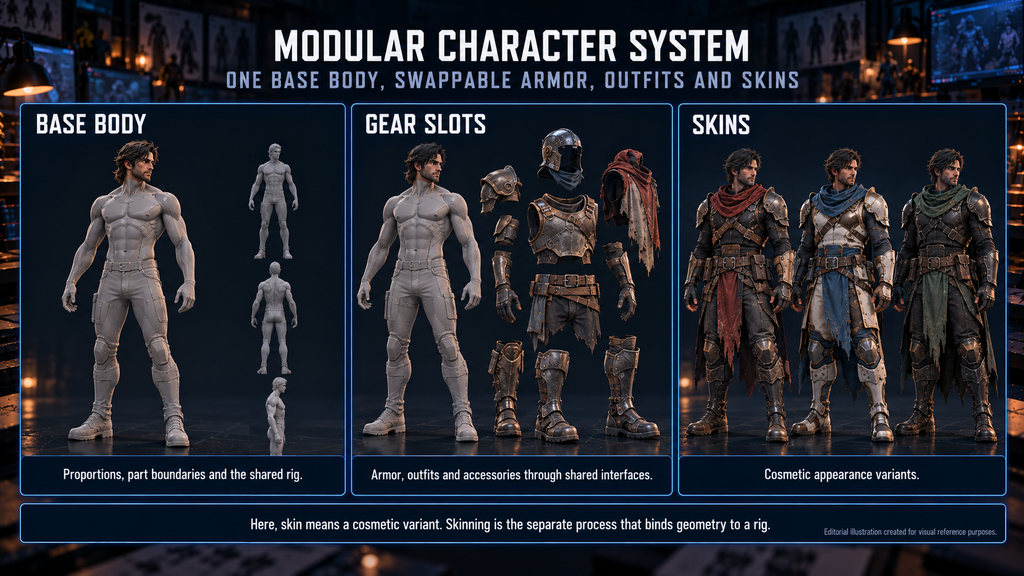
A modular character system supports outfit and equipment changes by reusing compatible bodies, parts and production rules. The work grows when a new jacket exposes a body region that was removed, a helmet conflicts with hair, or a new body shape no longer fits the approved gear.
“Editorial illustration created for visual reference purposes. It does not represent a real project, client work, or official software screenshot unless stated otherwise.”
For an art director or producer planning a growing cast, agree base-body requirements, equipment slots, variation methods, engine assembly and validation before expanding the asset library; new designs are then checked against those interfaces.
Written by Denys Zadoienyi, Founder of Nasty Rodent Studio.
A character variation system defines how a character’s appearance can change through materials, body shapes, outfits and equipment. A modular character system implements compatible part swaps through shared interfaces and assembly rules. Here, “skin” means a cosmetic appearance variant; skinning is the separate process that binds deforming geometry to a rig.
A second costume can be a complete replacement mesh or a set of interchangeable pieces. Decide which parts combine across outfits, which assets stay independent and which visual or rig requirements must remain compatible – these define the interfaces later items respect.
In his GDC 2014 talk on building customizable characters for Destiny, Bungie’s Scott Shepherd described a system designed to get the most out of existing art and to keep expanding over the life of the franchise. The scale differs by project, but the talk shows why reuse and expansion benefit from deliberate planning.
The art director preserves agreed quality, shape language and gameplay cues across permitted variations; the producer identifies which additions reuse assets and which change the agreed work. Counting deliverables is covered in our guide to character art scope estimation; here the focus is compatibility.
The Base Body: Proportions, Part Boundaries and What Hides Under Gear
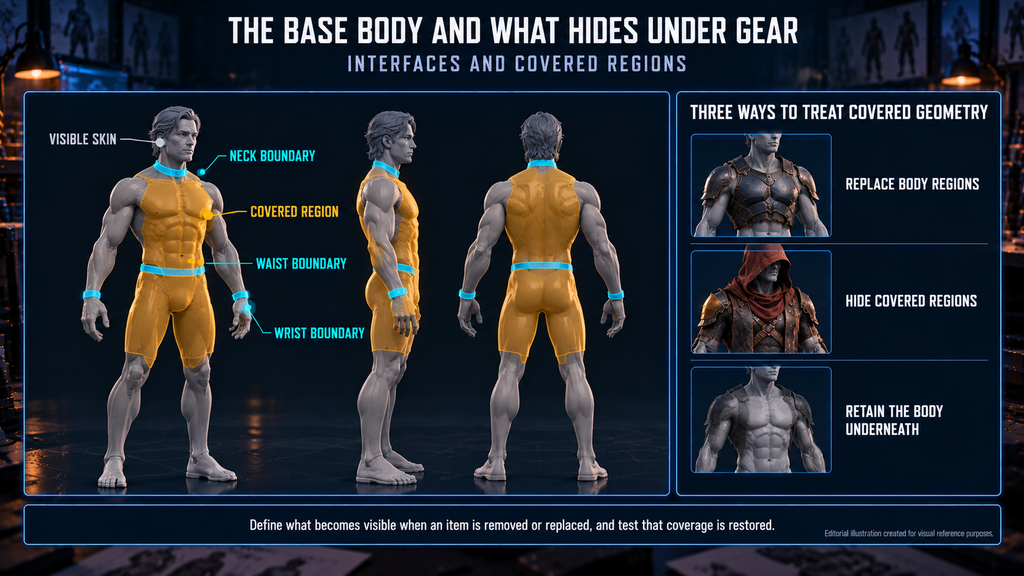
Define the supported body shapes and the animation and gear they must use. Some shape changes keep a compatible rig; others need adjusted clothing, deformation support or a different setup. Validate fit and motion rather than judging compatibility from bone names or body height; animation transfer is covered in our guide to UE5 skeletal mesh retargeting.
“Editorial illustration created for visual reference purposes. It does not represent a real project, client work, or official software screenshot unless stated otherwise.”
Modular character design then defines interfaces around the permitted outfits: some use neck, wrist or waist boundaries, others overlap an intact body. Exposed skin-to-skin joins need aligned boundaries and compatible deformation, shading and materials through the required poses; cuffs, armor edges and other overlaps follow different fit rules. Match visible detail to the quality target rather than requiring identical topology or texel density.
Then decide how to treat covered geometry:
- Replace body regions: use body-section variants suited to the equipped item, keeping any skin that must stay visible.
- Hide covered regions: use the project’s material masks or component and section visibility, with coverage rules for each supported combination.
- Retain the body underneath: fit clothing and body deformation together, checking clearance through the required motion.
Methods can be combined. Define what becomes visible when an item is removed or replaced, test that coverage is restored, and profile masking rather than assuming it costs the same as removing geometry.
Creatures may need their own base and skeleton, not a humanoid variant. Our realistic character gallery shows creature work; the team has delivered characters and creatures for Mutant Year Zero: Road to Eden.
Gear Slots: Attachments, Skinned Layers and Slot Conflicts
Classify gear by the behavior it needs: an attachment transform, rigid or deforming skin weights, cloth simulation or a combination. The material does not decide the setup – metal armor can be skinned, and a garment can mix deforming and rigid elements.
Define which regions each layer covers and which combinations are permitted; a layer order is a design convention, not an automatic clipping fix. Hair under a helmet or a cape with a backpack may need selective hiding, an alternate asset, a fit adjustment or an explicit incompatibility rule.
Test the required poses, body shapes and neighboring equipment. Resolve intersections through fit, coverage or compatibility changes. Agree any corrective deformation, extra joints or simulation with the technical owner, and use them only where the rig and assembly method support them; our article on character rigging covers the broader setup. Name parts by slot, body type and variant from the first item.
Skins and Material Variations: Reuse and New Work
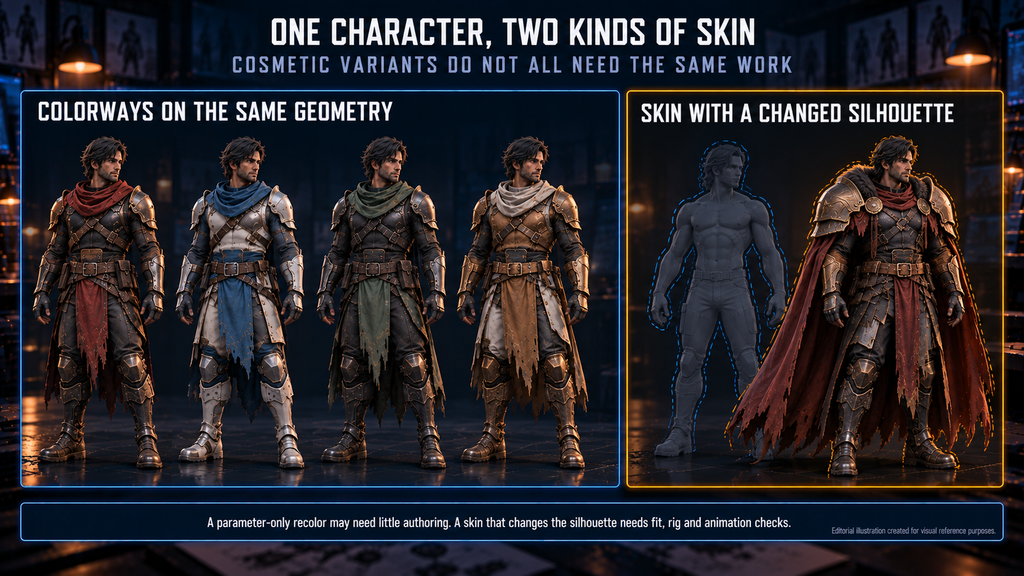
Define what each cosmetic variation reuses and changes. A parameter-only recolor may need little authoring, while a texture-heavy skin or a small but demanding gear item can need substantial artwork, integration and review.
“Editorial illustration created for visual reference purposes. It does not represent a real project, client work, or official software screenshot unless stated otherwise.”
| Variation | What changes | Compatibility to define | Red flag |
| Parameter recolor | Supported material values | Parameter and mask conventions | Intended regions do not change, or unintended ones do |
| Texture replacement | Texture resources | Mapping, shader inputs, target visual quality | Appearance or memory use misses the specification |
| Decal or trim detail | Added surface treatment | Mapping or placement suited to the technique | Detail breaks under deformation or part swaps |
| Part replacement | Geometry for one equipment region | Fit, attachment or deformation setup, neighboring parts | Required combinations lose coverage or clip in motion |
| Geometry-changing skin | Several parts or the full appearance | What stays compatible and what needs rig or animation work | Identity, motion or gameplay readability is lost |
Preserve required visual cues, such as class or faction readability, within the variation art direction permits; our guide to stylized 3D character art direction covers the broader rules.
A parameterized material can support controlled color or texture changes; in Unreal, material instances are one way to expose them if the parent material supports them, as the Material Editor in Unreal guide explains.

For seasonal skin batches, release gates and vendor capacity are covered in our guide to live-service game art outsourcing.
For Bubble Quest of Vikings, our team delivered stylized 2D and 3D character work. Bruni, the Viking captain and the wolf are shown in our stylized character gallery.
Did you know?
Unreal’s standard Skeletal Mesh Merge workflow does not transfer morph targets to the merged mesh. Characters that rely on them need a decision: keep affected parts separate or scope extra technical work. Epic describes a possible workaround, not a default feature.
Assembling the Character in the Engine: Choosing a Compatible Method
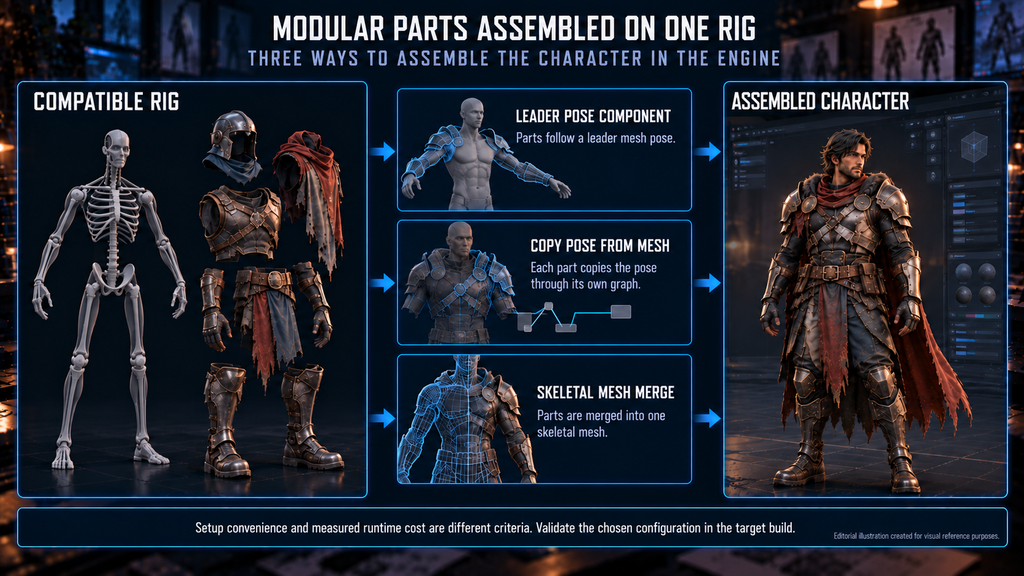
Epic’s documentation on working with modular characters in Unreal Engine (UE 5.8) compares three methods:
| Method | How parts follow the body | What to validate |
| Leader Pose Component | Followers use a leader mesh’s pose | Hierarchy compatibility; no independent follower animation or physics |
| Copy Pose from Mesh | Each part copies the pose through its own graph | Bone matching, evaluation order, any separate animation or simulation |
| Skeletal Mesh Merge | Parts are merged into one skeletal mesh | Merged geometry and materials, supported deformation, initial assembly work |
Use the comparison as a starting point and validate the chosen configuration in the target build; setup convenience and measured runtime cost are different criteria. Epic’s simplified example counts per component: three components on 50 characters mean 150 draw calls without merging and 50 with it. A merged mesh can still have several material sections, so compare actual configurations, including render passes and the cost of building or updating the merge. Fixed NPC variants and frequently changed player gear may use different strategies.
“Editorial illustration created for visual reference purposes. It does not represent a real project, client work, or official software screenshot unless stated otherwise.”
In Unity, skinned gear needs correct bone-transform references and compatible skin weights and bind poses; matching bone names alone is insufficient. Verify binding and motion in the target project – rigid attachments and simulated elements have their own setup.
Coordinate LOD transitions so joins, deformation and attachments stay compatible; parts do not need identical LOD counts or matching indices. Validate the assembled character across its viewing range, with broader budgeting in our polygon budget guide, and agree who implements and verifies the assembly logic.
Validating the Combination Matrix Before the Roster Grows
Define the permitted combination space first. A small authored roster may be checked exhaustively; a larger customization system needs a documented, risk-based plan, because representative tests give coverage, not proof. Include:
- demanding shapes at critical joints and openings;
- known conflict pairs and relevant multi-layer combinations;
- supported body-shape extremes with the gear that must fit them;
- equip, replace and remove transitions, checking restored coverage;
- the required LOD transitions and animation poses;
- costly configurations for rendering, animation, simulation or memory, at the intended character density.
Review results in the target build under gameplay cameras and lighting, and define what is rechecked when an item or rule changes. A bounded sample also suits a vendor trial; our guide to vetting a character art vendor explains how to scope one.
Before production, the spec should state:
- Target: platform, engine version, cameras, character density, animation set.
- Bodies and deformation: supported shapes, binding requirements, morph or cloth needs.
- Coverage and conflicts: hidden or replaced regions, allowed combinations, restoration rules.
- Variations: recolor, texture, decal and part methods.
- Assembly and delivery: runtime or preassembled variants, assets, owner of integration and tests.
- Budgets: geometry, material, memory, animation and simulation limits for expensive configurations.
- Validation: tested configurations, acceptance criteria and retest rules.
Our 3D character modeling service asks about gear, skins and variants at the estimate stage, so the system enters scope before modeling.
Our Approach to Character Variation
These decisions set how far a cast can grow. At Nasty Rodent we agree base bodies, equipment slots and naming at the brief, before the first sculpt. On Wild Rage, we led the art direction and produced 3D characters with rigging for Whimsy Games’ survival MMORPG, as described on our RPG and MMO game art page.
| Approach | Useful when | Reuse opportunity | Additional work to plan | Main check |
| Unique characters | Small cast, fixed costumes | Skeleton, materials, library parts | Costume-specific modeling, textures, rig work | Each character holds up at its views |
| Shared bases with authored variants | NPC crowds, faction variants | Base bodies, slot parts, masks | Boundaries, coverage rules, variant list | Variants read as distinct in play |
| Player customization kit | Players combine gear at runtime | Slots, parts, mask conventions | Conflict, coverage and restoration rules, assembly, budgets | Allowed combinations meet acceptance criteria |
Choose by required combinations, body shapes, update frequency and target-build limits.
Plan the Variation System Before the First Sculpt
A modular character system holds up when bodies, slots, variation methods and assembly are agreed together and checked on representative combinations.
Planning a character roster with variations? Get a scope estimate – send your character list, references, target engine and expected gear and skin variations to sales@nastyrodent.com; existing characters or an art bible help. We usually reply within 1–2 business days.
Get a character scope estimate →
Let's work
together


in mind?
From 3D characters and environments to weapons, props, concept art and game UI/UX: ten years deep, 40+ artists strong, zero fluff. Tell us what you are making and get a free, no-pressure estimate.
estimate