Art Outsourcing for Live-Service Games: Seasons, Skins and Vendor Capacity
-

Written byDenys Zadoienyi
-

Updated on15.10.2026
-

Time to read18 min

- Why a Season Is Not a Smaller Project
- What Seasonal Art Is Actually Made Of
- Planning a Season Backward From the Live Date
- Vendor Capacity: Baseline, Peaks and Overlapping Seasons
- Keeping Seasons Visually Consistent
- A Season Brief Checklist
- Capacity and Continuity Risks to Check Before Committing
- How to Plan the Next Season With a Vendor
Live service game art outsourcing brings external artists into an ongoing content roadmap. For teams that organize that roadmap into seasons, the planning challenge is to match each content batch to the skills, review time and integration window it needs, while accounting for work that overlaps between releases.
“Editorial illustration created for visual reference purposes. It does not represent a real project, client work, or official software screenshot unless stated otherwise.”
This guide is for teams that plan content in seasons. It shows how to break a season into work types, how to plan a seasonal content art pipeline backward from the live date, how to check vendor capacity when seasons overlap and which capacity and continuity risks to test before you commit.
Live service game art outsourcing means using an external art team to produce content for a game that continues to receive updates after launch. For season-based roadmaps, planning connects asset scope, release gates, discipline-specific capacity and approved style references. Capacity can be reserved or commissioned for a defined batch, depending on the agreement.
Why a Season Is Not a Smaller Project
In live ops art outsourcing, a season can look like a small project: a handful of skins, an event prop or two, perhaps a new section of a map. It tends to behave differently, for three reasons.
The first is that the date is not yours alone. A seasonal roadmap is often visible to players, and our guide to the game production pipeline notes that once players expect a cadence, schedule slippage can become visible to them instead of remaining an internal scheduling issue. That guide covers live operations as a phase of production; this article looks at how to organize art for a single season.
The second is that seasons can overlap. In a common pattern, one season is in production while the next is in concept and the previous still needs fixes, so the same people may be asked to serve three schedules at once. Not every roadmap follows this pattern, but where it does, capacity has to be planned for it.
The third is that asset delivery usually needs to happen before the live date. The release owner should set separate deadlines for art handoff, integration, testing and any required platform submission. Content lock is an internal change-control gate; late changes need an approved path and may affect scope or release timing.
The effects spread beyond the art team. Engineering integrates what arrives, QA tests what is in the build and marketing plans around what the season will contain. When a batch is late, the visible result is often more than a delay. It can be a thinner season, with an item cut or swapped for something easier.
If you are a producer who owns a live roadmap, the cost lands in the content calendar. The working question is what ships if the third batch is late, and the answer depends on knowing which items are blocked, which are only waiting for review and which can be dropped without breaking the theme. A vendor plan built around a single delivery date may not be able to answer it.
For a vendor manager, the cost lands in continuity. A studio staffed from scratch for each season may have to learn the style, the naming and the review habits again, and a style that depends on who happens to be assigned can be harder to hold steady. These costs tend not to appear on the estimate. They can show up later as extra review rounds, a slower first batch or a lower first-pass approval rate on the vendor scorecard at the start of a season.
What Seasonal Art Is Actually Made Of
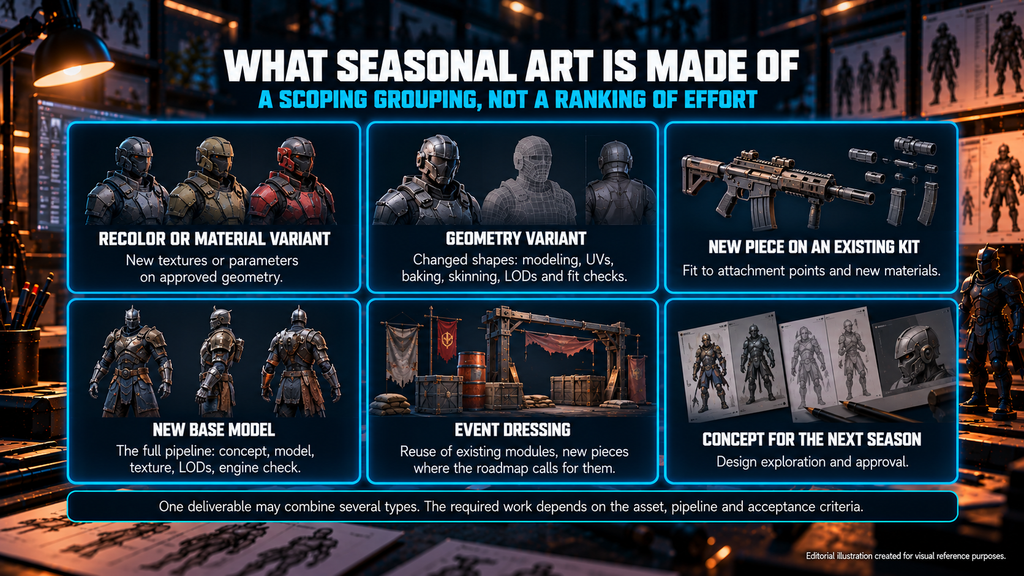
A season list that reads “twelve skins and two event props” hides the question that decides the workload: what kind of work each line is. Recolors, new geometry and new base models are different jobs, and treating them alike is one of the easier ways to underestimate a season. The table groups common work types for scoping. It is not an exhaustive list or a ranking of production effort. A single deliverable may combine several types, and the required work depends on the asset, pipeline and acceptance criteria. It gives no rates, because effort depends on your engine, style and quality bar.
“Editorial illustration created for visual reference purposes. It does not represent a real project, client work, or official software screenshot unless stated otherwise.”
| Work type | What drives the effort | Planning risk |
| Recolor or material variant | New textures or material parameters on approved geometry, plus a readability check in the build | Treated as negligible, then multiplied across many variants and platforms |
| Geometry variant (a skin with changed shapes) | Modeling and, where required, topology or retopology, UVs, baking, skinning, deformation checks and LOD updates, plus fit checks against the existing base | Estimated as a recolor |
| New piece on an existing kit (attachment, accessory) | Fit to attachment points and new materials; rigid attachments differ from parts that need rigging or deformation | Kit rules not written down, so every piece solves them again |
| New base model | The full pipeline: concept, model, texture, LODs, engine check, plus any agreed rigging or animation requirements | Compared with variant rates |
| Event dressing (props, environment changes) | Reuse of existing modules, new pieces where the roadmap calls for them, and assembly or placement in the level only where the agreed scope includes it | Level layout changes late and the art scope is not revisited |
| Concept for the next season | Design exploration and approval | Concept starts after the calendar is already fixed |
Depending on the roadmap, UI icons, VFX, animation and promotional art may run as additional streams or dependencies of the same season. This guide does not cover them in detail, but the season brief below should list them.
Check skins in the target engine and the camera contexts in which players will see them. Depending on the asset, validation may include material behavior, attachment fit, clipping, deformation, LOD transitions and platform budgets. Compare the result with approved references and document any intentional seasonal exceptions.
The groupings sit on top of the kit structure of base pieces, attachments and variants. Our guide to props and weapons scope estimation shows how to break an asset list into that structure and where reuse pays off, so the table does not repeat it.
A season also tends to grow after it is scoped. A “quick extra skin” requested mid-production is a common source of variant creep, and our character art scope estimation guide describes how to run an addition back through the worksheet instead of absorbing it.
Weapon skins show why concept and build work belong close together. On Squad, Nasty Rodent created concept art, unique skins and final weapon and vehicle assets for Offworld Industries. The concept work fed into assets the studio also produced, which illustrates a direct connection between design documentation and asset production. The point is the chain: when one team designs and builds, the design can account for how the asset will be constructed.
That chain is how our concept art service is set up, with concept deliverables designed to be consumed by 3D production.
On the build side, material-only weapon skins can reuse an approved base model, while skins that change geometry need the additional production and validation work included in their scope. Our 3D weapons service covers how game-ready weapons are produced for PC and console. Nasty Rodent has also produced props, environment assets and location support for Starship Troopers: Extermination for the same client, Offworld Industries.
Planning a Season Backward From the Live Date
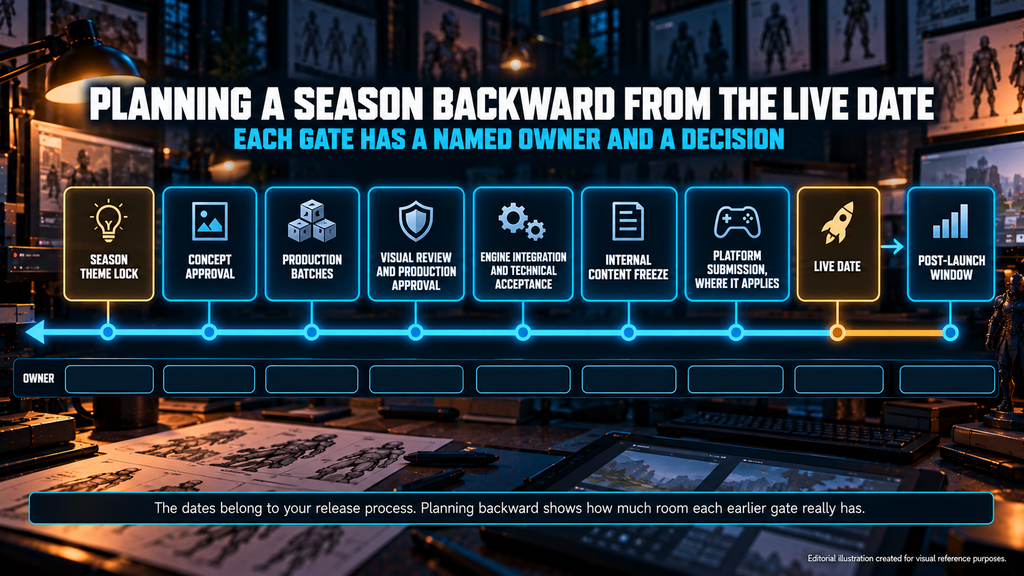
Start with the agreed target release date and work back. Planning forward from the theme feels natural, but it can leave the last gates compressed. Planning backward from the live date shows how much room each earlier gate really has.
The table below lists nine gates. They are a template: the dates belong to your release process, and platform submission applies only where your release path requires it. We recommend writing the name of the person who decides, and the day they decide, next to every gate. The last column is left for your own dates or windows, because the table deliberately gives none.
| Gate | What must be decided | Owner | What slips if it is missed | Planned date or window |
| Season theme lock | Theme, factions or motifs, palette direction, the list of content types | Creative or design lead | Concept starts on moving ground | Fill in |
| Concept approval | Approved designs and reference sheets for each hero item | Art director | Modeling begins against an unapproved design and returns as rework | Fill in |
| Production batches | What each batch contains and who reviews it | Vendor lead and client producer | Items arrive together at the end with no review time | Fill in |
| Visual review and production approval | Preliminary approval of the visual result against criteria written in advance | Client reviewer | Corrections pile up late in the schedule | Fill in |
| Engine integration and technical acceptance | Assets in the target build, within performance and memory budgets, with fixes re-checked | Technical artist | Defects surface at the same time as everything else | Fill in |
| Internal content freeze | The gate after which changes follow an approved change path | Release owner | Late changes affect scope or release timing | Fill in |
| Platform submission, where it applies | Submission, review and any correction or resubmission time | Release owner | The release date or the content list changes | Fill in |
| Live date | Release | Release owner | The public calendar moves | Fill in |
| Post-launch window | Fixes and hotfixes, coverage and triage order, agreed before release and carried out after it | Vendor lead and client producer | Fixes compete with the next season’s work | Fill in |
Within the production stage, split the season into batches instead of a single delivery. A first batch of hero items lets reviewers judge the style early, and later batches of variants can follow once the base is approved. This gives the review gate real work to do before the freeze and gives you an early signal if the vendor’s pace does not match the plan. We recommend ordering batches by their actual dependencies: approve shared bases before dependent variants, and run independent environment or dressing work in parallel where the pipeline allows.
Place an art-delivery buffer before integration and content freeze, and reserve time for testing, corrections and release preparation afterward. Size these allowances around the actual dependencies, review turnaround and remaining work. If the release has been announced, record who can approve a scope change or a revised date.
Our guide to keeping an outsourced art team on schedule explains how to size a buffer against approval rate, rework turnaround and complexity instead of adding a flat percentage to every milestone. The same logic applies to a season plan. Where the release date has been announced, the buffer also helps protect that public commitment.
Where platform certification applies, include submission, review and any required correction or resubmission time in the release plan. Do not use platform submission as the vendor’s default handoff deadline. Agree an earlier delivery window that leaves time to integrate and test the assets, and document how urgent changes are handled.

Vendor Capacity: Baseline, Peaks and Overlapping Seasons
Capacity is the part of a season plan that is easiest to leave vague. “The vendor can handle it” is not a plan, because the workload of a season is not flat. One season may be in production and need the most people, the next in concept and need a few, and the previous one need short interruptions for fixes. The peak moves around, and a vendor can be comfortable in one month and stretched in the next without any change in headcount.
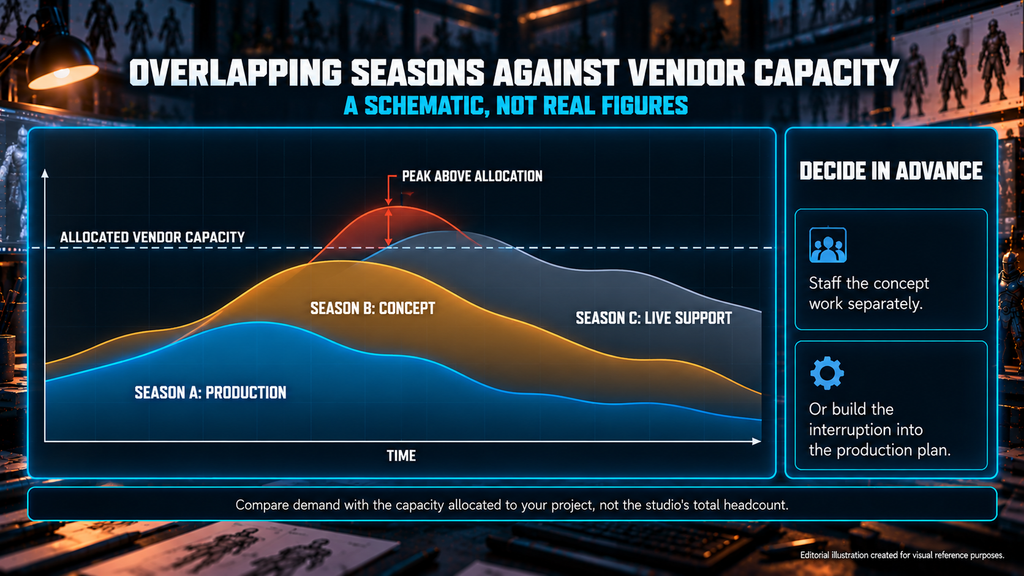
Here is a simple illustration with no real figures. Suppose a vendor team is sized for one season in production. If the next season’s concept work draws on the same artists, capacity for the current season falls for as long as they are reassigned. How much it falls depends on their specialization, the dependencies between tasks and the schedule reserve. Nobody has decided that trade-off. Capacity planning is the act of deciding it in advance: either the concept work is staffed separately or the production plan includes the interruption.
Build the capacity plan by discipline and time window, using the same unit for demand and availability, such as artist-days or hours. Include current production, upcoming concept work, internal lead review, planned revisions and agreed post-launch support. Compare this demand with capacity actually allocated to your project, rather than the vendor’s total studio headcount. Check client review and engine-integration availability separately, because additional vendor artists do not resolve a client-side approval bottleneck.
| Planning window | Discipline | Capacity allocated to this project | Estimated workload | Gap and agreed action |
| Agreed week or milestone | Concept | Confirmed allocation | Current approvals and upcoming exploration | Owner, action and decision date |
| Agreed week or milestone | Modeling and texturing | Confirmed allocation | Bases, variants and planned revisions | Owner, action and decision date |
| Agreed week or milestone | Technical art and vendor QA | Confirmed allocation | Validation, corrections and scoped integration | Owner, action and decision date |
| Agreed week or milestone | Agreed support roles | Confirmed coverage | Planned fixes and support allowance | Owner, action and decision date |
Four cautions apply to this template. Specialists in different disciplines are not automatically interchangeable. Estimates should rest on specific work types and their complexity. “Skins per month” is a weak measure unless the skin type is defined. And planned capacity does not prove actual pace, which is better checked against the delivery of comparable batches.
Different demand patterns can suit different ways of organizing the work.
| Demand pattern | Arrangement that may fit | Watch for |
| Steady content every season, similar in size | Reserved capacity with the same team | Paying for idle time if seasons shrink, so agree how unused capacity is handled |
| Large drops with long gaps between them | Defined seasonal projects | Continuity and ramp-up between projects, so ask who leads and who carries over |
| A roadmap that changes often | Flexible allocation against a prioritized backlog | Burn rate that nobody tracks on your side |
| A steady baseline with occasional peaks | An in-house baseline with agreed vendor coverage for peaks | Style ownership split between two teams |
These arrangements do not determine the pricing method. Fixed-price and time-and-materials terms should be chosen separately, based on scope certainty and change handling. Our guide to fixed price versus time and materials explains why a stream of arriving work may not fit a single fixed quote, so this article stays on capacity.
The in-house baseline row is the hybrid case. The in-house versus outsource decision framework describes a hybrid in which the in-house team holds art direction, style definition and review while the partner handles volume. For a live game that split can be attractive for a practical reason: the in-house team carries continuity, and the vendor can absorb the variation between seasons.
Consider co-development when the partner needs to participate in ongoing production decisions and share ownership of evolving work. Frequent backlog changes alone do not establish that need, and our guide to co-development versus outsourcing covers how to tell whether you are in that situation.
If you are a vendor manager comparing studios, ask each one the same capacity questions and keep the answers in your vendor scorecard:
- Which roles and capacity are committed for the upcoming planning windows, and how are staffing changes and handovers managed?
- What happens to my capacity when another client peaks?
- How do you handle two of my deliveries landing in the same fortnight?
- How quickly can the team scale up or down, and what does it cost to do so?
- What is the escalation path when a review and a delivery compete for the same artists?
In practice, the answer to the third question is worth hearing in detail, because it shows whether capacity is managed or only promised.
Keeping Seasons Visually Consistent
Visual drift can develop within a season or between releases. Staffing changes, new themes, inconsistent feedback and outdated references can all introduce differences that become visible when assets are reviewed together. Each change is small, and the drift is easy to miss until a full-scene review puts old and new content side by side.
Four habits reduce the risk.
- Maintain a versioned art bible during production and between seasons. Record approved changes, their owner and the assets or batches they apply to. Our guide to the game art bible explains how the document works, including ownership and version history.
- Keep approved benchmark assets and seasonal exceptions. Approved items from earlier seasons give new work something concrete to be compared with, and a list of exceptions separates intentional theme changes from unintended drift.
- Validate a new artist or team through an appropriate first batch or calibration task. Choose the check according to the work and the evidence you already have.
- Use internal vendor review before client review. Every batch at Nasty Rodent goes through internal art review by the lead artist before it reaches the client, which helps catch drift before client review.
Write down the decisions that were made verbally. Style rules often live in review comments, such as “less wear on the grip” or “keep the accent color to one panel”. A short log of such rulings, kept with the art bible, gives a new artist the reasoning behind approved assets and gives your reviewers something they can cite.
A consistent lead on the vendor side can also help carry the style from one season to the next.
A Season Brief Checklist
Copy the table below into your planning document and fill it in before the vendor estimates the season. A vendor can commit to capacity and dates with more confidence once these fields are filled in. If you want a second pair of eyes on a season brief, bring it to the first conversation.
| Field | What to write |
| Live date and internal freeze date | Both dates, plus the platform submission date where it applies |
| Season theme and reference set | The approved theme, references and any items that must match earlier seasons |
| Asset list by work type | Every item with its work type; one deliverable may combine several |
| Asset dependencies | Parent assets, required approvals and reusable components |
| Reuse permissions and versions | Approved source versions, availability and relevant restrictions |
| Technical budgets | Per-platform limits set by your technical team |
| Capacity allocation | Agreed allocation by discipline and planning window, including lead review and support |
| Review owners and turnaround | A named reviewer per batch and the turnaround you can commit to, including peak weeks |
| Deliverables and integration ownership | Source files, exports, engine packages and who integrates each batch |
| Acceptance and recheck | Visual and technical criteria, approving roles and how corrections are verified |
| Late-change process | Decision owner, impact review and approval route for urgent changes |
| Dependencies on your side | Design documents, naming rules, build access and anything else the vendor waits for |
| Support scope | Covered work, coverage window, triage owner and agreed response expectations |
After the live date, add a short review to the next brief. Compare similar batches and record what was cut, what was late and why. Note the cause of each repeated round: a vendor defect, a new requirement, a design change, an integration problem or a wait for a client decision. A return for rework is not automatically the vendor’s fault, and a one-page retrospective turns each season into input for the next calendar.
Two fields deserve particular care. The late-change process turns “can we add one more skin” into a decision with a date and an owner, and the review turnaround keeps the vendor’s schedule from depending on a queue on your side.
Capacity and Continuity Risks to Check Before Committing
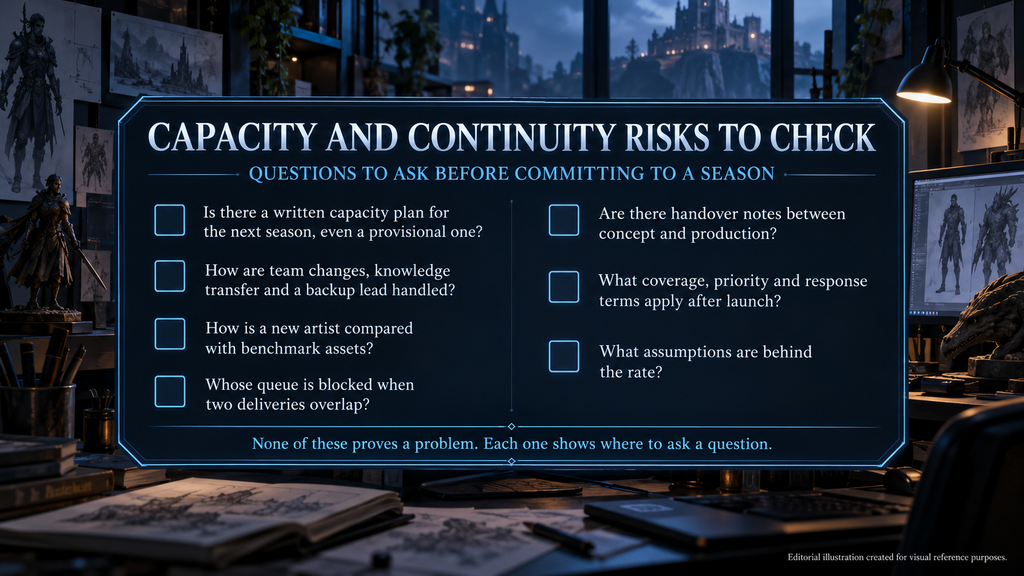
A vendor can have a strong portfolio and still need to show how it will hold a cadence. The signs are usually visible during the estimate or the first batch, and each one has a question that tests it.
“Editorial illustration created for visual reference purposes. It does not represent a real project, client work, or official software screenshot unless stated otherwise.”
| What you see | Why it matters | What to check |
| Capacity quoted only for the current batch | There may be no plan for the next season | A written capacity plan for the next season, even if provisional |
| The team changes between seasons | Re-onboarding and style drift are possible | Knowledge transfer, a backup lead and ramp-up time |
| “We adapt to your style” with no process | There may be no way to check a new artist | How a new artist is compared with benchmark assets |
| Reviews slip when two deliveries overlap | The delay may sit in your queue or in the vendor’s | Whose queue is blocked, and a review owner and turnaround for peak weeks |
| Concept and production handled by separate teams with no handover notes | Construction details can be lost between design and build | Handover notes or a joint review before production |
| Support after launch is “by request” | Fixes may compete with the next season | Agreed coverage, priority and response terms |
| One price per item | The blended rate may hide different scopes; a single rate is not an error in itself | Whether the composition and assumptions of the rate are disclosed |
None of these rows proves a problem. Each one shows where to ask a question. Your own calendar can fail the same tests: gates with no named owner and review turnarounds nobody has committed to can put a season at risk whichever vendor you choose.
Capacity and consistency are things you can verify. At Nasty Rodent, ongoing support is offered as monthly capacity allocated to a project, with the same team, lead and QA process across milestones and no re-onboarding between batches. Work is delivered by milestone, and each engagement has a dedicated point of contact. Our game art outsourcing services page describes the working models.
How to Plan the Next Season With a Vendor
Start with the live date and the internal freeze for the next season, classify every item by work type and ask the vendor which roles and capacity are committed for the upcoming planning windows. Written answers are easier to check later than verbal ones.
Bring the season brief checklist to the first call, and compare vendors by the same questions. A studio that answers the capacity questions with specifics is easier to evaluate than one that answers in general terms.
Planning a season roadmap? Send your season list and release dates to sales@nastyrodent.com, and we will come back with a skin and asset capacity estimate.