3D Vehicles for Games: Modularity, Damage States and Interiors
-

Written byDenys Zadoienyi
-

Updated on21.10.2026
-

Time to read10 min

- Why Vehicle Briefs Break Before Modeling Starts
- Plan Moving Parts for the Target Vehicle System
- Modularity: What a Shared Base Saves and Where It Stops
- Damage States: Choose How Damage Is Represented
- Interiors: Scope by Camera, Not by Ambition
- Where the Three Decisions Multiply: The Vehicle Variant Matrix
- What to Lock in the Vehicle Spec Before Production
- Our Approach to Vehicle Production
- Modular Fleet, Unique Hero Vehicle or Hybrid: Side by Side
- Brief the Vehicle’s Parts, States and Views Together
3D vehicles for games can grow in scope when interactions are discovered after the exterior is approved: the player opens a rear hatch, a mission needs a burnt-out hull, or several factions need distinct looks. Each can affect geometry, materials and integration beyond the original model.
“Editorial illustration created for visual reference purposes. It does not represent a real project, client work, or official software screenshot unless stated otherwise.”
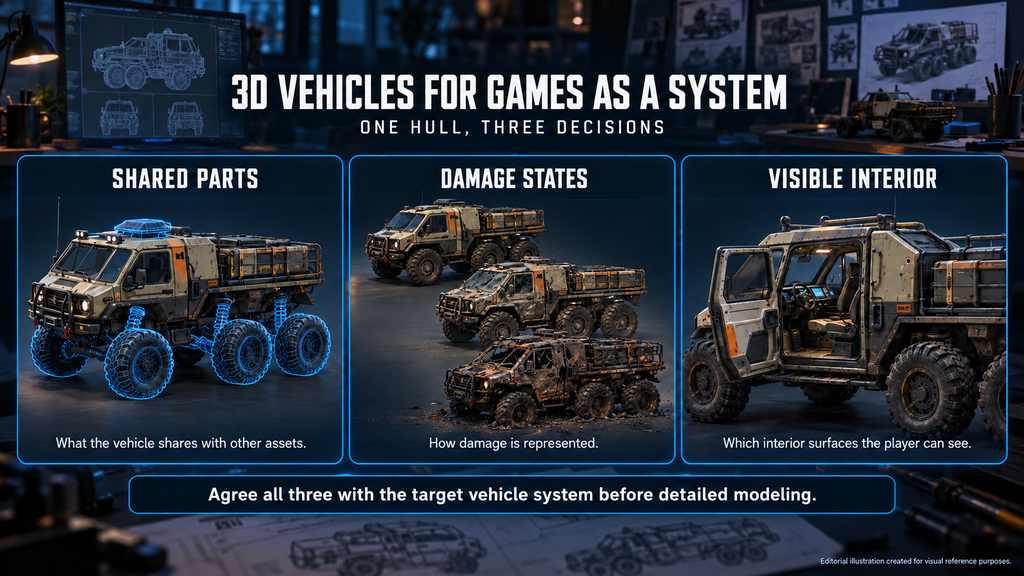
Three decisions define that work early: what the vehicle shares with other assets, how damage is represented and which interior surfaces the player can see. If you plan a fleet as an art director or producer, agree them with the target vehicle system before detailed modeling.
Game vehicle art comprises the geometry, materials and supporting game-ready assets for a vehicle’s real-time use. Depending on its role, it may include moving parts, interiors, damage representations and liveries, with collision, rigging, LODs and engine setup specified for the target platform and vehicle system.
Why Vehicle Briefs Break Before Modeling Starts
A vehicle list names the objects; production also needs their permitted parts, states and views, which decide what is reused and what is authored separately.
An illustrative example, not a studio benchmark: one vehicle base, three faction appearances and three visual states, including pristine, produce nine combinations to validate. That is not necessarily nine unique meshes: paint-only variants may share geometry and LODs, while geometry-changing damage may need additional assets or setup. Record combinations separately from the unique meshes, materials and collision configurations they use.
The art director keeps them consistent with the approved material response, wear language and silhouette rules; the producer tracks which are included and how later additions affect the agreed work and schedule.
Plan Moving Parts for the Target Vehicle System
Agree the target vehicle system, part hierarchy and required motion before detailed modeling. A rotating door needs a hinge axis; a detachable panel also needs attachment and physics behavior defined for the chosen system.
Vehicle rigging for Unreal Engine 5 follows the chosen system. Epic’s vehicle art setup documentation for Unreal Engine describes a skeletal-mesh workflow with X-forward orientation. Its four-wheeled example needs at least five joints – a root and one per wheel – with accurately centered wheel joints, rigid wheel weighting and a Physics Asset. These rules apply to that documented setup, not to every controller.
Other workflows may use transform hierarchies, separate components or a different rig, so specify the hierarchy, axes and naming the actual controller expects. Changing pivots after variants exist means rechecking them and their animations.
We model moving parts – wheels, hatches, rotors, turrets – as separate meshes with pivots at their intended rotation points; how far rig and physics setup go is agreed in the brief. Inconsistent LOD and collision names can require cleanup or fail pipeline validation, so the conventions from our asset import pipeline guide belong in the spec, not in the handoff.
Did you know?
A vehicle’s visible wheel and its suspension contact test are different parts of the setup. Their positions and dimensions must agree, but changing the wheel mesh does not by itself configure how the vehicle detects the ground.
Modular parts reduce repeated authoring where components are compatible; unique proportions and interactions limit what is shared.
“Editorial illustration created for visual reference purposes. It does not represent a real project, client work, or official software screenshot unless stated otherwise.”
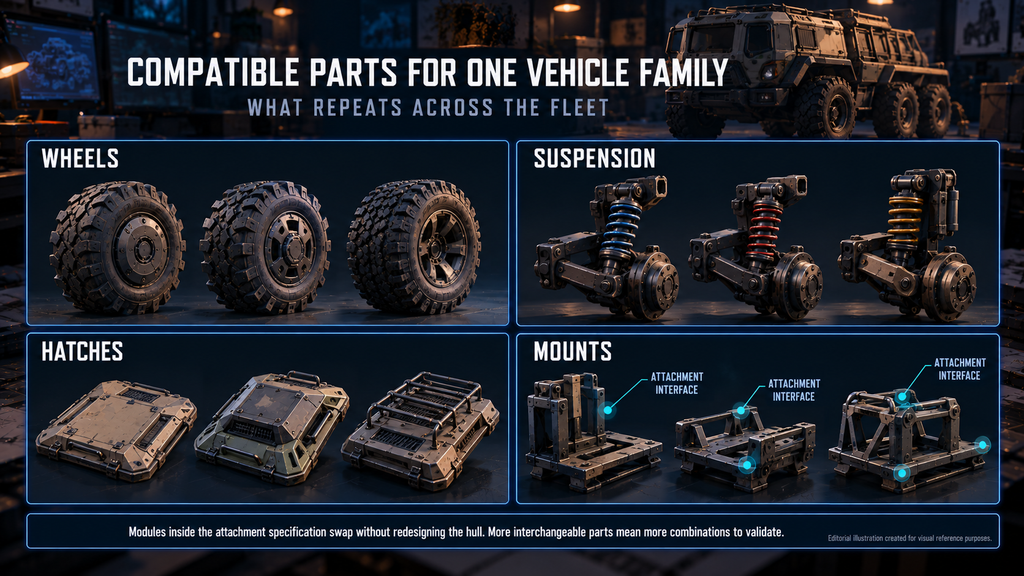
The parts that repeat are mostly mechanical: wheels, suspension, brakes, hatches, lights, weapon and cargo mounts. In a 2019 80.lv interview on vehicle art for AAA games, senior vehicle artist Irfan Haider notes that many studios keep libraries for parts such as brakes, calipers and suspension. He also says a shared interior library is hard to build, because interiors vary so much. Mechanical parts are good reuse candidates; cabin reuse depends on the actual designs and camera views.
Plan materials around real reuse: repeated components may share an atlas at a consistent texel density, while inspected surfaces need PBR detail matched to camera coverage. Agree whether liveries use color parameters, masks, decals or separate textures. Changing a color parameter can reuse existing textures, while unique graphics may require new ones. More interchangeable parts also mean more combinations to validate.
Mounts need an agreed attachment interface – location, orientation, compatible modules and clearance through the range of motion – much like the attachments in our guide to 3D weapon art for games. Modules inside that specification swap without redesigning the hull; incompatible ones may need additional work.
Detachable panels change what stays visible, so define part boundaries and exposed surfaces before baking; real seams are a reference, not a rule. Our guide to hard surface vs organic modeling covers the broader distinction. A hero vehicle can still reuse suitable components, but a shared base should not force an approved cockpit or silhouette into an incompatible shape.
Our vehicle work for Offworld Industries’ Squad includes the BTR-4 and Kozak-2M1 armored vehicles, a UH-1H Huey helicopter and an F-16, shown in our realistic vehicle gallery – a range of categories within one project, not a claim that they share a base mesh or rig.
For Corruption 2029, The Bearded Ladies brought us in for realistic vehicles and weapons, as shown on our tactics and strategy game art page.
Damage States: Choose How Damage Is Represented
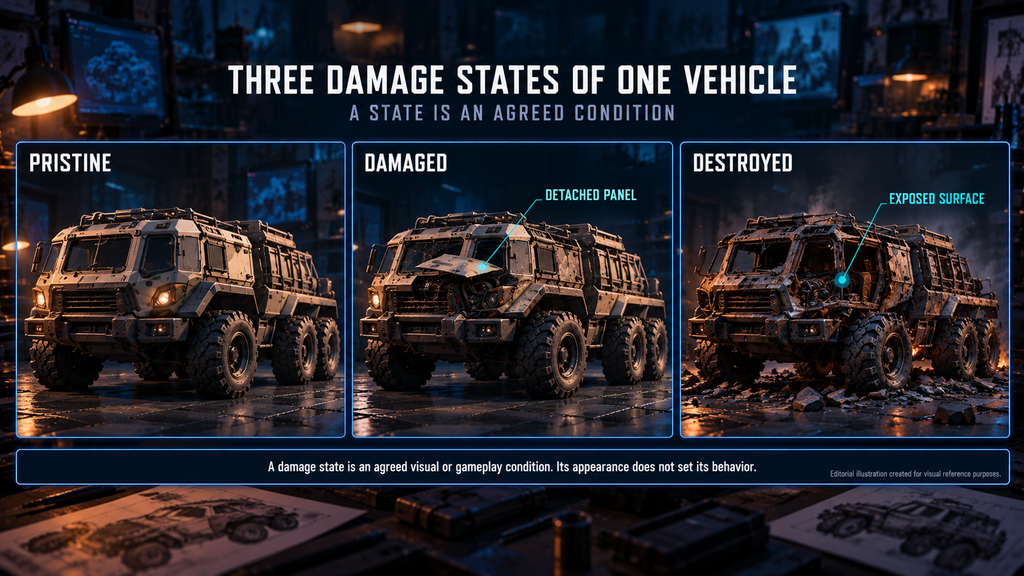
A damage state is an agreed visual or gameplay condition, and its appearance does not set its behavior. A scorched surface, a detached panel, reduced health and a disabled vehicle are separate requirements: specify what triggers each and which team connects the art to gameplay.
“Editorial illustration created for visual reference purposes. It does not represent a real project, client work, or official software screenshot unless stated otherwise.”
| Representation | Visual change | Possible requirements | Red flag |
| Surface damage | Scorch, impact marks or wear; mesh unchanged | Masks, decals or material parameters | Marks stretch on variants sharing the mapping |
| Authored damaged mesh | Parts or body swapped for damaged geometry | Extra geometry and materials; LOD and collision decisions | The state pops or loses its read at gameplay distance |
| Detachable parts | Doors, panels or wheels separate | Part splits, exposed surfaces, debris behavior | Unintended holes or leftover collision |
| Destroyed vehicle | A wreck remains | Authored wreck or damaged parts; collision and navigation decisions | Obstruction does not match the visible wreck |
| Runtime deformation | Shape changes through a deformation system | Compatible geometry, setup, system-specific tests | Shading or collision breaks as the shape changes |
These approaches can be combined. Runtime break-up is one way to implement detachable parts: Unreal’s Chaos Modular Vehicles, for example, supports adding or removing components during play. A kit of interchangeable pieces does not by itself provide that simulation.
Include each geometry-changing state in scope and validate its LOD chain and collision; some reuse parts of the base setup, others need new meshes, materials or collision. The polygon budget guide explains why the pristine model’s budget cannot simply be assumed to cover damaged geometry.

A late wreck can add substantial work when existing assets do not support its shape. Decide which variants share a wreck rather than building one per faction by default.
Interiors: Scope by Camera, Not by Ambition
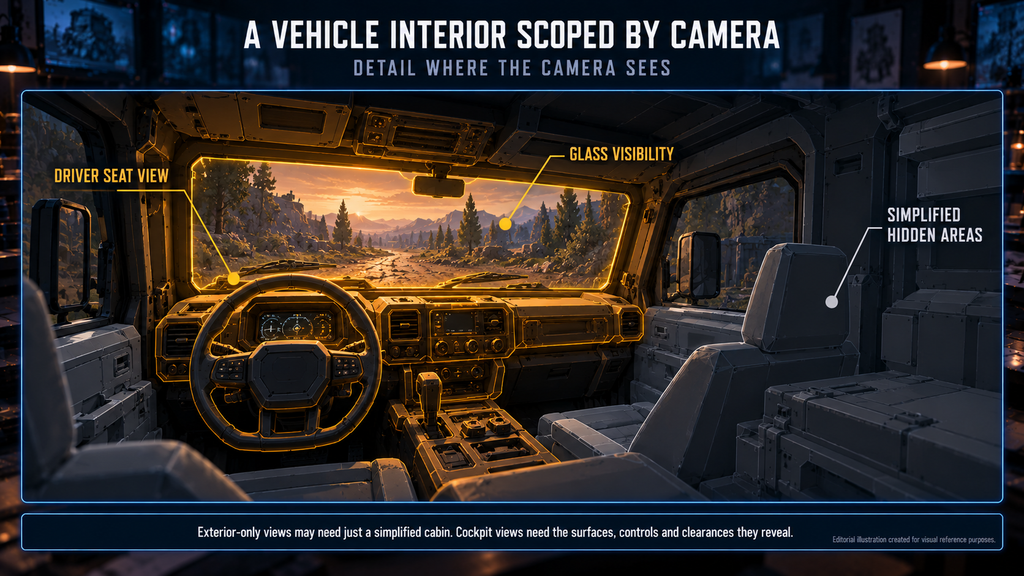
Vehicle interiors in games are scoped by what cameras and interactions reveal. Four questions settle most of it:
- Does any camera go inside – first person, seat view, cinematic, replay?
- What shows through glass, open hatches or gun ports?
- Where are the eyes – seats, camera height, field of view?
- Does anything inside move or need reading, such as instruments?
Exterior-only views may need just a simplified cabin that holds up through glass and openings. Cockpit or enterable views need the surfaces, controls and clearances they reveal. Scope that work separately; whether it uses separate meshes or LODs depends on the project. In the same interview, Haider advises keeping unseen interior details basic and concentrating detail where game cameras reveal it.
“Editorial illustration created for visual reference purposes. It does not represent a real project, client work, or official software screenshot unless stated otherwise.”
Damage can expose hidden surfaces, so specify what shows through an opened or missing hatch. If a destroyed state closes an opening, make that a defined state change, not a substitute for missing geometry. Enterable vehicles also need agreed seats, clearance and entry and exit; working instruments need their own scope and owner.
Stylized vehicles follow the same logic: silhouette carries readability, interiors follow the camera and moving parts need pivots and hierarchy suited to the intended motion, as in our stylized vehicle work.
Where the Three Decisions Multiply: The Vehicle Variant Matrix
As a producer, count combinations and the new work behind them, not just the vehicles listed.
| Axis | What may change | What can be reused | Decide before expansion |
| Liveries and faction colors | Parameters, decals, masks or textures | Geometry, compatible materials | Which differences are color-only |
| Swappable modules | Components, attachments, fit checks | Compatible bases and parts | Allowed combinations and clearances |
| Damage states | Geometry, materials, state logic, collision | Unchanged components and still-valid setup | Visual outcome, gameplay effect, sharing |
| Interior coverage | Visible cabin surfaces, controls, interactions | Compatible components | Camera access, openings, clearance |
A color-only variant may be inexpensive when the material already supports it, while a unique livery, a detailed cockpit or a complex damage setup can each need substantial authoring and validation. Count reuse and new work separately rather than ranking the axes by a fixed cost.
As in our guide to props and weapons scope estimation, count base pieces, attachments and variants separately, then account for the required damage states and interior work.
What to Lock in the Vehicle Spec Before Production
A short scope summary can point to the detailed technical spec. Before detailed modeling, agree:
- Roles and views: vehicle list, permitted cameras, visible openings, enterable areas.
- Target setup: platform, engine version, vehicle controller, performance and memory limits.
- Hierarchy and motion: axes, naming, attachment interfaces, moving parts and their ranges.
- Reuse and variants: shared components, livery method, allowed combinations.
- Damage behavior: appearance, exposed surfaces, transitions, gameplay effects.
- Interior coverage: camera and seat positions, visible surfaces, clearance.
- LOD and collision: what is reused or changes per configuration, and who validates it.
- Delivery and ownership: source files, exports, rig, engine setup, gameplay integration, acceptance evidence.
- Review gates: representative blockouts, combinations, damage and interior examples, then the required fleet configurations in the target build.
Collision for vehicle motion, hit detection and interaction queries may use different representations. An open hatch, a detached wheel or a wreck needs the behavior gameplay requires; the visible mesh does not update every collision response automatically. Agree who configures and tests it.
Representative assets reveal shared setup problems early but do not validate every vehicle or combination. Review states and moving parts under gameplay cameras, lighting and vehicle density, then profile against agreed target-build criteria.
Our 3D vehicle art service starts from these points, so interiors, damage states and variants are discussed at the estimate, not discovered in review.
Our Approach to Vehicle Production
The decisions above define what enters production. At Nasty Rodent we scope damage level, interiors and moving parts at the brief, before modeling starts. See our vehicles for Offworld Industries in the Squad case study.
Modular Fleet, Unique Hero Vehicle or Hybrid: Side by Side
| Approach | Useful when | Reuse | Extra work | Main check |
| Modular family | Vehicles share compatible structures | Bases, parts, materials | Interfaces, combination tests | Variants still meet visual and gameplay needs |
| Distinct hero vehicle | Unique proportions, views or interactions | Library parts, pipeline conventions | Unique geometry, interior and damage | Detail holds at intended views |
| Shared parts, unique bodies | Designs differ, some parts compatible | A bounded mechanical library | Exceptions and their checks | Parts fit without bending approved designs |
Pick by the actual vehicle list and permitted interactions; the closest camera alone does not set the reuse strategy.
Brief the Vehicle’s Parts, States and Views Together
Planning 3D vehicles for games means agreeing what is shared, how damage is represented and what the player sees inside, alongside the target vehicle system. Use the variant matrix to separate new work from reuse, then test it on representative assets first.
Get a vehicle art estimate for your project – send references to sales@nastyrodent.com. Share a vehicle list or references, the target engine and platform, and the damage and interior behavior you need; existing assets help if available. We usually reply within 1–2 business days.
Request a vehicle art estimate →

Let's work
together
in mind?
From 3D characters and environments to weapons, props, concept art and game UI/UX: ten years deep, 40+ artists strong, zero fluff. Tell us what you are making and get a free, no-pressure estimate.
estimate