Migrating Art from Unity to Unreal Engine 5: What Has to Be Rebuilt
-

Written byDenys Zadoienyi
-

Updated on23.10.2026
-

Time to read9 min

- Why “Import It Now, Fix It Later” Underestimates the Move
- What Can Be Reused: Meshes, Textures and Supported Animation Data
- What Needs Rebuilding: Engine-Specific Materials, Effects and Scene Systems
- Textures, LODs and Collision: Convert, Then Re-Check
- Planning the Migration: Inventory, Pilot Batch and Acceptance in UE5
- Our Approach to Rebuilding Art in UE5
- Transfer, Convert or Rebuild: Side by Side
- Plan What Your Art Needs Before It Moves to UE5
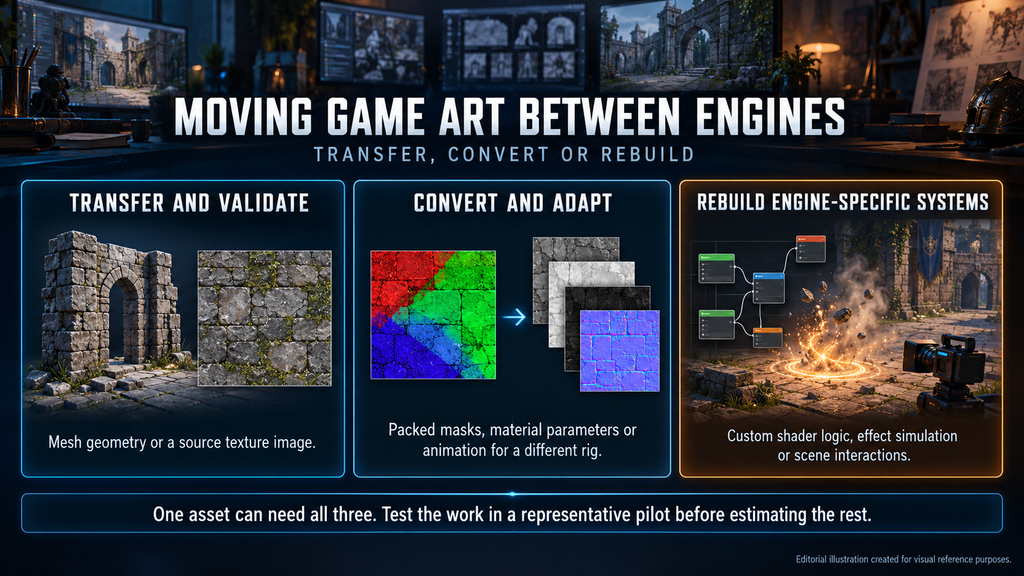
A Unity to Unreal migration can reuse meshes, textures and supported animation data, but a successful import does not preserve the game’s approved appearance or behavior. Plan separately for data transfer, conversion and validation, and for rebuilding engine-specific shaders, effects and scene systems in Unreal Engine 5.
“Editorial illustration created for visual reference purposes. It does not represent a real project, client work, or official software screenshot unless stated otherwise.”
If your team has already chosen the engine – the comparison itself is covered in our Unity vs Unreal Engine 5 guide – the useful question is which assets transfer, which convert with checks and which need new work in UE5.
Unity to Unreal art migration is the process of moving a game’s art library – meshes, rigs, animation, textures, materials, lighting and effects – into Unreal Engine 5 and re-establishing its approved look there. It differs from porting a game: code, gameplay systems and tools are separate workstreams, even when the art moves first.
Why “Import It Now, Fix It Later” Underestimates the Move
A batch import can fill the Content Browser quickly, and a test level may contain recognizable geometry. That does not establish visual parity: shading, lighting, exposure and post-processing still need to be checked in UE5, even when the source files imported without errors.
If you are a technical art lead, the risk is approving imports because they open rather than because they match references. For a producer, the risk is a schedule that counts migration as file transfer: the material, lighting and effects work then appears as rework after the first in-engine review, when changes to approved assets are harder to absorb.
What Can Be Reused: Meshes, Textures and Supported Animation Data
Epic’s guide to migrating assets from Unity to Unreal Engine describes an FBX route for mesh and supported animation data; Unreal’s FBX pipeline uses FBX 2020.2. Where available, use the original DCC files and texture sources. Unity’s FBX Exporter can export supported data from a selected GameObject hierarchy, but that is not a functional prefab conversion. Source texture images can be imported separately; Unity’s texture import settings do not accompany them.
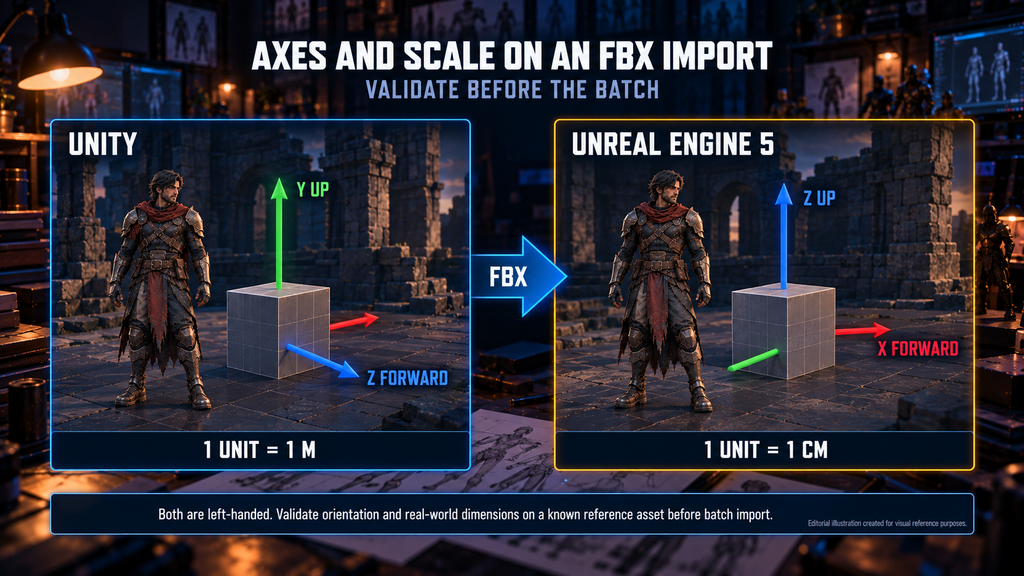
Both engines use left-handed coordinate systems, but Unity treats Y as up and Z as forward, while Unreal uses Z as up and X as forward, and one Unreal unit equals 1 cm. Validate orientation and real-world dimensions on a known reference asset before batch import. Check source transforms, export settings and the UE5 importer’s axis and unit conversion before adding a corrective rotation or scale. Epic’s troubleshooting example of a 90.0 X-axis Import Rotation applies only to assets confirmed to share that issue.
“Editorial illustration created for visual reference purposes. It does not represent a real project, client work, or official software screenshot unless stated otherwise.”
Record the Unity, exporter and UE5 versions, the importer used and the validated settings for each asset family. Reuse those presets for matching assets and log exceptions; our guide to the asset import pipeline covers documenting that setup.
Unity’s FBX Exporter 5.0 documentation lists Humanoid rigs and meshes inside bone hierarchies as unsupported. Do not assume those characters will export correctly: establish a supported route from the original rig and animation sources, then test it in UE5, including deformation, bind pose, root motion and required morph targets. Unity Animator controllers, Avatar mappings and runtime rig logic need a separate Unreal implementation.
When an animation must drive a different target skeleton, validate compatibility and plan retargeting where needed; our guide to UE5 skeletal mesh retargeting covers that work.
Did you know?
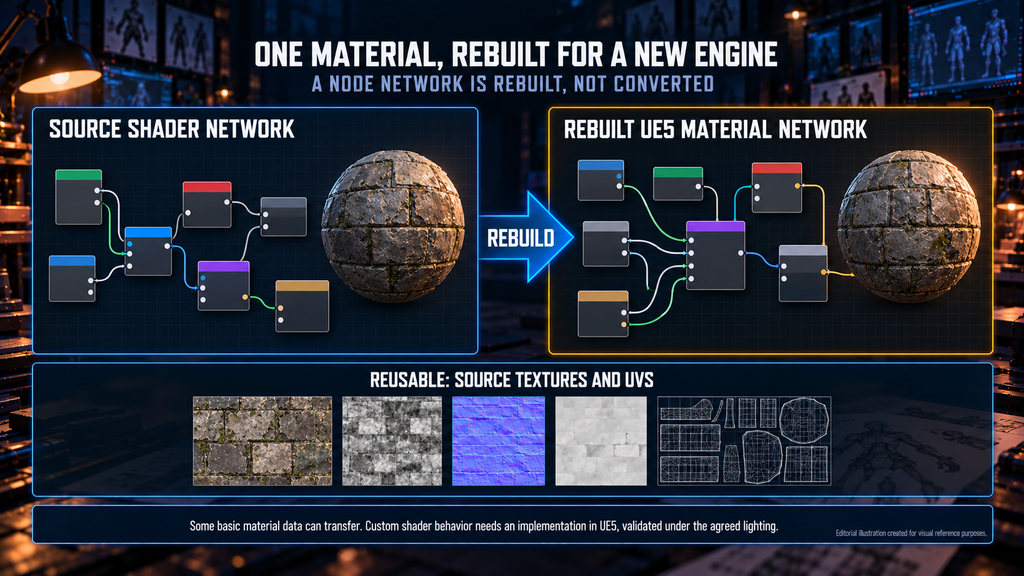
According to Unity’s FBX Exporter documentation, Unity materials are exported as classic FBX materials – Phong when the material has specular, Lambert otherwise – and primarily the Standard and Standard (Specular) shaders are supported. An exported basic material can be a starting point; a custom shader’s behavior still needs a suitable UE5 implementation.
What Needs Rebuilding: Engine-Specific Materials, Effects and Scene Systems
A standard FBX workflow does not convert Unity Shader Graphs into Unreal material graphs or Visual Effect Graph systems into Niagara systems. Timeline and Cinemachine setups also need a new Unreal implementation. Scope those systems separately from reusable geometry, images and animation data.
“Editorial illustration created for visual reference purposes. It does not represent a real project, client work, or official software screenshot unless stated otherwise.”
| Asset family | Potentially reusable data | Work required in UE5 | Red flag |
| Materials and shaders | Source textures, UVs, supported basic material data | Validate imports; recreate unsupported shader behavior and parameter controls | A compiled material accepted without visual review |
| Lighting and post-processing | Layout, reference captures, supported light data | Re-establish lighting, exposure, grading and the chosen GI solution | Unity lightmaps or renderer settings treated as a UE lighting setup |
| Visual effects | Textures, flipbooks, meshes, suitable source animation | Recreate simulation, timing and material behavior in the target system | Only the effect’s texture export is estimated |
| Cameras and cutscenes | Camera data and animation where the workflow preserves them | Rebuild sequence bindings, cuts, events and runtime camera behavior | Baked motion confused with a portable Cinemachine setup |
| Prefabs and scenes | Supported hierarchy, transforms, mesh placement | Validate assembly; recreate missing components, references and behavior | Imported placement treated as a working Unity prefab |
If the project uses Unity Terrain, scope it separately from mesh export. Height data may be reusable through a compatible Landscape heightmap import, but terrain materials, vegetation placement and runtime setup need a defined conversion or rebuild path.
Materials are one major part of the migration scope. Group source materials by the behavior they need in UE5, then decide which can use shared master materials and instances and which need a separate implementation; our guide to the Material Editor in Unreal covers that structure.

Lighting needs its own decision before materials are signed off. A project leaving baked Unity lighting can keep a baked approach or adopt dynamic global illumination, depending on target platforms and performance budget. Lumen in Unreal Engine 5 is one option, not a requirement; it changes how emissive surfaces and indirect light behave, so materials approved under one setup may need retuning under another.
For effects that need Niagara, reuse suitable source images and meshes while rebuilding the required behavior; our comparison of Niagara vs Cascade provides context. For cinematics, test whether camera data or baked animation can be reused before estimating every shot from scratch. Epic’s FBX Scene Import brings cameras without animation, so a Sequencer animation workflow has to be evaluated separately.
Textures, LODs and Collision: Convert, Then Re-Check
Texture images can be reused, but their channels and import settings must match the UE5 material. Identify the source shader and render pipeline before converting smoothness to roughness, unpacking masks or changing normal-map orientation. For example, HDRP’s Lit mask map stores metallic in R, ambient occlusion in G, detail mask in B and smoothness in A; it is not a ready-made roughness map. Define conversion rules per source-material family and validate them under controlled lighting; our PBR texturing workflow guide covers the wider workflow.
Then check texture settings: sRGB for color maps, linear values for data maps, compression per map type, and mip and streaming settings appropriate to the target platform.
Unity’s FBX Exporter can export all, the highest or the lowest levels of a LOD group, and Unreal can import mesh LODs. For static geometry, decide per asset family whether to keep the imported LOD chain or enable Nanite; our guide to Nanite in Unreal Engine 5 explains where each fits. Validate the chosen path with the asset’s materials, platform support and measured runtime cost; Nanite does not replace collision setup or visual acceptance.
Treat generated collision as a starting point. Validate shapes and scale, then configure the required collision channels, query and physics responses, and trigger behavior in Unreal. Check representative player, camera and interaction cases; equivalent geometry alone does not establish equivalent behavior.
Planning the Migration: Inventory, Pilot Batch and Acceptance in UE5
Start a Unity to Unreal migration with an inventory, not an import. List asset families with counts, source files, shader and render-pipeline variants, rig and controller dependencies, lighting dependencies and owners. Mark the work each family needs – transfer, convert or rebuild – knowing one asset can need all three. Flag assets without source files, store assets whose license terms need checking and anything planned for redesign.
Choose a pilot around the asset families and exceptions in the actual library: for example, a modular kit, a character with required animation, a demanding material and an effect, plus cameras or Terrain if they are in scope. Run the full export, import, adaptation and review path, record effort by task and note what the sample does not cover. Estimate the remaining work with explicit assumptions, then update it as exceptions appear.
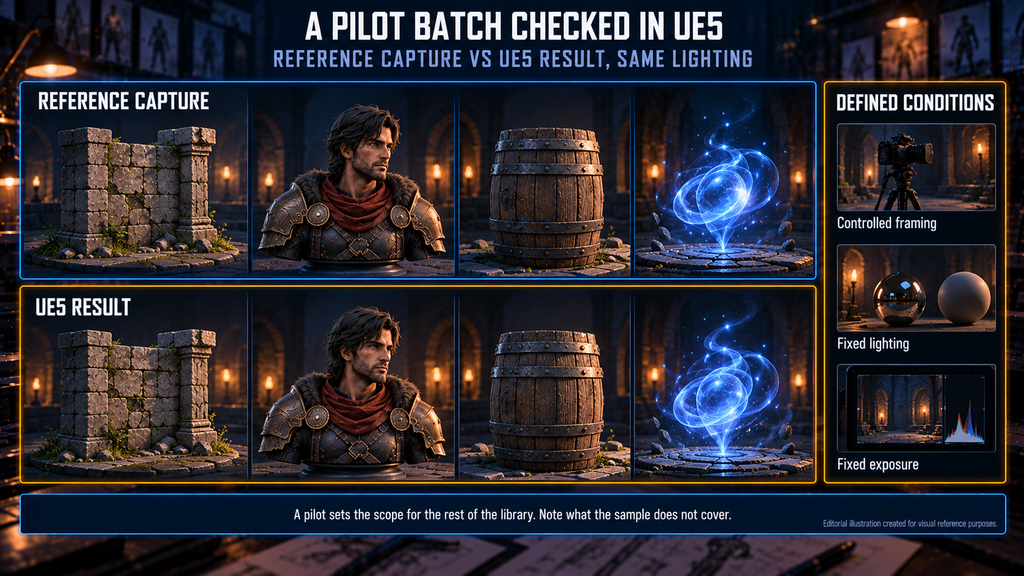
“Editorial illustration created for visual reference purposes. It does not represent a real project, client work, or official software screenshot unless stated otherwise.”
Agree acceptance criteria before scaling up: real-world dimensions, orientation and pivots; shading, UVs and material assignment; texture interpretation; required animation and root motion; collision behavior; LOD or Nanite results; naming and folder structure. Compare agreed reference views with controlled framing, lighting and exposure, then check performance and memory against the target build. Our guide on how to brief a game art studio for UE5 production covers documenting those requirements.
For environment libraries, document kit dimensions, material families and texel-density targets before distributing conversion work. Our 3D environment art service starts from levels already in your build to establish those production rules.
Our Approach to Rebuilding Art in UE5
At Nasty Rodent, UE5 is our primary real-time environment, and our game art services include testing assets inside UE5 before handoff. That gives a basis for agreed in-engine checks; project-specific integration and acceptance requirements are defined with the client.
Transfer, Convert or Rebuild: Side by Side
| Work category | What it means | Example | Acceptance check |
| Transfer and validate | Reuse supported source data | Mesh geometry or a source texture image | Dimensions, integrity and correct interpretation in UE5 |
| Convert and adapt | Change representation or settings to fit the target | Packed masks, material parameters or animation for a different rig | Equivalent required appearance or motion |
| Rebuild engine-specific systems | Implement behavior the transfer path does not preserve | Custom shader logic, effect simulation or scene interactions | Visual and functional review in the target build |
One asset can involve all three categories; test the work in a representative pilot before estimating the rest of its family.
Plan What Your Art Needs Before It Moves to UE5
Before moving the full library in a Unity to Unreal migration, agree which source data can be reused, which assets need adaptation and which systems need rebuilding. A representative pilot helps establish that scope and identify unresolved risks.
Send your asset list, target platforms and a few sample assets or captures from your Unity build to sales@nastyrodent.com. We usually reply within 1–2 business days.
Moving your art to UE5? Get an estimate for the assets that need rebuilding →
Let's work
together


in mind?
From 3D characters and environments to weapons, props, concept art and game UI/UX: ten years deep, 40+ artists strong, zero fluff. Tell us what you are making and get a free, no-pressure estimate.
estimate