Console-Ready Game UI Outsourcing: The Certification, Performance, and Localization Checks
-

Written byDenys Zadoienyi
-

Updated on11.08.2026
-

Time to read12 min

Most guides to choosing a game UI/UX studio focus on craft: portfolio depth, accessibility readiness, whether the team understands diegetic versus non-diegetic interface design. Those checks matter, and if you haven’t run them yet, our full technical checklist for vetting UI/UX design quality covers them in depth.
This guide covers what happens after the portfolio review passes: the checks that determine whether a vendor’s work is actually console-ready – not just visually finished. Two of them – console certification readiness and interface performance budget – rarely show up in a sales conversation, because neither one is visible in a portfolio. A beautiful menu screen or a polished HUD mockup says nothing about whether the same interface holds its frame budget during gameplay or introduces avoidable UI-related issues during pre-certification testing and platform review. Both can turn a technically beautiful UI into a rejected submission or a frame-rate problem discovered late, when fixing it costs far more than catching it at vendor selection would have.
A third question sits underneath both: evaluating a UI/UX vendor is a structurally different exercise from evaluating a 3D art vendor, and procurement teams that reuse a 3D vetting framework for UI/UX tend to ask the wrong questions in the room.
One thing to settle before running any of the checks below: what is this vendor actually being hired to own? A design-only partner delivers flows, wireframes, and visual specifications – they can and should design for text expansion, controller states, and performance-sensitive layout, but they aren’t the ones who can be held accountable for repaint cost in a running build if your internal team handles implementation. Certification history and profiling methodology become decisive specifically when the vendor also owns in-engine implementation, or when you’re evaluating a co-development partner who’s inside your pipeline for the long run. Match the checks below to the scope you’re actually contracting for.
Console Certification: The Check Most Vendor Evaluations Skip
If your title is shipping on PlayStation, Xbox, or Nintendo platforms, the submitted build has to pass the platform holder’s formal certification process before it can be approved for release – Sony’s TRC, Microsoft’s XR requirements, and Nintendo’s Lotcheck. Each process is platform-specific, run under NDA, and not something a vendor can fully prepare for by reading a public checklist. UI behavior contributes to that result through areas such as controller navigation, platform-specific messaging and iconography, text rendering across every supported language, account and save-state flows during menu navigation, and suspend/resume handling while a menu or HUD element is on screen.
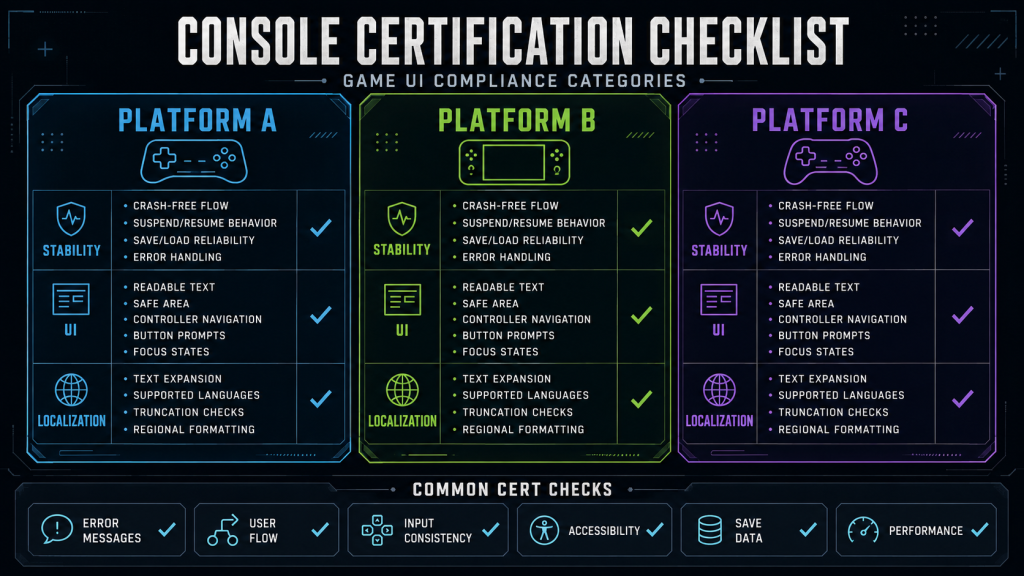
“Editorial illustration created for visual reference purposes. It does not represent a real project, client work, or official software screenshot unless stated otherwise.”
Exact requirements, test categories, and submission types vary by platform, SDK version, and what the title actually does – the areas above are recurring UI-sensitive categories, not a substitute for the current confidential platform documentation, which only registered developers can access. What implementation-owning vendors should be expected to know is the general shape of the process, not the exact NDA text.
The reason this belongs in vendor vetting rather than QA is timing. A certification failure isn’t a bug report your team files and fixes on its own schedule – it’s a formal resubmission into a platform holder’s review queue, and that queue doesn’t move on your production schedule. A rejection can force an additional correction-and-review cycle that affects the launch schedule, especially where multiple platforms are meant to release in a coordinated window. A vendor with no relevant console experience may overlook platform-specific behavior that’s difficult to infer from general UI guidelines, which raises the risk of issues surfacing during pre-certification testing or submission – even if it doesn’t guarantee a rejection.
What to ask. Has the vendor’s implementation work been through a certification cycle on the platforms you’re targeting, or only contributed to a project that shipped without them owning submission-relevant behavior? Where NDA permits, ask for anonymized examples of issues they identified or corrected during pre-certification review. If they can’t disclose specifics, ask about their pre-cert review process and how current platform requirements will be provided, controlled, and reviewed during the engagement – and which team members will be authorized to work with them. General assurances like “we follow platform guidelines” are less useful than process evidence – but the absence of a rejection story isn’t itself a red flag, since a vendor can have clean submission history for reasons unrelated to skill (NDA restrictions, publisher-managed submissions, or genuinely careful pre-cert work).

UI Performance Budget as a Vetting Criterion
A UI that looks correct in an editor preview and a UI that holds its frame budget in a running build under load are not the same deliverable, and the gap between them is where a lot of outsourced interface work quietly fails.
Unreal Engine’s own optimization documentation is direct about this: interface rendering typically receives a smaller share of a game’s performance budget than gameplay and rendering systems, which means the margin for inefficient UI work is thin from the start. The broad categories of risk recur across engines, even though the implementation details and profiling tools differ: unnecessary per-frame update logic instead of event-driven changes, repeated layout recalculation, overdraw, and excessive draw calls. A vendor should be able to explain these in the terminology of whichever engine the project actually uses.
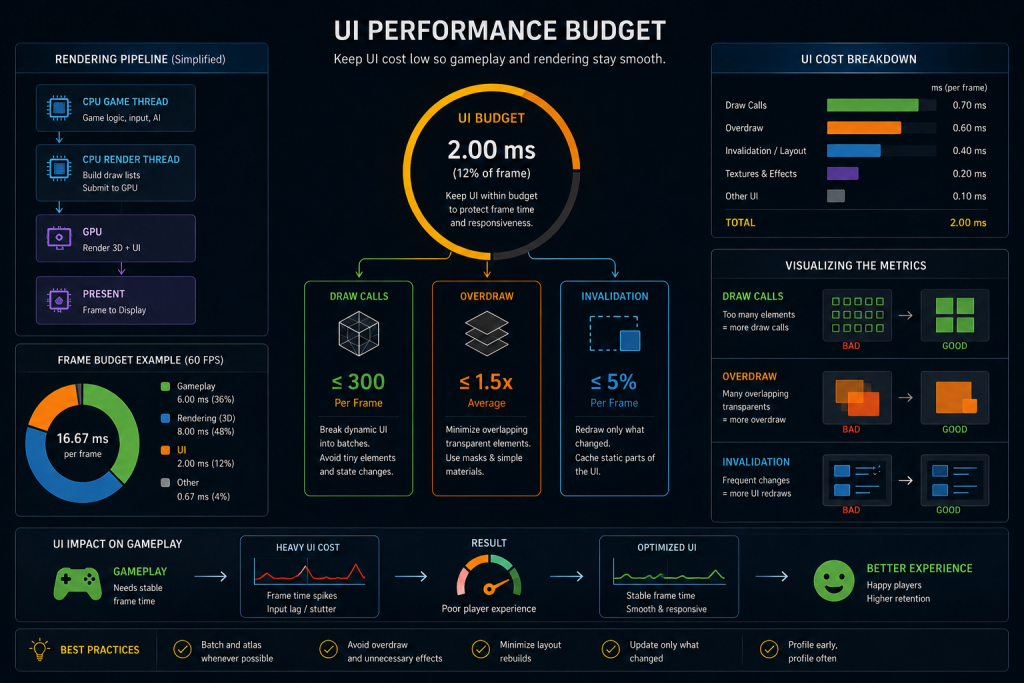
“Editorial illustration created for visual reference purposes. It does not represent a real project, client work, or official software screenshot unless stated otherwise.”
Overdraw is a common cost worth understanding specifically: overlapping translucent panels, gradients, glows, and shadows can cause the same screen pixels to be shaded and blended multiple times. The exact performance impact depends on element size, materials, clipping, and batching – it needs to be measured with engine profiling tools, not inferred from counting layers. Unreal, for its part, provides more than one tool for the update-frequency problem, and they aren’t interchangeable: Invalidation caches a widget’s cached geometry and paint information and reuses it until something actually changes, cutting CPU cost for content that rarely updates. Retainer Panels solve a related but different problem – they render a group of child widgets into an off-screen texture, which can reduce repeated rendering work or draw-call pressure in suitable cases, at the cost of additional memory, render-target work, and potential visual or input complexity. Which tool fits depends on how often the content changes and how the result profiles in practice, not on a generic “cache it” instinct – a vendor who reaches for the same tool regardless of the widget’s actual update pattern is optimizing by habit, not by measurement.
None of this shows up in a static mockup review, and that’s precisely the problem for procurement. A Figma file or a still render of a HUD tells you nothing about repaint cost. The failure surfaces later – when a HUD is active during combat, when a menu opens over a busy scene with particle effects running underneath, or when a live-service title adds UI elements faster than the original performance budget accounted for and nobody re-profiles the accumulated cost.
What a real performance budget includes. “We optimize for performance” is not a budget. Ask the vendor to name: the target hardware profiling is done against, the worst-case UI state they test (combat HUD with every element active, not the idle menu screen), who owns the CPU/GPU/draw-call targets on the project, what profiling tools generate the numbers, whether a profiling report is part of milestone acceptance criteria, and which metrics are treated as blocking versus advisory. Specific answers are stronger evidence of production experience than a list of optimization technique names alone. Where disclosure permits, ask for an anonymized profiling example, a milestone report structure, or an acceptance template – artifacts tell you more than a vendor’s ability to describe the theory.
What to ask. Walk us through how you’d profile a combat HUD, separate static elements from frequently changing ones, and verify the result stays within an agreed CPU, GPU, and draw-call budget on target hardware – in your own words, using your own engine’s tools.
Localization: Structural, Not a Late-Stage Fix
Localization deserves its own line in a vendor evaluation, though it’s a shorter one here because we’ve covered the production mechanics of a technically specific brief – including localization requirements – in our decision framework for co-development versus outsourcing. The short version for vetting purposes: localized strings can expand substantially relative to English, and short labels often expand the most, so a UI/UX vendor who designs layouts assuming English-length text is building interfaces that break the moment a longer language ships. CJK languages introduce a different set of problems entirely – line-breaking rules, glyph coverage, and font fallback rather than simple length – and right-to-left languages add mirroring and logical focus order on top of that. Rather than reserving one fixed percentage for every language, a vendor with real experience tests layouts through pseudolocalization and representative target-language strings before English ever ships as final. Ask whether that’s a standard step in their process or something added only after a localization pass flags problems.
Why Vetting a UI/UX Vendor Isn’t the Same as Vetting a 3D Art Vendor
Procurement teams that have already run a 3D art vendor search sometimes reuse the same evaluation framework for UI/UX, and it under-serves the decision. Our broader guide to vetting a game art outsourcing vendor covers the general production-fit criteria – style consistency across a batch, engine-readiness, revision discipline – and those still apply. But four differences change what actually predicts success.
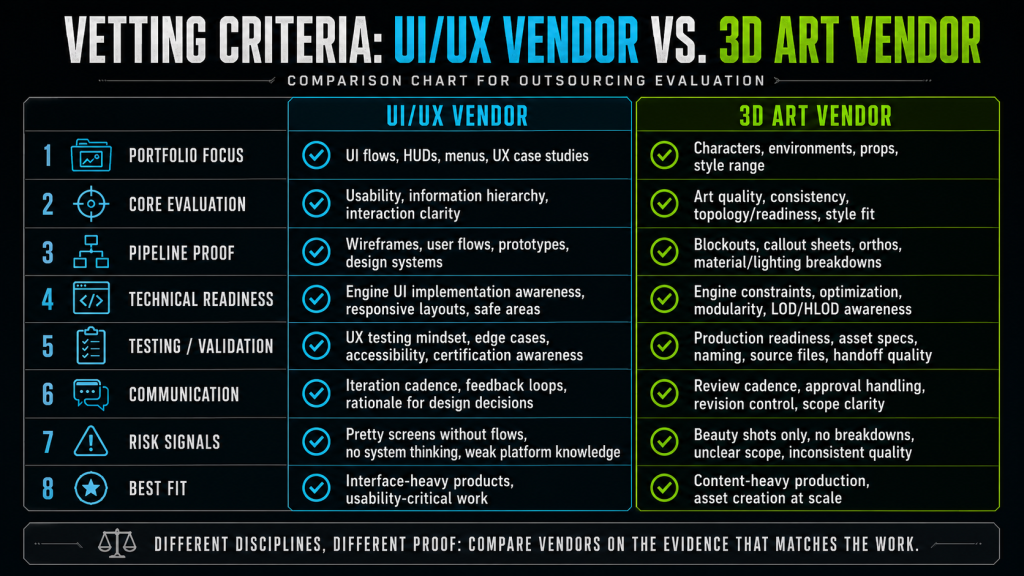
“Editorial illustration created for visual reference purposes. It does not represent a real project, client work, or official software screenshot unless stated otherwise.”
First, the dependency pattern is different, not absent on either side. Both UI and 3D assets require in-engine validation – a 3D asset is often reviewed against a comparatively bounded asset specification (topology, materials, rigging, LODs, scale, runtime budget), even though shared rigs, master materials, and modular systems can expand that dependency surface. UI has to additionally stay correct across interconnected states, input methods, languages, and platform flows that shift independently of the asset itself, which is why performance and certification testing carry more weight for interface work specifically.
Second, the failure signatures differ. Problems in a 3D delivery tend to surface through visual review or asset validation – topology, rigging, materials, scale, or LODs are things an art review or an engine import catches directly. UI failures more often emerge across state transitions, input navigation, localization, and platform behavior – categories that a static screenshot review doesn’t test at all, which is why they tend to surface later, at certification or a performance pass, rather than at the milestone art review.
Third, the reference material is different. A 3D vendor is evaluated substantially against a portfolio and a style guide – you can look at shipped characters or environments and judge fit directly. A UI/UX vendor needs to be evaluated against process questions – certification history, performance methodology – because portfolio screenshots can’t show whether an interface holds its frame budget or passes a platform review; that only shows up in production.
Fourth, propagation risk runs differently. A problem isolated to one 3D asset is usually contained to that asset, though errors in a shared rig, master material, or modular kit can propagate across a batch the same way a UI habit can. What makes UI’s propagation risk distinct is how routinely layout and update patterns get reused: a vendor who defaults to per-frame polling instead of event-driven updates, or who doesn’t reserve localization space by habit, tends to repeat that pattern across every screen they touch, because it’s baked into their process rather than isolated to one deliverable.
What to Ask: A Working Checklist
Bring these questions into the vendor selection meeting alongside the craft checks from our full studio selection guide:
- What is this vendor being hired to own – design, implementation, or both – and does that scope match which of the questions below actually apply to them?
- Has their implementation work gone through certification on our target platform(s)? Where NDA permits, what specifically did they identify or fix during pre-certification review?
- How will current platform requirements be provided, controlled, and reviewed during the engagement, and which team members will be authorized to work with them?
- Walk us through how you’d profile a combat HUD, separate static elements from frequently changing ones, and stay within an agreed CPU, GPU, and draw-call budget.
- Who owns the performance budget on this engagement, and is a profiling report part of milestone acceptance?
- How does your layout process handle text expansion and pseudolocalization for our target languages – built in from the start, or fixed after a localization pass flags problems?
None of these questions have a single “correct” answer. What matters is whether the vendor answers with specific, production-grounded detail or with general reassurance. A vendor who can only describe technique names without saying what they measured them against is usually describing intention, not process.
About Nasty Rodent
Nasty Rodent is a game art outsourcing studio based in Tallinn, Estonia, delivering UX/UI design alongside 3D characters, environments, props, and concept art for mid-core and AAA titles. The checks in this guide reflect the same scoping discipline we bring to any production engagement – matching what a vendor is actually accountable for against what gets asked of them at selection.