Playtesting and Heatmaps: Validating Game UX With Data
-

Written by Denys Zadoienyi
-

Updated on27.10.2026
-

Time to read10 min


- Why “Players Stopped Here” Is Not Yet a UI Change
- What Each Kind of Evidence Can and Cannot Tell You About a Game Interface
- Planning a Playtest So the Data Is Usable: Hypothesis, Task, Success Criterion
- What to Record for Reliable UI Analysis
- Reading the Signal: From Heatmap Pattern to UI Change
- From Findings to a UI Change List: Priority, Owner, Retest
- Our Experience With Game UX and UI
- Evidence Types for Game UI at a Glance
- Discuss Your Next Game UI/UX Iteration
Game UX playtesting can show where players hesitate, and heatmaps can show where they tap, click or look, but neither tells you by itself which interface change to make. This guide covers the step in between: what each kind of evidence shows, how to prepare a test, what to record and how to turn findings into changes you can retest.
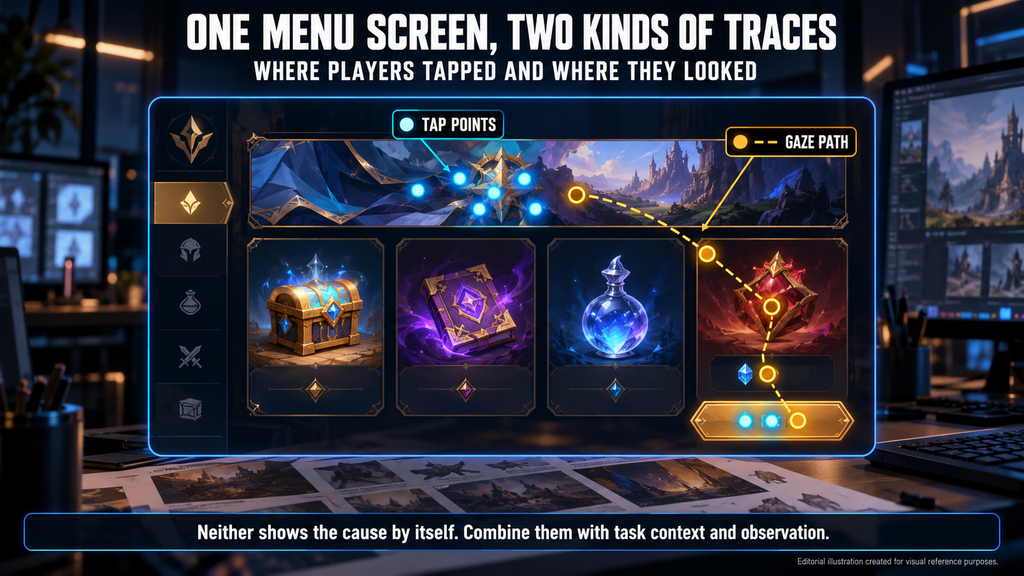
“Editorial illustration created for visual reference purposes. It does not represent a real project, client work, or official software screenshot unless stated otherwise.”
Game UX playtesting studies how players experience a game or prototype through observation, feedback and, where relevant, telemetry. This guide focuses on interface usability: whether players can understand and complete intended actions. Heatmaps visualize recorded interactions or gaze; interpreting friction requires the task context and evidence appropriate to the question.
Why “Players Stopped Here” Is Not Yet a UI Change
A report that says players stopped at the loadout screen gives you a location, not a decision. The team still has to agree what players were trying to do and which change would help.
If you are an art director or UX lead, the risk is an argument data cannot close: one person reads a hot zone as interest, another as confusion. As a producer, the risk is shipping changes without checking whether they solve the problem or add new friction.
A change in retention flags an outcome worth investigating but does not identify a UI cause. Our guide to player retention through UX design explains why.
What Each Kind of Evidence Can and Cannot Tell You About a Game Interface
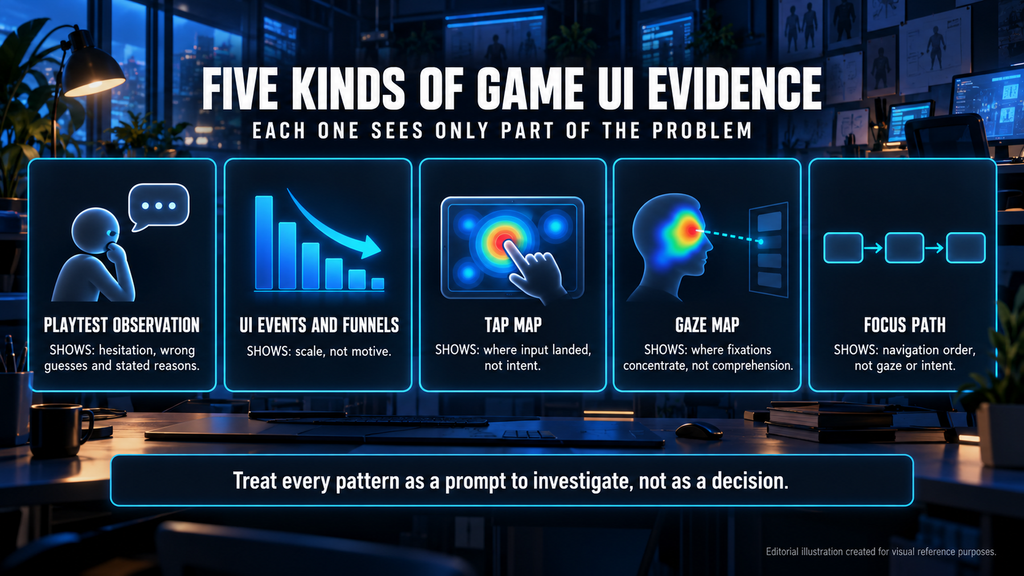
“Editorial illustration created for visual reference purposes. It does not represent a real project, client work, or official software screenshot unless stated otherwise.”
Video game heatmaps are not one thing. Five kinds of evidence come up in UI work, and each sees only part of the problem.
- Playtest observation. Shows hesitation, wrong guesses and stated reasons. A small sample cannot reliably estimate how widespread a problem is.
- UI events and funnels. Count players or attempts passing defined steps in a time window. They show scale, not motive.
- Click and touch heatmaps. Show where pointer or touch input landed on a screen. They do not show intent.
- Gaze heatmaps. Show where recorded fixations concentrate during a task. They do not establish comprehension, and missing gaze data does not prove an element was missed.
- Focus paths. Show how focus moves through a menu. They show navigation, not gaze, intent or necessarily activation.
NN/g’s eyetracking heatmaps from 2017 show how to read a gaze map: red areas received the most and longest fixations, and areas with no overlay were not viewed by any of that study’s participants. The pages were modified web pages, not games, and the maps do not explain why people looked there.
Spatial heatmaps, which show where players die or travel in a level, answer level design questions and are outside this guide. Choosing between an expert review, playtests and telemetry is covered in our UX audit guide; here we assume player data is available or planned.
Gaze data can help investigate visual search and attention in HUDs and menus; for dynamic interfaces, check that the map matches the actual UI state. Our explainer on the HUD in games defines the elements involved.
Planning a Playtest So the Data Is Usable: Hypothesis, Task, Success Criterion
Start with one specific hypothesis. MY.GAMES UX researchers Maria Amirkhanyan and Anna Dedyukhina write in a Game Developer explainer (2023) that the more specific the hypothesis, the more accurate the questions. One example is “Players cannot find how to upgrade their character.”
Fix four things before the first session of game usability testing:
- Task. Give players a job that exercises the screen, such as “equip a better weapon.”
- Success criterion. Decide in advance what counts as passed, such as completing the task without help.
- Build state. Fix and record the build, device and input method.
- Participants. Choose them for experience with the game, genre and function under test; newcomers and veterans answer different discoverability questions. The same authors note that internal research tends to give lower scores and harsher feedback than real players.
Match moderation to the study. Minimize interruptions when observing natural play or measuring task performance; the MY.GAMES researchers ask questions after the session or in pauses, such as a loading screen. In a moderated usability session, use neutral prompts and record any assistance.
There is no universal participant count. Qualitative sessions help find and understand problems; quantitative estimates need a sample planned around the metric, the precision required and the study design. For context, the same authors suggest at least four or five people per target group for qualitative work and at least 60 for quantitative comparisons; NN/g (2017) cites around 30 for gaze heatmaps. These figures do not carry over automatically.
Include some players with accessibility needs, or their problems stay hidden. Our guide to accessibility in game design covers colorblind, subtitle and remapping systems.
What to Record for Reliable UI Analysis
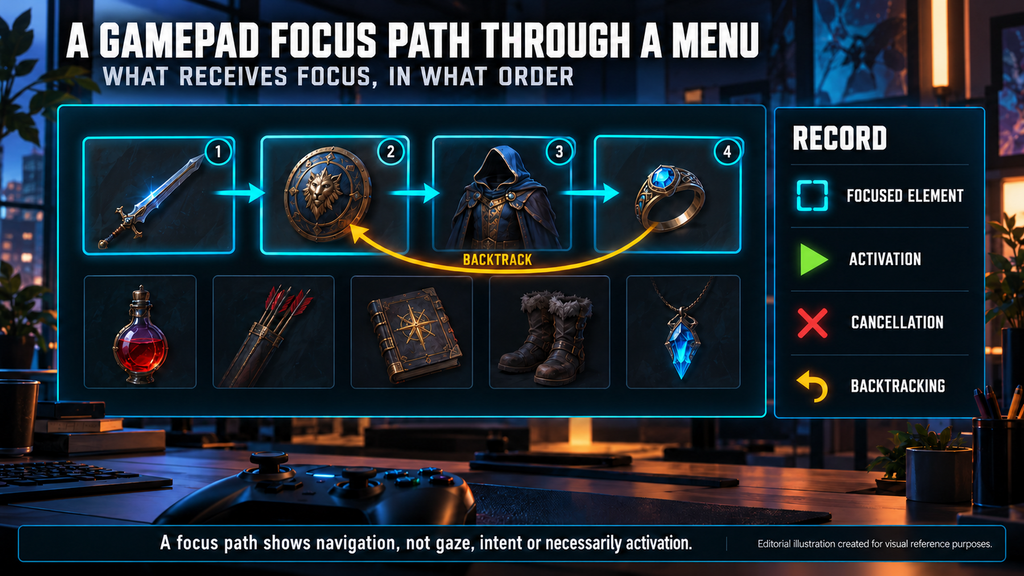
“Editorial illustration created for visual reference purposes. It does not represent a real project, client work, or official software screenshot unless stated otherwise.”
Before testing, agree how the following information will be captured in the build or session records, as appropriate:
- Session and task context. Participant or session ID, task attempt, result, errors and moderator help.
- Screen, state and layout. Screen or popup ID, state, layout version and the viewport information needed to interpret positions.
- Event and target. Event type, a stable target-element ID and whether the action was available.
- Input method and time. Touch, mouse, keyboard or gamepad, with a timestamp and build or variant.
Store coordinates in a defined reference space, and combine spatial data only when layouts are equivalent or can be mapped reliably. Normalizing coordinates changes the unit, not the layout: on another aspect ratio a button may move. When layouts differ, compare by stable element IDs or analyze them separately.

Log pointer and touch input at the input layer, not only clicks on interactive controls; otherwise taps on a non-interactive element may never reach the data. Count participants and attempts as well as events, because one person can press the same spot many times.
For focus-based gamepad navigation, record which element receives focus, activation, cancellation and backtracking. If a controller drives a cursor, record the pointer interactions too and keep the input method identifiable, so cursor events are not mistaken for mouse behavior. Our game menu navigation guide covers focus logic and input parity.
Define funnel steps, the counting unit and the time window before reading a drop, and pilot the logging to catch gaps and duplicates. Checking the result in a running build is the last stage of our game UI design process.
Did you know?
In NN/g’s 2017 eyetracking study, six of nine page pairs produced different gaze maps and three nearly identical ones, although each pair differed in the signifiers on interactive elements.
Reading the Signal: From Heatmap Pattern to UI Change
Treat every pattern as a prompt to investigate. The causes below are hypotheses: supporting evidence can strengthen an explanation, but check alternative causes. Not every pause or backtrack is bad UX, so define the intended behavior first.
| Signal | Possible cause | What to check | UI change to consider | How to re-measure | Red flag |
| Presses on a non-interactive element | It looks tappable | What did the player expect? | Clarify the look, or add the interaction if the flow needs it | Fewer failed presses on the way to the intended action | Editing the map, not the cause |
| Few presses on a key control | Not noticed, or not needed in this task | Was it shown, available and needed? | Raise prominence or rethink placement | Task completion without help | Calling it unused without checking state |
| Gaze stays on a decorative area | Decoration competes with the target, or the player is reading or waiting | What was the player doing then? | Reduce competing contrast if it hinders search | Time to find, same task | Reading long gaze as interest |
| Focus path loops or backtracks | Focus order does not match the layout, or players compare options | Replay against the layout and intent | Reorder focus or fix wrap if unintended | Backtracks on the same route | Equating click counts with focus moves |
| Sharp drop at one funnel step | Unclear next step, event gap or technical fault | Event logs, step definition, time window | Clarify the step or fix the fault | Same funnel, revised build | Calling it abandonment before checking delivery |
Report what the colors show (event count, fixation count or dwell time) and the aggregation unit: a hot area can reflect repeated actions by a few participants, not a problem shared by many. Keep the observed problem separate from the proposed explanation.
From Findings to a UI Change List: Priority, Owner, Retest
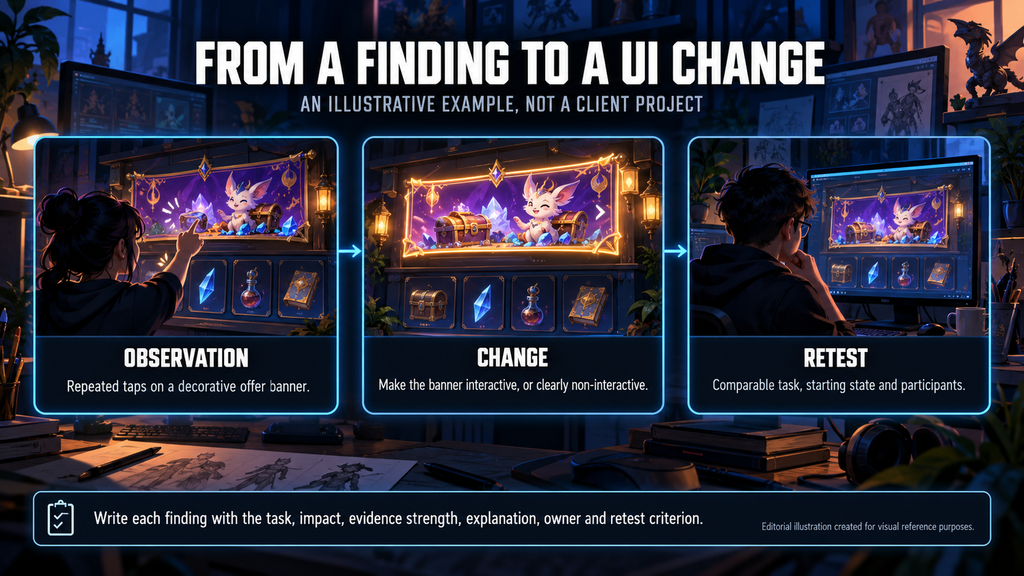
“Editorial illustration created for visual reference purposes. It does not represent a real project, client work, or official software screenshot unless stated otherwise.”
Write each finding the same way: affected task and player group, observed impact, evidence strength, proposed explanation, owner and retest criterion. Weigh severity as well as frequency: a rare problem can block an important action for some players, and a small-sample frequency is not a population rate.
Use additional evidence when the interpretation is uncertain or the change is risky. A reproducible interaction failure may justify a direct fix; an ambiguous heatmap pattern usually needs further investigation.
Illustrative example (not a client project). A store heatmap shows repeated taps on a decorative offer banner. Recordings and follow-up questions suggest participants expect it to open offer details. Depending on the intended flow, the team could add that interaction or make the banner clearly non-interactive. The retest checks whether players reach the intended information without repeated unsuccessful taps. Mixed results call for further investigation, not an automatic conclusion about the cause.
For the retest, keep the task, starting state and participant criteria comparable to the baseline. New participants reduce learning effects but do not make the groups equivalent.
As a producer, plan the test, retest and fixes as separate work. Our guide to game UI design cost explains why research and playtesting need explicit scope.
Our Experience With Game UX and UI
We design UX and UI for games, including Wave Master (Banner Games) and the UI of Bubble Quest of Vikings as part of full art production. Our game UX/UI design service covers screen flows and interface art; the scope of any project is agreed with each client.
Evidence Types for Game UI at a Glance
| Evidence | Shows on the screen | Does not show | Data to capture |
| Playtest observation | Hesitation, wrong guesses, stated reasons | Reliable prevalence in the wider player population | Session recording, task, build version |
| UI events and funnels | How many players or attempts pass each defined step | Why they left | An event per screen and state, a defined counting unit |
| Click or touch heatmap | Where pointer or touch input landed | Intent | Coordinates in a reference space, screen ID, layout version |
| Gaze heatmap | Where recorded fixations concentrate | Comprehension, or that missing gaze means a missed element | Eye-tracking data matched to the UI state |
| Gamepad focus path | Order and duration of focus | Gaze, intent or necessarily activation | Focus, activation and cancel events, input method |
Combining behavioral measures with observation can strengthen an explanation, if the samples, tasks and events support the comparison.
Discuss Your Next Game UI/UX Iteration
Our stylized UI/UX portfolio shows interface screens from casual and mobile game projects.
Share your current interface, target platforms and planned changes at sales@nastyrodent.com or use the button below, and we’ll discuss the scope and the materials needed. We usually reply within 1–2 business days.
Let's work
together


in mind?
From 3D characters and environments to weapons, props, concept art and game UI/UX: ten years deep, 40+ artists strong, zero fluff. Tell us what you are making and get a free, no-pressure estimate.
estimate