UE5 World Partition Workflow: Streaming, HLOD, and Team Organization for AAA Open Worlds
-

Written byDenys Zadoienyi
-

Updated on19.08.2026
-

Time to read13 min

- The Core Mechanic: One Persistent Level, Not a Web of Sublevels
- One File Per Actor: What Actually Changes for a Team, and Where It Doesn’t
- HLOD: Three Layer Types, and Which One Fits an Art Department’s Assets
- Data Layers: Separating What the World Contains from What’s Currently Loaded
- Putting the Systems Together: How a Team Navigates and Scopes Work in a Shared World
- This Is Being Tested at AAA Scale, Not Just Documented at Feature Level
- Where This Fits an Outsourced or Hybrid Production Pipeline
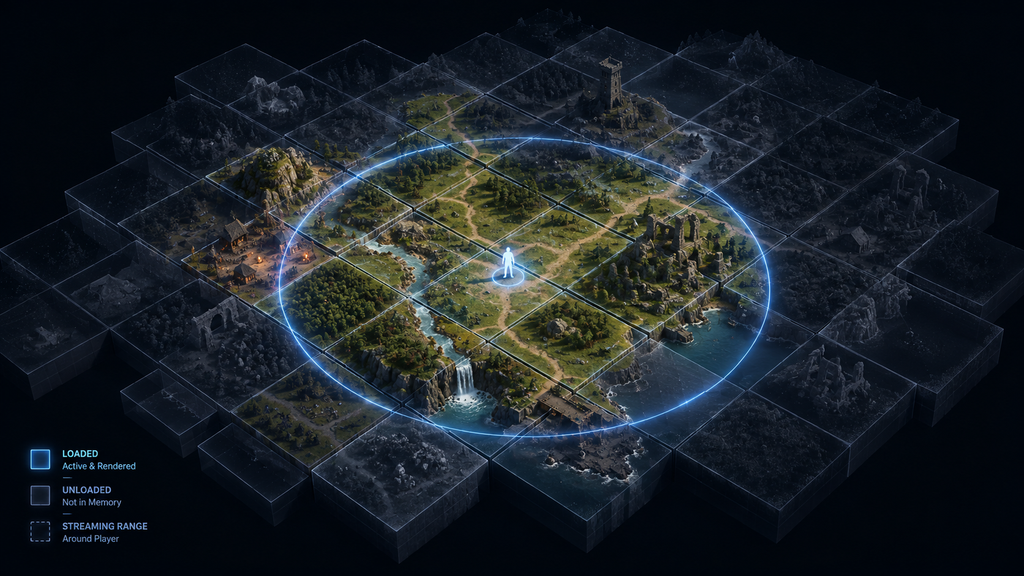
“Editorial illustration created for visual reference purposes. It does not represent a real project, client work, or official software screenshot unless stated otherwise.”
World Partition is Unreal Engine 5’s system for building open worlds that are too large to fit in memory: it stores the entire world as a single persistent level, automatically divides it into streaming grid cells, and loads only the cells near the player. That much is in every introductory guide — including our own overview of what Unreal Engine 5 is as a feature set. What most guides skip is the part that actually determines whether an art department can work in that world without constant friction: how streaming sources, Hierarchical Level of Detail (HLOD), and Data Layers interact once a team — not a solo developer — is placing thousands of actors into the same persistent world at the same time. This is a workflow breakdown for that scale, not a feature tour.
The Core Mechanic: One Persistent Level, Not a Web of Sublevels
Before World Partition, building a large UE4 level meant manually slicing it into sublevels, then writing streaming volumes or Blueprint logic to load and unload them as the player moved. According to Epic’s own documentation, this approach created two specific production problems: multiple team members editing the same sublevel created file-lock conflicts, and seeing the whole world in context became difficult once it was broken into dozens of separate map files.
World Partition replaces the traditional workflow of manually dividing the main world into streaming sublevels. As described in Epic’s World Partition documentation, the world lives in one persistent level, subdivided into a configurable runtime grid of cells. At runtime, cells load and unload based on their distance from a streaming source — by default, the player’s Player Controller, which has streaming enabled automatically. Additional streaming sources can be placed through the World Partition Streaming Source component — for example, to pre-load cells around a teleport destination or another location the game needs ready before the player arrives.
Two settings on the runtime grid control what actually streams: Cell Size, which sets the dimensions of each grid cell, and Loading Range, which sets how far from a streaming source cells start loading. Epic’s documentation illustrates this with a 256-meter cell size and a 768-meter loading range as a working example — not a universal default. The right values depend entirely on the density of a specific world and the platform’s memory budget, which is why this is a setting a technical artist or environment lead needs to tune and profile per project, not copy from a tutorial. A second, related setting lives on every individual actor: Is Spatially Loaded, which determines whether that actor streams with nearby cells or stays loaded independent of distance to a streaming source — a property teams typically use for global managers or world-scale systems, though the actual choice depends on the project’s architecture, and an actor’s Data Layer state still affects whether it’s loaded regardless of this setting.
One File Per Actor: What Actually Changes for a Team, and Where It Doesn’t
The production-facing benefit of World Partition that matters most to an art department isn’t the streaming grid — it’s One File Per Actor (OFPA), the system that stores every actor in a World Partition level as its own individual file rather than as an entry inside one shared level file. Per Epic’s documentation, this means a team member doesn’t need to check out the entire level file from source control to add or modify an actor; only that actor’s individual file is touched, which frees the level for everyone else working elsewhere in the same persistent world at the same time.
This is the change that makes it realistic for an environment art team, a lighting artist, and a level designer to work in the same open-world map simultaneously without the file-locking standoffs that defined large UE4 productions — though OFPA reduces that specific conflict rather than eliminating source-control contention altogether. It’s also where teams hit a specific, documented exception worth planning around: actors that reference other actors are bundled together and loaded as a group. A prop hard-referencing a manager object on the far side of the map, or a Blueprint that holds a direct reference to something outside its own cell, pulls both into the same load — quietly working against the loading-range tuning the team just spent time getting right. Two artists can also still collide by editing the same actor or a tightly connected actor group at once; OFPA removes the whole-level bottleneck, not every point of contention. For an art department, this translates into a concrete authoring discipline: cross-references between actors in different regions of the world need to be deliberate, reviewed, and rare, not an incidental byproduct of how a prop was set up.
For teams evaluating a UE5-specific outsource partner, this is exactly the kind of system-level awareness that separates a vendor who has shipped in World Partition from one who’s only worked in UE4 sublevels — a distinction covered in more detail in our vendor scorecard for hiring 3D environment artists for UE5.
HLOD: Three Layer Types, and Which One Fits an Art Department’s Assets
Hierarchical Level of Detail solves a different problem than streaming does: when a cell unloads, its content disappears — which is correct for gameplay and memory, but wrong visually if that cell contained a mountain range or a skyline the player can still see from a distance. HLOD Layers generate a lightweight proxy representation of unloaded content so distant geometry stays visible without keeping the full-detail actors loaded.
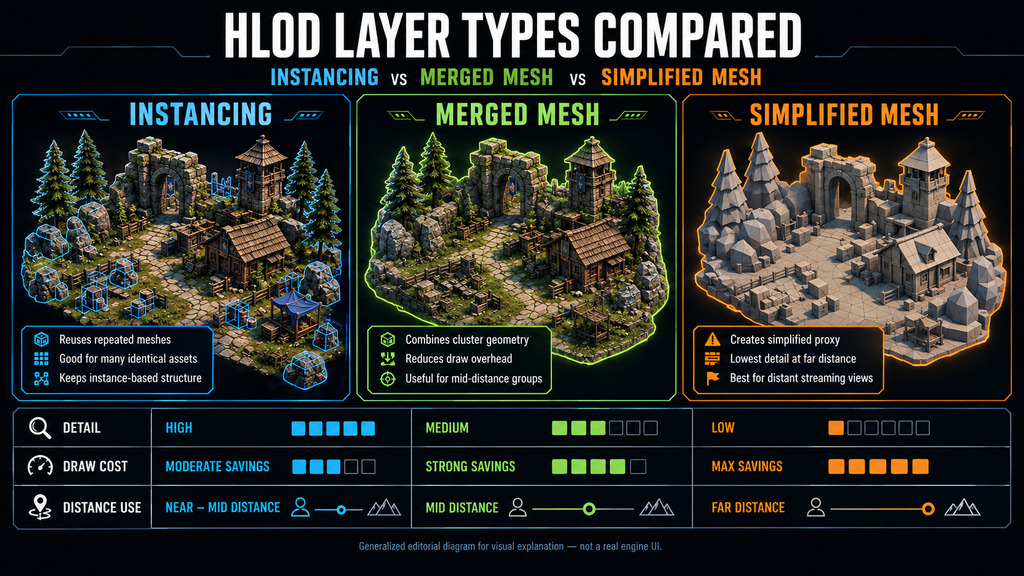
“Editorial illustration created for visual reference purposes. It does not represent a real project, client work, or official software screenshot unless stated otherwise.”
Epic’s documentation defines three HLOD layer types, and picking the right one per asset category is a real production decision, not a technical afterthought:
- Instancing replaces static mesh assets with Instanced Static Mesh components at their lowest LOD. Epic’s documentation describes it as ideal for impostor meshes such as trees and foliage — dense, repeated content where merging into one mesh would be wasteful.
- Merged Mesh combines multiple static mesh actors into a single proxy mesh, with options to bake materials, generate lightmap UVs, and merge collision. This commonly suits architectural clusters and modular kit assemblies — the kind of content an environment team builds from repeating pieces.
- Simplified Mesh goes a step further and runs mesh simplification on top of the merge, controlled by a target screen size rather than a fixed polycount. It can suit large, non-repeating clusters — some rock formations or terrain-adjacent structures — where a straight merge would retain more geometric complexity than the distant view justifies.
None of this is a fixed rule mapping asset type to layer type; the right choice still needs validating against silhouette quality, material baking behavior, draw-call budget, memory, and target-platform profiling for the specific project.
Actors get assigned to an HLOD Layer three ways: a per-actor property in the Details panel, a default set on a Data Layer (useful for assigning an entire gameplay category at once), or a project-wide default in World Settings. HLODs are then generated through Build > Build HLODs in the editor or the WorldPartitionHLODsBuilder commandlet for automated pipelines — and, per Epic’s documentation, an HLOD actor only rebuilds when its source actors, meshes, materials, or textures actually change, which keeps iteration from turning into a full-world rebake every time an artist tweaks one prop.
The production implication for an art director briefing a team, internal or outsourced, is that HLOD strategy needs a working hypothesis by asset category before a single environment kit ships, not a discovery made during a performance pass at the end of production. Foliage vendors need to know whether the project expects an Instancing-based strategy and which source LODs or impostor assets it depends on. Modular architecture vendors need to know their kit pieces are expected to merge cleanly. Getting this wrong doesn’t just cost performance — it costs a second pass on assets that were already approved.

Data Layers: Separating What the World Contains from What’s Currently Loaded
Data Layers solve a problem that’s adjacent to streaming but distinct from it: not whether a cell is near the player, but whether a specific piece of content inside that cell should exist right now at all. Per Epic’s Data Layers documentation, a Data Layer can be toggled between states — including loaded-but-invisible and loaded-and-visible — dynamically, through Blueprint or C++, independent of the streaming grid’s distance-based logic.
This is the system that lets a single persistent world contain a day version and a night version of the same street without duplicating the geometry, or lets a quest-complete state swap which building occupies a lot without the art team maintaining two parallel levels. It’s also how a production can organize editor-only debug actors, whitebox references, and temporary review geometry so they stay out of the way of shippable content — provided that content is assigned to an Editor Data Layer, which Epic’s documentation describes as existing purely to organize assets within the project, rather than to a Runtime Data Layer that’s merely switched off. Runtime Data Layers ship as part of the cooked content and are toggled through Blueprint or C++ at runtime; leaving one inactive by default is a different mechanism from keeping content editor-only, and the two shouldn’t be treated as interchangeable when a production is deciding what belongs in a debug or blockout category.
For an art department specifically, Data Layers are an organizational tool as much as a runtime one: they let artists work on a defined content category — architecture, vegetation, gameplay-blocking volumes — without the rest of the world’s actors cluttering their view or their attention, since a Data Layer can be loaded or hidden independently in the editor. That editor-side control corresponds to, but isn’t identical to, how Runtime Data Layer state is managed once the game is live — worth keeping distinct, since the two use different mechanisms for different purposes. This is a meaningfully different working experience from UE4’s old Layers system, which Data Layers formally replace, and it changes how a lead should structure a large world for a multi-department team from day one — deciding the Data Layer breakdown, and which categories are Editor versus Runtime, at the same time as the initial world layout, not retrofitting it once a hundred artists’ worth of actors already exist ungrouped.
None of the three systems above function in isolation once real production headcount is involved, and Epic’s tooling around World Partition reflects that. A World Partition level opens with most of the world unloaded by default — only actors marked as not spatially loaded appear immediately — which is deliberate: it’s what makes it possible to open a multi-kilometer world at all without loading everything into memory at once. From there, a team scopes their editing session using the World Partition window, selecting and loading specific regions to work in, or by placing Location Volumes — editor-only actors that define a named, reusable region other team members can load with a couple of clicks instead of manually navigating and drag-selecting the same area every session. A generated Minimap gives the whole team a shared visual reference for where those regions sit relative to the rest of the world, which matters more than it sounds once dozens of artists are each responsible for a different named region of the same map.
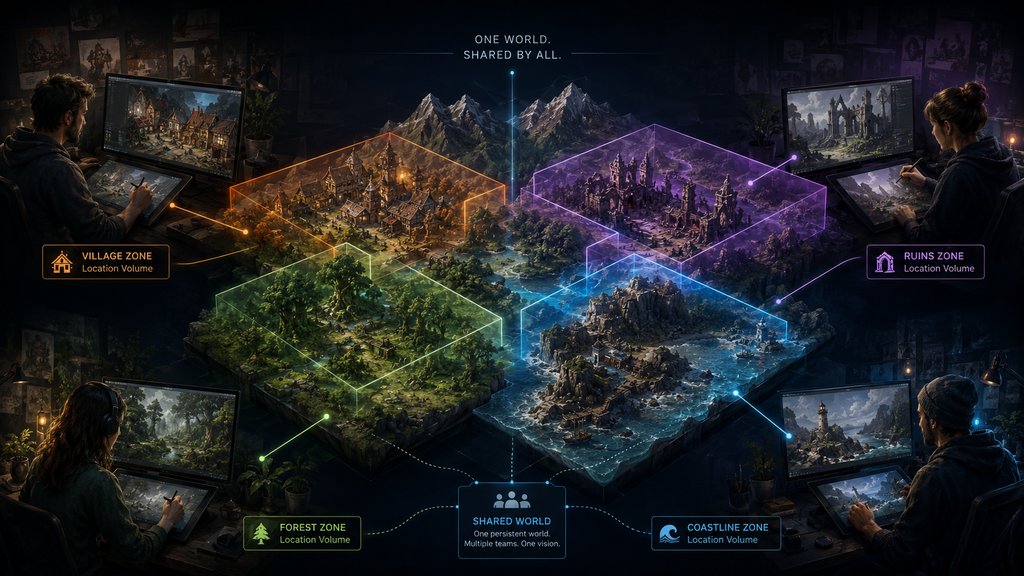
“Editorial illustration created for visual reference purposes. It does not represent a real project, client work, or official software screenshot unless stated otherwise.”
This combination — persistent world, per-actor file storage, named loadable regions, and a shared minimap — is what actually replaces the old sublevel discipline for a team, not any single feature on its own. An art director planning headcount and asset ownership for an open-world production is, in practice, deciding how to divide the world into Location Volumes and Data Layer categories before deciding who’s building what.
This Is Being Tested at AAA Scale, Not Just Documented at Feature Level
World Partition’s production credibility isn’t purely theoretical. At Unreal Fest Orlando 2025, CD Projekt Red presented a session specifically on streaming improvements for dense worlds, built around the publicly shown Witcher 4 Unreal Engine 5 Tech Demo — a dense, populated open-world region, developed in direct collaboration with Epic specifically to push large-world streaming further. It’s worth being precise about what this does and doesn’t prove: it’s a tech demo, not a released title, and it doesn’t confirm the final performance profile of a shipped Witcher 4 build. What it does show is a studio with decades of open-world production experience choosing to build and stress-test World Partition streaming against the requirements of a dense AAA open-world project, and presenting the engineering behind it publicly rather than treating it as an implementation detail. For an art director weighing whether World Partition can hold up under real production volume, that’s a meaningful public reference point — not a tutorial writer’s opinion, and not a marketing claim.
Where This Fits an Outsourced or Hybrid Production Pipeline
Everything above changes what an external art vendor needs to know before the first asset batch ships, and it’s specific enough that “familiar with Unreal Engine” isn’t a sufficient qualifier anymore. A studio briefing outsourced environment work into a World Partition world needs to specify which Data Layer new assets belong to, the HLOD layer type expected for that asset category, and the cell size, loading range, and asset-density budget the region was designed around — details that don’t exist in a UE4-era brief template at all. We cover the specific brief fields this changes in our guide to briefing a game art studio for UE5 production, and the broader question of what UE5 changes about vendor evaluation generally in our overview of why AAA studios choose UE5. If your team hasn’t worked in World Partition before, that’s exactly the gap worth closing before the brief goes out, not after the first batch comes back built for the wrong grid.
At Nasty Rodent, environment assets for World Partition projects are planned against the client’s streaming and HLOD requirements from the start — modular kits are prepared to support the intended merge or instancing strategy, and cell-size, loading-range, and asset-density expectations are aligned with the client before full-scale modeling begins, rather than discovered during a late optimization pass. For a studio planning a World Partition production and weighing internal capacity against external support, that upfront alignment is the difference between a vendor extending the pipeline and a vendor generating rework.