Character Rigging Explained: AAA Pipelines
-

Written byDenys Zadoienyi
-

Updated on08.09.2026
-

Time to read9 min

- What Rigging Actually Builds
- Skinning and Weight Painting: Where Deformation Problems Often Surface
- IK vs. FK, and Why AAA Rigs Use Both
- Blend Shapes and Facial Rigging
- Rig Complexity Is a Budget, Not a Fixed Standard
- Control Rig vs. DCC Rigging in a UE5 Pipeline
- How Rig Complexity Changes by Genre and Platform
- Where Rigging Fits in the Larger Character Pipeline
- Rigging at Nasty Rodent
Character rigging is the process of building the internal skeleton, deformation system, and control structure that lets a static 3D character mesh move, pose, and animate inside a game engine. A model without a rig is a sculpture – rigging is what turns it into something an animator can actually direct, and something a game can drive at runtime through gameplay logic rather than a pre-rendered sequence. For an art director scoping a character roster, rig complexity is one of the least visible line items in a brief and one of the most consequential for both quality and performance.
“Editorial illustration created for visual reference purposes. It does not represent a real project, client work, or official software screenshot unless stated otherwise.”
What Rigging Actually Builds
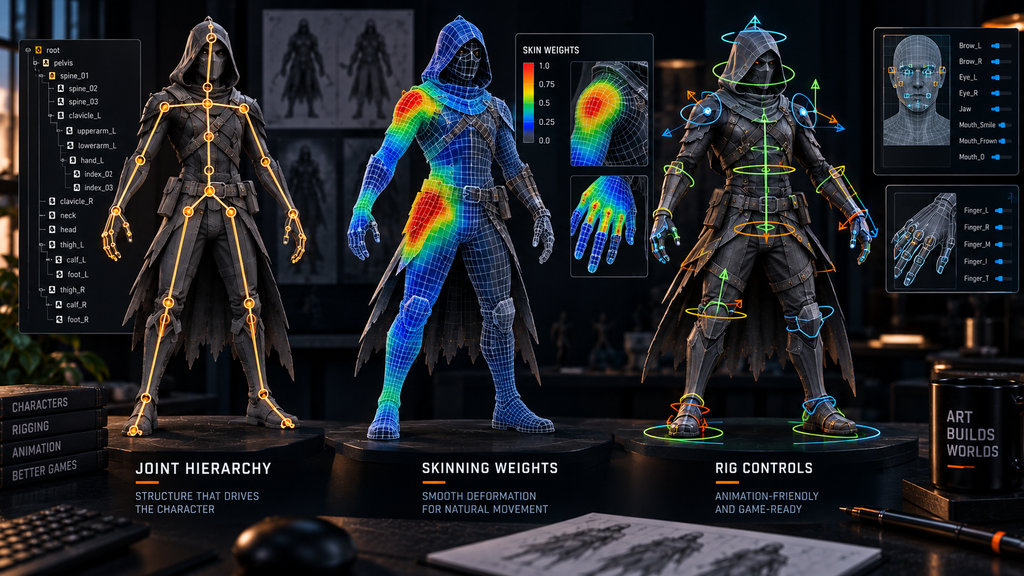
At its core, a rig is a hierarchy of joints – sometimes called bones – arranged to match how the character needs to move: a spine chain, limb chains with shoulder/elbow/wrist or hip/knee/ankle joints, a neck and head, and often finger joints for hand-heavy gameplay or cinematic close-ups. Each joint has a position in 3D space and a parent-child relationship to the joints around it, so that rotating a shoulder joint carries the upper arm, forearm, and hand along with it.
On top of that skeleton sits the control layer – the handles an animator actually manipulates, which are deliberately separated from the raw joints underneath. A well-built control rig lets an animator pose a character intuitively without needing to think about the joint hierarchy directly, and it’s this control layer, more than the joint count itself, that determines how efficiently an animation team can actually work with a given character.
Skinning and Weight Painting: Where Deformation Problems Often Surface
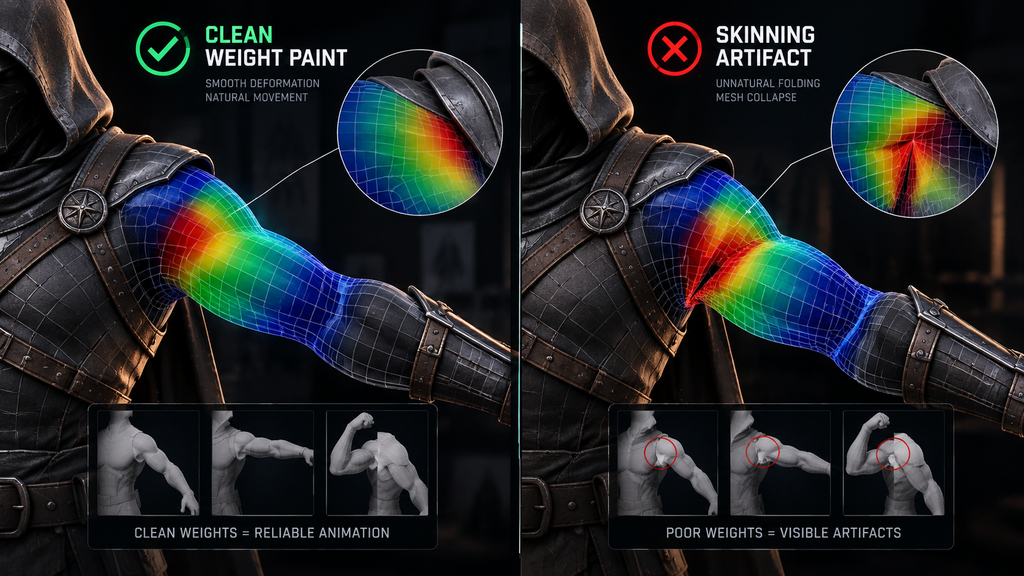
Skinning is the process of binding a mesh to a skeleton and assigning bone influences to its vertices. Weight painting is the artist-facing process used to edit those influence weights and control exactly how the mesh deforms around each joint – a related step, not a synonym for skinning itself.
Get the weights wrong, and the visible symptoms are the same ones every 3D artist recognizes on sight: a shoulder that collapses instead of rotating smoothly, a knee that pinches at a bend angle, a stomach that distorts into a sharp crease when the spine twists. A joint hierarchy can be structurally correct and still produce broken deformation if the weight distribution around a joint is wrong, which is why mature pipelines usually validate skinning separately from skeleton structure, using deformation and range-of-motion tests against real animation rather than a static bind pose. High-motion areas – shoulders, hips, and any joint that rotates through a wide range in gameplay – get disproportionate attention here relative to their share of the total vertex count, because that’s where deformation failures are most visible on screen.
“Editorial illustration created for visual reference purposes. It does not represent a real project, client work, or official software screenshot unless stated otherwise.”
IK vs. FK, and Why AAA Rigs Use Both
Forward kinematics (FK) poses a limb by rotating each joint in sequence, from the root outward – rotate the shoulder, then the elbow, then the wrist. It gives an animator precise control over the exact path a limb travels, which matters for expressive, hand-animated performance. Inverse kinematics (IK) works the other way: the animator places the end point – a hand on a ledge, a foot planted on uneven ground – and the system solves the joint rotations needed to get there.
Neither approach replaces the other in a production rig. FK suits broad, expressive body motion where the travel path itself carries performance. IK suits any contact-driven interaction – foot placement on stairs and slopes, hand contact with a weapon or a wall, climbing and cover systems – where the end position matters more than how the limb got there. Production animation rigs commonly provide both FK and IK controls over the same underlying skeleton, with animators switching or blending between them per limb depending on the motion, rather than committing to one system for the whole character.
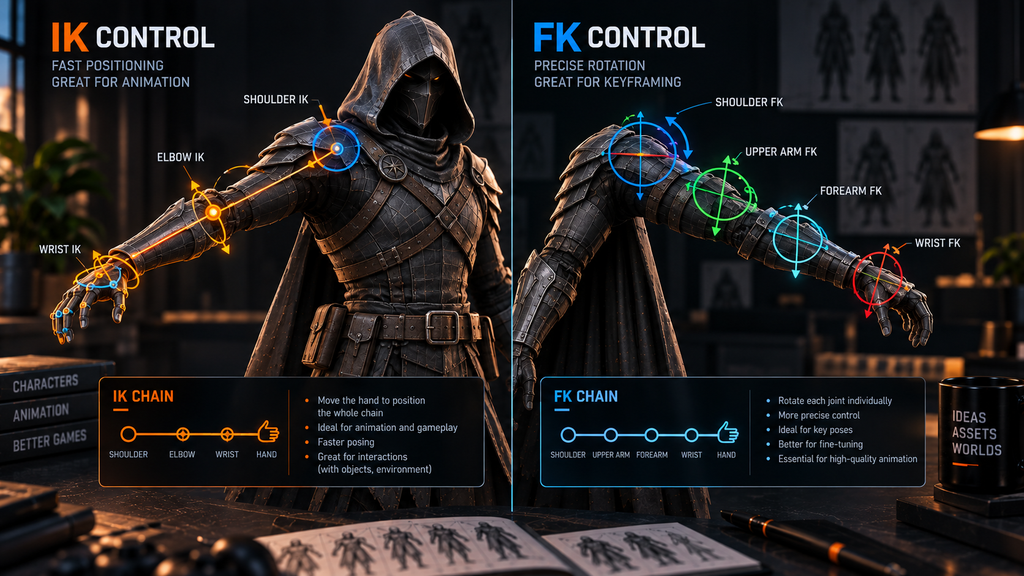
“Editorial illustration created for visual reference purposes. It does not represent a real project, client work, or official software screenshot unless stated otherwise.”

Blend Shapes and Facial Rigging
Facial animation often runs on a different system from body rigging, and the approach varies by project rather than following one universal method. Facial rigs commonly use blend shapes (also called morph targets or shape keys) – pre-sculpted deformations of the base mesh, each representing one expression component such as a raised eyebrow, a closed eyelid, or a corner of the mouth pulling back – joint-based setups, or a hybrid of both, depending on what the project’s animation pipeline expects. Blend shapes are especially common for expression targets and lip shapes, while joints may handle the jaw, eyes, or brows depending on the setup. An animator or a runtime system blends between shapes, and combines several at once, to produce a full facial expression from a smaller library of individual targets.
How large a facial rig needs to be depends entirely on what the character is required to do. A background character seen briefly and from a distance needs far less than a hero character carrying dialogue in close-up cinematics, where subtle combinations across a broader expression set are what separate a believable performance from a stiff one. This is a genuine scope variable worth defining explicitly in a brief, rather than assuming one facial setup applies uniformly across an entire character roster.
Rig Complexity Is a Budget, Not a Fixed Standard
There’s no single “correct” rig complexity for a AAA character – the right answer depends on the character’s role, the platform’s performance budget, and how the character will actually be seen in gameplay. A hero character in third-person combat, viewed in close proximity constantly, justifies a denser joint count, a fuller facial setup, and secondary-motion systems for cloth or hair. A background NPC seen briefly at a distance does not, and over-building its rig is pure cost with no visible return. Rig complexity is also not just bone count: custom anatomy, control systems, retargeting requirements, and the animation set the rig has to support can matter just as much as the joint and blend shape counts themselves.
This is also where rig complexity intersects directly with performance: joint count and skinning influence count both have a runtime cost, and that cost compounds across every character on screen simultaneously in a crowd or combat scenario, not just the cost of one asset in isolation. A practical way to scope a roster is to define rig complexity tiers up front – hero, mid-tier NPC, background/crowd – rather than defaulting every character to hero-level treatment and discovering the performance cost during optimization passes late in production.
Control Rig vs. DCC Rigging in a UE5 Pipeline
Where the actual rig gets built has become a real production decision in modern engines, not just a tooling preference. Unreal Engine 5’s Control Rig system allows procedural rig construction directly inside the engine, which can shorten some engine-specific iteration loops compared to a traditional round-trip through a DCC application like Maya or 3ds Max. A DCC-side rig, by contrast, is often the more practical choice when a studio already has an established Maya-based animation pipeline, existing rig conventions, proprietary tools, or a large animation library already authored around a known skeleton.
Neither approach is universally correct, and the decision typically gets made per project rather than per character. We cover this specific fork in more depth, alongside the rest of the stage-by-stage character pipeline it sits inside, in our guide to the 3D character pipeline for Unreal Engine 5.
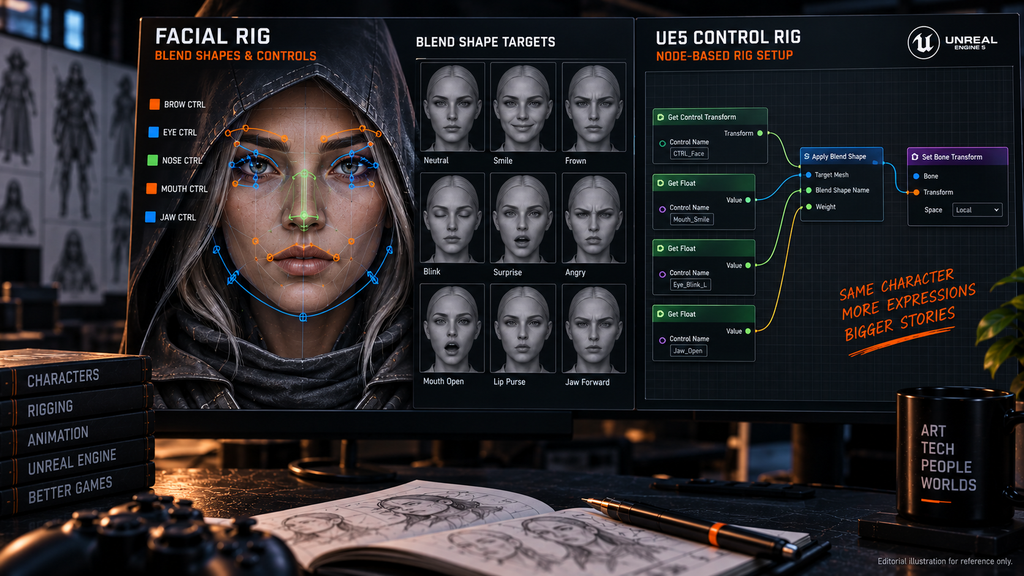
“Editorial illustration created for visual reference purposes. It does not represent a real project, client work, or official software screenshot unless stated otherwise.”
How Rig Complexity Changes by Genre and Platform
The same character role can call for a meaningfully different rig depending on the game it’s built for, even before any specific technical parameters are set. On Wild Rage, a stylized MMORPG project for Whimsy Games where Nasty Rodent led the full art direction, character work sat at the centre of the scope alongside concept art, weapons, props, environment, and UI/UX. The project is a useful example of why a rig has to match the needs of a stylized multiplayer character pipeline rather than follow a single universal “AAA” template – but exact technical parameters such as bone counts, facial setup, or LOD structure aren’t part of the public case, so this article doesn’t assign specific figures to it.
Bubble Quest of Vikings, a casual mobile title for Whaleapp, gives the contrasting context: character rigging there sat inside a full art-production scope built for a casual, mobile-first audience, a context where mobile character work in general tends to favor reduced bone counts and simplified rigs to hold performance across a wide range of hardware. That’s a general pattern in mobile character production rather than a confirmed technical detail of this specific project, and it’s presented here as context, not as a claim about Bubble Quest of Vikings’ actual rig architecture.
Neither rig is “better” in the abstract – they’re built against different performance budgets and different camera relationships to the character, which is exactly the kind of platform-and-genre context that should shape a rig brief before production starts, rather than being resolved reactively once a first build reveals a bottleneck.
Where Rigging Fits in the Larger Character Pipeline
Rigging doesn’t happen in isolation – it depends directly on decisions made earlier in the pipeline. A model handed to rigging with unresolved topology issues will fight the rig from the first weight-painting pass, which is why clean, deformation-aware topology upstream of final skinning is a core requirement for a production-ready character, not an optional polish step. And because rig complexity is one of the variables that most directly affects a character’s price, our breakdown of what actually drives 3D character cost is worth reading alongside this one if you’re scoping a roster rather than a single asset.
Curious what a rig actually looks like across a full character roster? Explore our character portfolio →
Rigging at Nasty Rodent
Character rigging at Nasty Rodent is scoped as part of the full character pipeline – from sculpt through retopology, texturing, and into a rig built to the target engine and platform – rather than as an isolated add-on. If you’re planning a character roster and want to talk through rig complexity for your specific platform and genre, that’s the conversation our character team starts from.

Let's work
together
in mind?
From 3D characters and environments to weapons, props, concept art and game UI/UX: ten years deep, 40+ artists strong, zero fluff. Tell us what you are making and get a free, no-pressure estimate.
estimate