Unity URP vs HDRP: Choosing Render Pipeline
-

Written byDenys Zadoienyi
-

Updated on11.09.2026
-

Time to read9 min

- What URP and HDRP Actually Are
- The 2026 Trajectory Shift: Why This Decision Changed
- What HDRP Still Does Well Today
- Matching the Pipeline to a Real Project
- Built-in Render Pipeline: Why It’s Not a Third Option Anymore
- What Switching Pipelines Actually Costs
- If You’re Actually Choosing Between Engines, Not Just Pipelines
- Getting a Second Opinion Before Committing
- How Nasty Rodent Approaches Engine and Pipeline Decisions
- Unity URP vs HDRP: Comparison
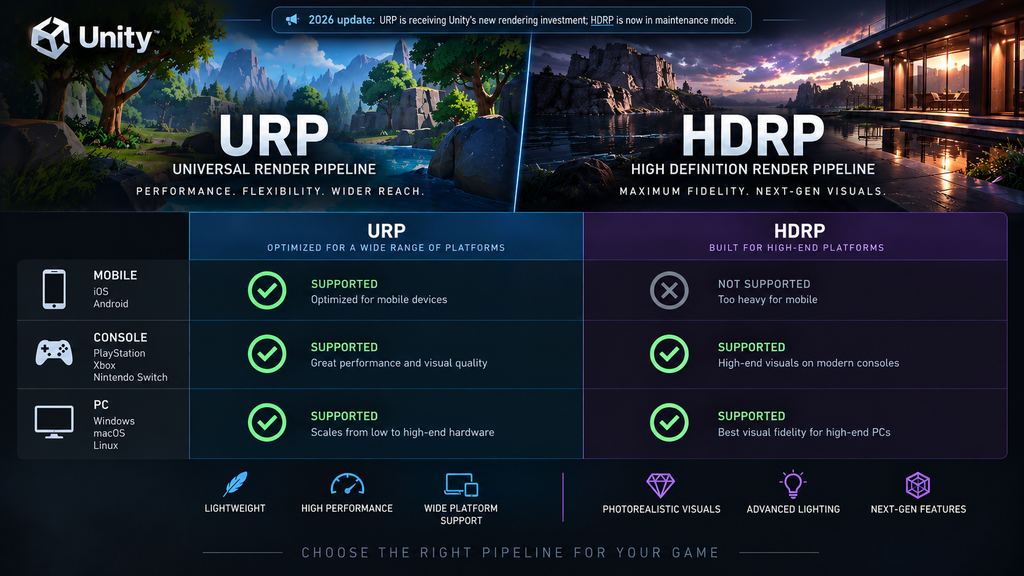
“Editorial illustration created for visual reference purposes. It does not represent a real project, client work, or official software screenshot unless stated otherwise.”
Choosing between Unity’s two render pipelines used to be a straightforward feature trade-off: URP for reach, HDRP for fidelity, both actively developed, pick based on your platform target. That framing stopped being accurate in February 2026, when Unity confirmed its render pipeline strategy for the year – and it’s not a symmetric update. One pipeline is getting the bulk of Unity’s rendering investment. The other is being maintained, not advanced. Choosing between them today means understanding which side of that split your project needs to live on, not just comparing today’s feature lists.
This guide covers what URP and HDRP actually are, what changed in Unity’s 2026 strategy, and how to match a pipeline to a real project – platform target, visual bar, and how long the project needs to live before a pipeline decision becomes hard to reverse.
What URP and HDRP Actually Are
Universal Render Pipeline (URP) and High Definition Render Pipeline (HDRP) are Unity’s two prebuilt render pipelines, both built on the Scriptable Render Pipeline architecture but exposing different feature sets, platform support, and rendering workflows. URP is built for breadth: it targets any genre on any platform, from 2D and mobile through XR to current-generation consoles, and per Unity’s own account it has been the pipeline behind the large majority of Unity games shipped over the past several years. HDRP is built for depth: high-fidelity rendering historically focused on PC and console – with official Nintendo Switch 2 support being added starting in Unity 6.5 – using rasterized, ray-traced, and path-traced techniques, physically based lighting in real-world units, and shader support for subsurface scattering, anisotropy, hair, fabric, and layered materials.
Both pipelines sit alongside Unity’s older Built-in Render Pipeline (BIRP), which is a separate, non-scriptable rendering path predating both – and which is no longer a realistic third option for a new project, covered further down.
The 2026 Trajectory Shift: Why This Decision Changed
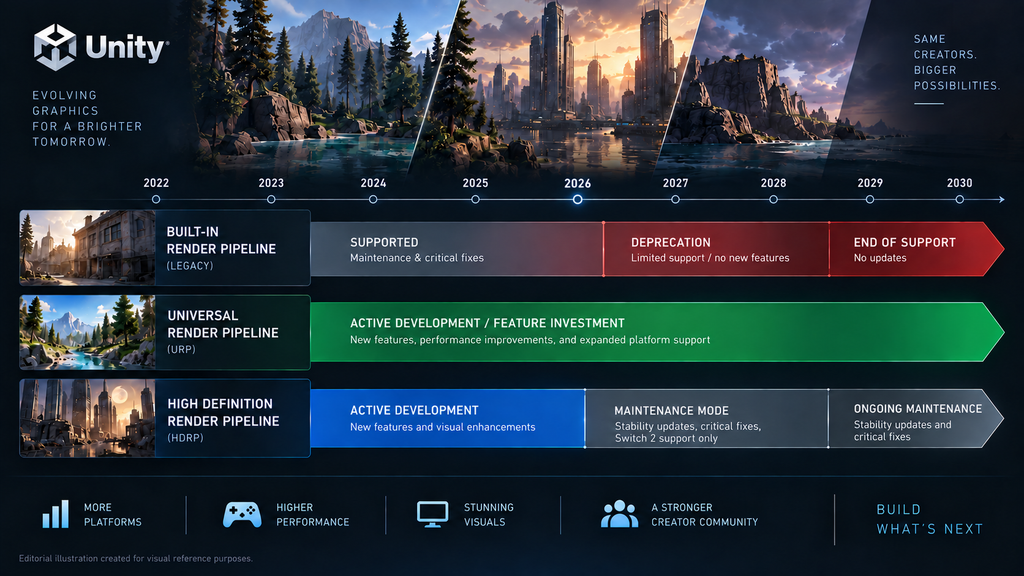
Unity’s engineering team confirmed its 2026 render pipeline strategy directly to the community in late February: HDRP moves into maintenance, with no new features planned – development effort there is limited to expanding platform reach (Nintendo Switch 2 support) and stability work. URP, by contrast, is where the bulk of new rendering investment is landing: physical light units, pre- and auto-exposure, a physical sky and dynamic sky manager, real-time global illumination, screen-space reflections, and on-tile post-processing for mobile devices are all confirmed additions.
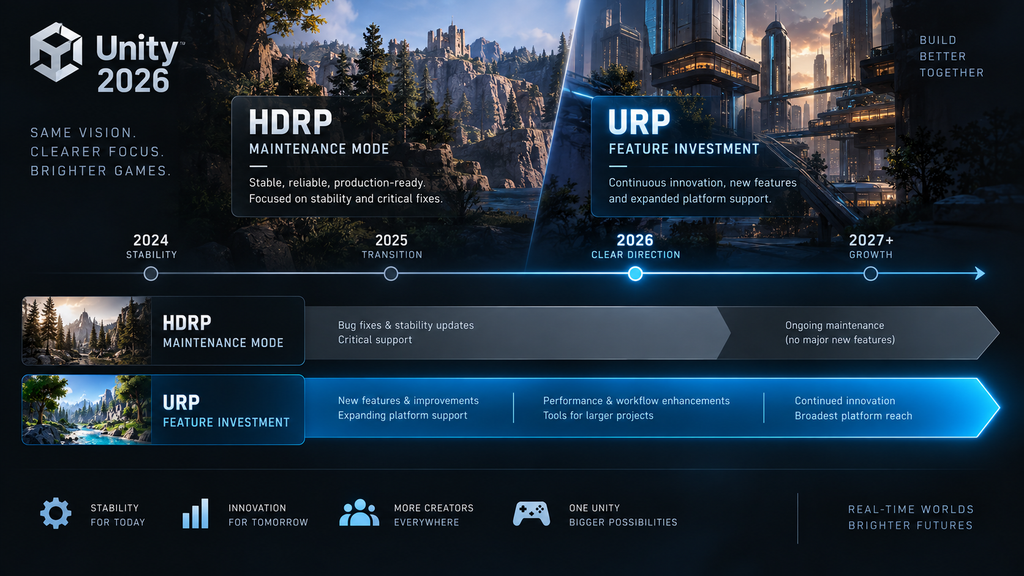
“Editorial illustration created for visual reference purposes. It does not represent a real project, client work, or official software screenshot unless stated otherwise.”
That’s a materially different situation from a normal feature gap between two pipelines. A team choosing HDRP today should plan primarily around its current rendering feature set: Unity has no net-new HDRP rendering features planned, although maintenance, platform support, and shared cross-pipeline infrastructure can still evolve. A team on URP, by contrast, is picking a pipeline actively narrowing parts of the gap with HDRP-level rendering, while retaining broader platform reach.
One detail worth being precise about: the upcoming upscaler framework – bringing DLSS4, FSR3, and console-specific upscalers – is landing on both pipelines through shared underlying infrastructure, not URP alone. Not every future improvement is URP-exclusive; the trajectory difference is specifically about net-new rendering features, not every single engineering investment Unity makes.
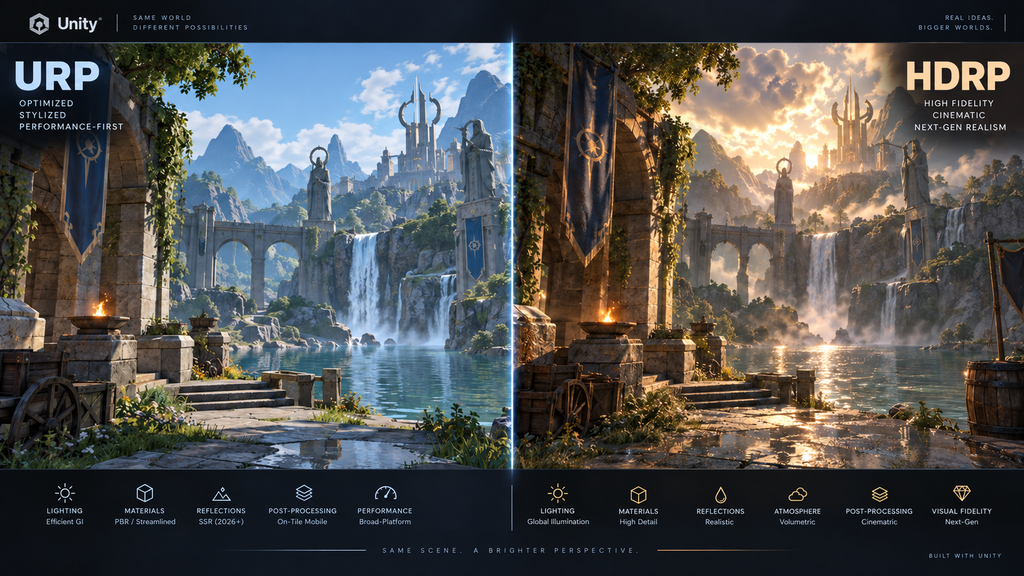
“Editorial illustration created for visual reference purposes. It does not represent a real project, client work, or official software screenshot unless stated otherwise.”
What HDRP Still Does Well Today
None of this makes HDRP a bad choice for every project, and it’s worth being direct about that. HDRP is, in Unity’s own framing, already feature-rich enough that a team doesn’t have to build common high-end rendering techniques themselves – Unity’s own list of production titles running on HDRP includes Harold Halibut, V Rising, PGA Tour 2K25, Node: The Last Favor of the Antarii, and Into the Dead: Our Darkest Days, alongside industrial uses like archviz and simulation tools. A studio with an existing HDRP investment, a defined PC- or console-focused platform set, and a defined visual scope can ship a genuinely high-fidelity title on HDRP today without the maintenance-mode status changing anything about the current build.
Where maintenance mode matters is forward-looking commitment. A shorter project shipping against rendering requirements HDRP already meets has less exposure to roadmap risk. A multi-year production whose visual requirements may evolve needs to weigh Unity’s future investment direction much more heavily, because Unity is directing net-new rendering feature development toward URP rather than HDRP.

Matching the Pipeline to a Real Project
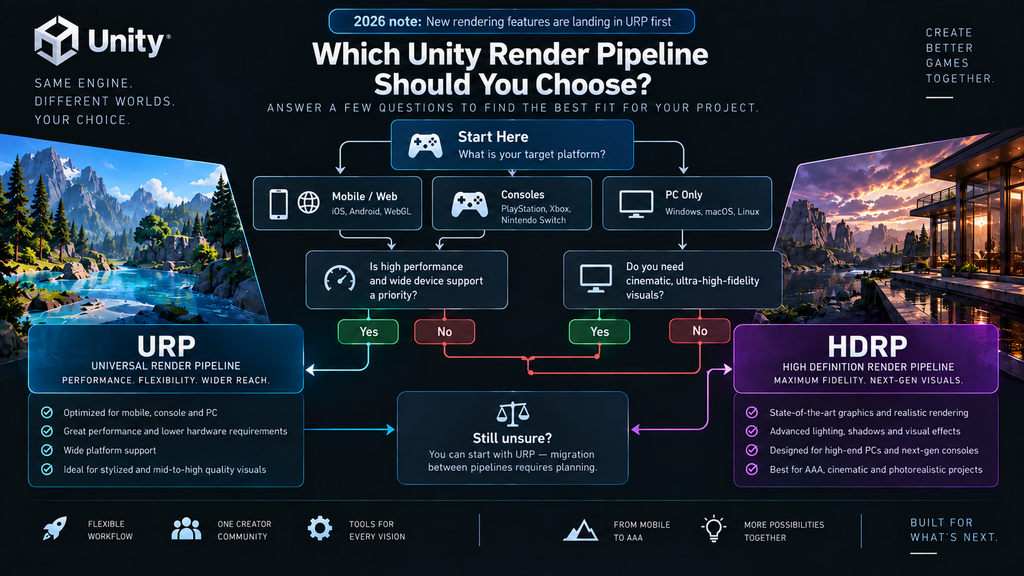
Four questions do most of the work in this decision, in roughly this order of importance:
Platform target. If the project needs mobile, standalone/mobile XR, Web, or genuinely broad cross-platform reach, URP is the practical choice regardless of the maintenance-mode question. HDRP does support desktop and console VR configurations – Unity’s own HDRP documentation covers Single-Pass Instanced rendering for headsets like Oculus Rift, Windows Mixed Reality, and PSVR – but its platform coverage stops well short of URP’s mobile and standalone XR reach. If the project is strictly PC and console, including desktop VR, both pipelines are technically viable, which pushes the decision to the remaining questions.
Project length versus feature trajectory. A shorter project shipping against a visual target both pipelines can already hit doesn’t need to weigh the trajectory question heavily. A project with a multi-year runway aimed at a visual bar that keeps moving is betting on whichever pipeline keeps receiving new capability – which, as of the 2026 strategy, is URP.
Existing team depth. A studio with senior staff who’ve already solved HDRP’s setup overhead – volume framework, exposure model, material types – has a real head start that a fresh URP adoption doesn’t erase overnight. That existing depth is a legitimate reason to stay on HDRP for a project that fits its current feature set, even knowing net-new rendering capability is going to URP first.
Tolerance for a pipeline migration later. Moving from HDRP to URP, or from Built-in to either scriptable pipeline, is not a toggle – shader workflows, materials, lighting setup, post-processing, and pipeline-specific rendering features typically need conversion or manual rework, the same category of issue covered in our asset import pipeline guide. Unity is reducing some of this friction over time – the pipelines increasingly share underlying systems such as Render Graph, and shared lighting and exposure infrastructure is intended to make future migration easier – but that doesn’t make a migration today automatic, particularly for pipeline-specific shaders and rendering features. Planning for a pipeline that will need migrating in two years is a materially different decision than planning around one you expect to keep.
“Editorial illustration created for visual reference purposes. It does not represent a real project, client work, or official software screenshot unless stated otherwise.”
Built-in Render Pipeline: Why It’s Not a Third Option Anymore
“Editorial illustration created for visual reference purposes. It does not represent a real project, client work, or official software screenshot unless stated otherwise.”
Built-in Render Pipeline officially entered its deprecation process starting with Unity 6.5. Unity has guaranteed it will remain available through the Unity 6.7 LTS release, which puts official coverage at least through the end of 2028 for standard licenses (2029 for Enterprise or Industry licenses), with the final removal version still undecided. For a live game already shipped on Built-in, that timeline is workable to plan a migration around. For a new project, Unity’s own guidance is direct: use a Scriptable Render Pipeline – URP or HDRP – rather than starting fresh on a pipeline that’s being phased out.
What Switching Pipelines Actually Costs
Migration risk deserves more weight in this decision than it usually gets in early planning conversations. Moving an existing project between render pipelines – Built-in to URP, or HDRP to URP – typically means converting or manually reworking shader graphs, materials, lighting, and post-processing rather than a straightforward asset move, and teams that have made this move report the effort scales with how deeply the project’s shaders and lighting setup lean on pipeline-specific features. This is a cost worth pricing into a pipeline decision before committing, not after a milestone reveals it.
If You’re Actually Choosing Between Engines, Not Just Pipelines
Everything above assumes Unity is the settled engine choice. If that decision is still open, the render pipeline question folds into a bigger one – our Unity HDRP vs Unreal Engine 5 comparison covers the fidelity ceiling, lookdev workflow, and asset pipeline differences between committing to Unity’s high-end pipeline versus Unreal, including the same 2026 maintenance-mode context in that broader framing. If the deciding factor is licensing cost rather than technical fit, that’s a separate calculation covered in our Unity vs Unreal royalties breakdown.
Getting a Second Opinion Before Committing
A render pipeline choice sets constraints that are expensive to unwind mid-production – shader authoring approach, lighting workflow, and which platforms are realistically reachable without a rebuild. For a team without in-house rendering or technical-art expertise, a short technical assessment against the project’s actual platform targets, performance budget, and visual bar is usually cheaper than discovering a pipeline mismatch after production has scaled.
Working across URP/HDRP? Get a technical assessment for your project →
How Nasty Rodent Approaches Engine and Pipeline Decisions
For Unity production, render-pipeline choice is an early technical constraint because it affects assumptions about lighting, materials, shaders, performance targets, and platform reach before an asset pipeline scales. There isn’t a universal pipeline recommendation to hand out here, because the right answer depends on the platform targets and visual bar of the specific project, not a general preference.
If your team is weighing URP against HDRP for a new production, or planning a migration off Built-in, our production services team can walk through the trade-offs against your actual platform list and timeline.
Unity URP vs HDRP: Comparison
| Dimension | Unity URP | Unity HDRP |
| Platform reach | Mobile, Web, XR, current-gen consoles, PC – broadest reach of the two | High-end PC and current-gen console, with official Nintendo Switch 2 support arriving in 2026; no mobile or Web support |
| XR / VR support | Broad – mobile and standalone XR, plus desktop VR | Desktop and console VR configurations supported (e.g. Oculus Rift, Windows Mixed Reality, PSVR); no mobile or standalone XR |
| Feature development trajectory (2026+) | Active – receiving real-time GI, physical sky, SSR, mobile post-processing | Maintenance – no net-new rendering features planned; effort limited to Switch 2 support and stability |
| High-end rendering feature set today | Expanding rapidly; several HDRP-class lighting features are planned but not all are available yet | Broader out-of-the-box high-end feature set today, including advanced material shading and path tracing |
| Typical project fit | Cross-platform, mobile-inclusive, or long-runway projects | PC- or console-focused projects with a defined, near-term visual scope |
| Migration risk if requirements change | Lower – broadest forward path as Unity’s primary pipeline | Higher specifically where future requirements depend on net-new rendering features, since that investment is going to URP |
| Existing shipped precedent | Majority of Unity titles released in recent years | Harold Halibut, V Rising, PGA Tour 2K25, and other high-fidelity PC/console titles |

Let's work
together


in mind?
From 3D characters and environments to weapons, props, concept art and game UI/UX: ten years deep, 40+ artists strong, zero fluff. Tell us what you are making and get a free, no-pressure estimate.
estimate