Environment Kitbashing for Games: Speed Without Visible Repetition
-

Written by Denys Zadoienyi
-

Updated on26.10.2026
-

Time to read10 min

- Why Fast Kit Assembly Can Still Look Repetitive
- Kitbashing and Modular Kits: How They Work Together
- Placement Rules That Reduce Repetition: Silhouette, Rhythm, Scale and Surface
- Reviewing a Kitbashed Location Under Real Play Conditions
- When a Kit-Derived Variant or Custom Asset Is Worth It
- Reusable Assemblies and In-Engine Validation
- Our Environment Production Experience
- Three Production Choices Compared
- Explore Our Environment Work
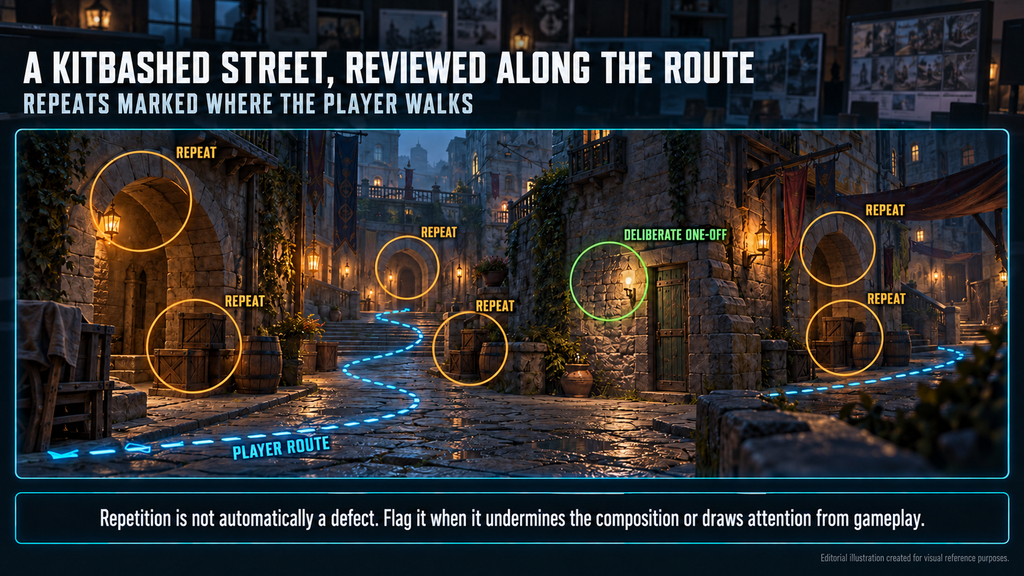
Environment kitbashing for games can speed up the move from an approved blockout to a dressed location by reusing existing meshes and parts. The risk is that reused parts return as the same stair, panel or prop group along the player’s route. This guide covers assembling kitbashed locations and reviewing them under real play conditions, not designing the kit itself.
“Editorial illustration created for visual reference purposes. It does not represent a real project, client work, or official software screenshot unless stated otherwise.
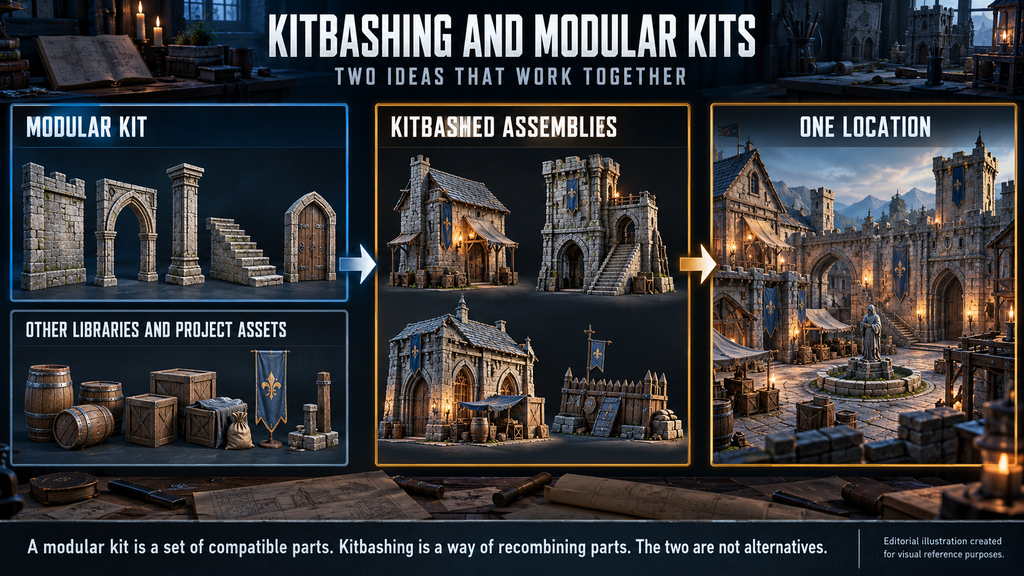
Environment kitbashing uses existing meshes and reusable parts to build new assets or assemble locations. Those parts may come from one kit, several libraries or the project’s own assets. Kitbashing can follow a shared grid and connection rules; its defining feature is recombining existing parts rather than creating every element from scratch.
Why Fast Kit Assembly Can Still Look Repetitive
A location can look convincing in an editor overview and still feel repetitive during play. Review it through the camera and movement conditions players actually use, whether that is first-person, third-person or top-down.
If you are an art director, the risk is polish time spent on repetition that could have been planned out. As a producer, the risk is late rework: changing placed pieces after lighting and dressing can touch many spaces.
Treat visible repetition as a production risk with an owner and a check. It starts with scope: 3D environment art can be scoped as kits your level artists assemble or as the assembled, dressed location delivered to your build, and the review belongs to whoever owns the assembly.
Kitbashing and Modular Kits: How They Work Together
“Editorial illustration created for visual reference purposes. It does not represent a real project, client work, or official software screenshot unless stated otherwise.”
A modular kit is a set of compatible parts, usually built around shared dimensions, pivots and connection rules. Kitbashing is a way of using parts: recombining existing meshes into new assemblies or assets. The two are not alternatives. A team can kitbash within one grid-based kit, across several libraries or with its own earlier assets.
Each choice moves the work. A grid-based kit makes connections predictable, but repeated layouts, intervals and silhouettes can become visible. Mixing sources widens the range of shapes, but the assembler must reconcile scale, texel density, material palette and level of detail, or the result drifts in style. Kit specification is covered in our 3D environment design guide.
In a 2018 interview, level designer Joel Burgess, formerly of Bethesda Game Studios, discusses kit discipline in an interview article on 80.lv: respect a kit’s core rules and break them deliberately. He notes that shared logic across kits makes them more compatible but makes repetition more obvious, and argues against tying kits to particular enemies or lighting, since mixing fights repetition.
Placement Rules That Reduce Repetition: Silhouette, Rhythm, Scale and Surface
Start by identifying the most noticeable repeat. Layout and silhouette problems usually need composition or geometry changes; repeated surface marks need material variation. Check the larger forms first, but address a dominant texture pattern early when it is the main distraction.
Stay inside the rules. Vary placement only within the kit’s connection rules and the approved gameplay layout. Keep structural dimensions, traversable clearances, collision and interaction points intact. Use scale variation only on assets approved for it, and recheck any affected gameplay geometry.
Regroup instead of shifting. For large forms, prefer compatible variants and regrouping over arbitrary offsets.

Cluster with a reason. Group props around a purpose – a barricade, a camp – and leave quiet areas between them. An even scatter of the same props can read as procedural.
Add deliberate one-offs. A repaired section, a differently damaged panel or a mismatched door gives the eye something to hold on to. Review the most distinctive pieces first.
Choose surface variation deliberately. Material instances, decals, vertex paint and world-aligned textures handle surface variation; they do not fix layout or silhouette. Check whether the variation is stored on the shared mesh asset, on a component or in per-instance data. These paths have different constraints, particularly with Nanite, and the material must support the chosen method. Our modular prop kits guide covers the toolbox.
Did you know?
In the same interview, Burgess notes that if a kit’s pivot or footprint metrics change late, hundreds or thousands of level layouts can break, so functional polish on a kit comes early and visual polish later.
Reviewing a Kitbashed Location Under Real Play Conditions
“Editorial illustration created for visual reference purposes. It does not represent a real project, client work, or official software screenshot unless stated otherwise.”
Repetition is not automatically a defect. Repeated structures can establish architectural logic and help navigation. Flag a repeat when it undermines the intended composition, makes distinct spaces hard to distinguish or draws attention away from gameplay.
- Fix routes and cameras. List the critical path, detours, backtracking and main vantage points, and use the project’s real camera settings.
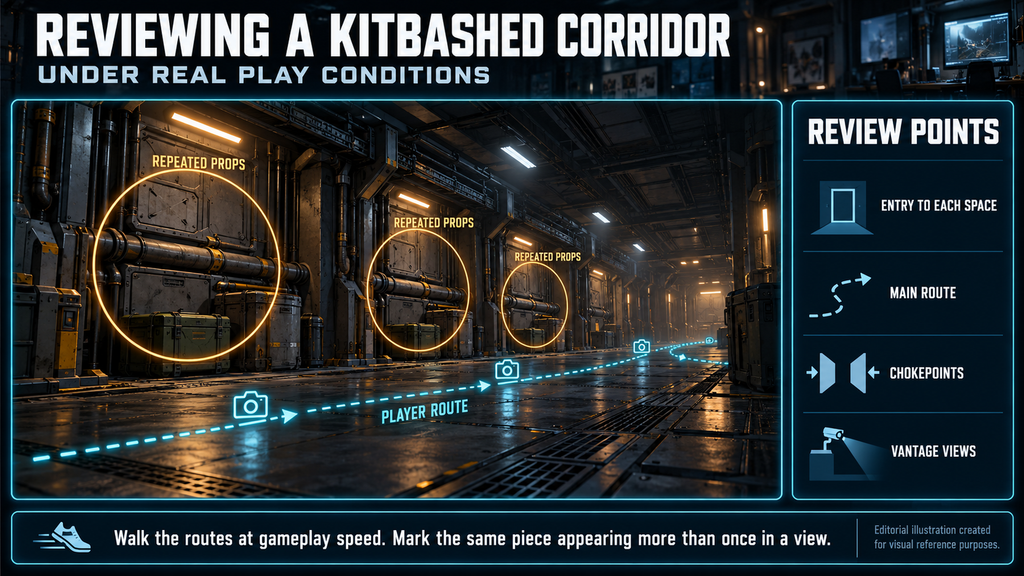
- Walk, then capture. Walk the routes at representative gameplay speed and use fixed captures to document findings. Keep camera settings consistent between versions.
- Include return visits. Check spaces where players encounter the same assemblies again.
- Mark repeats in each frame. Annotate the same piece, cluster or silhouette appearing more than once in one view or in consecutive views.
- Decide per repeat. Keep it if it serves the design; otherwise vary, regroup, replace or remove it. If a fix needs new geometry, log a variant or custom-asset request with the capture.
- Check lighting twice. Use consistent review lighting to compare versions, then verify the result in the intended gameplay lighting. Lighting can reveal or conceal different kinds of repetition.
Review at blockout, after the first assembly pass, after dressing and before lock. The criteria below are qualitative; thresholds are agreed per project.
| Review point | How to check | What good looks like | Red flag |
| Entry to each space | First view through the project’s gameplay camera | The space reads as distinct for its purpose | Different spaces are hard to tell apart |
| Main route | Walk the critical path at gameplay speed | Rhythm supports navigation | A repeated group pulls attention from gameplay |
| Chokepoints | View where players slow down or wait | Details differ where players dwell | Identical props at every dwell point |
| Vantage views | Wide views from high points and long corridors | The composition reads as intended | One assembly competes with the focal point across the view |
| Gameplay spaces | Cover, combat and interaction positions | Positions work as landmarks | Players cannot tell two positions apart |
Illustrative example (not a client project). An industrial corridor repeats the same arrangement of a wall panel, a pipe run and a crate. Recoloring the panel leaves the repeated composition intact. Regrouping compatible parts and adjusting the dressing can make the pattern less noticeable. The team then walks the route again and rechecks collision.
Carry the findings into planning. Our art scope estimation guide covers counting unique and repeated pieces and the variation a location needs; review results should land in that estimate.
When a Kit-Derived Variant or Custom Asset Is Worth It
“Editorial illustration created for visual reference purposes. It does not represent a real project, client work, or official software screenshot unless stated otherwise.”
Set dressing makes assembled geometry feel lived in. It can be planned as its own pass, though it often overlaps with assembly. Give each cluster a reason – who put it there and why – or it is just more repetition.
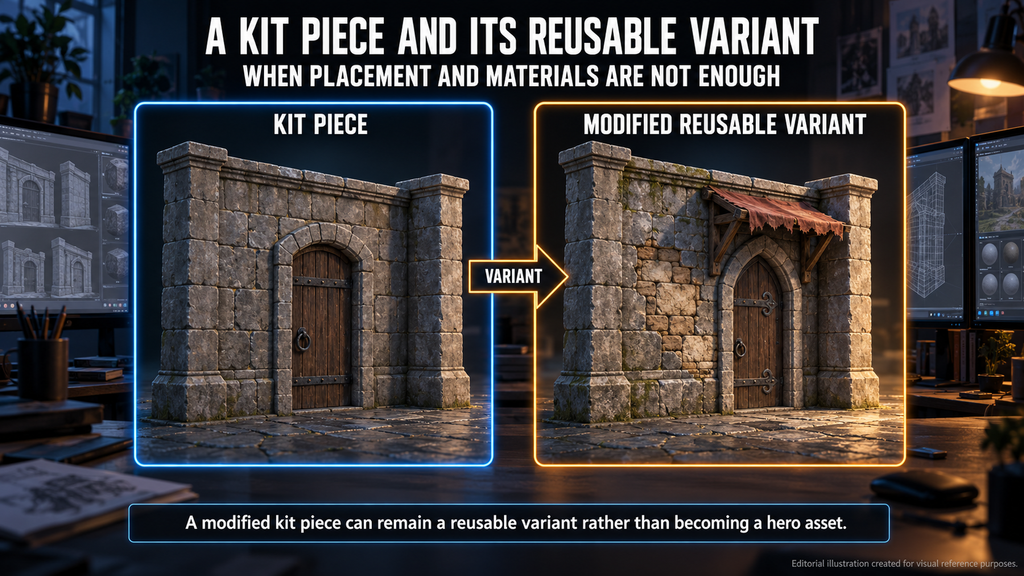
Create a variant when existing parts cannot meet the required silhouette, function or visual identity through placement and material changes alone. Reserve hero-level work for assets whose camera exposure, narrative role or gameplay function justifies it. A modified kit piece can remain a reusable variant rather than becoming a hero asset.
Consistent pivots and clear naming make props easier to place manually or through rules. Rendering efficiency is a separate check: UE instanced static meshes share a mesh and component-level material and collision settings, so variation must be designed for that setup. Our props production pipeline guide covers instancing and pivots for AAA projects.
Procedural placement follows its authored rules and inputs. Review whether they preserve clustering, clear routes, collision constraints and the intended composition before treating the result as ready.
Reusable Assemblies and In-Engine Validation
Level Instances and Packed Level Actors help organize and reuse assemblies; they do not decide how repetitive the result looks. Per Epic’s documentation (UE 5.8) on Level Instancing, Level Instances are collections of Actors packed into a sublevel that can be placed and repeated across a world, and changes committed to the shared Level Instance source propagate to its other copies. Packed Level Actors combine static meshes into one Blueprint Actor that Epic describes as optimized for rendering. Breaking either one out cannot be undone, though the source stays in the Content Browser, and Epic notes that the level-streaming mode adds runtime cost.
Decide whether a change belongs in the shared assembly or in a location-specific variant. Review the scope of shared edits before committing them, so a fix for one location does not unintentionally change the others. A packed assembly reused across a district is still one recognizable assembly to the player, so review it like any other repeat.
Validate frame time, materials, texture memory, collision and rendering method on the target platforms; no reuse tool or variation technique is free. Epic ties decal cost, for example, to screen coverage and material complexity.
In large worlds, also review across streaming boundaries; our World Partition workflow guide covers how locations are split.
As a producer, write the review into the brief: routes, cameras, review lighting, who owns the fixes and how many review rounds the location gets. Estimate new asset production separately from assembly work. Count the unique meshes and variants to be created, then scope layout completion, placement, dressing, source adaptation, integration and review. Repeated placements reuse assets, but they still require production time and validation.
Our Environment Production Experience
Our environment work for released games includes Starship Troopers: Extermination (environment assets and location development) and Mutant Year Zero: Road to Eden and Miasma Chronicles (environment assets). Our game art services include testing assets in UE5 before handoff; project specifics are agreed with each client.
Three Production Choices Compared
These choices can be combined in one location.
| Production choice | Useful for | Repetition to watch | Additional work to scope | Review focus |
| Grid-based modular assembly | Connected architecture and repeated structures | Repeated layouts, silhouettes and intervals | Transitions, variants and dressing | Connections, composition and player routes |
| Kitbashed assembly | Recombined architecture, props and environment details | Recognizable combinations reused unchanged | Source compatibility, materials and collision | Visual coherence and in-engine behavior |
| Custom focal asset | Specific visual, narrative or gameplay requirements | Repeated use of a distinctive asset | Bespoke authoring and integration | Camera importance, function and required detail |
Explore Our Environment Work
Agree the review routes, cameras and variant budget before assembly starts. Our realistic environments portfolio shows modular kits and environment scenes from released projects and internal studies.
Send your references and target platforms to sales@nastyrodent.com or through our contact page. We usually reply within 1–2 business days.
Explore our realistic environments portfolio →
Let's work
together

in mind?
From 3D characters and environments to weapons, props, concept art and game UI/UX: ten years deep, 40+ artists strong, zero fluff. Tell us what you are making and get a free, no-pressure estimate.
estimate