Source Files & Handover Package: What You Should Receive on Delivery
-

Written byDenys Zadoienyi
-

Updated on01.10.2026
-

Time to read13 min

- Why a Folder of Final Exports Is Not Always a Handover
- Five Areas to Check in a Handover Package
- What Missing Authoring Data Can Add to the Next Task
- Area by Area: What to Open and What It Should Prove
- How to Verify the Package Before You Sign Off
- Define the Package and Its Checks Before Production
- When an Export-Only Delivery May Be Sufficient
- Run This Self-Test Before You Give Final Approval
- Ask for a Defined Delivery Package
A game art delivery can look complete and still leave gaps for the next production team. The approved assets import correctly, but a later variant request, a vendor change or an engine upgrade shows that the package lacks the complete source files or dependencies those changes need.
Exports such as FBX can still be edited. What they may not preserve is the full authoring setup: modeling history, sculpt detail, texture layers or DCC rig controls. For an outsource decision-maker, the question is whether the delivery can be verified against what was agreed. For a producer, it is whether the receiving team can open, modify and integrate the agreed assets using the package and its documented dependencies. If you own the vendor decision, this guide is built for that check.
What is a game art handover package? It is the agreed set of files and records transferred at a milestone or project handover: editable sources where included, delivery exports, engine content and the documentation needed for the specified work. Its completeness is checked against the delivery specification, including documented dependencies, exclusions and accepted exceptions.
Why a Folder of Final Exports Is Not Always a Handover
Delivery exports support integration into the target pipeline. Editable authoring files support changes to the underlying work. Unity’s documentation shows a related split: the file placed in the Assets folder stays unmodified, and the engine builds its own internal representation from it. A game runs on that internal data, so shipping an asset does not show that its DCC scenes, sculpt files or texture projects were handed over.
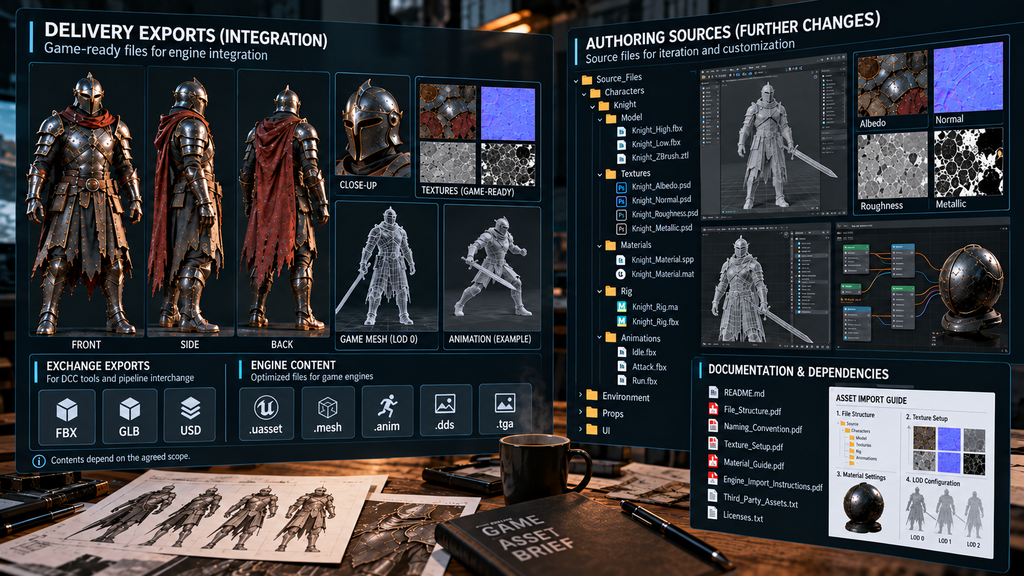
“Editorial illustration created for visual reference purposes. It does not represent a real project, client work, or official software screenshot unless stated otherwise.”
The gap shows up when something has to change. Three situations bring it to the surface:
- A variant request. A recolor may be possible from delivered textures or material parameters. Changes to sculpted detail, texture layers or deformation may need authoring sources, and reconstructing missing authoring data can add work.
- A change of vendor. Another team may be able to continue from exports. Missing sources, dependencies or documentation can limit the changes it can make efficiently.
- An engine or platform change. Materials, detail settings and texture budgets may need adaptation. Sources help where the adaptation touches the original model or texture workflow; they do not remove integration work.
Source-file delivery is also not standardized across engagements. Our breakdown of the four costs a quote usually leaves out lists source-file preparation as one of them. This guide starts after that conversation: the scope is agreed, the work is done and a package is in your hands.
Five Areas to Check in a Handover Package
The following five-part checklist is a practical way to review a package. It is not a universal delivery standard. Some areas share files or folders, and each requirement should be marked as included, not applicable or explicitly excluded in the agreed specification. If you own the vendor decision, the table is the part worth copying into your vendor scorecard.
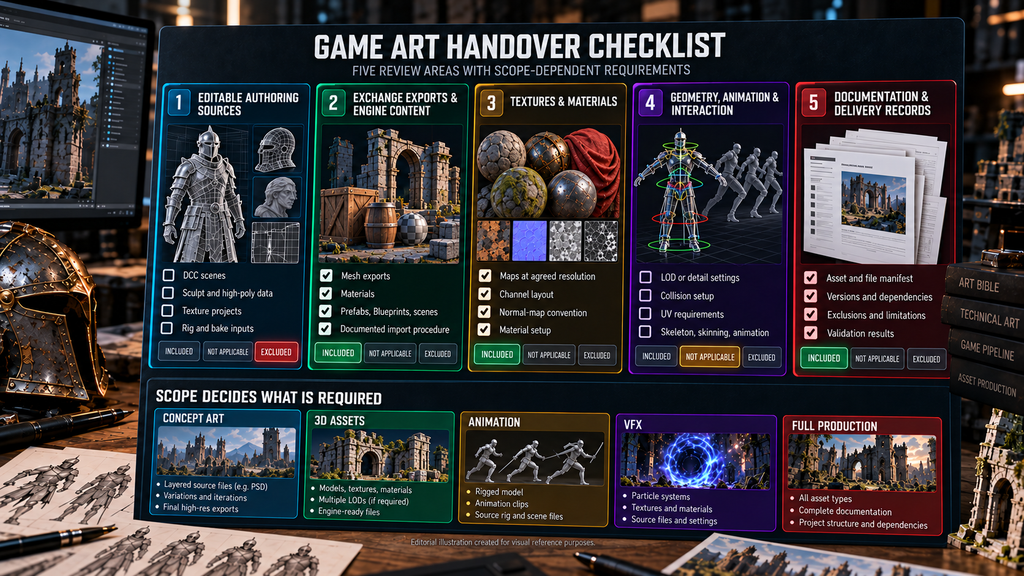
“Editorial illustration created for visual reference purposes. It does not represent a real project, client work, or official software screenshot unless stated otherwise.”
| Review area | What to account for | Acceptance check | Finding to investigate |
| 1. Editable authoring sources | Agreed DCC scenes, sculpt and high-poly data, texture projects, rig or bake inputs where included | Opens in the documented environment and supports the agreed changes | A named source is absent; required references or tools are unresolved |
| 2. Exchange exports and engine content | Agreed mesh exports, materials, prefabs, Blueprints or scenes where included | Integrates into the specified engine version and configuration using the documented procedure | Undocumented manual repair; broken references; incorrect scale or pivots |
| 3. Textures and materials | Maps at agreed resolutions, channel layout, normal-map convention, material setup | Maps and material bindings match the specification and the approved appearance | Missing required maps; wrong channel interpretation; material structure differs from the agreed setup |
| 4. Geometry, animation and interaction requirements | Applicable LOD or detail settings, collision setup, UV requirements, skeleton, skinning, animation data | Required components work in the agreed test conditions | Required configuration is absent or fails its acceptance check |
| 5. Documentation and delivery records | Asset and file manifest, versions, dependencies, exclusions, known limitations, validation results | The agreed asset list reconciles with delivery paths, revisions and status | Undocumented dependencies; unclear revisions; unresolved issues without an owner |
Import failures can involve several areas at once: exports, textures, material references and dependencies. Our guide to the asset import pipeline explains the export and import conventions. Here the task is narrower: check that the agreed components are present and usable together.
What Missing Authoring Data Can Add to the Next Task
The extra work depends on the change. A simple recolor may reuse existing maps, a rebake may need the high-poly model and bake inputs, and a rig change may need DCC controls that a runtime skeleton does not preserve.
For an outsource decision-maker, the risk is a vendor you cannot easily replace without paying to reconstruct data the first package did not include, which can turn the exit clause in your MSA into a theoretical option. For a producer, it is rework that was not in the capacity plan, taken from the people building the next release.
Estimate the gap task by task: which data can be reused, which must be reconstructed and which dependencies must be restored. Allow for shared materials and batch work before multiplying one estimate across assets. Artist effort and calendar delay are separate measures: staffing, parallel work and approvals decide how one becomes the other.
Did you know? When an FBX file is imported into Unreal Engine, the pipeline transfers only basic materials and some textures. Epic’s FBX material documentation says it does not transfer individual material settings. FBX import alone does not guarantee that the approved material appearance will be reproduced, so verify the required engine materials, shaders and texture bindings as part of the handover.

Area by Area: What to Open and What It Should Prove
Open the agreed sources in the receiving team’s documented environment, with the specified application versions and required dependencies. They should not rely on inaccessible files on the vendor’s workstation. Check that the working data needed for the agreed changes is present. Required plugins, scripts, linked libraries and path-remapping steps should be documented, with access or alternatives agreed in advance.
Exports: reproduce the documented delivery workflow
Test representative assets from each relevant category, prioritizing complex assets and distinct export paths. Use the documented tools, versions, presets and post-processing steps to reproduce the agreed export. Compare acceptance-relevant properties such as scale, pivots, UV layout, normals, material assignments and geometry limits. Investigate unexplained differences; optimization or importer processing may legitimately change counts or structure.
Textures and materials: verify the agreed surface workflow
FBX can transfer mesh data and some basic material information, but it does not guarantee reproduction of the original shader setup. Check texture resolutions, channel mapping, normal-map convention, color-space handling, material slots and the required engine materials or shaders against the specification. If the project uses shared parent materials, verify those dependencies and their instances. Hand-painted shading and flattened texture exports can be valid deliverables; the question is whether they match the agreed scope and workflow.
Detail settings, collision and UVs: check what the asset requires
Check the detail-management approach, collision configuration and UV requirements agreed for each asset category. Where baked lighting requires lightmaps, verify the designated lightmap UV channel rather than assuming a fixed channel number. Collision may use supplied geometry, generated shapes or engine-side configuration. Record items that are not applicable or intentionally omitted, so absence is assessed against the specification and not against a generic checklist.
Documentation: connect each asset to its files and dependencies
The manifest should connect agreed asset IDs and revisions to the relevant source, export and engine paths, including shared resources. Record the tools and versions, naming conventions, dependencies, known limitations and approved deviations. A README or equivalent delivery record should explain how to use the package. The technical specification established during vendor onboarding is the reference for checking it; the delivery record can be a separate document.
What changes by asset type
Use the checklist at package level, then define the applicable deliverables for each category. The following are items to check, not claims about how often vendors omit them.
- Props and environment kits. Check the agreed scale, pivots, module relationships, shared materials and assembly notes. Confirm whether delivery covers individual assets, a modular kit or an assembled scene, as in our 3D environment art work.
- Weapons. Where attachments or animation are in scope, check the agreed part separation, attachment points, hierarchy and supporting source data.
- Vehicles. Where moving parts or damage variants are required, check the corresponding geometry, pivots, deformation or animation data and the sources needed for further changes.
- Characters. Check the agreed model and texture sources. Skeletons, skin weights, control rigs, blend shapes and animations are separate deliverables where specified; a runtime skeleton is not the same as a DCC control rig.
- Concept art and UI. Check agreed layered or component sources, exports, style notes and font dependencies. Identify licensing and redistribution conditions instead of assuming every font file can be handed over.
How to Verify the Package Before You Sign Off
Review gates catch problems while an asset is still being built. Our guide to quality control for outsourced game art covers that sequence. The package check is the last gate in it, and the one that looks at everything at once.
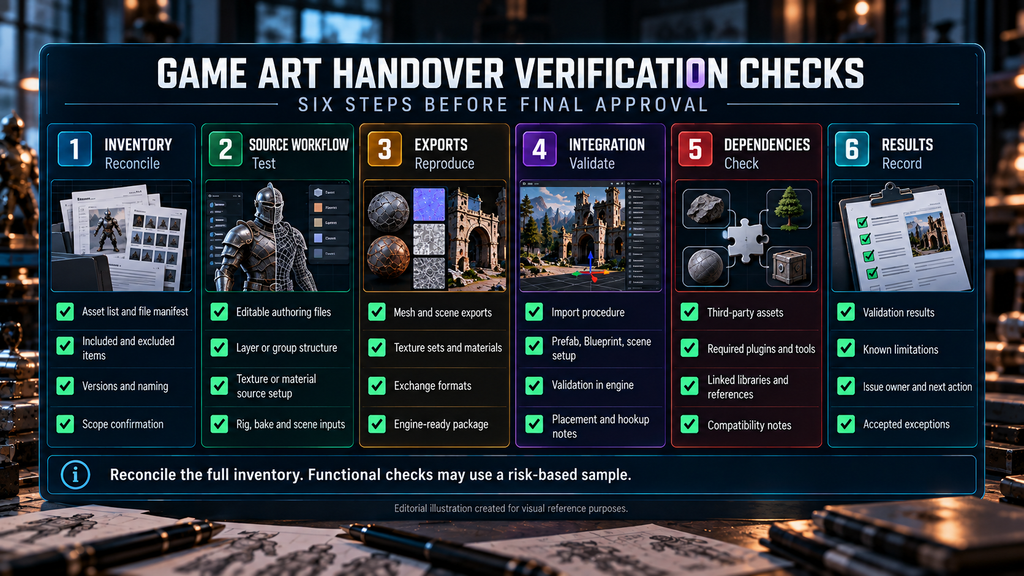
“Editorial illustration created for visual reference purposes. It does not represent a real project, client work, or official software screenshot unless stated otherwise.”
- Reconcile the full inventory. Compare the agreed asset list, revisions, delivery paths and vendor manifest. Record missing, additional, excluded and not-applicable items, including shared resources.
- Test agreed sources. Open them in the documented receiving environment and check the working data required for the specified changes. Record unresolved references and undocumented dependencies.
- Reproduce representative exports. Follow the documented workflow and compare acceptance-relevant properties. Investigate differences the procedure does not explain.
- Validate integration in a controlled copy. Use the specified engine version and configuration. Follow the documented setup and check references, materials, detail settings, collision or animation where applicable. Log any manual repair beyond the agreed procedure, and avoid overwriting production assets during testing.
- Check dependencies and functional requirements. Account for external tools and content, their versions and the receiving team’s access. Perform the agreed behavior checks, not just a successful import. Epic’s migration documentation advises moving an asset together with its dependencies.
- Record the outcome. Link the tested revision to the reviewer, date, environment, result and outstanding issues. Each issue needs an owner and a next action; accepted exceptions should be explicit.
Reconcile the full inventory even when functional checks use a risk-based sample. Cover the relevant asset categories and distinct workflows, prioritizing complexity and shared dependencies. A failing sample warrants investigation and may require broader checks. Passing samples do not prove that every asset is defect-free, so document what was and was not tested. The log also gives you a number worth tracking next to first-pass approval rate: the share of packages that pass this check on the first attempt.
Define the Package and Its Checks Before Production
Agree the asset list, named sources, formats and versions, texture and material requirements, applicable technical data, documentation, dependencies and exclusions before production starts. Decide who verifies the package, which checks apply and how unresolved issues are recorded and corrected.
File delivery and ownership are separate questions. Our guide to IP, NDA and liability terms covers the legal side.
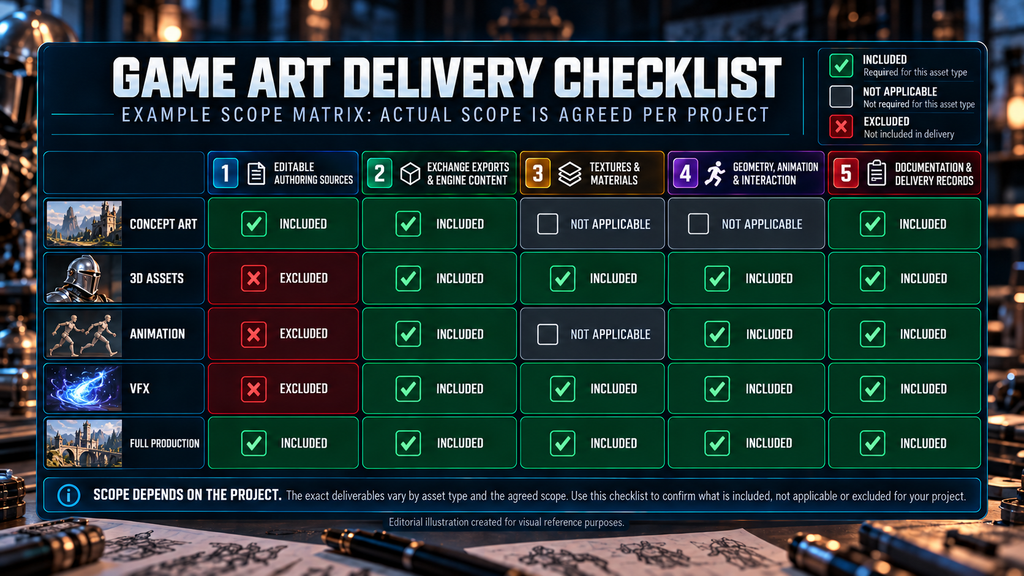
“Editorial illustration created for visual reference purposes. It does not represent a real project, client work, or official software screenshot unless stated otherwise.”
The RFP and SOW guide explains how to document scope.
Agree when the receiving team can access and verify the package, how findings are resolved and when final acceptance occurs. Align those steps with the project agreement.
When we run game art outsourcing services engagements, delivery formats are fixed during planning, before production starts. Our process includes a Project Handoff step: named, packed files ready for import, asset usage guides where a project needs them, and a final review with sign-off. Files follow the client’s naming convention, or ours when the client has none.
When an Export-Only Delivery May Be Sufficient
Export-only delivery may fit a narrowly scoped asset with limited planned changes, provided the receiving team has the data needed for integration and use. Check this against the actual future tasks: a simple material adjustment and a new sculpted variant need different working data.
Sources become more valuable when the team expects rebakes, substantial variants, rig changes or continuation by another vendor. Compare the cost of preparing and maintaining those sources with the likely work they enable. Ask what changes the delivered package supports before deciding what to include.
On projects where a studio leads the art direction, the package may carry more than files. On Wild Rage, we partnered with Whimsy Games to lead and develop the entire art direction, covering concept art, characters, weapons, props and environment assets, as the case page describes. For an engagement that includes art direction, agree whether the handover should also include the approved style rules and design rationale needed for continued production.
On Starship Troopers: Extermination, our work with Offworld Industries covered props, environment assets and help with developing game locations. In prop and environment production, the receiving team needs the naming, scale, pivots and material relationships specified for the assets it will use.
Run This Self-Test Before You Give Final Approval
- [ ] The delivery specification identifies the agreed files, formats and versions.
- [ ] The full asset inventory and final revisions match the manifest.
- [ ] Included, excluded and not-applicable components are explicit.
- [ ] Agreed sources open with the documented tools and dependencies.
- [ ] Tested exports meet the specified properties, with differences explained.
- [ ] Engine content works in the agreed test configuration.
- [ ] Required textures, materials and shared dependencies are present.
- [ ] Applicable detail, collision, UV, rig and animation requirements have been checked.
- [ ] Required external resources and access conditions are documented.
- [ ] Validation coverage, unresolved issues and accepted exceptions are recorded.
Use this checklist alongside the project’s acceptance criteria. Final approval should reflect the documented results and exceptions; ticking these boxes alone does not establish production performance or coverage of untested assets.
Ask for a Defined Delivery Package
Before production starts, ask which sources and exports are included, how dependencies are recorded and how the receiving team will verify the package. A written description makes the scope reviewable; a relevant sample and a documented validation process are better evidence of handover readiness than a promise to deliver “everything”.
Send your brief to sales@nastyrodent.com to discuss the source files, delivery formats and handover requirements for your project. We usually reply within 1–2 business days. If your team is building or standardizing its asset pipeline, you can also send your current asset spec and engine configuration for the 48-hour pipeline audit described in our asset import guide.