How AAA Shooter Teams Work With a Weapon Art Partner
-

Written byDenys Zadoienyi
-

Updated on09.11.2026
-

Time to read15 min

- Why Weapons Need a Different Collaboration Setup
- Map the Teams That Depend on Each Weapon
- Use a Representative First Weapon as the Family Template
- Review Weapons Where the Player Will Hold Them
- Real-World Names and Markings Are the Studio’s Decision
- Plan Skins Before the Base Weapon Is Final
- Draw the Delivery Boundary for Weapons
- A Weapon Family Collaboration Brief, Filled In
- Our Approach
- Base Weapon, Variant, Attachment or Skin: Who Signs Off
- Planning Weapons With an External Partner?
A weapon art partner on a AAA shooter works with decisions that can affect animation, gameplay, VFX, UI and, where relevant, live content. The collaboration has to define those dependencies, not just the model deliverables, because a rifle can pass review as a beauty render and still fail the agreed checks once it is in the player’s hands.
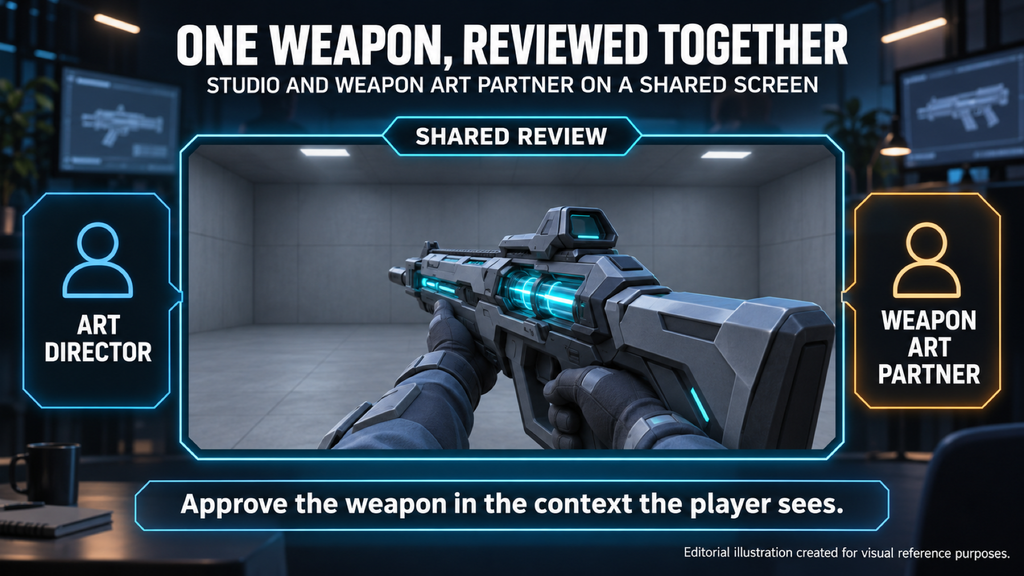
“Editorial illustration created for visual reference purposes. It does not represent a real project, client work, or official software screenshot unless stated otherwise.”
A collaboration model with a weapon art partner is the agreed way a shooter studio and an external art team divide decisions, inputs, reviews and delivery for weapons. It also covers the teams that depend on each weapon, where weapons are reviewed, decisions about real-world references, and how variants and skins relate to a base weapon.
Why Weapons Need a Different Collaboration Setup
First-person weapons can require coordinated input from several disciplines. Animation needs an agreed model and moving-part setup for handling and reload work. Weapon or gameplay design defines attachment compatibility and how the weapon should read in use. VFX may need points for muzzle flashes and shell ejection, UI may need renders or captures, and a live-content team may need a stable base for cosmetic variants. Environment props can have dependencies too; the useful step is to identify the ones that actually apply to this weapon package.
That changes what “late” means. A delayed answer about a magazine shape does not only hold up the partner; it can hold up animation and every team that plans work around the same weapon. If you are an art director, you will recognize the other half of the problem: the weapon set has to read as one family across variants, attachments and skins, and every exception approved in isolation makes the next one easier to justify.
Map the Teams That Depend on Each Weapon
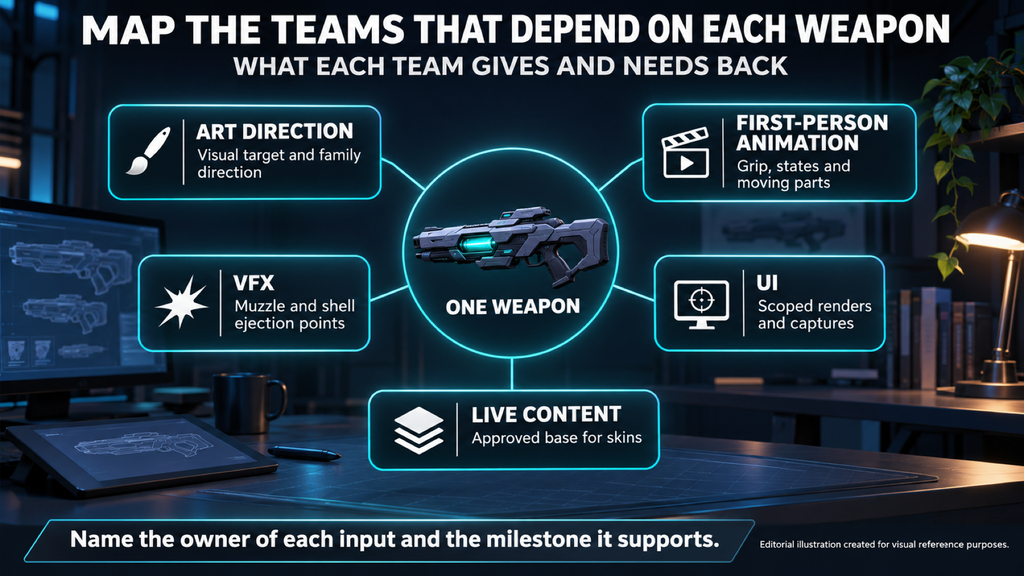
“Editorial illustration created for visual reference purposes. It does not represent a real project, client work, or official software screenshot unless stated otherwise.”
Before the first weapon goes into production, list every team that will use it, what each one gives the partner and what each one needs back. The table below is a starting point; your studio may split these roles differently, and not every weapon needs every row.
| Team | Gives the partner | Needs back | Checkpoint to agree |
| Art direction | Visual target, style guide, approved references | Assets consistent with the approved family direction | Blockout approval and final visual review |
| First-person animation | Grip references, required states, moving-part and rig interface requirements | Geometry with the agreed part separation, pivots or skeleton interface | Early blockout review; interface checks before final geometry approval |
| Weapon or gameplay design | Intended role and attachment compatibility requirements | Geometry that supports the approved configurations | Before base and attachment interfaces are locked |
| VFX | Effect attachment requirements and conventions | Agreed attachment points with the required position and orientation | Alignment early; verification at technical delivery |
| UI | Presentation, framing and output requirements | Scoped renders or captures, including early versions if needed | Before the first UI-dependent milestone |
| Live content, where applicable | Cosmetic plans, change limits and release dependencies | A recorded base and the agreed inputs for skin production | Before affected skin work starts |
As a producer, name the owner of each input and the milestone it supports. An unresolved grip interface may block animation; icon framing or equipment-screen requirements can also shape earlier decisions, so do not assume UI can always wait until final approval.
Then decide how feedback reaches the partner. Use one agreed contact to send consolidated notes, and resolve conflicting discipline notes on your side before the review goes out. Each note should identify the asset revision, the view or state, the observed issue and the requested outcome, and each review should end in a recorded decision: approved, approved with stated exceptions, or returned for changes.
Our own weapon workflow starts with a blockout and approval of silhouette and proportions before detailing, and nothing goes to high poly until the shape is signed off. That checkpoint matters to the animation team as much as to the art director, so invite the right reviewer to it rather than discovering a grip conflict after texturing.
Did you know? Studio-led weapon outsourcing has a long track record on major shooters. In his GDC Europe 2013 presentation on Epic’s outsourcing approach, Chris Mielke listed some weapons among the work outsourced for the Gears of War series and weapons for Infinity Blade, and described agreed specifications, fixed delivery and feedback days, and feedback compiled into one voice from the studio. It is a historical example of studio-led collaboration, not a universal workflow for today’s projects.
Use a Representative First Weapon as the Family Template
A rifle family may include a base weapon, geometry variants, attachments and cosmetic variants. Choose a representative first asset to validate the decisions those items will actually share, and review it with more people and more care than the ones that follow. If later assets introduce a different rig, interface or material approach, review those differences separately rather than assuming the first approval covers them.
The working template should record the approved attachment compatibility and alignment rules; the project’s naming convention for attachment and effect points, together with their position and orientation; the material and UV reuse strategy, where applicable; and the limits of each variant or skin. Sharing materials with the receiver is one possible approach, not a requirement for every attachment. Record approved exceptions so later reviews compare like with like.
The technical side of that review – camera context, UV rules, baking and level-of-detail decisions – is covered in our guide to the technical checks for a 3D weapon model. Here the point is organizational: the template is where those technical decisions become shared rules for the partner and for every internal team that touches the family.
When a partner joins a game that already has weapons in it, the template is often one of your existing assets. In that case we ask for a few existing weapons, ideally with source files, the technical specification, screenshots in the game’s actual lighting and the naming and folder convention, so new weapons sit inside the set instead of standing out from it.
The template also makes planning more honest. Once you know which pieces are shared and which are unique, you can turn a weapon list into a kit and schedule it, instead of counting every variant as a separate hero asset.
Review Weapons Where the Player Will Hold Them
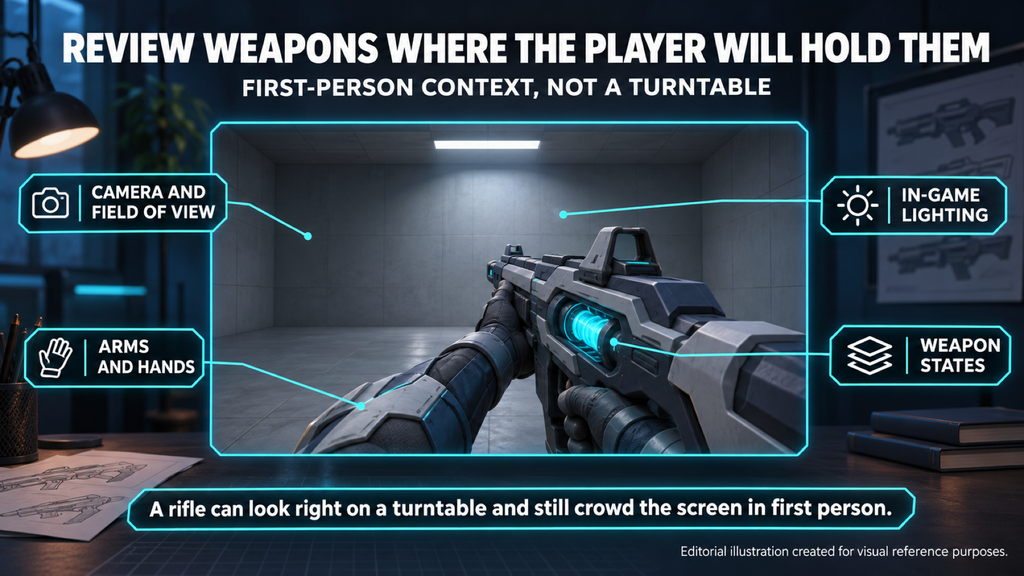
“Editorial illustration created for visual reference purposes. It does not represent a real project, client work, or official software screenshot unless stated otherwise.”
A first-person weapon should be approved in the context the player sees: the game’s camera and field of view, the arms and hands, the in-game lighting and the states the weapon will actually take. A rifle can look right in a turntable and still crowd the screen in first-person view, or hide its most recognizable silhouette behind the player’s hand.
Agree who provides and maintains that review context before the first submission. Three possible arrangements are:
- The partner uses an authorized review build or test project. This can shorten capture turnaround, provided access, confidentiality requirements, dependencies and a usable build are in place.
- Your team captures the asset in the agreed build. Agree the required views, states, submission format and capture turnaround, and identify the asset revision and build used in each review.
- The partner approximates the context from supplied references such as camera settings, arm references and lighting references. This supports early checks; confirm the limits of the approximation and assign final validation in your studio-approved project.
As part of our published weapon scope, we check each weapon in-engine, in the lighting your game uses, before hand-off. That check and your team’s final review need the same target: engine and importer version, review build or test-project revision, camera setup, material references and the applicable technical budgets. Record which asset revision each capture shows and who closes each issue. Visual approval does not replace checks of attachment compatibility, animation interfaces or the agreed performance requirements, and gameplay code, animation clips, VFX and networking remain separate deliverables unless they are included in the scope.
Late first-person changes can create rework beyond the base mesh. A proportion change may affect detailed geometry, bakes, textures, animation interfaces and dependent variants or skins; the impact depends on what changed and how those assets are built. Reviewing the representative weapon in first person at blockout catches some of these issues before dependent work is committed.
Real-World Names and Markings Are the Studio’s Decision
Military shooters often reference real firearms. Whether a weapon carries a real-world name, keeps manufacturer markings, gets generic markings or becomes a fictional design is a decision for your studio, its publisher and their legal advisers – not for the art partner. The partner’s job is to execute that decision consistently across the family.

Publishers have taken different positions here. In 2013, EA said it would no longer pay gun manufacturers for licenses while continuing to depict branded weapons, citing free speech, as reported by Game Developer; the company later clarified it had never paid such fees. That is one publisher’s position at one point in time, not a rule – which is exactly why the decision has to come from your side.
In practice, record the studio-approved direction before detailed work: a real-world, generic or fictional name and design, and which markings must be kept, removed or replaced. Record any unresolved clearance question with the responsible studio owner before the affected work proceeds. A later change may affect geometry, textures, decals, UI labels or dependent skins, so assess the affected deliverables rather than assuming every skin must be rebuilt. A generic name or a removed logo is not a substitute for the studio’s own clearance decision.
Our published terms ask the client to make sure the content and references it provides do not infringe third-party intellectual property, and the same logic applies to likeness decisions: the studio decides, the partner executes. Ownership, approvals and liability belong in the IP and contract terms you agree before work starts.
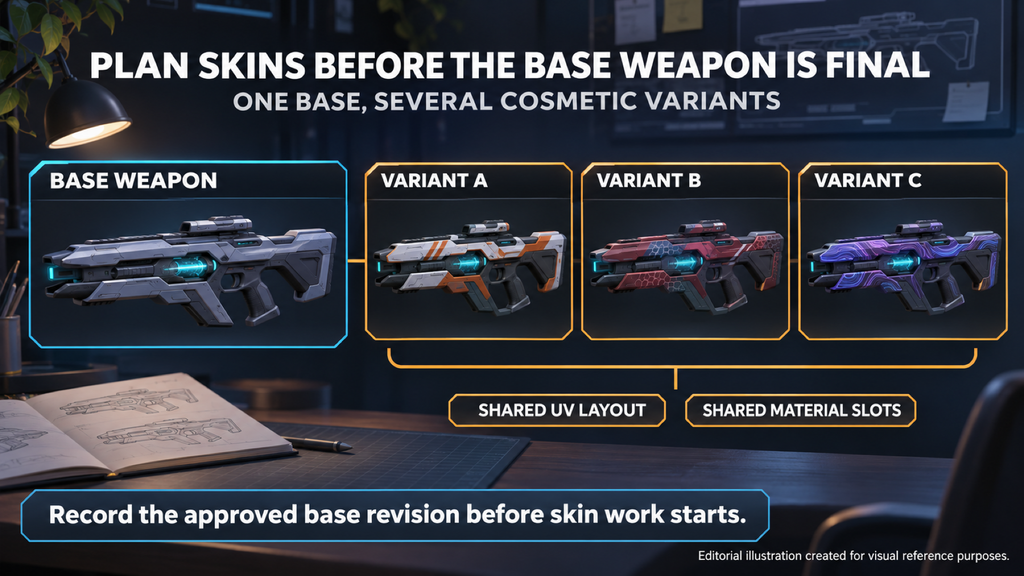
Plan Skins Before the Base Weapon Is Final
“Editorial illustration created for visual reference purposes. It does not represent a real project, client work, or official software screenshot unless stated otherwise.”
Start by defining what “skin” means in your project. For texture-only skins, the main dependencies may be the approved geometry, UV layout, material slots and any masks or parameters used by the cosmetic system. Other cosmetic systems also change geometry or effects. When the base changes, check which of those dependencies are affected rather than assuming every skin follows automatically.
Choosing between a new design and a texture-only skin is a separate decision at the concept stage, and our hard-surface concept art guide walks through it, together with how attachments and variants are designed as a kit.
Before affected skin work starts, record the approved base revision, the geometry and material properties that may change, and the relevant UV or mask constraints. Name the visual approver and, where applicable, the owner of themes and release timing. If you are an art director, keep those decisions traceable and resolve any conflict before feedback goes to the partner; one person may hold both roles, but the two kinds of decision should not blur into one art note.
On Squad, our work with Offworld Industries included final weapon assets and concept art for unique weapon skins. For any collaboration of this kind, documenting the approved base and its cosmetic constraints gives the skin team a reference it can use without relying on anyone’s memory of earlier reviews.
Draw the Delivery Boundary for Weapons
A weapon is not finished when the model is. Attachment points, collision, detail levels, material setup and the rig state all sit at the boundary between the partner and your team, and each one needs an owner and a check. The files themselves – sources, exports, textures and documentation – are covered in our guide to the source files and handover package.
| Delivery item | Agree who prepares it | Who verifies | Red flag |
| Attachment and effect points | Partner or studio, in the agreed tool or engine | Technical artist with animation or VFX input | Names, position, orientation or ownership are unspecified |
| Collision, where required | The side assigned the required collision type and representations | Technical owner in the agreed test context | Collision requirements surface only after integration |
| Level-of-detail meshes or another agreed detail strategy | The side assigned the project-required setup | Technical owner in the agreed build and camera context | Only the highest-detail version is ever reviewed |
| Engine material setup | Agreed per project, with dependencies listed | Art director for appearance; technical owner for compatibility and budgets | A viewer render is the only evidence of engine readiness |
| Mesh separation, skeleton and rig state | Defined, with an owner, before production | Animation and technical owners | “Animation-ready” has no agreed interface or test |
| Import into the studio project | Assigned importer, target engine version and integration owner | Studio technical or integration owner | Each side assumes the other completed the import |
Our weapon work for The Bearded Ladies included realistic vehicles and weapons for Corruption 2029, each delivered to that project’s technical requirements.
In our own published weapon scope, level-of-detail meshes, custom collision, sockets named to your convention, material setup and an in-engine review pass are part of the base scope rather than add-ons. Whether we hand over rigged weapons or static meshes is something we agree at the estimate stage, because it changes who owns moving parts.
For Miasma Chronicles, published by 505 Games, our work included weapons, props and environment assets, developed in line with the project’s technical standards.
A Weapon Family Collaboration Brief, Filled In
Use a short collaboration brief to record the decisions around a weapon package, and reference the versioned technical specification rather than duplicating it. The example below is a starting point, not authorization to begin every production stage: its open technical decisions must be closed before the affected work starts.
Illustrative example, not a client project. Asset counts describe this fictional assignment only.
| Field | Example entry |
| Package and scope | One fictional rifle, one optic, one foregrip and one texture-only color variant, in first-person and third-person or world versions |
| Decision owners | Art director – visual direction; technical art lead – engine requirements and technical approval; animation lead – moving-part interface; producer – consolidated feedback and scope decisions |
| Dependent teams | Animation – agreed magazine and grip interfaces; VFX – agreed effect points; UI – scoped captures; live content – approved inputs for the color variant |
| Review setup | Studio supplies camera, arm and lighting references and validates submissions in its agreed test build; partner records the asset revision in each preview |
| References and markings | Fictional design with studio-approved generic markings; any unresolved clearance question returns to the studio owner |
| Representative asset | Base rifle reviewed first; attachment fit, material and UV strategy and cosmetic change limits recorded before dependent work |
| Animation boundary | Unrigged meshes with agreed part separation and pivots; the studio builds the rig; animation clips are outside this scope |
| Technical reference | Studio technical specification and test-build revision identified before final mesh, material and engine validation; exact versions and budgets stay open in this example |
| Delivery | Scoped meshes, attachments, color-variant textures, engine materials, agreed source files and exports; detail-level and collision requirements closed before the related work starts |
| Changes | Producer checks each request against the approved brief, gathers discipline input and records any agreed scope or schedule adjustment before work proceeds |
| Acceptance | Visual approval by the art director, technical approval by the technical art lead and interface approval by the animation lead; final acceptance recorded by the designated studio approver against the delivered revision and any accepted exceptions |
For the wider structure of a brief – scope, style references, milestones and feedback – see our guide on how to brief an external art studio. This example adds the weapon-specific collaboration decisions on top of it.
Our Approach
Our 3D weapon modeling services are organized around these handoffs. The art director keeps the family consistent, the project manager connects your team with ours and tracks each weapon through production, the lead 3D artist sets the quality bar, and the technical artist owns the constraints, socket setup and the in-engine check before hand-off. We follow your conventions, and we can join at concept, at blockout or with your existing high poly.
[BANNER: about-us-bottom – вставити штатний банер студії]
Base Weapon, Variant, Attachment or Skin: Who Signs Off
| Asset type | Who approves | Where it is reviewed | What must be agreed first | Risk if skipped |
| Base weapon | Art director plus the relevant technical and animation owners | Agreed first-person, third-person or world and interface test contexts | Design, required states, interfaces and applicable budgets | Dependent work starts against an unverified base |
| Geometry variant | Art director, with technical or animation review where the change affects those requirements | Beside the approved base and in the affected test contexts | Base revision and permitted differences | Changed interfaces or technical costs go unnoticed |
| Attachment | Visual and gameplay owners, with technical and interface verification | Mounted on every base or configuration in the compatibility scope | Fit, position and orientation, naming and material strategy | An attachment fails a configuration it was meant to support |
| Texture-only skin | Visual approver, the relevant content owner and a technical check where needed | On the identified base revision in the agreed lighting context | UV, material or mask dependencies and permitted changes | The cosmetic result no longer matches the approved base or system |
The representative base validates shared decisions. Later assets reuse that approval where it applies, while new geometry, interfaces or material behavior receive their own checks.
Planning Weapons With an External Partner?
Start with an approved concept, a relevant existing asset or the references you have for a new weapon. Include the planned base weapons, attachments and cosmetic variants; the target engine and version, platforms, technical requirements and deadline; and whether rigging or animation is in scope. If some decisions are still open, list them so we can assess the next step. The initial consultation is free and helps us clarify dependencies, the review setup and the proposed delivery scope for an estimate.
Write to sales@nastyrodent.com or use our contact form. We usually reply within 1–2 business days.
See the realistic weapons we build for games →
Let's work
together
in mind?
From 3D characters and environments to weapons, props, concept art and game UI/UX: ten years deep, 40+ artists strong, zero fluff. Tell us what you are making and get a free, no-pressure estimate.
estimate