How Indie and AA Teams Scope a 3D Weapon Pack Without Overspending
-

Written byDenys Zadoienyi
-

Updated on11.11.2026
-

Time to read15 min

- More Unique Models Don’t Always Add Useful Variety
- Map Gameplay Roles to Production Families
- Check What a Variant Reuses Before Ordering a New Base
- Let the Camera and Views Set Where Detail Pays Off
- Decide Which Weapon Features the Game Actually Uses
- Style Changes What a Variant Needs
- Split the Pack Into Slice, Launch and Later
- A Weapon Pack Plan, Filled In
- Our Approach
- New Geometry, Attachments or Surface Changes: What the Scope Includes
- Planning a Weapon Pack for Your Game?
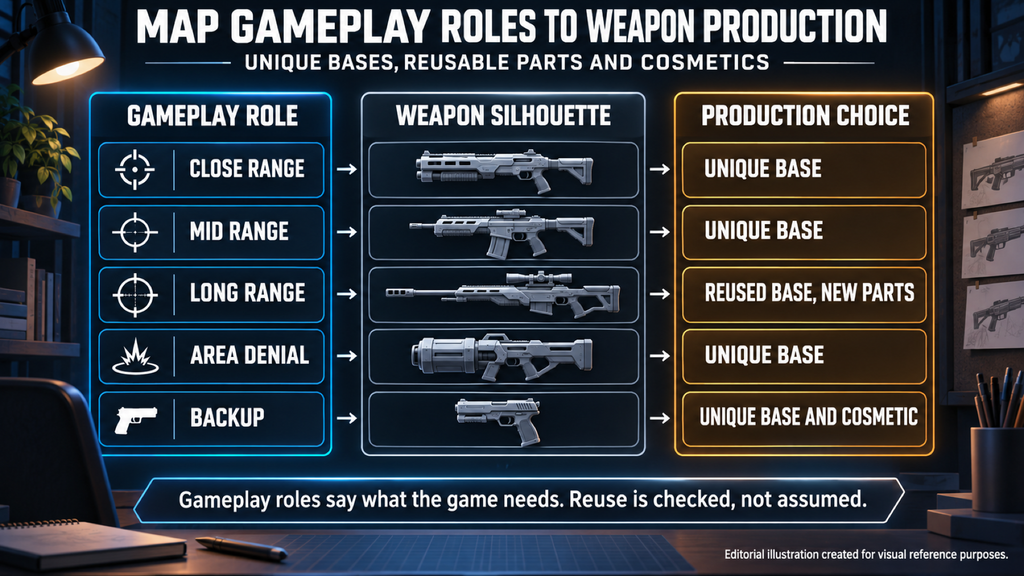
Scoping a custom 3D weapon pack for an indie or AA game means deciding which weapons need unique geometry, which can share a production base and which only need changes to materials or textures. Gameplay roles tell you what the game needs; camera exposure, visual identity and technical compatibility decide what can actually be reused.
“Editorial illustration created for visual reference purposes. It does not represent a real project, client work, or official software screenshot unless stated otherwise.”
Weapon pack scope is the record of the bases, additional parts, cosmetic changes, required views and features included in an assignment, with their priorities and delivery phases. A skin describes a cosmetic purpose; the work behind it may involve materials, geometry or both, so each piece of work is counted once.
More Unique Models Don’t Always Add Useful Variety
A weapon list is not yet a scope. Names in a design document can mix gameplay loadouts, visual variants, attachments and cosmetics, and modeling every name as a new base may pay for differences the game never needs. Reuse is useful when it keeps the intended design; a unique silhouette can be justified even when two weapons share a combat role.
In a 2017 Game Developer article on Dead Cells, Motion Twin producer Steve Filby described weapons built around different ways to approach combat, such as a dagger that does little damage from the front but deals critical damage from behind. That is a design lesson from a 2D game, not a budget formula. For a 3D pack, use the roles to ask what must differ in play, then decide separately what the art has to change.
If you are a founder or creative director, this is where overspending usually starts: a long list, a budget that covers fewer unique builds and no rule for what to cut. Give each unique build a reason – a required shape, a hero presentation, an interaction the existing geometry cannot support or another approved visual need – and give lower-priority items a lighter treatment or a later phase instead of making every weapon a little worse.
Ready-made packs can work for prototypes, or for production when they meet the project’s requirements. This guide is about commissioned custom work. Production scale shapes how much each decision weighs, and our guide to how indie, AA and AAA productions differ covers the broader distinctions.
Map Gameplay Roles to Production Families
Start with the roles or classes your game design defines, then group the requested art into production families: weapons that can share geometry and interfaces. These are two different decisions. One role may need several distinct designs, and one compatible base may support more than one gameplay configuration.
Ask the design side five questions about every weapon on the list:
- Range: where in a fight is this weapon meant to be used?
- Pacing: how does it change the rhythm of combat, from rate of fire to reload timing?
- Risk and reward: what does the player give up to use it well?
- Target: which enemy types or situations is it built for?
- Acquisition: is it a starting weapon, a progression step or a reward?
Then make the art decision separately. Can an existing base weapon deliver the required silhouette, dimensions, visible states and animation interfaces? Does the weapon need its own identity for recognition, faction or story? Is it a hero weapon – the main carry item, the one in key art, the one with an inspect view? Hero status sets the presentation priority; it does not add another model to the count.
A change to gameplay numbers can alter tactics without new geometry, and a visually distinct weapon can need a new base while keeping the same combat role. Treat reuse as a proposal to check against the approved design and interfaces, not as the automatic result of assigning a class.
The business impact shows up in two places. For the founder, the budget follows unique builds and hero priorities rather than the size of the gameplay roster. For the producer, separating unique builds, dependent parts and cosmetic work gives the estimate and the schedule their shape: bases are usually the review-heavy items, and dependent work can follow once a base is approved. The detailed kit count comes later; here the decision is which items deserve unique art and which proposed reuse is acceptable.
Check What a Variant Reuses Before Ordering a New Base
“Editorial illustration created for visual reference purposes. It does not represent a real project, client work, or official software screenshot unless stated otherwise.”
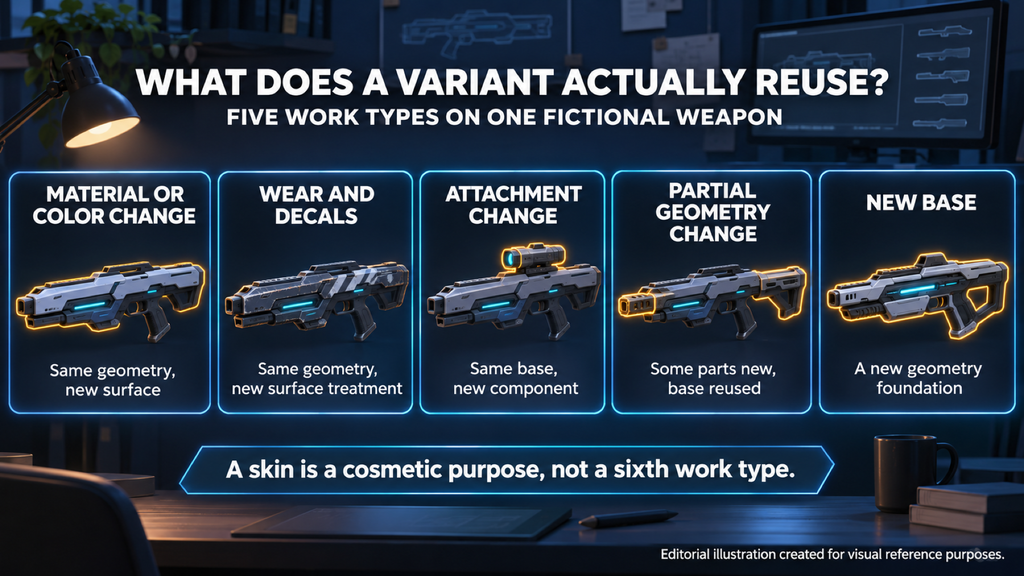
Five work types help a small team discuss weapon variants and their alternatives. They describe what changes, not a guaranteed order of cost: a detailed surface treatment can take more work than a simple geometry change, and a small-looking change can touch several dependencies.
- Material or color change. Reuse the approved geometry and, where suitable, its UVs. Specify the textures, masks or material parameters that change.
- Wear, decals and markings. Define the surface treatment, viewing distance and delivery method. Reusing a mesh does not remove the design, authoring and validation work.
- Attachment change. Distinguish mounting an existing approved attachment from creating a new one. List the new components and the configurations that need fit checks.
- Partial geometry change. Identify which parts are new and which are reused. Review the affected silhouette, bakes, materials and animation or attachment interfaces.
- New base. Build a distinct geometry foundation where the approved design or interfaces require it. Existing references, materials, rig conventions or other compatible work may still be reusable.
A skin is a cosmetic deliverable, not a sixth work type beside this list. A texture-only skin belongs under material or surface changes; a geometry-changing cosmetic may involve partial geometry or a new base. Record the work once and label its purpose separately.
For a proposed family, confirm actual compatibility rather than assuming that similar-looking receivers can share a mesh. Counting the resulting pieces is the next step, and our method for how to turn a weapon list into a reusable kit covers bases, attachments and variants in more detail.
Choose the least extensive change that meets the approved visual and technical requirements. If it cannot deliver the required silhouette, movement or recognition, the saving is not real.
Let the Camera and Views Set Where Detail Pays Off
“Editorial illustration created for visual reference purposes. It does not represent a real project, client work, or official software screenshot unless stated otherwise.”
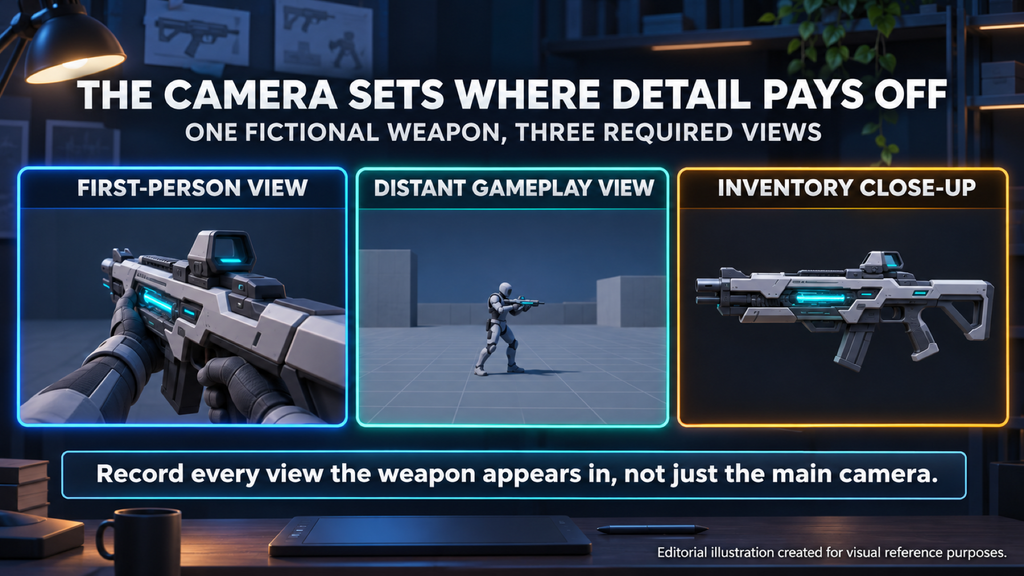
Camera context helps decide where detail and unique presentation are useful. Record every place the asset appears – gameplay, equipment screens, icons, inspect animations and cinematics – because main-camera distance alone does not define the whole art requirement.
In a first-person game, frequently visible surfaces and required weapon states may receive close scrutiny, so review them with the intended framing and lighting. Unreal Engine’s documentation on first-person rendering illustrates separate first-person and world-space primitives for different views, shadows and reflections. Separate rendering representations do not by themselves mean that every project needs two independently modeled weapons; agree the required representations and any adaptation work before the estimate.
In isometric, top-down or more distant third-person gameplay, prioritize what stays visible at the actual display size. The same weapon may still need closer treatment for an inventory view or a cinematic, so check the full set of required views before cutting detail or commissioning a second representation.
La Quimera, a first-person shooter from Reburn currently in early access, is a relevant close-camera example. Our work on it covered props and weapons built to the project’s technical requirements and distinctive visual style.
As a producer, record the views and states for each scoped item, not only for its gameplay class. Mark where geometry, textures or setup can be shared and where another deliverable or validation pass is required.
For Mutant Year Zero: Road to Eden, The Bearded Ladies’ tactical adventure with an isometric gameplay perspective, our work included weapons. It is a useful contrast to first-person gameplay, but any required inventory or cinematic views still belong in the brief.
Paying for close-up detail that no required view shows is one of the quieter ways a weapon budget leaks. Cutting detail that a required view does show is the opposite mistake, and it usually surfaces late.

Decide Which Weapon Features the Game Actually Uses
Features add work where they apply. Some need shared setup, some create authoring work per item, and some need repeated compatibility checks, so record what is built once, what changes per item and which configurations must be checked.
- Moving parts. Specify the required states and the animation team’s geometry, pivot or skeleton interface. Part separation alone does not define every animation workflow.
- Attachment system. Separate the art for new attachments from the gameplay system that equips them. List the compatible bases and configurations that need validation.
- Inspect view. Include the surfaces, states and presentation quality exposed by the agreed inspection sequence.
- Several representations. Identify first-person, world and UI outputs, then decide whether they share assets or need additional authoring and setup.
- Cosmetics. Define whether each skin changes textures, materials, geometry or effects, and record the relevant base, UV, mask or interface dependencies.
- Rigging and animation. State whether delivery is unrigged geometry, geometry bound to a specified skeleton, a rig, animation clips or an agreed combination, and assign the included work explicitly.
Mark each feature as included, excluded or deferred for each applicable item or family. Deferring a feature may still leave agreed preparation work in the current scope. An optional feature should earn its place through an actual game requirement rather than appear as an unexamined default – an attachment system the player never uses is paid for on every weapon it touches.
When the quote arrives, check that it reflects those choices item by item. Our guide on how to read an art outsourcing estimate explains what to compare beyond the total.
Style Changes What a Variant Needs
Art style changes the quality target and the work needed to reach it. A stylized weapon may need tightly controlled shapes, proportions or painted detail; a realistic weapon may need specific reference accuracy and surface treatment. Neither label decides whether a color change is a gameplay variant, a faction identifier or a cosmetic skin – the game defines that role.
For scope, identify what must change to meet the approved look. A recolor may be enough for one assignment, while another needs a new silhouette, bespoke surface work or geometry changes. Those decisions occur in either style, so compare like-for-like deliverables rather than assuming a universal price order.
On Wild Rage, we led and developed the game’s art direction for Whimsy Games, weapons included. For a pack like that, the shape language, palette and surface treatment are agreed before deciding which variations need new geometry.
Teams without a dedicated art director should name who owns the approved weapon style and the reference against which variants are judged. That owner may be on your side or part of the agreed partner scope; without one, every variant becomes a fresh style decision.
For the broader trade-offs between the two directions, see our comparison of stylized vs realistic 3D production.
Split the Pack Into Slice, Launch and Later
Split the plan by what the vertical slice must demonstrate, what the launch experience needs and what is deferred. Assign phases to specific deliverables rather than to whole weapons: a base may be needed in the slice while its attachments or cosmetics belong to launch.
The slice needs the art and working interfaces required to demonstrate its selected experience at the intended quality. That may include a hero weapon, a reused base or a representative attachment setup; it does not require one new base per gameplay class. Our guide to scoping art for a vertical slice covers the wider selection process.
For launch, include the bases, variants and presentations required by the approved release plan. Keep deferred content outside the current production total unless specific preparation work is included, and remember that a future weapon that has not been designed cannot yet carry a confirmed modeling scope.
If you are a founder, the decision worth recording early is how later content should connect to what you build now. Before dependent work starts, agree the relevant interfaces, naming, references and reuse rules; shared materials or UV layouts can help where the project uses them, but they are not universal requirements. Record known extension needs without assuming that an undefined future weapon will fit the existing base.
For each planned cosmetic, decide whether it changes surfaces, geometry or other features. Our guide on when a skin needs a new design covers that distinction at the concept stage.
A Weapon Pack Plan, Filled In
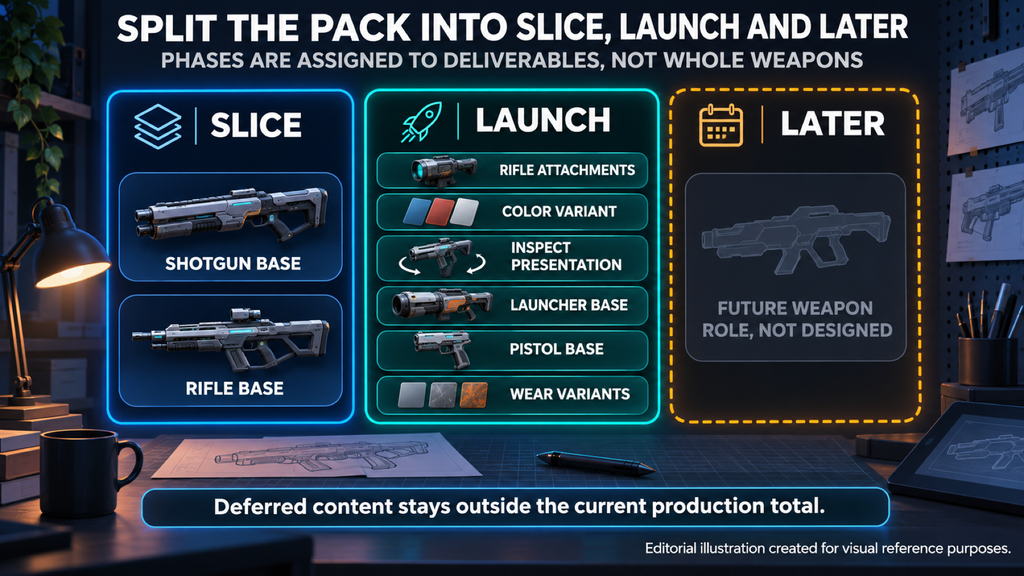
“Editorial illustration created for visual reference purposes. It does not represent a real project, client work, or official software screenshot unless stated otherwise.”
The example below is a planning scenario for a fictional co-op first-person shooter. It separates gameplay roles, production choices and the first milestone that needs each deliverable. Proposed reuse still needs validation before it becomes a production commitment.
Illustrative example, not a client project. Counts and priorities describe this fictional assignment only.
| Gameplay role | Production choice | Presentation priority | First needed |
| Close range | S1: one new shotgun base; one wear cosmetic variant | Standard first-person treatment; distinctive silhouette and reload states | Base for slice; wear variant for launch |
| Mid range | R1: one new rifle base; one optic and one magazine attachment; one color cosmetic variant | Hero priority: the main carry weapon, with an inspect view | Base for slice; attachments, color variant and inspect presentation for launch |
| Long range | Proposed R1 geometry variant with two new components, a stock and a barrel; reuses the same optic | Standard first-person treatment; verify the required silhouette and interface differences | Launch, subject to reuse validation |
| Area denial | G1: one new launcher base; no additional variant in the launch scope | Standard first-person treatment; agreed visible states | Launch |
| Backup | P1: one new pistol base; one wear cosmetic variant | Standard first-person treatment; agreed visible states | Launch |
| Possible future role | Not designed; excluded from the current production total | To be decided | Separate future scope |
The planning total is four unique geometry bases, one proposed geometry variant with two additional components, two attachments and three cosmetic texture or material variants. The optic is counted once even though two loadouts use it, and the hero priority does not add another weapon to the count.
Required outputs are first-person and world presentations for the five gameplay loadouts, plus their agreed inventory icons. These outputs do not automatically mean ten independently modeled bases; the extent of geometry sharing and any required adaptation work must be confirmed before production. The R1 inspect presentation is included only at launch. Delivery is unrigged geometry with agreed part separation and pivots; in this example the studio owns rigging and animation clips, and gameplay code, VFX and audio are outside the art package.
Before production, confirm the proposed R1 reuse, attachment compatibility, the relevant material or UV dependencies, the target engine context and the technical requirements. If the geometry variant cannot meet the approved design and interfaces, re-scope it before committing to a new base or dependent work.
Our Approach
We build custom 3D weapons for games in realistic and stylized styles, and we can join at concept, at blockout or with your existing high poly. A brief that identifies unique builds, proposed reuse, presentation priorities and included features gives us a clear basis for discussing the production scope and preparing an estimate. Open design or compatibility decisions stay visible instead of being hidden inside an assumed asset count.
New Geometry, Attachments or Surface Changes: What the Scope Includes
| Work type | What is new | What may be reused | When to consider it | Check before approval |
| New base | A distinct geometry foundation and its scoped downstream work | Compatible references, materials, rig conventions or other approved content | The required shape, identity or interfaces cannot be met by the proposed base | The reason for a unique build and all required representations |
| Partial geometry variant | Identified replacement or additional parts | Approved base components and compatible downstream work | A related design can use the base while changing specified features | Affected silhouette, bakes, materials and movement or attachment interfaces |
| New attachment | A distinct component and its scoped setup | The base and existing compatible content | The approved pack needs that component | Compatibility scope, and whether the component is new or already supplied |
| Material, color or wear change | Specified textures, masks, decals or material changes | Suitable approved geometry and UVs | The required appearance can be delivered without geometry changes | Surface quality target, dependencies and required views |
“Skin” describes the cosmetic purpose of an item, so its work goes under the applicable row instead of being counted again. “Hero” describes a presentation priority, not another production category. Choose reuse where it meets the approved requirements, and commission unique work where it has a clear visual or technical purpose.
Planning a Weapon Pack for Your Game?
Send us the planned weapon items, their gameplay roles and visual priorities, the required views, and any references or existing assets. Mark which items need unique geometry, which propose reuse and which need cosmetic changes, together with the features and phases in scope. We can discuss those requirements and prepare an estimate for the agreed production package. The initial consultation is free.
Write to sales@nastyrodent.com or use our contact form. We usually reply within 1–2 business days.
See the weapons we build for games →
Let's work
together
in mind?
From 3D characters and environments to weapons, props, concept art and game UI/UX: ten years deep, 40+ artists strong, zero fluff. Tell us what you are making and get a free, no-pressure estimate.
estimate